https://github.com/sergiye/authenticator
Authenticator for Windows – portable OTP and 2FA tool. Easily generate, store, and manage all your authentication codes in a secure and user-friendly app
https://github.com/sergiye/authenticator
2fa 2factor 2factor-authentication authenticator authentificator battle-net desktop desktop-app desktop-application google microsoft okta otp otpauth portable windows winforms
Last synced: 3 months ago
JSON representation
Authenticator for Windows – portable OTP and 2FA tool. Easily generate, store, and manage all your authentication codes in a secure and user-friendly app
- Host: GitHub
- URL: https://github.com/sergiye/authenticator
- Owner: sergiye
- Created: 2023-05-02T10:24:05.000Z (about 3 years ago)
- Default Branch: master
- Last Pushed: 2026-04-17T20:55:09.000Z (3 months ago)
- Last Synced: 2026-04-17T22:27:33.947Z (3 months ago)
- Topics: 2fa, 2factor, 2factor-authentication, authenticator, authentificator, battle-net, desktop, desktop-app, desktop-application, google, microsoft, okta, otp, otpauth, portable, windows, winforms
- Language: C#
- Homepage:
- Size: 1.38 MB
- Stars: 21
- Watchers: 1
- Forks: 0
- Open Issues: 1
-
Metadata Files:
- Readme: README.md
- Funding: .github/FUNDING.yml
Awesome Lists containing this project
README
# Authenticator
[](https://github.com/sergiye/authenticator/releases/latest)


[](https://www.nuget.org/packages/TwoFactorAuth/)
[](https://www.nuget.org/packages/TwoFactorAuth/)
[](https://www.nuget.org/packages/TwoFactorAuth.Core/)
[](https://www.nuget.org/packages/TwoFactorAuth.Core/)
*Authenticator is a portable OTP/Two-Factor Authentication tool for Windows that provides a user-friendly interface and allows you to copy the login code instead of manually entering it from your phone.*
Authenticator provides an alternative solution to combine various two-factor authenticator services in one convenient place.
It works with counter or time-based RFC 6238 authenticators and common implementations, such as the Google Authenticator.
----
## What does it look like?
Here's a preview of the app's UI running on Windows 10:
[ ](https://github.com/sergiye/authenticator/raw/master/preview.png)
Also there are:
- `Auto`/`Light`/`Dark` themes integrated into executable.
- Custom `themes` supported from external files
To add custom theme to the app, just create a `themes` folder next to the executable file and place any {themeName}.json files there.
Custom theme.json file content example:
```json
{
"DisplayName": "Custom Theme",
"DarkMode": true,
"BackgroundColor": "#1E1E1E",
"ForegroundColor": "#E9E9E9",
"HyperlinkColor": "#00D980",
"SelectedBackgroundColor": "#4CBB17",
"SelectedForegroundColor": "#000000",
"LineColor": "#262626",
"StrongLineColor": "#454545",
"WarnColor": "#FF4500"
}
```
Don't forget to restart the app to scan for new theme files!
## Download Latest Version
The published version can be obtained from [releases](https://github.com/sergiye/authenticator/releases) page, or get the newer one directly from:
[Latest Version](https://github.com/sergiye/authenticator/releases/latest)
Features include:
* Support for time-based RFC 6238 authenticators (e.g. Google Authenticator) and HOTP counter-based authenticators
* Displays multiple authenticators simultaneously
* Codes displayed and refreshed automatically or on demand
* Data is protected with your password, locked to Windows machine or account
* Additional password protection per authenticator
* Selection of standard or custom icons
* Capture a QR code from a selected area of the screen, image URL or parse from 'otpauth' string
* Portable mode preventing changes to other files or registry settings
* Import and export in UriKeyFormat and from Authenticator Plus for Android
## How To Use
To use:
* Download the latest version from releases
* There is no installation required, just start executable file from anywhere on your computer
* Use the Add menu item to add or import an authenticator
* Right-click any authenticator to bring up context menu
* Click the icon on the right to show the current code, if auto-refresh is not enabled
* Use options menu for program options
## Developer information
**Integrate the TwoFactorAuth/TwoFactorAuth.Core library in own application**
1. Add the [TwoFactorAuth](https://www.nuget.org/packages/TwoFactorAuth/) NuGet package to your application.
2. Use the sample code below
**Sample code**
```c#
//generate secret key
var accountId = 12345;
var accountName = "user@mail.org";
var applicationName = "Your Application Name";
var tfa = new TwoFactorAuthenticator(accountId);
var secretKey = tfa.ManualSecretKey;
//generate QR code image by google api
var qrCodeImageLink = QrGenerator.GetQrCodeLink(applicationName, $"{applicationName} - {accountName}", secretKey);
var qrCodeImageBytes = QrGenerator.GenerateQrCodeByGoogle(applicationName, $"{applicationName} - {accountName}", secretKey);
//base64 image string to use on web page (%20-%20no%20internet%20required%0D%0Avar%20qrCodeImageString%20=%20QrGeneratorEx.GenerateQrCode(applicationName,%20$)
You can check if it works properly on your PC. If you notice any inaccuracies, please send us a pull request. If you have any suggestions or improvements, don't hesitate to create an issue.
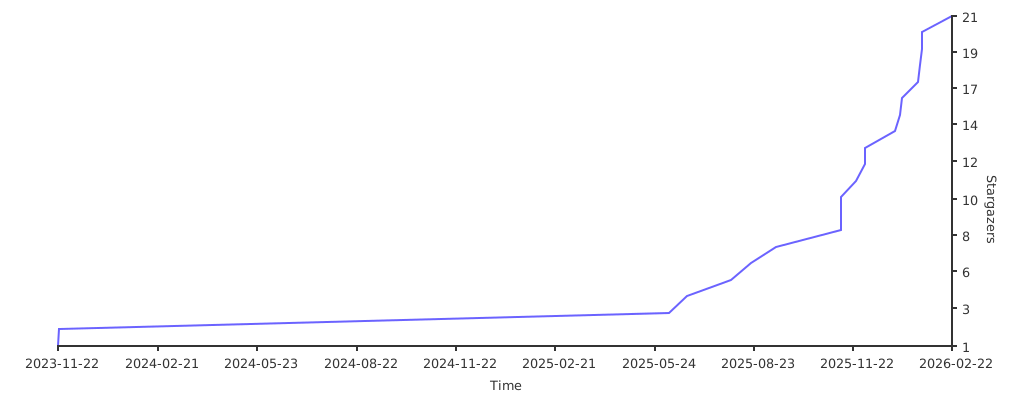
Also, don't forget to ★ star ★ the repository to help other people find it.
[//]: # ([](https://starchart.cc/sergiye/authenticator))
[](https://star-history.com/#sergiye/authenticator&Date)
## Donate!
Every [cup of coffee](https://patreon.com/SergiyE) you donate will help this app become better and let me know that this project is in demand.