https://github.com/sergiye/rdpWrapper
A portable tool for setting up multiple simultaneous RDP sessions with a simple user interface and automatic offset generation feature in offline mode (useful after Windows update)
https://github.com/sergiye/rdpWrapper
portable rdp rdpwrapper windows wrapper
Last synced: 12 months ago
JSON representation
A portable tool for setting up multiple simultaneous RDP sessions with a simple user interface and automatic offset generation feature in offline mode (useful after Windows update)
- Host: GitHub
- URL: https://github.com/sergiye/rdpWrapper
- Owner: sergiye
- License: gpl-3.0
- Created: 2025-05-05T17:12:13.000Z (about 1 year ago)
- Default Branch: master
- Last Pushed: 2025-06-30T14:27:48.000Z (12 months ago)
- Last Synced: 2025-06-30T15:35:55.912Z (12 months ago)
- Topics: portable, rdp, rdpwrapper, windows, wrapper
- Language: C#
- Homepage:
- Size: 1.26 MB
- Stars: 38
- Watchers: 2
- Forks: 6
- Open Issues: 1
-
Metadata Files:
- Readme: README.md
- Funding: .github/FUNDING.yml
- License: LICENSE.txt
Awesome Lists containing this project
README
# RDP Wrapper
[](https://github.com/sergiye/rdpWrapper/releases/latest)
[](https://sergiye.github.io/github-release-stats/?username=sergiye&repository=rdpWrapper&page=1&per_page=100)

----
## Overview
`RDP Wrapper` is a RDP setup and configuration utility
This tool is inspired by the [stascorp's rdpwrap project](https://github.com/stascorp/rdpwrap).
However it is written in pure .NET instead of Pascal/Delphi.
The main idea was to create small and portable single-file application with all required functionality.
And yes, it can auto-generate offsets for new/updated Windows versions - thanks to the @llccd projects:
- [TermWrap](https://github.com/llccd/TermWrap)
- [RDPWrapOffsetFinder](https://github.com/llccd/RDPWrapOffsetFinder).
RDP Wrapper works as a layer between Service Control Manager and Terminal Services, so the original termsrv.dll file remains untouched. Also this method is very strong against Windows Update.
It's recommended to have original termsrv.dll file with the RDP Wrapper installation. If you have modified it before with other patchers, it may become unstable and crash in any moment.
### What can it do?
The application is portable and has the following features:
- RDP Wrapper does not patch termsrv.dll, it loads termsrv with different parameters
- RDP host server on any Windows edition beginning from Vista
- Using the same user simultaneously for local and remote logon (see configuration app)
- Console and remote sessions at the same time
- Enabled camera and USB redirection (when TermWrap installed)
- show RDP service current status
- configure RDP options
- install / uninstall wrapper
- generate config for not supported OS (after windows update) - make sure you have [Microsoft Visual C++ Redistributable](https://learn.microsoft.com/en-us/cpp/windows/latest-supported-vc-redist?view=msvc-170#visual-studio-2015-2017-2019-and-2022) installed
- check for app updates (from main window system menu)
- Console and RDP session shadowing (using [Task Manager in Windows 7](http://cdn.freshdesk.com/data/helpdesk/attachments/production/1009641577/original/remote_control.png?1413476051) and lower, and [Remote Desktop Connection in Windows 8](http://woshub.com/rds-shadow-how-to-connect-to-a-user-session-in-windows-server-2012-r2/) and higher)
- Windows 2000, XP and Server 2003 are not supported
### What does it look like?
Here's a preview of the app's UI running on Windows 10:
[ ](https://raw.githubusercontent.com/sergiye/rdpWrapper/master/preview.png)
Also there are:
- `Light`/`Dark` themes with auto switching mode.
- Custom `themes` supported from external files
You can find custom theme examples [here](https://github.com/sergiye/rdpWrapper/tree/master/themes)
To add custom theme to the app, just create a `themes` folder next to the executable file and place all theme files there.
Don't forget to restart the app to scan for new theme files!
## Download
The published version can be obtained from [releases](https://github.com/sergiye/rdpWrapper/releases).
## Notes
### Enable USB redirection
To enable remote desktop USB redirection, additional group policy settings are required (gpedit):
`Computer Configuration\Administrative Templates\System\Device Installation` - `Allow remote access to the Plug and Play interface` -> Enabled
`Computer Configuration\Administrative Templates\Windows Components\Remote Desktop Services\Remote Desktop Session Host\Device and Resource Redirection` - `Do not allow supported Plug and Play device redirection` -> Disabled
`Computer Configuration\Administrative Templates\Windows Components\Remote Desktop Services\Remote Desktop Connection Client\RemoteFX USB Device Redirection` - `Allow RDP redirection of other supported RemoteFX USB devices from this computer` -> Enabled
### Notes on audio recording redirection
Just like UmWrap, EndpWrap is only needed on server and home editions. It gets loaded in all applications that play/record remote audio, and may cause some tricky applications to stuck or crash.
To enable audio recording redirection, both EndpWrap.dll and Zydis.dll needs to be copied to the system32 folder. After that, change the following registry entry from rdpendp.dll to EndpWrap.dll:
HKEY_LOCAL_MACHINE\SYSTEM\CurrentControlSet\Control\Terminal Server\WinStations\RDP-Tcp\AudioEnumeratorDll
## How can I help improve it?
The rdpWrapper team welcomes feedback and contributions!
You can check if it works properly on your PC. If you notice any inaccuracies, please send us a pull request. If you have any suggestions or improvements, don't hesitate to create an issue.
Also, don't forget to star the repository to help other people find it.
[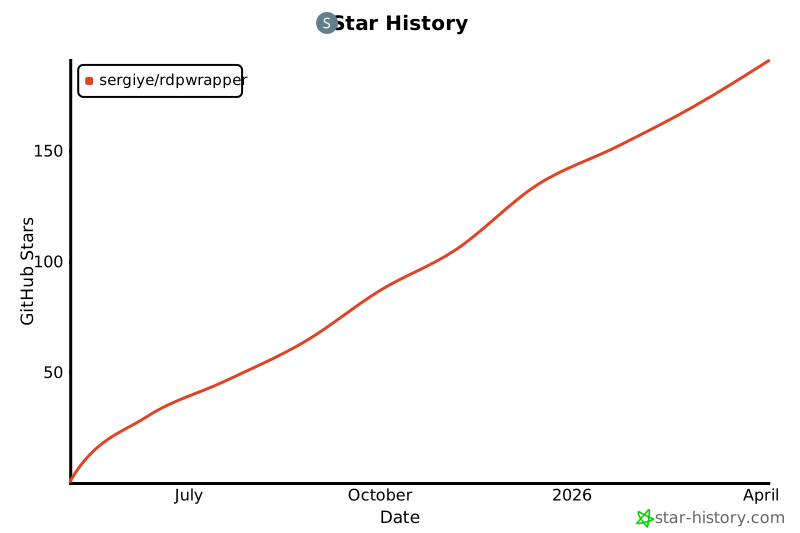](https://star-history.com/#sergiye/rdpwrapper&Date)
[//]: # ([](https://starchart.cc/sergiye/rdpwrapper))
[](https://github.com/sergiye/rdpWrapper/stargazers)
## Donate!
Every [cup of coffee](https://patreon.com/SergiyE) you donate will help this app become better and let me know that this project is in demand.