https://github.com/serudda/evacenter-frontend-challenge
Eva Center Frontend Challenge
https://github.com/serudda/evacenter-frontend-challenge
Last synced: over 1 year ago
JSON representation
Eva Center Frontend Challenge
- Host: GitHub
- URL: https://github.com/serudda/evacenter-frontend-challenge
- Owner: serudda
- Created: 2021-03-19T16:56:23.000Z (over 5 years ago)
- Default Branch: main
- Last Pushed: 2021-03-27T11:56:50.000Z (over 5 years ago)
- Last Synced: 2025-03-20T19:01:48.744Z (over 1 year ago)
- Language: TypeScript
- Size: 777 KB
- Stars: 0
- Watchers: 1
- Forks: 0
- Open Issues: 2
-
Metadata Files:
- Readme: README.md
Awesome Lists containing this project
README
# Eva Center Frontend Challenge
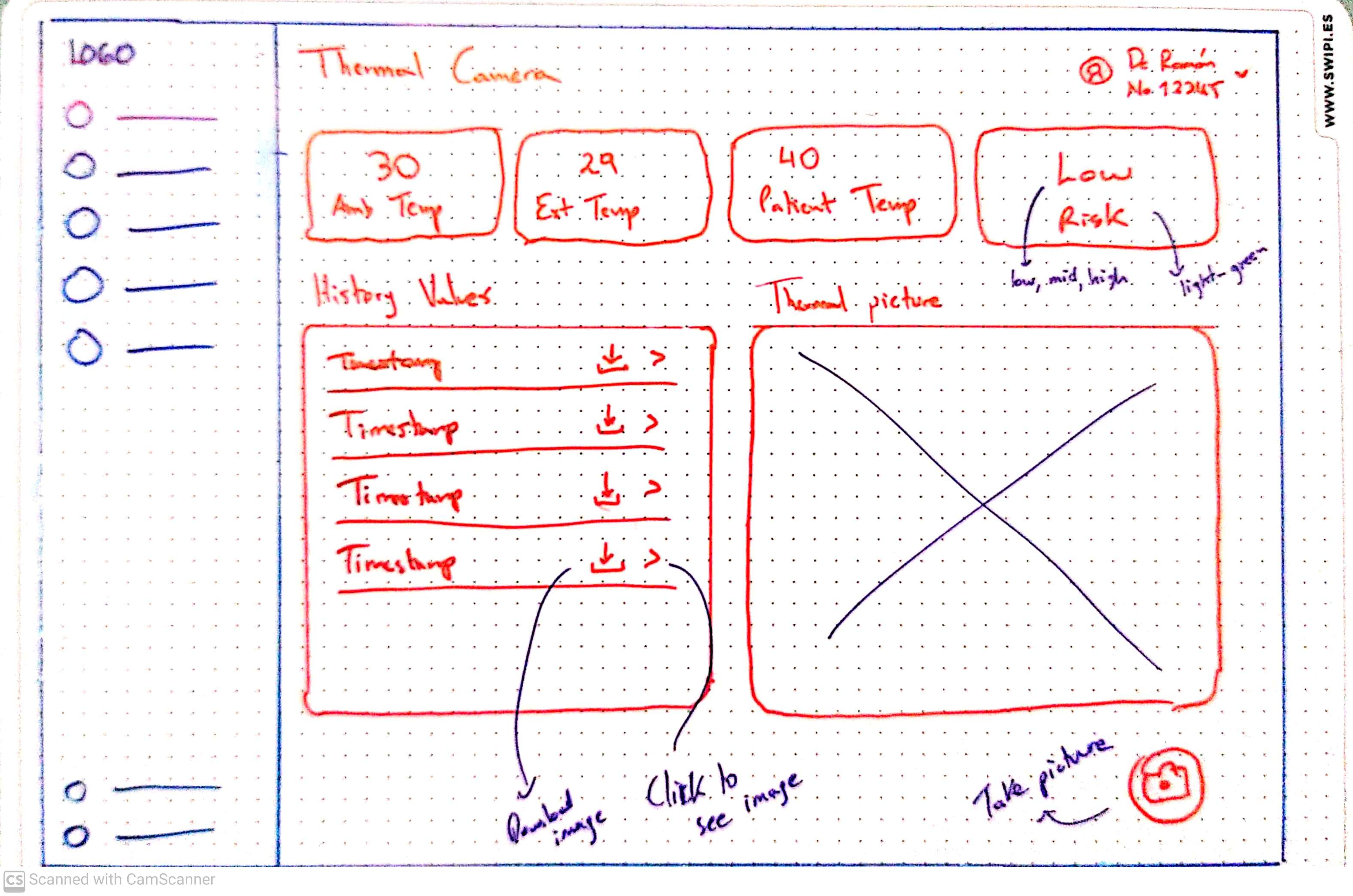
Web application that permits doctors to operate a thermal camera.
## Description
Create an application to handle controls for the camera. Take a picture from the thermographic camera. This app will store and show previews of the images taken. Doctors want to see the ambient temperature, the patient temperature and if there's an indicator of risk
---
## Requirements
1. Must be responsive. Doctors use the application from their laptop or phone.
2. Must take the image using the camera's endpoint. (For the purpose of this exercise the endpoint will be cloud based) Endpoint → GET:[https://fake-img-endpoint.vercel.app/api/preview](https://fake-img-endpoint.vercel.app/api/preview)
3. ⚠️⚠️ Must be able to handle common known bugs from the camera. Make a proposal for how to handle it while giving the best experience to the doctor. Listed below are the known bugs:
1. Camera hangs, takes more than thirty to respond to request
2. Camera returns empty response
4. Must poll values from the camera every 2 seconds and show them to the doctor. (For the purpose of this exercise the endpoint will be cloud based) Endpoint → GET:[https://fake-img-endpoint.vercel.app/api/data](https://fake-img-endpoint.vercel.app/api/data)
5. Must alert doctor if risk value is high. (Testing endpoint will return low)
6. Must be written in Typescript and use React. Can be NextJS, Gatsby, CRA or custom webpack.
7. Must be hosted in Vercel, Firebase, Netlify or Github Pages
8. Must be stored in Github.
9. Must contain a Github Action workflow that at least compiles the code with each push to main branch
10. Must use Tailwind CSS or Material UI to achieve design goals
11. Must take image previews and store the timestamp.
12. Must permit image previews to be downloaded and use the timestamp in the filename.
---
## Mockup
## General Access
### Roadmap
https://github.com/sruda/evacenter-frontend-challenge/projects/1
### Prd Environment
https://evacenter-fe-challenge.netlify.app/
### Firebase (Firestore and Storage)
evacenter-fe-challenge
(antonio.torres@evacenter.com has access to this project on Firebase)
---
## Available Scripts
In the project directory, you can run:
### `yarn install`
Install all dependencies in order to run app locally.
### `yarn start`
Runs the app in the development mode.\
Open [http://localhost:3000](http://localhost:3000) to view it in the browser.
The page will reload if you make edits.\
You will also see any lint errors in the console.
### `yarn test`
Launches the test runner in the interactive watch mode.\
See the section about [running tests](https://facebook.github.io/create-react-app/docs/running-tests) for more information.
### `yarn lint`
Launches the Linter runner in order to see eslint rules validation.
### `yarn build`
Builds the app for production to the `build` folder.\
It correctly bundles React in production mode and optimizes the build for the best performance.
The build is minified and the filenames include the hashes.\
Your app is ready to be deployed!
See the section about [deployment](https://facebook.github.io/create-react-app/docs/deployment) for more information.
### `yarn eject`
**Note: this is a one-way operation. Once you `eject`, you can’t go back!**
If you aren’t satisfied with the build tool and configuration choices, you can `eject` at any time. This command will remove the single build dependency from your project.
Instead, it will copy all the configuration files and the transitive dependencies (webpack, Babel, ESLint, etc) right into your project so you have full control over them. All of the commands except `eject` will still work, but they will point to the copied scripts so you can tweak them. At this point you’re on your own.
You don’t have to ever use `eject`. The curated feature set is suitable for small and middle deployments, and you shouldn’t feel obligated to use this feature. However we understand that this tool wouldn’t be useful if you couldn’t customize it when you are ready for it.