https://github.com/servicestack/servicestack-php
PHP ServiceStack Client
https://github.com/servicestack/servicestack-php
Last synced: 5 months ago
JSON representation
PHP ServiceStack Client
- Host: GitHub
- URL: https://github.com/servicestack/servicestack-php
- Owner: ServiceStack
- License: bsd-3-clause
- Created: 2023-10-09T11:32:25.000Z (over 2 years ago)
- Default Branch: main
- Last Pushed: 2024-11-25T05:01:45.000Z (over 1 year ago)
- Last Synced: 2025-10-20T18:40:11.961Z (9 months ago)
- Language: PHP
- Size: 525 KB
- Stars: 0
- Watchers: 2
- Forks: 0
- Open Issues: 0
-
Metadata Files:
- Readme: README.md
- License: LICENSE
Awesome Lists containing this project
README

ServiceStack's **Add ServiceStack Reference** feature allows clients to generate Native Types from directly within PhpStorm using [ServiceStack IntelliJ Plugin](https://plugins.jetbrains.com/plugin/7749-servicestack/) - providing a simple way to give clients typed access to your ServiceStack Services.
[](https://youtu.be/WjbhfH45i5k)
> YouTube: [youtu.be/WjbhfH45i5k](https://youtu.be/WjbhfH45i5k)
### First class development experience
[PHP](https://www.php.net) is one of the worlds most popular programming languages thanks to its ease of use,
platform independence, large standard library, flexibility and fast development experience which sees it excels as
a popular language for web development and for development of popular CMS products like WordPress, Drupal and Joomla
thanks to its flexibility, embeddability and ease of customization.
To maximize the experience for calling ServiceStack APIs within these environments ServiceStack now supports PHP as a
1st class Add ServiceStack Reference supported language which gives PHP developers an end-to-end typed API for consuming
ServiceStack APIs, complete with IDE integration in [PhpStorm](https://www.jetbrains.com/phpstorm/) as well as
[built-in support in x dotnet tool](https://docs.servicestack.net/dotnet-tool#addupdate-servicestack-references)
to generate Typed and annotated PHP DTOs for a remote ServiceStack instance from a single command-line.
### Ideal idiomatic Typed Message-based API
To maximize the utility of PHP DTOs and enable richer tooling support and greater development experience, PHP DTOs are generated as
Typed [JsonSerializable](https://www.php.net/manual/en/class.jsonserializable.php) classes with
[promoted constructors](https://www.php.net/manual/en/language.oop5.decon.php#language.oop5.decon.constructor.promotion)
and annotated with [PHPDoc Types](https://phpstan.org/writing-php-code/phpdoc-types) - that's invaluable when scaling
large PHP code-bases and greatly improves discoverability of a remote API. DTOs are also enriched with interface markers
and Annotations which enables its optimal end-to-end typed API:
The PHP DTOs and `JsonServiceClient` library follow
[PHP naming conventions](https://infinum.com/handbook/wordpress/coding-standards/php-coding-standards/naming)
so they'll naturally fit into existing PHP code bases. Here's a sample of [techstacks.io](https://techstacks.io)
generated PHP DTOs containing string and int Enums, an example AutoQuery and a standard Request & Response DTO showcasing
the rich typing annotations and naming conventions used:
```php
enum TechnologyTier : string
{
case ProgrammingLanguage = 'ProgrammingLanguage';
case Client = 'Client';
case Http = 'Http';
case Server = 'Server';
case Data = 'Data';
case SoftwareInfrastructure = 'SoftwareInfrastructure';
case OperatingSystem = 'OperatingSystem';
case HardwareInfrastructure = 'HardwareInfrastructure';
case ThirdPartyServices = 'ThirdPartyServices';
}
enum Frequency : int
{
case Daily = 1;
case Weekly = 7;
case Monthly = 30;
case Quarterly = 90;
}
// @Route("/technology/search")
#[Returns('QueryResponse')]
/**
* @template QueryDb of Technology
* @template QueryDb1 of TechnologyView
*/
class FindTechnologies extends QueryDb implements IReturn, IGet, JsonSerializable
{
public function __construct(
/** @var array|null */
public ?array $ids=null,
/** @var string|null */
public ?string $name=null,
/** @var string|null */
public ?string $vendorName=null,
/** @var string|null */
public ?string $nameContains=null,
/** @var string|null */
public ?string $vendorNameContains=null,
/** @var string|null */
public ?string $descriptionContains=null
) {
}
/** @throws Exception */
public function fromMap($o): void {
parent::fromMap($o);
if (isset($o['ids'])) $this->ids = JsonConverters::fromArray('int', $o['ids']);
if (isset($o['name'])) $this->name = $o['name'];
if (isset($o['vendorName'])) $this->vendorName = $o['vendorName'];
if (isset($o['nameContains'])) $this->nameContains = $o['nameContains'];
if (isset($o['vendorNameContains'])) $this->vendorNameContains = $o['vendorNameContains'];
if (isset($o['descriptionContains'])) $this->descriptionContains = $o['descriptionContains'];
}
/** @throws Exception */
public function jsonSerialize(): mixed
{
$o = parent::jsonSerialize();
if (isset($this->ids)) $o['ids'] = JsonConverters::toArray('int', $this->ids);
if (isset($this->name)) $o['name'] = $this->name;
if (isset($this->vendorName)) $o['vendorName'] = $this->vendorName;
if (isset($this->nameContains)) $o['nameContains'] = $this->nameContains;
if (isset($this->vendorNameContains)) $o['vendorNameContains'] = $this->vendorNameContains;
if (isset($this->descriptionContains)) $o['descriptionContains'] = $this->descriptionContains;
return empty($o) ? new class(){} : $o;
}
public function getTypeName(): string { return 'FindTechnologies'; }
public function getMethod(): string { return 'GET'; }
public function createResponse(): mixed { return QueryResponse::create(genericArgs:['TechnologyView']); }
}
// @Route("/orgs/{Id}", "DELETE")
class DeleteOrganization implements IReturnVoid, IDelete, JsonSerializable
{
public function __construct(
/** @var int */
public int $id=0
) {
}
/** @throws Exception */
public function fromMap($o): void {
if (isset($o['id'])) $this->id = $o['id'];
}
/** @throws Exception */
public function jsonSerialize(): mixed
{
$o = [];
if (isset($this->id)) $o['id'] = $this->id;
return empty($o) ? new class(){} : $o;
}
public function getTypeName(): string { return 'DeleteOrganization'; }
public function getMethod(): string { return 'DELETE'; }
public function createResponse(): void {}
}
```
The smart PHP `JsonServiceClient` available in the [servicestack/client](https://packagist.org/packages/servicestack/client)
packagist package enables the same productive, typed API development experience available in our other 1st-class supported
client platforms.
Using promoted constructors enables DTOs to be populated using a single constructor expression utilizing named parameters
which together with the generic `JsonServiceClient` enables end-to-end typed API Requests in a single LOC:
```php
use ServiceStack\JsonServiceClient;
use dtos\Hello;
$client = new JsonServiceClient("https://test.servicestack.net");
/** @var HelloResponse $response */
$response = client->get(new Hello(name:"World"));
```
> The `HelloResponse` optional type hint doesn't change runtime behavior but enables static analysis tools and IDEs like PyCharm to provide rich intelli-sense and development time feedback.
## Installation
Ensure you have [PHP](https://www.php.net/manual/en/install.php) and [Composer](https://getcomposer.org/doc/00-intro.md) installed.
The only requirements for PHP apps to perform typed API Requests are the generated PHP DTOs and the generic `JsonServiceClient`
which can be installed in Composer projects with:
```bash
$ composer require servicestack/client
```
Or by adding the package to your `composer.json` then installing the dependencies:
```json
{
"require": {
"servicestack/client": "^1.0"
}
}
```
### PhpStorm ServiceStack Plugin
PHP developers of [PhpStorm](https://www.jetbrains.com/phpstorm/) can get a simplified development experience for consuming
ServiceStack Services by installing the [ServiceStack Plugin](https://plugins.jetbrains.com/plugin/7749-servicestack) from the JetBrains Marketplace:
[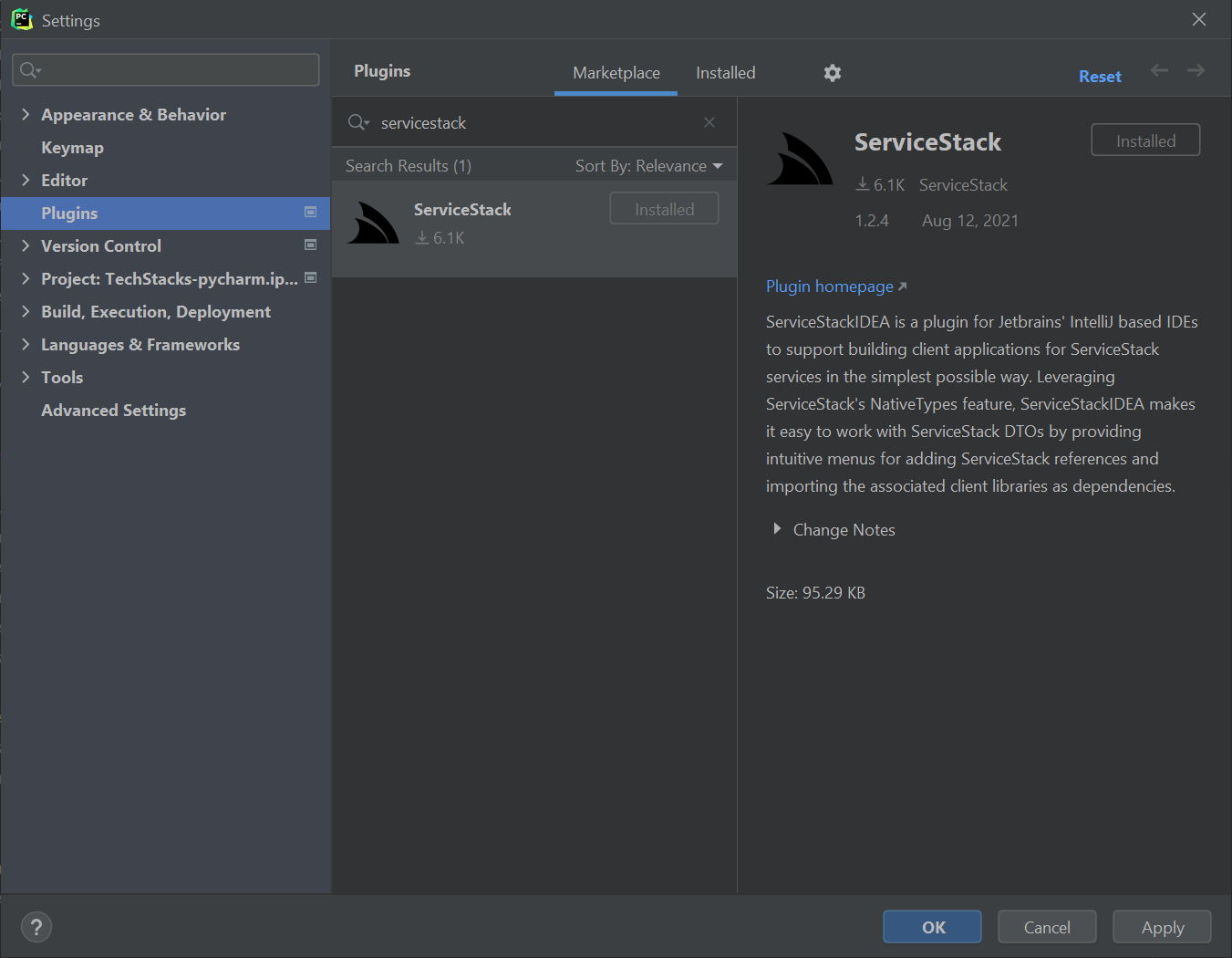](https://plugins.jetbrains.com/plugin/7749-servicestack)
Where you'll be able to right-click on a directory and click on **ServiceStack Reference** on the context menu:
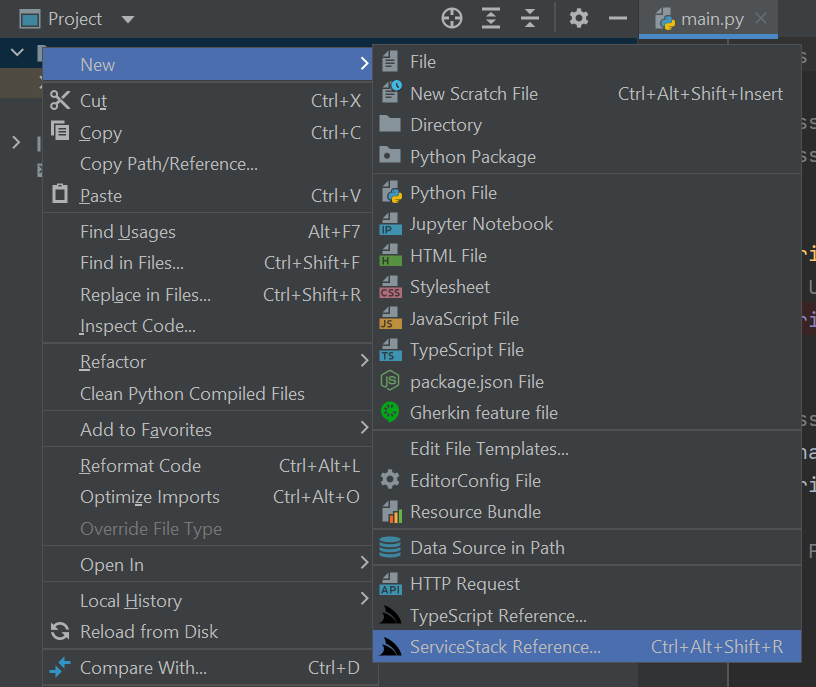
To launch the **Add PHP ServiceStack Reference** dialog where you can enter the remote URL of the ServiceStack endpoint you wish to call to generate the Typed PHP DTOs for all APIs which by default will saved to `dtos.php`:
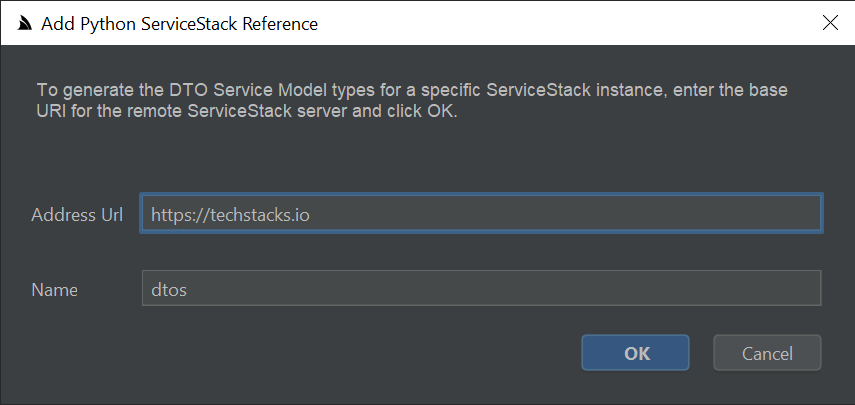
Then just import the DTOs and `JsonServiceClient` to be able to consume any of the remote ServiceStack APIs:
```php
send(new FindTechnologies(
ids: [1,2,4,6],
vendorName: "Google"));
print_r($response);
```
If any of the the remote APIs change their DTOs can be updated by right-clicking on `dtos.php` and clicking **Update ServiceStack Reference**:
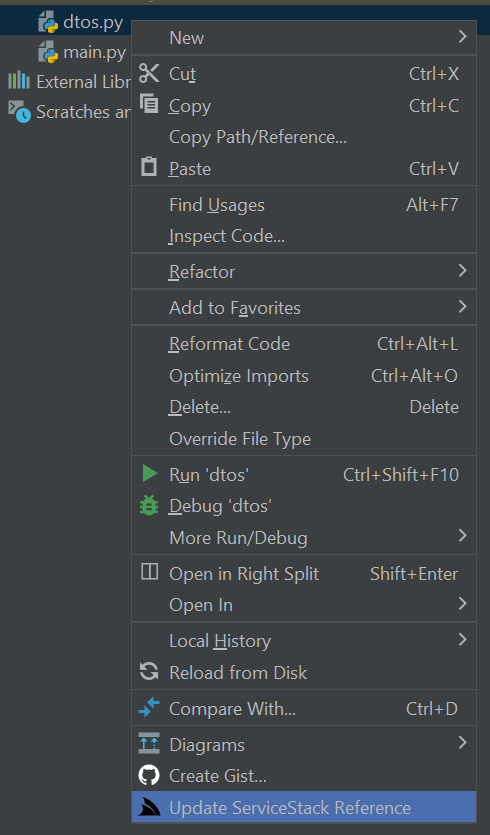
### Simple command-line utility for PHP
Developers using other PHP IDEs and Text Editors like VS Code can utilize the cross-platform [`x` command line utility](https://docs.servicestack.net/dotnet-tool) for generating PHP DTOs from the command-line.
To install first install the [latest .NET SDK](https://dotnet.microsoft.com/download) for your OS then install the [`x` dotnet tool](https://docs.servicestack.net/dotnet-tool) with:
```bash
$ dotnet tool install --global x
```
### Adding a ServiceStack Reference
To Add a PHP ServiceStack Reference just call `x php` with the URL of a remote ServiceStack instance:
```bash
$ x php https://techstacks.io
```
Result:
Saved to: dtos.php
Calling `x php` with just a URL will save the DTOs using the Host name, you can override this by specifying a FileName as the 2nd argument:
$ x php https://techstacks.io Tech
Result:
Saved to: Tech.dtos.php
### Updating a ServiceStack Reference
To Update an existing ServiceStack Reference, call `x php` with the Filename:
$ x php dtos.php
Result:
Updated: dtos.php
Which will update the File with the latest PHP Server DTOs from [techstacks.io](https://techstacks.io).
You can also customize how DTOs are generated by uncommenting the [PHP DTO Customization Options](https://docs.servicestack.net/#dto-customization-options) and updating them again.
### Updating all PHP DTOs
Calling `x php` without any arguments will update all PHP DTOs in the current directory:
```bash
$ x php
```
Result:
Updated: Tech.dtos.php
Updated: dtos.php
### Smart Generic JsonServiceClient
The generic `JsonServiceClient` is a 1st class client with the same rich feature-set of the smart ServiceClients in other
[1st class supported languages](https://docs.servicestack.net/add-servicestack-reference#supported-languages) sporting a terse,
typed flexible API with support for additional untyped params, custom URLs and HTTP Methods, dynamic response types including
consuming API responses in raw text and binary data formats. Clients can be decorated to support generic functionality
using instance and static Request, Response and Exception Filters.
It includes built-in support for a number of [ServiceStack Auth options](https://docs.servicestack.net/authentication-and-authorization)
including [HTTP Basic Auth](https://en.wikipedia.org/wiki/Basic_access_authentication) and stateless Bearer Token Auth Providers like
[API Key](https://docs.servicestack.net/api-key-authprovider) and [JWT Auth](https://docs.servicestack.net/jwt-authprovider) as well as
[stateful Sessions](https://docs.servicestack.net/sessions) used by the popular **credentials** Auth Provider and an
`onAuthenticationRequired` callback for enabling custom authentication methods.
The built-in auth options include auto-retry support for transparently authenticating and retrying authentication required
requests as well as [Refresh Token Cookie](https://docs.servicestack.net/jwt-authprovider#refresh-token-cookies-supported-in-all-service-clients)
support where it will transparently fetch new JWT Bearer Tokens automatically behind-the-scenes for friction-less stateless JWT support.
A snapshot of these above features is captured in the high-level public API below:
```php
class JsonServiceClient
{
public static ?RequestFilter $globalRequestFilter;
public ?RequestFilter $requestFilter;
public static ?ResponseFilter $globalResponseFilter;
public ?ResponseFilter $responseFilter;
public static ?ExceptionFilter $globalExceptionFilter;
public ?ExceptionFilter $exceptionFilter;
public ?Callback $onAuthenticationRequired;
public string $baseUrl;
public string $replyBaseUrl;
public string $oneWayBaseUrl;
public ?string $userName;
public ?string $password;
public ?string $bearerToken;
public ?string $refreshToken;
public ?string $refreshTokenUri;
public bool $useTokenCookie;
public array $headers = [];
public array $cookies = [];
public function __construct(string $baseUrl);
public function setCredentials(?string $userName = null, ?string $password = null) : void;
public function getTokenCookie();
public function getRefreshTokenCookie();
public function get(IReturn|IReturnVoid|string $request, ?array $args = null): mixed;
public function post(IReturn|IReturnVoid|string $request, mixed $body = null, ?array $args = null): mixed;
public function put(IReturn|IReturnVoid|string $request, mixed $body = null, ?array $args = null): mixed;
public function patch(IReturn|IReturnVoid|string $request, mixed $body = null, ?array $args = null): mixed;
public function delete(IReturn|IReturnVoid|string $request, ?array $args = null): mixed;
public function options(IReturn|IReturnVoid|string $request, ?array $args = null): mixed;
public function head(IReturn|IReturnVoid|string $request, ?array $args = null): mixed;
public function send(IReturn|IReturnVoid|null $request, ?string $method = null, mixed $body = null,
?array $args = null): mixed;
public function getUrl(string $path, mixed $responseAs = null, mixed $args = null): mixed;
public function postUrl(string $path, mixed $responseAs = null, mixed $body = null, ?array $args = null): mixed;
public function putUrl(string $path, mixed $responseAs = null, mixed $body = null, ?array $args = null): mixed;
public function patchUrl(string $path, mixed $responseAs = null, mixed $body = null, ?array $args = null): mixed;
public function deleteUrl(string $path, mixed $responseAs = null, mixed $args = null): mixed;
public function optionsUrl(string $path, mixed $responseAs = null, mixed $args = null): mixed;
public function headUrl(string $path, mixed $responseAs = null, mixed $args = null): mixed;
public function sendUrl(string $path, ?string $method = null, mixed $responseAs = null, mixed $body = null,
mixed $args = null): mixed
public function sendAll(array $requestDtos): mixed; # Auto Batch Reply Requests
public function sendAllOneWay(array $requestDtos): void; # Auto Batch Oneway Requests
```
### Change Default Server Configuration
The above defaults are also overridable on the ServiceStack Server by modifying the default config on the `NativeTypesFeature` Plugin, e.g:
```csharp
var nativeTypes = this.GetPlugin();
nativeTypes.MetadataTypesConfig.AddResponseStatus = true;
...
```
PHP specific functionality can be added by `PhpGenerator`
```csharp
PhpGenerator.ServiceStackImports.Add("MyNamespace\\Type");
```
### Customize DTO Type generation
Additional PHP specific customization can be statically configured like `PreTypeFilter`, `InnerTypeFilter` & `PostTypeFilter`
(available in all languages) can be used to inject custom code in the generated DTOs output.
Use the `PreTypeFilter` to generate source code before and after a Type definition, e.g. this will append a custom `MyAnnotation`
annotation on non enum & interface types:
```csharp
PhpGenerator.PreTypeFilter = (sb, type) => {
if (!type.IsEnum.GetValueOrDefault() && !type.IsInterface.GetValueOrDefault())
{
sb.AppendLine("#[MyAnnotation]");
}
};
```
The `InnerTypeFilter` gets invoked just after the Type Definition which can be used to generate common members for all Types and interfaces, e.g:
```csharp
PhpGenerator.InnerTypeFilter = (sb, type) => {
sb.AppendLine("public ?int $id;");
sb.AppendLine("public function getId(): int { return $this->id ?? ($this->id=rand()); }");
};
```
There's also `PrePropertyFilter` & `PostPropertyFilter` for generating source before and after properties, e.g:
```csharp
PhpGenerator.PrePropertyFilter = (sb , prop, type) => {
if (prop.Name == "Id")
{
sb.AppendLine("#[IsInt]");
}
};
```
### Emit custom code
To enable greater flexibility when generating complex Typed DTOs, you can use `[Emit{Language}]` attributes to generate code before each type or property.
These attributes can be used to generate different attributes or annotations to enable client validation for different validation libraries in different languages, e.g:
```csharp
[EmitCode(Lang.Php, "// App User")]
[EmitPhp("#[Validate]")]
public class User : IReturn
{
[EmitPhp("#[IsNotEmpty]", "#[IsEmail]")]
[EmitCode(Lang.Swift | Lang.Dart, new[]{ "@isNotEmpty()", "@isEmail()" })]
public string Email { get; set; }
}
```
Which will generate `[EmitPhp]` code in PHP DTOs:
```php
// App User
#[Validate]
class User implements JsonSerializable
{
public function __construct(
#[IsNotEmpty]
#[IsEmail]
/** @var string|null */
public ?string email=null
) {
}
//...
}
```
Whilst the generic `[EmitCode]` attribute lets you emit the same code in multiple languages with the same syntax.
### PHP Reference Example
Lets walk through a simple example to see how we can use ServiceStack's PHP DTO annotations in our PHP `JsonServiceClient`.
Firstly we'll need to add a PHP Reference to the remote ServiceStack Service by **right-clicking** on a project folder and clicking on `ServiceStack Reference...` (as seen in the above screenshot).
This will import the remote Services dtos into your local project which looks similar to:
```php
slug = $o['slug'];
}
/** @throws Exception */
public function jsonSerialize(): mixed
{
$o = [];
if (isset($this->slug)) $o['slug'] = $this->slug;
return empty($o) ? new class(){} : $o;
}
public function getTypeName(): string { return 'GetTechnology'; }
public function getMethod(): string { return 'GET'; }
public function createResponse(): mixed { return new GetTechnologyResponse(); }
}
class GetTechnologyResponse implements JsonSerializable
{
public function __construct(
/** @var DateTime */
public DateTime $created=new DateTime(),
/** @var Technology|null */
public ?Technology $technology=null,
/** @var array|null */
public ?array $technologyStacks=null,
/** @var ResponseStatus|null */
public ?ResponseStatus $responseStatus=null
) {
}
/** @throws Exception */
public function fromMap($o): void {
if (isset($o['created'])) $this->created = JsonConverters::from('DateTime', $o['created']);
if (isset($o['technology'])) $this->technology = JsonConverters::from('Technology', $o['technology']);
if (isset($o['technologyStacks'])) $this->technologyStacks = JsonConverters::fromArray('TechnologyStack', $o['technologyStacks']);
if (isset($o['responseStatus'])) $this->responseStatus = JsonConverters::from('ResponseStatus', $o['responseStatus']);
}
/** @throws Exception */
public function jsonSerialize(): mixed
{
$o = [];
if (isset($this->created)) $o['created'] = JsonConverters::to('DateTime', $this->created);
if (isset($this->technology)) $o['technology'] = JsonConverters::to('Technology', $this->technology);
if (isset($this->technologyStacks)) $o['technologyStacks'] = JsonConverters::toArray('TechnologyStack', $this->technologyStacks);
if (isset($this->responseStatus)) $o['responseStatus'] = JsonConverters::to('ResponseStatus', $this->responseStatus);
return empty($o) ? new class(){} : $o;
}
}
```
By default the generated PHP DTOs use the default `dtos` namespace which you can reference as individual classes:
```php
use dtos\GetTechnology;
use dtos\GetTechnologyResponse;
```
Or combined within a single line with:
```php
use dtos\{GetTechnology,GetTechnologyResponse};
$request = new GetTechnology();
```
### Making Typed API Requests
Making API Requests in PHP is the same as all other [ServiceStack's Service Clients](https://docs.servicestack.net/clients-overview)
by sending a populated Request DTO using a `JsonServiceClient` which returns typed Response DTO.
So the only things we need to make any API Request is the `JsonServiceClient` from the `servicestack/client` package and any
DTO's we're using from generated PHP ServiceStack Reference, e.g:
```php
get(new GetTechnology(slug:"ServiceStack"));
$tech = $response->technology; // typed to Technology
echo "$tech->name by $tech->vendorName from $tech->productUrl\n";
echo "$tech->name TechStacks:\n";
print_r($response->technologyStacks);
```
### PHPDoc Typed Annotations
Whilst PHP is a dynamic language with limited support for static typing and generics included in the PHP language itself,
you can get many of the static type and intelli-sense benefits of a typed language by using
[PHPDoc type hints](https://phpstan.org/writing-php-code/phpdoc-types) to annotate the APIs Typed Responses which lights
up static analysis and intelli-sense benefits in smart IDEs like PhpStorm:
```php
/** @var GetTechnologyResponse $response */
$response = $client->get(new GetTechnology(slug:"ServiceStack"));
echo $response->technology->name . PHP_EOL; //intelli-sense
/** @var QueryResponse $response */
$response = $client->get(new FindTechnologies(ids:[2,4,8]));
/** @var TechnologyView[] $results */
$results = $response->results;
echo $results[0]->name . PHP_EOL; //intelli-sense
```
### Constructors Initializer
All PHP Reference DTOs also implements promoted constructors making them much nicer to populate using a
constructor expression with named params syntax we're used to in C#, so instead of:
```php
$request = new Authenticate();
$request->provider = "credentials";
$request->userName = $userName;
$request->password = $password;
$request->rememberMe = true;
$response = $client->post($request);
```
You can populate DTOs with a single constructor expression without any loss of PHP's Typing benefits:
```php
$response = $client->post(new Authenticate(
provider: "credentials",
userName: "test",
password: "test",
rememberMe: true));
```
### Sending additional arguments with Typed API Requests
Many AutoQuery Services utilize [implicit conventions](https://docs.servicestack.net/autoquery-rdbms#implicit-conventions)
to query fields that aren't explicitly defined on AutoQuery Request DTOs, these can be queried by specifying additional arguments
with the typed Request DTO, e.g:
```php
/** @var QueryResponse $response */
$response = $client->get(new FindTechnologies(), args:["vendorName" => "ServiceStack"]);
```
### Making API Requests with URLs
In addition to making Typed API Requests you can also call Services using relative or absolute urls, e.g:
```php
$client->getUrl("/technology/ServiceStack", responseAs:new GetTechnologyResponse());
$client->getUrl("https://techstacks.io/technology/ServiceStack",
responseAs:new GetTechnologyResponse());
// https://techstacks.io/technology?Slug=ServiceStack
$args = ["slug" => "ServiceStack"]
client.getUrl("/technology", args:$args, responseAs:new GetTechnologyResponse());
```
as well as POST Request DTOs to custom urls:
```php
$client->postUrl("/custom-path", $request, args:["slug" => "ServiceStack"]);
$client->postUrl("http://example.org/custom-path", $request);
```
### Raw Data Responses
The `JsonServiceClient` also supports Raw Data responses like `string` and `byte[]` which also get a Typed API once
declared on Request DTOs using the `IReturn` marker:
```csharp
public class ReturnString : IReturn {}
public class ReturnBytes : IReturn {}
```
Which can then be accessed as normal, with their Response typed to a PHP `string` or `ByteArray` for raw `byte[]` responses:
```php
/** @var string $str */
$str = client.get(new ReturnString());
/** @var ByteArray $data */
$data = client->get(new ReturnBytes());
```
### Authenticating using Basic Auth
Basic Auth support is implemented in `JsonServiceClient` and follows the same API made available in the C# Service Clients where the `userName/password` properties can be set individually, e.g:
```php
$client = new JsonServiceClient($baseUrl);
$client->username = user;
$client->password = pass;
$response = client->get(new SecureRequest());
```
Or use `$client->setCredentials()` to have them set both together.
### Authenticating using Credentials
Alternatively you can authenticate using userName/password credentials by
[adding a PHP Reference](#add-php-reference)
to your remote ServiceStack Instance and sending a populated `Authenticate` Request DTO, e.g:
```php
$request = new Authenticate();
$request->provider = "credentials";
$request->userName = $userName;
$request->password = $password;
$request->remember_me = true;
$response = client->post(request);
```
This will populate the `JsonServiceClient` with [Session Cookies](https://docs.servicestack.net/sessions#cookie-session-ids)
which will transparently be sent on subsequent requests to make authenticated requests.
### Authenticating using JWT
Use the `bearerToken` property to Authenticate with a [ServiceStack JWT Provider](https://docs.servicestack.net/jwt-authprovider)
using a JWT Token:
```php
$client->bearerToken = $jwt;
```
Alternatively you can use just a [Refresh Token](https://docs.servicestack.net/jwt-authprovider#refresh-tokens) instead:
```php
$client->refreshYoken = $refreshToken;
```
Where the client will automatically fetch a new JWT Bearer Token using the Refresh Token for authenticated requests.
### Authenticating using an API Key
Use the `bearerToken` property to Authenticate with an [API Key](https://docs.servicestack.net/api-key-authprovider):
```php
$client->bearerToken = $apiKey;
```
### Transparently handle 401 Unauthorized Responses
If the server returns a 401 Unauthorized Response either because the client was Unauthenticated or the
configured Bearer Token or API Key used had expired or was invalidated, you can use `onAuthenticationRequired`
callback to re-configure the client before automatically retrying the original request, e.g:
```php
$client = new JsonServiceClient(BASE_URL);
$authClient = new JsonServiceClient(AUTH_URL);
$client->onAuthenticationRequired = new class($client, $authClient) implements Callback {
public function __construct(public JsonServiceClient $client, public JsonServiceClient $authClient) {}
public function call(): void {
$this->authClient->setCredentials("test", "test");
$this->client->bearerToken = $this->authClient->get(new Authenticate())->getRefreshTokenCookie();
}
};
// Automatically retries requests returning 401 Responses with new bearerToken
$response = client->get(new Secured());
```
### Automatically refresh Access Tokens
With the [Refresh Token support in JWT](https://docs.servicestack.net/jwt-authprovider#refresh-tokens)
you can use the `refresh_token` property to instruct the Service Client to automatically fetch new JWT Tokens behind
the scenes before automatically retrying failed requests due to invalid or expired JWTs, e.g:
```php
// Authenticate to get new Refresh Token
$authClient = new JsonServiceClient(AUTH_URL);
$authClient.userName = $userName;
$authClient.password = $password;
$authResponse = $authClient->get(new Authenticate());
// Configure client with RefreshToken
$client->refreshToken = $authResponse->refreshToken;
// Call authenticated Services and clients will automatically retrieve new JWT Tokens as needed
$response = client->get(new Secured());
```
Use the `refreshTokenUri` property when refresh tokens need to be sent to a different ServiceStack Server, e.g:
```php
$client->refreshToken = $refreshToken;
$client->refreshTokenUri = AUTH_URL . "/access-token";
```
## DTO Customization Options
In most cases you'll just use the generated PHP DTO's as-is, however you can further customize how the DTO's are generated
by overriding the default options.
The header in the generated DTO's show the different options PHP native types support with their defaults.
Default values are shown with the comment prefix of `//`. To override a value, remove the `//` and specify the value to
the right of the `:`. Any uncommented value will be sent to the server to override any server defaults.
The DTO comments allows for customizations for how DTOs are generated. The default options that were used to generate the
DTO's are repeated in the header comments of the generated DTOs, options that are preceded by a PHP comment `//` are defaults
from the server, any uncommented value will be sent to the server to override any server defaults.
```php
();
nativeTypes.MetadataTypesConfig.AddResponseStatus = true;
...
```
We'll go through and cover each of the above options to see how they affect the generated DTO's:
### GlobalNamespace
This lets you specify which namespace you want the DTOs to be generated in:
```php
data = isset($data) ? base64_decode($data) : null;
}
public function jsonSerialize(): mixed
{
return base64_encode($this->data);
}
}
```
## Inspect Utils
To help clients with inspecting API Responses the `servicestack/client` library also includes a number of helpful utils
to quickly visualizing API outputs.
For a basic indented object graph you can use `Inspect::dump` to capture and `Inspect::printDump` to print the output
of any API Response, e.g:
```php
$orgName = "php";
$opts = [
"http" => [
"header" => "User-Agent: gist.cafe\r\n"
]
];
$context = stream_context_create($opts);
$json = file_get_contents("https://api.github.com/orgs/{$orgName}/repos", false, $context);
$orgRepos = array_map(function($x) {
$x = get_object_vars($x);
return [
"name" => $x["name"],
"description" => $x["description"],
"url" => $x["url"],
"lang" => $x["language"],
"watchers" => $x["watchers"],
"forks" => $x["forks"],
];
}, json_decode($json));
usort($orgRepos, function($a,$b) { return $b["watchers"] - $a["watchers"]; });
echo "Top 3 {$orgName} GitHub Repos:\n";
Inspect::printDump(array_slice($orgRepos, 0, 3));
echo "\nTop 10 {$orgName} GitHub Repos:\n";
Inspect::printDumpTable(array_map(function($x) {
return [
"name" => $x["name"],
"lang" => $x["lang"],
"watchers" => $x["watchers"],
"forks" => $x["forks"],
];
}, array_slice($orgRepos, 0, 10)));
```
Output:
```
Top 3 php GitHub Repos:
[
{
name: php-src,
description: The PHP Interpreter,
url: https://api.github.com/repos/php/php-src,
lang: C,
watchers: 36122,
forks: 7653
},
{
name: web-php,
description: The www.php.net site,
url: https://api.github.com/repos/php/web-php,
lang: PHP,
watchers: 785,
forks: 532
},
{
name: php-gtk-src,
description: The PHP GTK Bindings,
url: https://api.github.com/repos/php/php-gtk-src,
lang: C++,
watchers: 201,
forks: 59
}
]
```
For tabular result-sets you can use `Inspect::table` to capture and `Inspect::printTable` to print API result-sets in a
human-friendly markdown table, e.g:
```php
echo "\nTop 10 $orgName Repos:\n"
Inspect::printTable(array_slice($orgRepos, 0, 10));
```
Output:
```
Top 10 php GitHub Repos:
+------------------------------------------------+
| name | lang | watchers | forks |
|------------------------------------------------|
| php-src | C | 36122 | 7653 |
| web-php | PHP | 785 | 532 |
| php-gtk-src | C++ | 201 | 59 |
| web-qa | PHP | 68 | 39 |
| phd | PHP | 68 | 44 |
| web-bugs | PHP | 58 | 68 |
| presentations | HTML | 45 | 27 |
| web-doc-editor | JavaScript | 43 | 37 |
| systems | C | 41 | 27 |
| web-wiki | PHP | 35 | 29 |
+------------------------------------------------+
```