https://github.com/servicestack/servicestackidea
Jetbrains IDE plugin for ServiceStack
https://github.com/servicestack/servicestackidea
Last synced: 12 months ago
JSON representation
Jetbrains IDE plugin for ServiceStack
- Host: GitHub
- URL: https://github.com/servicestack/servicestackidea
- Owner: ServiceStack
- Created: 2021-07-07T02:12:55.000Z (about 5 years ago)
- Default Branch: main
- Last Pushed: 2024-09-30T03:59:04.000Z (almost 2 years ago)
- Last Synced: 2025-07-29T03:05:40.512Z (12 months ago)
- Language: Java
- Size: 531 KB
- Stars: 1
- Watchers: 4
- Forks: 0
- Open Issues: 0
-
Metadata Files:
- Readme: README.md
- Changelog: CHANGELOG.md
Awesome Lists containing this project
README
# ServiceStackIDEA plugin

[](https://plugins.jetbrains.com/plugin/PLUGIN_ID)
[](https://plugins.jetbrains.com/plugin/PLUGIN_ID)

ServiceStackIDEA is a plugin for Jetbrains' IntelliJ based IDEs to support building client applications for ServiceStack services in the simplest possible way. Leveraging ServiceStack's NativeTypes feature, ServiceStackIDEA makes it easy to work with ServiceStack DTOs by providing intuitive menus for adding ServiceStack references and importing the associated client libraries as dependencies.
ServiceStackIDEA now supports many of the most popular Jetbrains IDEs including:
- IntelliJ
- Java, Kotlin and TypeScript
- Android Studio
- Java and Kotlin
- WebStorm, RubyMine, PhpStorm & PyCharm
- TypeScript
## New TypeScript Support
Since version 1.0.11, ServiceStackIDEA now supports adding new TypeScript References!
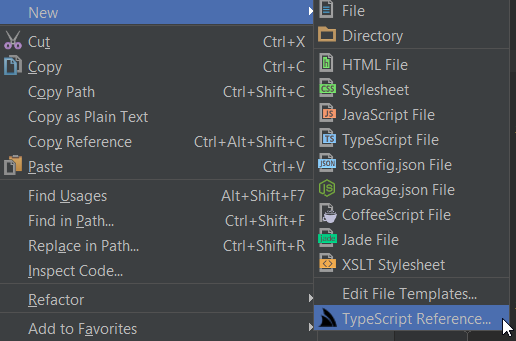
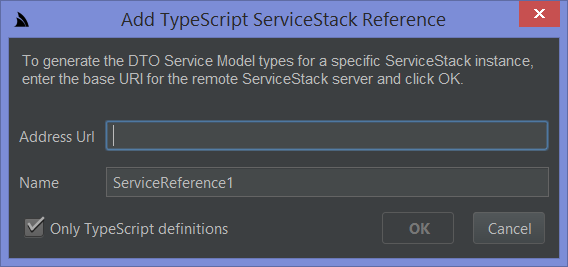
By right clicking on any folder in your Project explorer, you can add a TypeScript reference by simply providing any based URL of your ServiceStack server.
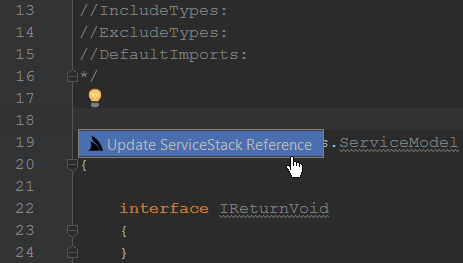
Once this file as been added to your project, you can update your service DTOs simply right clicking `Update Servicestack Reference` or using the light bulb action (Alt+Enter by default).
This now means you can integrate with a ServiceStack service easily from your favorite Jetbrains IDE when working with TypeScript!
#### Install ServiceStack IDEA from the Plugin repository
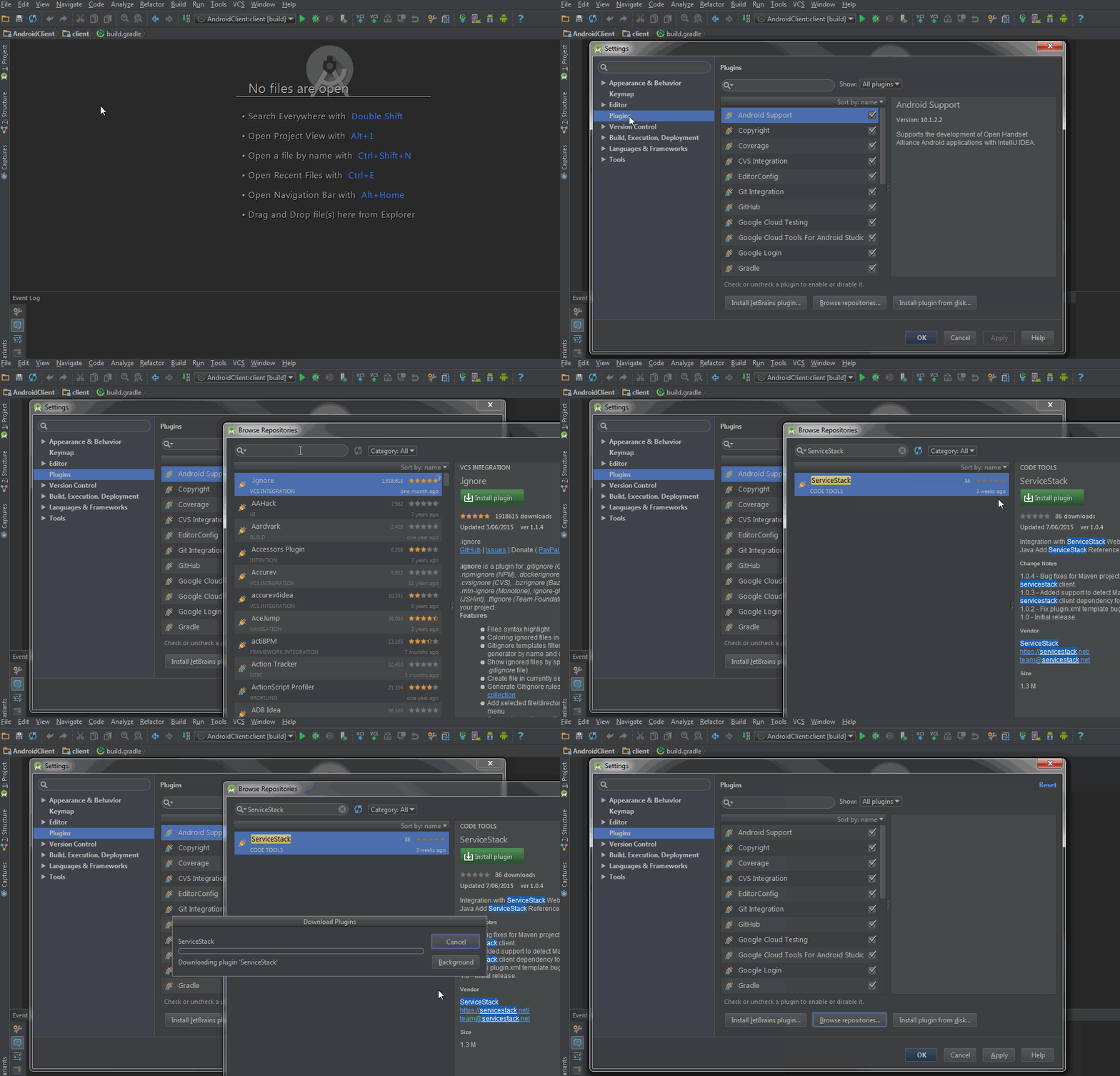
The ServiceStack IDEA is now available to install directly from within a supported IDE Plugins Repository, to Install Go to:
1. `File -> Settings...` Main Menu Item
2. Select **Plugins** on left menu then click **Browse repositories...** at bottom
3. Search for **ServiceStack** and click **Install plugin**
4. Restart to load the installed ServiceStack IDEA plugin
### Development
Local development of the plugin requires:
- Java SDK 1.8
- IntelliJ Ultimate/Community 2019.2+ (ideally 2020.3+)
Once loaded into IntelliJ for the first time, `import gradle` project by right clicking on `build.gradle` in the Project menu.
Once imported, run the `build` task, this should try to resolve the gradle version to use.
#### Debugging
Use the gradle task `runIde` on Debug, this should launch 2019.2 of IntelliJ Community edition which is the ealiest version supported after ServiceStackIDEA 1.0.40.
This breaking change came from 2019.2+ separation of Java lang features in the `com.intellij.psi.*` packages which SSIDEA uses for IntelliJ + Android studio Java support.
## Installation
- Using IDE built-in plugin system:
Settings/Preferences > Plugins > Marketplace > Search for "ServiceStackIDEA" >
Install Plugin
- Manually:
Download the [latest release](https://github.com/ServiceStack/ServiceStackIDEA/releases/latest) and install it manually using
Settings/Preferences > Plugins > ⚙️ > Install plugin from disk...
---
Plugin based on the [IntelliJ Platform Plugin Template][template].
[template]: https://github.com/JetBrains/intellij-platform-plugin-template
## Release process
When adding changes, be sure to update the `CHANGELOG.md` file, filling content in under the `## [Unreleased]` section.
This will get added to the change notes for the plugin release. Also note that version changes will create `Draft` Release entries in this repository. Once the change log is updated and everything is release, publish the draft release to push the updated plugin to Jetbrains Plugin Marketplace.
To update changes in another channel, other than `stable`, use the SEMVER suffix of `-{channel_name}` at the end of the version in `gradle.properties`. For example, `pluginVersion = 1.1.2-beta` to release to the Plugins `beta` channel.