https://github.com/sethcottle/tabcloser
TabCloser automatically closes redirected tabs for Asana, Discord, Figma, Linear, Notion, Slack, Spotify, VS Code Live Share, Webex, and Zoom.
https://github.com/sethcottle/tabcloser
auto-close chrome-extension chromium-extension edge-extension tab tab-management
Last synced: over 1 year ago
JSON representation
TabCloser automatically closes redirected tabs for Asana, Discord, Figma, Linear, Notion, Slack, Spotify, VS Code Live Share, Webex, and Zoom.
- Host: GitHub
- URL: https://github.com/sethcottle/tabcloser
- Owner: sethcottle
- License: gpl-3.0
- Created: 2023-05-05T18:39:52.000Z (over 3 years ago)
- Default Branch: main
- Last Pushed: 2025-02-19T20:19:31.000Z (over 1 year ago)
- Last Synced: 2025-04-12T12:06:55.759Z (over 1 year ago)
- Topics: auto-close, chrome-extension, chromium-extension, edge-extension, tab, tab-management
- Language: HTML
- Homepage: https://tabcloser.com
- Size: 442 KB
- Stars: 11
- Watchers: 2
- Forks: 6
- Open Issues: 0
-
Metadata Files:
- Readme: README.md
- License: LICENSE
Awesome Lists containing this project
README

# TabCloser 3
[What is TabCloser?](https://github.com/sethcottle/tabcloser#what-is-tabcloser) | [TabCloser Options](https://github.com/sethcottle/tabcloser#tabcloser-options) | [URL Schemas](https://github.com/sethcottle/tabcloser#url-schema) | [Privacy and Permissions](https://github.com/sethcottle/tabcloser#requested-permissions) | [Installing TabCloser](https://github.com/sethcottle/tabcloser#installing-tabcloser) | [License](https://github.com/sethcottle/tabcloser#license)
## What is TabCloser?
Keep your tabs tidy, so you can stay focused. TabCloser eliminates those pesky leftover tabs from Asana, Discord invites, Figma files, Linear, Notion, Slack, Spotify, VS Code Live Share, Webex meetings, and Zoom meetings—leaving you with a clean browser and a clear path to productivity.

## TabCloser Options
By default, Asana, Discord invites, Figma, Notion, Slack, Spotify, VS Code Live Share, Webex Joins, and Zoom Joins are enabled. Just deselect any service that you don't want tabs to close for automatically. You can also change the interval that TabCloser uses to close a new tab once a new tab has been opened, by default it's `15 seconds`.

#### Custom URLs
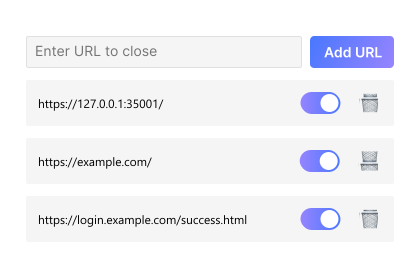
TabCloser 3 brings the ability to add custom URLs to the detection criteria. TabCloser will only close URLs that are an exact match to what is entered. That means if the URL is `https://example.com/` instead of `https://example.com`, TabCloser will not close the tab because the trailing `/` is missing from the end of the entry. The Custom URL options is great for closing out out specific pages you may use, like leftover tabs from SSO, VPN, ..etc redirect pages.
#### URL Schema
Let's breakdown how TabCloser decides if it should close a tab. TabCloser is using regular expressions to look for a partial match on a dedicated URL for each service.
Here's how TabCloser is handling URLs for each service:
`^`: The start of the URL
`https?://`: This will match "http://" or "https://"
`([a-z0-9-]+\\.)?`: This isn't included in each service, but it's to detect a subdomain, followed by a dot "."
`example\\.com/`: This matches the primary URL of a particular service
#### Asana
For Asana, TabCloser is using `^https?://app\\.asana\\.com/-/desktop_app_link\\?.*`.
The `app.asana.com/-/desktop_app_link?` designates that an Asana link is being redirected to the native Asana client. `.*` will match any string that follows the `?`.
#### AWS IAM Access Authorization
For the "Authorization Successful" page of the AWS IAM identity sign
in flow, TabCloser is using
`^https://[a-z0-9-]+\\.awsapps\\.com/start/user-consent/login-success.html`
It only matches on secure connections, as that page would never be served over a non-secure one. The domain `[a-z0-9-]+.awsapps.com` should capture any AWS organization (the subdomain), and the regex only matches on the `login-success.html` page to make sure login errors would not be hidden from you.
#### Discord
For Discord, TabCloser is using `^https?://discord\\.com/invite/`.
The `/invite/` is associated with a Discord invite which can be opened in the Discord desktop client.
#### Figma
For Figma, TabCloser is using three patterns: `^https?://(?:www\.)?figma\.com/design/` for Figma Design files, `^https?://(?:www\.)?figma\.com/board/` for FigJam files, and `^https?://(?:www\.)?figma\.com/slides/` for Figma Slide files (note that TabCloser will not close `/presentation/` files from shared Slide presentations).
TabCloser will not close tabs for Figma Community profiles, templates, plugins, ..etc. Only file URLs which can be redirected to the Figma desktop client.
#### Linear
For Linear, TabCloser is using `^https?://linear\\.app/.*\\?noRedirect=1$'`
The `\\?noRedirect=1$` designates that the URL was successfully redirected to the Linear desktop client.
#### Microsoft Teams
For Microsoft Teams, TabCloser is using `^https?://teams\\.microsoft\\.com/dl/launcher/.*`
The `teams\\.microsoft\\.com` matches the domain "teams.microsoft.com.". `/dl/launcher/` is looking for the Teams launcher page that givesm you the ability to download, use the web app, or launch in your current Teams install.
#### Notion
For Notion, TabCloser is using `^https?://www\\.notion\\.so/native/.*&deepLinkOpenNewTab=true`
The `^https?://www\\.notion\\.so/native/` designates that it's being redirected to the native client. The `.*` allows for any string of content after the base URL. Then TabCloser is looking for an exact match on `&deepLinkOpenNewTab=true` to make sure the redirect was successful.
#### Slack
Slack is a little more complicated that our typical regex patterns. TabCloser is using `^https?://(?!(app\\.slack\\.com|slack\\.com|api\\.slack\\.com|.*\\/(customize|account|apps)(\\/|$)|.*\\/home(\\/|$)))[a-z0-9-]+\\.(enterprise\\.)?slack\\.com/(?:.*|ssb/signin_redirect\\?.*$)`
`(?!(app\\.slack\\.com|slack\\.com|api\\.slack\\.com|.*\\/(customize|account|apps)(\\/|$)|.*\\/home(\\/|$)))` is a negative lookahead assertion that excludes several important Slack URLs:
- `app\\.slack\\.com` keeps the web client open
- `slack\\.com` excludes the base Slack website
- `api\\.slack\\.com` excludes developer docs
- `.*\\/(customize|account|apps)(\\/|$)` excludes settings and configuration pages
- `.*\\/home(\\/|$)` excludes the home page
`[a-z0-9-]+\\.(enterprise\\.)?slack\\.com` matches both regular Slack workspaces (like `team.slack.com`) and enterprise workspaces (like `company.enterprise.slack.com`).
TabCloser should close redirected tabs from:
- Regular workspace redirects to the desktop app
- Enterprise SSO sign-in redirects (like `company.enterprise.slack.com/ssb/signin_redirect`)
TabCloser shouldn't close:
- The Slack web client (app.slack.com)
- Settings or configuration pages
- The workspace home page
- The main Slack website or docs
#### Spotify
For Spotify, TabCloser is using `^https?://open\\.spotify\\.com`
The `open\\.` portion is typically associated with opening a song, artist, playlist, ..etc which can be opened in the Spotify desktop client.
#### VS Code Live Share
For Live Share, TabCloser is using `^https?://vscode\\.dev/liveshare`.
The `/liveshare/` is associated with the Live Share URL which can be opened in the VS Code desktop client.
#### Webex
For Webex, TabCloser is using `^https?://([a-z0-9-]+\\.)?webex\\.com/wbxmjs/joinservice`.
The `webex\\.com/wbxmjs/joinservice` is associated with the join meeting URL which can be opened in the Webex desktop client.
#### Zoom
For Zoom, TabCloser is using `^https?://([a-z0-9-]+\\.)?zoom\\.us/[js]/[^/]+.*#success$`
`([a-z0-9-]+\\.)?` matches to any subdomain that your Zoom may be using. `zoom\\.us/` matches the core URL. `[js]/` matches the `/j/` and `/s/` paths that the redirect URL may encounter. `[^/]+` matches the meeting ID. `.*` matches anything between the meeting ID and `#success`, this accounts for things like a `pwd` being included in the URL. And of course, `#success$` matches the "#success" at the end of URL that has been successfully redirected to the Zoom client.
## Requested Permissions
TabCloser requests a few permissions in the `manifest.json` file.
`tabs` allows TabCloser to interact with your tabs, giving it the ability to run when a new tab is detected and if a matched URL is found, close that tab automatically.
`storage` allows TabCloser to save your `enabled` or `disabled` auto close preferences for a particular service, saves custom URLs you enter, and saves the interval you've set for closing tabs from the options menu.
#### Privacy
TabCloser runs completely locally in your browser. It does not collect any analytics, it does not store any information about your tabs or browser history, it does not send any data back for processing or analysis. Your data is yours and yours alone.
## Installing TabCloser
TabCloser is available in the Google Chrome Web Store, the Microsoft Edge Add-ons Store, and available for manual download and installation.
[](https://chrome.google.com/webstore/detail/tabcloser/ebhkgfbgbcaphagkjbiffhnfbmkkbadb?hl=en&authuser=0)
[](https://microsoftedge.microsoft.com/addons/detail/tabcloser/odipgobonaabhgghappnhfjimopchehg)
[](https://apps.apple.com/us/app/tabcloser-3/id6553966600?mt=12)
[](https://github.com/sethcottle/tabcloser/zipball/main)
#### For Chrome
Download the latest release and unzip it. Then navigate to `chrome://extensions/` and enable "Developer mode" using the toggle in the top right corner. Upload the extension manually by pressing "Load unpacked" and selecting the unzipped TabCloser folder.
#### For Edge
Download the latest release and unzip it. Then navigate to `edge://extensions/` and enable "Developer mode" in the left sidebar, it's near the bottom. Upload the extension manually by pressing "Load unpacked" and selecting the unzipped TabCloser folder.
#### For Safari
`tabcloser-3.2.2-macos.zip` is available for download in the latest release. You can unzip this and drag TabCloser.app to your Applications folder. TabCloser.app was created using Xcode and signed for Direct Distribution, however there are a few steps you'll need to take to enable it. Once you install TabCloser you'll need to launch Safari and go to `Safari` > `Settings` > `Advanced` and check `Show features for web developers`. Once you've done that, go to the Developer tab and enable `Allow unsigned extensions`. [Need help? Watch the installation video](https://youtu.be/ZKSxBJY_g7c?si=7oH_BDfJDnXYTIY3).
---
## Support the Addon
You can support TabCloser by contributing through these links:
[](https://buymeacoffee.com/seth)
[](https://www.paypal.com/paypalme/sethcottle)
[](https://github.com/sponsors/sethcottle)
Signing up through these services through these affiliate links is also a good way to support TabCloser.
[](https://m.do.co/c/632b45e20266)
[](https://usefathom.com/ref/EQVZMV)
---
## 🆕 Stay Connected
Join the [Seth's Nook Discord](https://discord.gg/PrAEQFF2fK) server to get updates on LittleLink and more. Use the invite code `PrAEQFF2fK` or click the button below.
[](https://discord.gg/PrAEQFF2fK)
---
## License
Copyright (C) 2023-2024 Seth Cottle
TabCloser is free software: you can redistribute it and/or modify
it under the terms of the GNU General Public License as published by
the Free Software Foundation, either version 3 of the License, or any later version.
TabCloser is distributed in the hope that it will be useful,
but WITHOUT ANY WARRANTY; without even the implied warranty of
MERCHANTABILITY or FITNESS FOR A PARTICULAR PURPOSE. Please see the
[GNU General Public License](https://www.gnu.org/licenses/quick-guide-gplv3.html) for more details.