https://github.com/sethwebster/react-fps-counter
https://github.com/sethwebster/react-fps-counter
Last synced: 10 months ago
JSON representation
- Host: GitHub
- URL: https://github.com/sethwebster/react-fps-counter
- Owner: sethwebster
- License: mit
- Created: 2023-01-07T16:25:19.000Z (over 3 years ago)
- Default Branch: main
- Last Pushed: 2023-01-13T15:33:35.000Z (over 3 years ago)
- Last Synced: 2025-02-27T23:43:13.101Z (over 1 year ago)
- Language: TypeScript
- Homepage:
- Size: 746 KB
- Stars: 5
- Watchers: 2
- Forks: 0
- Open Issues: 1
-
Metadata Files:
- Readme: README.md
- License: LICENSE.txt
Awesome Lists containing this project
README
# React Fps Counter
This package provides a component to overlay of the number of FPS (frames per second) of your React page.
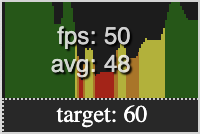
You can see the current FPS, and the average FPS over a number of frames.
[Code Sandbox](https://codesandbox.io/s/admiring-haslett-hluduf) | [Demo](https://hluduf.csb.app/)
## Basic Usage
If you want to measure FPS across your entire React App, it's best to place the `FPSCounter` component at the root of your app. Otherwise, if you only want to measure a specific component or page, place the component there.
```jsx
import { useState } from 'react';
import FPSCounter from '@sethwebster/react-fps-counter';
function App() {
const [fpsVisible, setFpsVisible] = useState(true)
return (
...
...
)
}
```
### Options
Option
Default
Notes
visible
false
Controls the visibility of the component
targetFrameRate
60
Specifies the desired number of frames per second. Used to calculate the graph.
position
`top-left`
Controls the position of the component. Possible values are: `top-left`, `top-right`, `bottom-left`, `bottom-right`
samplePeriod
1000
Specifies how long each sample period should be in milliseconds. Smaller numbers sample more often. Every frame is captured, but when calculating the average, the samplePeriod is used.
numberOfFramesForAverage
5
The number of frames to sample for an average.
colorTiers
```js
{
0.1: "red",
0.35: "orange",
0.5: "yellow",
0.75: "green"
}
```
The colors to use in the graph, and the appropriate threshold for each color. Thresholds are specified in percentage of the specified `targetFrameRate`.
useAnimationFrames
true
Specifies whether to use window.requestAnimationFrame or not. It is highly recommended, for accuracy's sake, to leave this true.
## Advanced Usage
```jsx
import { useState } from 'react';
import FPSCounter from '@sethwebster/react-fps-counter';
function App() {
const [fpsVisible, setFpsVisible] = useState(true)
return (
...
...
)
}
```
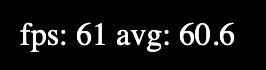
## Using Frame Data
It is possible to use the frame data yourself without the overlay, if you desire.
```jsx
...
import { useFps } from '@sethwebster/react-fps-counter';
...
function Component() {
const fpsData = useFps(/* {samplePeriod: number, numberOfFramesForAverage: number } */);
return
fps: {fps.fps}
{" "}
avg: {fps.avg}
}
```
### License
[MIT](./LICENSE.txt)