https://github.com/sflems/led-board-manager
A Django based web app to configure LED Scoreboards running on a Raspberry Pi.
https://github.com/sflems/led-board-manager
Last synced: about 1 year ago
JSON representation
A Django based web app to configure LED Scoreboards running on a Raspberry Pi.
- Host: GitHub
- URL: https://github.com/sflems/led-board-manager
- Owner: sflems
- License: gpl-3.0
- Created: 2021-01-24T12:05:20.000Z (over 5 years ago)
- Default Branch: main
- Last Pushed: 2024-02-20T10:09:59.000Z (over 2 years ago)
- Last Synced: 2025-03-24T00:14:46.829Z (over 1 year ago)
- Language: Python
- Homepage:
- Size: 3.62 MB
- Stars: 26
- Watchers: 3
- Forks: 0
- Open Issues: 1
-
Metadata Files:
- Readme: README.md
- Contributing: CONTRIBUTING.md
- License: LICENSE
- Code of conduct: CODE_OF_CONDUCT.md
Awesome Lists containing this project
README
# LED Board Manager
#### A Django based web app to configure an NHL LED Scoreboard, and others, running on a Raspberry Pi.
#### Latest Release:
##### LED Board Manager
[](https://github.com/sflems/led-board-manager/releases) [](https://github.com/sflems/led-board-manager/actions/workflows/python-app.yml)
#### Compatible With:
##### NHL LED Scoreboard:
[](https://github.com/riffnshred/nhl-led-scoreboard/releases/latest) [](https://github.com/falkyre/nhl-led-scoreboard-img/actions/workflows/main.yml)
##### MLB LED Scoreboard:
[](https://github.com/MLB-LED-Scoreboard/mlb-led-scoreboard/releases/latest)
##### NHL LED Scoreboard:
[](https://github.com/mikemountain/mlb-led-scoreboard/releases/latest)
## Table of Contents
- [Description](#description)
- [Features](#features)
- Config Generator
- Boards/Profile Manager (NEW!)
- [Disclaimer](#disclaimer)
- [Requirements](#requirements)
- [Installation](#installation)
- [First Steps](#first-steps)
- [Manual Installation (optional)](https://github.com/sflems/led-board-manager/wiki/Manual-Installation)
- [Autostarting the Webserver](https://github.com/sflems/led-board-manager/wiki/Auto-Starting-the-server-@-Boot)
- [Updates](#updates)
- [Removal / Uninstall](https://github.com/sflems/led-board-manager/wiki/Uninstall)
- [Usage](#usage)
- [Starting the Server](#to-start-the-webserver)
- [Accessing the Server](#to-access-the-server)
- [Remote Viewing via SSH Tunnelling](https://github.com/sflems/led-board-manager/wiki/Remotely-Viewing-Your-Board-Manager-via-SSH-Tunnel)
- [To Stop the Server](#to-stop-the-server)
- [Default Login](#default-admin-login)
- [Info](#info)
- [Troubleshooting](https://github.com/sflems/led-board-manager/wiki/Troubleshooting)
- [Screenshots](#screenshots--demo)
_____________
## Description
Designed as a solution to manage the NHL LED Scoreboard project by [Joel Joannisse](https://github.com/riffnshred), as well as custom board integration.
The app uses a Django webserver to manage profiles in a simple SQLite database. Users can access the web interface which can be hosted on their local machine or network. If a schema is found in a board's config directory, Django dynamically generates and validates an easy to use form to create a `config.json` file. It saves a new `config.json` in the appropriate `config` directory and restarts your board process to implement any changes on the fly!
JSON can also be edited manually in the `/admin` interface. The profiles dashboard also has the ability to backup configurations on the fly. The admin panel also has a section for global RGB Matrix flags/arguments.
Boards and their paths/settings may also be added or configured in the admin panel.
_____________
## Features
- GUI / Today's NHL Games Dashboard
- Swap between various board projects ie. NHL, NFL, MLB, etc.
- Easily Toggle your scoreboard On and Off
- Profile Status & Resource Monitor
- Profiles Dashboard
- Manage Configurations on the Fly
- Create Configurations with a Simple Form (schema dependant)
- Configuration/Profile Backup
- Supervisor Integration
- Activating A Profile Updates the Board in Real Time
- Scoreboard Status Monitor
- Pi Commands
- Scoreboard On/Off Toggle
- Stop Server
- Reboot
- Shutdown
- Admin Dashboard
- Boards Management (NHL / NFL / MLB / etc.)
- Profiles Management
- User Management
- Scoreboard Flags (ie. `--led-brightness`, `--led-gpio-mapping`, `--update-check`, etc.)
- WebGUI Defaults (ie. Default paths, Supervisor `[program:names]`)
- REST API (W.I.P.)
- Interact with the board management backend API routes. (via http://`YOUR_IP`:9002/api)
_____________
### Disclaimer
_(Work in Progress)_
This project is still in development. Development of the NHL LED Scoreboard is similarly evolving. They both rely on the external NHL API which, at any time may be inaccessible or updated. This app __does__ modify your configuration files in the `nhl-led-scoreboard/config` directory. While these files are cloned during installation, please backup any _prized_ configurations on your own accord.
_____________
## Requirements
- [Raspberry Pi (Zero WH, 3B+, 3A+, 4B)](https://github.com/riffnshred/nhl-led-scoreboard)
- [NHL LED Scoreboard](https://github.com/riffnshred/nhl-led-scoreboard)
- [Hockey](https//www.nhl.com)
- [App Dependancies](requirements.txt)
#### Compatible Boards:
- [NFL LED Scoreboard](https://github.com/mikemountain/nfl-led-scoreboard)
- [MLB LED Scoreboard](https://github.com/MLB-LED-Scoreboard/mlb-led-scoreboard)
- [Stonks](https://github.com/rdefeo/stonks)
- ...and similar forks.
## Installation
__Be sure to back up any previous configurations before use!!!__
#### From the `/home/pi` directory:
###### (or the same location as your `nhl-led-scoreboard` directory)
```bash
git clone --recursive https://github.com/sflems/led-board-manager.git
cd led-board-manager
```
#### First Steps
##### Install `supervisor` (as root):
###### You can skip [to this step](#install-and-start-python3-venv) if you have an active `supervisor' installation.
```bash
sudo apt update >&3
sudo apt install -y supervisor >&3
sudo cp scoreboard/static/supervisor/supervisord.conf /etc/supervisor/supervisord.conf
sudo sed -i -E "s#/home/pi/#$HOME/#g" /etc/supervisor/supervisord.conf
sudo sed -i -E "s#=pi:pi\$#=$USER:$USER#g" /etc/supervisor/supervisord.conf
sudo chmod 644 /etc/supervisor/supervisord.conf
```
###### Sample configurations can be found in the [`nhl-led-scoreboard-img`](https://github.com/falkyre/nhl-led-scoreboard-img/tree/master/stage2/06-supervisor/files) project, by [@falkyre](https://github.com/falkyre).
###### Install and Start `python3-venv`:
_To run the server in a development environment, `python3-venv` can be a solution to create a separate "environment" for the server to run in._
```bash
sudo apt install python3-venv python3-dev
python3 -m venv env
./scripts/install.sh
```
Once finished, you can start the server with:
```bash
source env/bin/activate
gunicorn Capstone.wsgi -b 0:9002
```
If all is working, you should then be able to access the app @ `YOUR_IP:9002` in the browser. You can deactivate the env with the command `deactivate`.
#### Default Login (Change me in the admin panel!)
Username: `admin`
Password: `scoreboard`
If you can't access the server and are using a firewall such as `ufw` or `iptables`, be sure to allow access _to your local network only_ over the `9002` port (or whatever you set it to if so). If you have ports 80/443 open on your Pi/Router, this site WILL be accessable by all, so be sure to have your firewall(s) in order.
__See also: [Usage Instructions](#usage)__
_____________
## Manual Installation:
See the wiki for the [Manual Installation](https://github.com/sflems/led-board-manager/wiki/Manual-Installation) steps.
## Auto-Starting the server @ boot:
See the wiki for the complete [Auto-Start Instructions](https://github.com/sflems/led-board-manager/wiki/Auto-Starting-the-server-@-Boot).
## Updates
The latest update notes can be found under the [project releases](https://github.com/sflems/led-board-manager/releases).
[Stop the server](#to-stop-the-server), then:
```bash
cd led-board-manager/
git reset --hard
git checkout main
git pull
```
_When updating, or if stated in the release notes, it may be necessary to run the update script from the `led-board-manager` directory._
```bash
./scripts/update.sh
```
Then, restart the web server.
Alternatively, manually enter the following commands:
```bash
source env/bin/activate
pip3 install -r requirements.txt
python3 manage.py makemigrations
python3 manage.py migrate
python3 manage.py test
```
Then, restart the web server. You can `deactivate` the `(env)` if you are using the `./scripts/autorun.sh` script or `supervisor`.
## Usage
__Be sure to back up any previous configurations before use!!!__
### To start the webserver:
To start the server manually, and from the `led-board-manager` directory, enter:
```bash
source env/bin/activate && gunicorn Capstone.wsgi -b 0:9002
```
### To start the webserver with a script:
Simply run `./scripts/autorun.sh` from the same location.
This command, and the default configuration, start the server on `0.0.0.0` and port `9002` making it available to any connected devices on your local network. Alternatively, you can run the server on a different port, e.g. `0:8000`, `0:PORT`, or available to _just_ the `localhost` machine by running:
```bash
source env/bin/activate
gunicorn Capstone.wsgi -b 127.0.0.1:9002
```
__Note__: _This server should not be served over a public connection or used in a production environment. If you wish to view the scoreboard WebGUI remotely, you can do so securely by accessing your local network using a VPN service._
_____________
### To access the server:
Access the dashboard at `YOUR_IP:PORT` in the browser.
###### Default Login (Change me in the admin panel!)
Username: `admin`
Password: `scoreboard`
#### Remote Viewing from External Networks
Viewing the board manager from an external network is possible. For more information, [see the following wiki article.](https://github.com/sflems/led-board-manager/wiki/Remotely-Viewing-Your-Board-Manager-via-SSH-Tunnel)
_____________
### To stop the server:
In a terminal shell with the server running, `Ctrl` + `C` will terminate the process. Then, `deactivate` at any time to stop the `venv`.
###### If the server is running in the background:
`pkill -f Capstone.wsgi`
...Or to find the process IDs, enter `ps aux | grep gunicorn`
Example response:
```bash
user@raspi:~ $ ps aux | grep gunicorn
--> user 6300 26.6 0.8 38236 33364 pts/0 S+ 00:22 0:01 gunicorn Capstone.wsgi -b 0:9002
user 6319 0.0 0.0 3160 1536 pts/1 S+ 00:22 0:00 grep --color=auto gunicorn
user@raspi:~ $
```
This is the second number in the table following the username (Use caution if you have more than one python/Django server running!). Change the `PID` in the following command to that number to kill the server:
`kill -9 PID`
_Better yet_... simply stop the server from supervisor, or the dashboard :).
_____________
### Default Admin Login
`YOUR_IP:9002/admin`
Username: `admin`
Password: `scoreboard`
__Please change this password!__ You can do this by visiting `YOUR IP:PORT/admin` and clicking the change password button. Email currently isn't configured.
_____________
## Info
- The supervisor configuration is updated when saving flag settings or BoardType settings in the admin panel.
- When a profile is activated, the appropriate `config.json` contents are replaced with an updated configuration. You can do this on the profiles page. Your previous config.json is still "active" until you activate one here.
- When a profile is backed up, a file is created in the same folder as `profile_name.config.json`. It's path and name are displayed as a message in the browser.
- Deleted profiles do not delete the `config.json` files; it only removes them from the Django Sqlite database.
- The `supervisor-daemon.conf` used by the `led-board-manager` app prefixes any configured BoardTypes with `boards:`.
- These programs are grouped in supervisor with the `boards:` prefix.
- `sudo supervisorctl restart scoreboard` would become `sudo supervisorctl restart boards:scoreboard`.
- The GUI Defaults (ie Scoreboard path, Supervisor Program Name, etc.) can be changed in the admin panel. Alternatively, they can be modified manually in the `Capstone/settings.py` file under the `CONSTANCE_CONFIG` variable.
- Scoreboard Flags (ie. `--led-brightness`, `--led-gpio-mapping`, `--update-check`, etc.) can be changed here too.
_____________
## Screenshots / Demo
##### It's Mobile Friendly Too! (Responsive)
I encourage anyone interested to take a quick peek at the demo on YouTube:
[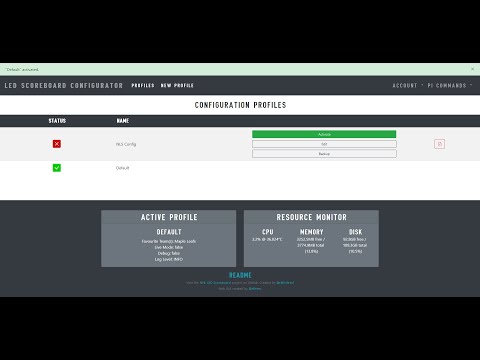](https://www.youtube.com/watch?v=5byJf5v6Hnc)
_____________
###### Dashboard

###### Profiles Dashboard

###### Create/Edit A Profile

###### Settings Admin

###### Boards Admin

### Please let me know if you experience any bugs, have any feature suggestions or issues. Enjoy!