https://github.com/shaikh-raj/talk2data
POC project integrating LLM, RAG, and KG to generate context-aware responses from text and database inputs.
https://github.com/shaikh-raj/talk2data
faiss knowledge-graph langchain langsmith neo4j python serpapi
Last synced: 2 months ago
JSON representation
POC project integrating LLM, RAG, and KG to generate context-aware responses from text and database inputs.
- Host: GitHub
- URL: https://github.com/shaikh-raj/talk2data
- Owner: shaikh-raj
- Created: 2025-03-15T18:32:40.000Z (over 1 year ago)
- Default Branch: main
- Last Pushed: 2025-03-15T19:22:16.000Z (over 1 year ago)
- Last Synced: 2025-10-11T01:11:30.065Z (9 months ago)
- Topics: faiss, knowledge-graph, langchain, langsmith, neo4j, python, serpapi
- Language: Python
- Homepage: https://talk2data.mathnai.com/
- Size: 87.9 KB
- Stars: 1
- Watchers: 1
- Forks: 1
- Open Issues: 0
-
Metadata Files:
- Readme: readme.md
Awesome Lists containing this project
README
# LLM POC Project
This project demonstrates integration of various AI capabilities using LangChain, including:
- Text-based RAG (Retrieval-Augmented Generation)
- Knowledge Graph integration with Neo4j
- SQL database querying
- Web search capabilities
- Multi-tool orchestration
## Features
- Text input processing with vector embeddings
- Knowledge graph creation and querying
- Database integration for structured data
- Web search capability via SerpAPI
- Streamlit-based user interface
## Setup Instructions
1. Install dependencies:
```
pip install -r requirements.txt
```
2. Set up API keys:
- Create a `secrets.toml` file in the `.streamlit` directory with:
```
GOOGLE_API_KEY = "your-google-api-key"
LANGSMITH_API_KEY = "your-langsmith-api-key" # Optional
NEO4J_URI = "your-neo4j-uri"
NEO4J_USERNAME = "your-neo4j-username"
NEO4J_PASSWORD = "your-neo4j-password"
SERPAPI_API_KEY = "your-serpapi-key"
```
3. Run the application:
```
streamlit run app.py
```
## Usage
1. **Text Data**: Enter text or use the sample text. Click "Process Text Data" to create embeddings and knowledge graph.
2. **Database**: Upload an Excel file or use the sample database. Click "Process Database" to load data into SQLite.
3. **Web Search**: Enable web search for external information retrieval.
4. **Query Selection**: Select which data sources to use for answering queries.
5. **Ask Questions**: Type your query in the text box and get answers from the selected data sources.
## Architecture
The application uses a modular architecture:
- **Streamlit Frontend**: User interface and interaction
- **LangChain**: Orchestration of various components
- **FAISS**: Vector storage for text embeddings
- **Neo4j**: Knowledge graph storage and querying
- **SQLite**: Relational database for structured data
- **SerpAPI**: Web search capabilities
## Project Structure
```
├── app.py # Main Streamlit application
├── utils.py # Helper Library
├── requirements.txt # Project dependencies
├── flow_diagram.png # System architecture diagram
└── README.md # Project documentation
```
## Project Flow
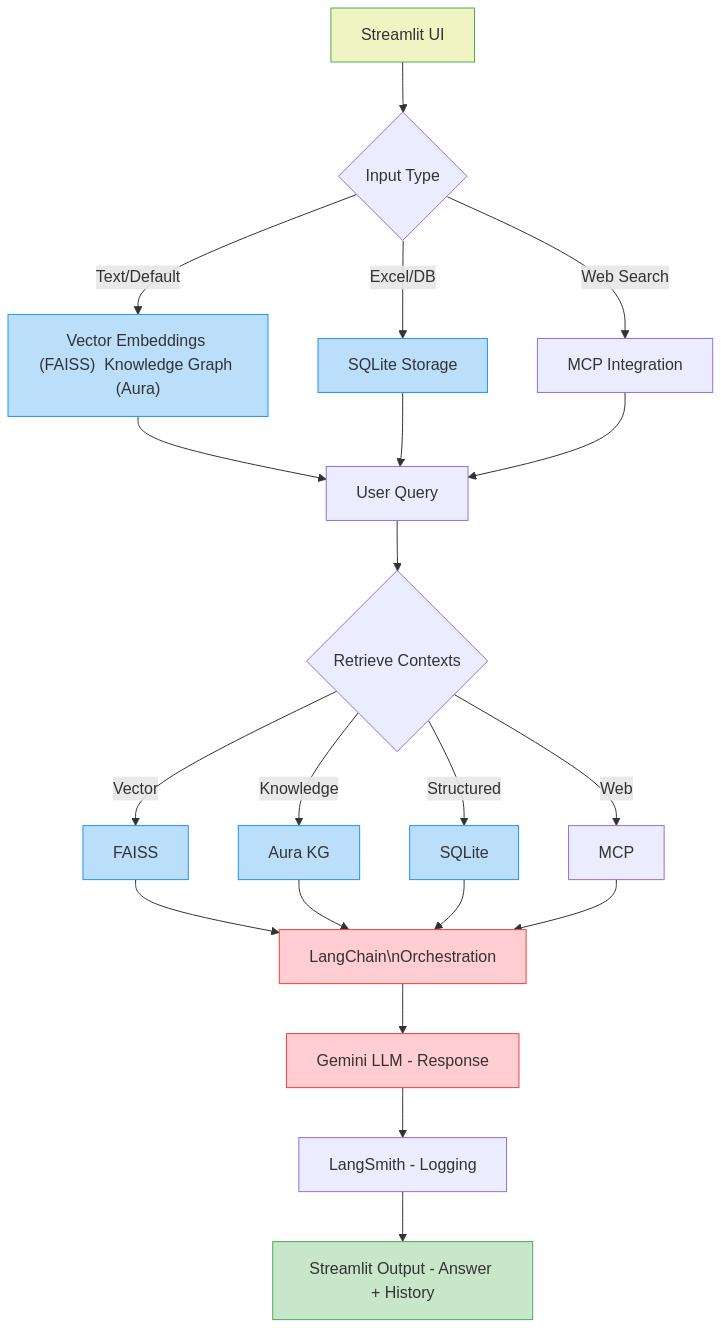
## Future Improvements
- Support for PDF and document processing
- Integration with more external tools
- Enhanced visualization capabilities
- User authentication and permissions
- Improved performance and caching