https://github.com/sharpcoder/hexagon2
Hexagon wall v2
https://github.com/sharpcoder/hexagon2
Last synced: 12 months ago
JSON representation
Hexagon wall v2
- Host: GitHub
- URL: https://github.com/sharpcoder/hexagon2
- Owner: SharpCoder
- License: mit
- Created: 2021-12-22T15:13:14.000Z (over 4 years ago)
- Default Branch: main
- Last Pushed: 2022-08-07T03:51:22.000Z (almost 4 years ago)
- Last Synced: 2025-04-15T14:53:33.097Z (about 1 year ago)
- Language: Rust
- Size: 390 KB
- Stars: 5
- Watchers: 2
- Forks: 0
- Open Issues: 0
-
Metadata Files:
- Readme: README.md
- License: LICENSE
Awesome Lists containing this project
README
# hexagon2
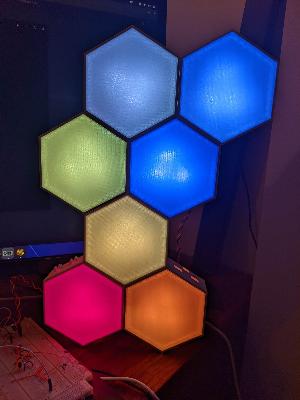
Hexagon wall v2
## Installation
To properly build the hexagon2 project, you'll need the following:
```bash
# Install build tools
sudo apt-get install gcc-arm-none-eabi jq
# Configure rust
rustup default nightly
rustup target add thumbv7em-none-eabi
```
## Building
In order for your project to build correctly, you'll need to run the following command:
```
./build.sh
```
The build script will generate a `.hex` file and place it in a folder called `out`. This hex file is compatible with the teensy 4.0 and can be flashed with the teensy-loader utility.
**CAUTION**: Do not build this in release mode. It optimizes a lot of stuff away, and can cause problems.
## Bill of Materials
### Brain
- 1x [DC Barrel Jack](https://www.sparkfun.com/products/10811)
- 1x DS18B20
- 1x 4.5k Resistor
- 1x 100uf Capacitor
- 1x [ESP8266](https://www.amazon.com/dp/B010N1ROQS)
- 1x [Teensy4.0](https://www.sparkfun.com/products/16997)
- 3x [WS2812b SMD](https://www.sparkfun.com/products/16346)
### Unit
- 3x [WS2812b SMD](https://www.sparkfun.com/products/16346)
- 2x Right-Angle Headers
### Hardware (per unit)
- 1x M4x12 Bolt
- 1x M4 Nut
- 2x M4 Washers
### Circuits
There are two circuit boards which need to be fabricated. The gerber files are located in the `gerber/` folder. You will need:
- 1x brain_v1.x.zip
- nx unit_v1.x.zip
You need 1 brain per project and as many units as you like. Each hexagon will require 1 unit.
_NOTE_ There is SMD soldering required for this project. If you don't want to solder yourself, a BOM and Pick and Place file are included inside the unit.1.x.zip file. This only applies to the individual hexagon units. Brain still has to be manually assembled.
### Power Warning!!!
Each WS2812B takes 50mA and one hexagon unit has 3 of those. So that means you're looking at 150mA draw per hexagon unit. The trace in all the circuits (as of the August 6th upload) is pretty thick (1mm) which can support 2.3A with 10 degrees (C) of thermal dissipation. That is about 15 hexagon units that you can string together before you'll reach capacity. You can go more, but things will start getting toasty.
To mitigate this problem, all boards have a "POWER JUMPER" section. You can connect wire to the POWER JUMP (like, say, 18 guage wire) and splice it in throughout the final assembly. in this way, you can route the power in a much more controlled fashion.
### 3D Printed
There are a few parts which need to be 3D printed. You can find everything in the `3d/` folder. The important things are pre-generated in .STL format. You can also find all the openscad source code for each object.
- hexcore.stl
- hexshield.stl
- snapfit.stl
---
### hexcore.stl
This is the actual hexagon which you will mount the circuitry to.
**Infill** 15 or 20%
**Pattern** Rectilinear is fine
**Material** PLA Recommended
**Color** White
---
### hexshield.stl
This is the faceplate which attaches to each hexagon node using a friction-fit mechanism.
**Infill** 100%
**Pattern** Rectilinear **Required**
**Material** PETG Recommended
**Color** Transparent
---
### snapfit.stl
This is the little snapfit connector that you can use to attach hexagons together.
**Infill** 15 or 20%
**Pattern** Rectilinear is fine
**Material** PLA recommended
**Color** Any
---
## License
[MIT](https://choosealicense.com/licenses/mit/)