https://github.com/sharpjs/psprefix
A PowerShell module that prefixes output with the elapsed time or a custom header
https://github.com/sharpjs/psprefix
powershell powershell-module
Last synced: 2 months ago
JSON representation
A PowerShell module that prefixes output with the elapsed time or a custom header
- Host: GitHub
- URL: https://github.com/sharpjs/psprefix
- Owner: sharpjs
- License: mit
- Created: 2025-02-13T18:48:00.000Z (over 1 year ago)
- Default Branch: main
- Last Pushed: 2025-02-23T02:57:31.000Z (over 1 year ago)
- Last Synced: 2025-02-23T03:17:39.342Z (over 1 year ago)
- Topics: powershell, powershell-module
- Language: C#
- Homepage:
- Size: 174 KB
- Stars: 0
- Watchers: 1
- Forks: 0
- Open Issues: 0
-
Metadata Files:
- Readme: README.md
- Changelog: CHANGES.md
- License: LICENSE.txt
Awesome Lists containing this project
README
## About
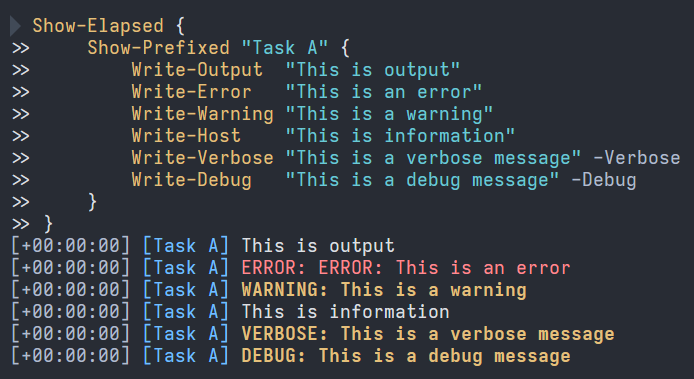
The **PSPrefix** PowerShell module improves the output of long-running, potentially parallel tasks.
PSPrefix provides three cmdlets:
- **Show-Prefixed** – prefixes output with a custom header.
- **Show-Elapsed** – prefixes output with an elapsed-time header.
- **Get-SynchronizedHost** – makes the current `$Host` shareable across threads.
## Status
[](https://github.com/sharpjs/PSPrefix/actions)
[](https://github.com/sharpjs/PSPrefix/actions)
[](https://www.powershellgallery.com/packages/PSPrefix)
[](https://www.powershellgallery.com/packages/PSPrefix)
## Installation
To install in PowerShell 7.2 or later:
```pwsh
Install-Module PSPrefix
```
To update:
```pwsh
Update-Module PSPrefix
```
## Usage
### The Basics
To prefix command output with an abitrary string, use the `Show-Prefixed` cmdlet.
```pwsh
Show-Prefixed "Foo" {
# your commands here
}
```

To prefix command output with the elapsed time, use the `Show-Elapsed` cmdlet.
```pwsh
Show-Elapsed {
# your commands here
}
```

The cmdlets can be combined.
```pwsh
Show-Elapsed {
Show-Prefixed Foo {
Show-Prefixed Bar {
# your commands here
}
}
}
```

### What Gets Prefixed
By default, this module's cmdlets affect the following output streams:
\#| Name | Write Cmdlet
--|-------------|----------------
1 | Success | `Write-Output`
2 | Error | `Write-Error`
3 | Warning | `Write-Warning`
4 | Verbose | `Write-Verbose`
5 | Debug | `Write-Debug`
6 | Information | `Write-Host`
The cmdlets do not affect the Progress stream.
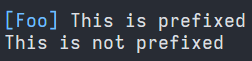
To output objects (the Success stream) unaltered, use the `-PassThru` switch to
exempt that stream from prefix behavior.
```pwsh
Show-Prefixed Foo -PassThru {
Write-Host "This is prefixed"
Write-Object "This is not prefixed"
}
```
### The Clean Slate
The code between the `{` and `}` (the script block) runs in a new, clean
PowerShell environment (runspace). No state from the invoking script is
visible in the script block. Specifically:
- The current directory (location) is at its default value.
- Built-in PowerShell variables have their default values.
- No other variables are defined, except as shown below.
- No modules are imported, except as shown below.
- No profile scripts are run.
To pre-import modules for the script block to use, specify one or more modules
via the `-Module` parameter.
```pwsh
Show-Prefixed Foo -Module A, B {
# modules A and B are available here
}
```
To copy variable values from the invoking script into the script block, specify
one or more variables via the `-Variable` parameter.
```pwsh
$x = 1337
$y = 42
Show-Prefixed Foo -Variable x, y {
# $x and $y are visible here
}
```
The script block is free to import modules, define variables, and perform other
setup as needed. Becuase the script block runs isolated in its own runspace,
the script block's state changes do not affect the state of the invoking
script.
### Parallel Operations
PSPrefix is designed to add clarity to the output of long-running, parallel
operations. The `Show-Elapsed` cmdlet provides relative time information.
The `Show-Prefixed` cmdlet can differentiate output from separate tasks.
Together, the cmdlets can help to detangle webs of intermingled output from
multiple threads.
Imagine this scenario that runs a command four times in parallel:
```pwsh
1..4 | ForEach-Object -Parallel {
Write-Host "example command output"
}
```
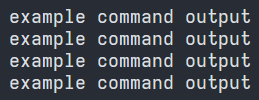
Which command invocation produced which line of output? It is impossible to
know. PSPrefix removes the ambiguity:
```pwsh
Show-Elapsed {
$MyHost = Get-SynchronizedHost
1..4 | ForEach-Object -Parallel {
Show-Prefixed "Task $_" -CustomHost $using:MyHost {
Write-Host "example command output"
}
}
}
```
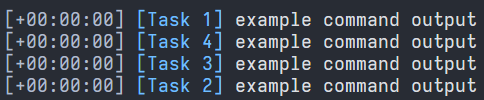
A trick is required when using the `Show-Elapsed` and `Show-Prefixed` cmdlets
in parallel multithreaded scenarios. The cmdlets work by routing output
through custom `PSHost` objects, but that technique does not work within
`ForEach-Object -Parallel` script blocks. PSPrefix provides a pair of features
to work around this limitation,
First, PSPrefix provides a `Get-SynchronizedHost` cmdlet that returns a wrapper
over the current `$Host` object. The wrapper makes the host object safe to
share across threads.
Second, the `Show-Elapsed` and `Show-Prefixed` cmdlets have a `-CustomHost`
parameter that accepts a host object to use instead of the current `$Host`
object.
To use a PSPrefix cmdlet within a `ForEach-Object -Parallel` script block, use
`Get-SynchronizedHost` to obtain a thread-safe host object outside the parallel
script block. Then pass the thread-safe host object inside the parallel script
block using the `-CustomHost` parameter and the `$using:` syntax, as shown in
the example above.