https://github.com/sharpjs/subatomix.powershell.taskhost
A PowerShell PSHost wrapper to improve the clarity of output from parallel tasks
https://github.com/sharpjs/subatomix.powershell.taskhost
parallel powershell
Last synced: 2 months ago
JSON representation
A PowerShell PSHost wrapper to improve the clarity of output from parallel tasks
- Host: GitHub
- URL: https://github.com/sharpjs/subatomix.powershell.taskhost
- Owner: sharpjs
- License: isc
- Created: 2021-10-02T15:02:14.000Z (almost 5 years ago)
- Default Branch: main
- Last Pushed: 2023-12-03T17:59:54.000Z (over 2 years ago)
- Last Synced: 2024-04-27T07:42:13.643Z (about 2 years ago)
- Topics: parallel, powershell
- Language: C#
- Homepage:
- Size: 535 KB
- Stars: 0
- Watchers: 2
- Forks: 0
- Open Issues: 0
-
Metadata Files:
- Readme: README.md
- Changelog: CHANGES.md
- License: LICENSE.txt
Awesome Lists containing this project
README
## About
The **TaskHost** PowerShell module and **Subatomix.PowerShell.TaskHost** NuGet
package provide a thread-safe PowerShell
[`PSHost`](https://learn.microsoft.com/en-us/dotnet/api/system.management.automation.host.pshost)
wrapper to improve the clarity of output from long-running, possibly parallel
tasks.
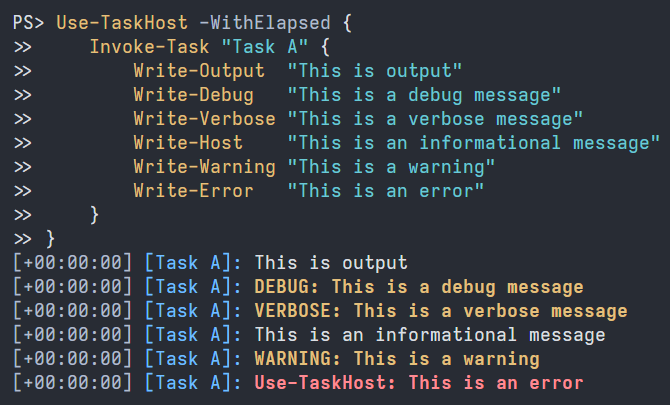
TaskHost adds a header to each line of output, reporting the elapsed time and
which task produced the output. Line header components are optional and use
color where supported.
## Status
[](https://github.com/sharpjs/Subatomix.PowerShell.TaskHost/actions)
[](https://github.com/sharpjs/Subatomix.PowerShell.TaskHost/actions)
[](https://www.powershellgallery.com/packages/TaskHost)
[](https://www.powershellgallery.com/packages/TaskHost)
[](https://www.nuget.org/packages/Subatomix.PowerShell.TaskHost)
[](https://www.nuget.org/packages/Subatomix.PowerShell.TaskHost)
- **Tested:** 100% coverage by automated tests.
- **Documented:** IntelliSense on everything. Quick-start guide below.
## Installation
⚠ **These instructions are for version 2.0 pre-releases.** For version 1.0, see
[the prior version of these instructions](https://github.com/sharpjs/Subatomix.PowerShell.TaskHost/blob/release/1.0.0/README.md).
From PowerShell 7 or later, install [the TaskHost module](https://www.powershellgallery.com/packages/TaskHost):
```ps1
Install-Module TaskHost -AllowPrerelease
```
Update or uninstall the module with `Update-Module` or `Uninstall-Module`,
respectively.
Developers wanting to implement similar features in their own software can install
[the Subatomix.PowerShell.TaskHost NuGet package](https://www.nuget.org/packages/Subatomix.PowerShell.TaskHost)
to get the building blocks of the TaskHost module.
## Usage
⚠ **These instructions are for version 2.0 pre-releases.** For version 1.0, see
[the prior version of these instructions](https://github.com/sharpjs/Subatomix.PowerShell.TaskHost/blob/release/1.0.0/README.md).
### The Basics
Start with a `Use-TaskHost` command.
```ps1
Use-TaskHost {
}
```
Optionally, add `-WithElapsed` to enable the elapsed-time header.
```ps1
Use-TaskHost -WithElapsed {
}
```
For each task, add an `Invoke-Task` command.
```ps1
Use-TaskHost -WithElapsed {
Invoke-Task "Step 1" {
Write-Host "Example output from a task"
}
Invoke-Task "Step 2" {
Write-Host "Example output from another task"
}
}
```
Output:
```
[+00:00:00] [Step 1]: Example output from a task
[+00:00:00] [Step 2]: Example output from another task
```
A task is a chunk of code whose output should be distinguishable from that of
other tasks and non-task code. Beyond that, what constitutes a task is
entirely at the discretion of the user of this module. There is no restriction
on the number of or size of tasks or on what can appear in a task's script
block.
Tasks are nestable.
```ps1
Use-TaskHost -WithElapsed {
Invoke-Task "Step 3" {
Invoke-Task "Part 1" {
Write-Host "Example output from a nested task"
}
}
}
```
Output:
```
[+00:00:00] [Step 3|Part 1]: Example output from a nested task
```
### Advanced Usage
The PowerShell `ForEach-Object -Parallel` command complicates the preceding
example. See
[this script](https://github.com/sharpjs/Subatomix.PowerShell.TaskHost/blob/main/Subatomix.PowerShell.TaskHost.Module/Test-TaskHost.ps1)
for a working example with detailed explanation.
Information about the currently executing task is available via the following
expression, which returns null if there is no such task:
```ps1
[Subatomix.PowerShell.TaskHost.TaskInfo]::Current
```
The `TaskInfo` object provides a few useful properties:
- `Id` – Unique integer identifier for the task.
- `Name` – Name of the task. Writable.
- `FullName` – `Name` prefixed with the `FullName` of the task's parent, if any.
- `Parent` – The task in which the current task is nested, if any.
The `FullName` property determines the text that TaskHost prepends to each
output line. To change the text, set the `Name` property of the task or of its
ancestors.
```ps1
[Subatomix.PowerShell.TaskHost.TaskInfo]::Current.Name = "New name"
```
To remove the line header, set the property to an empty string.
```ps1
[Subatomix.PowerShell.TaskHost.TaskInfo]::Current.Name = ""
```