https://github.com/shayanabbas/my-wp-bedrock-site
Test site for debugging case where Laravel and Bedrock projects are not working on ddev+docker on MacOS Ventura
https://github.com/shayanabbas/my-wp-bedrock-site
Last synced: 11 months ago
JSON representation
Test site for debugging case where Laravel and Bedrock projects are not working on ddev+docker on MacOS Ventura
- Host: GitHub
- URL: https://github.com/shayanabbas/my-wp-bedrock-site
- Owner: shayanabbas
- License: mit
- Created: 2022-08-17T19:17:05.000Z (almost 4 years ago)
- Default Branch: master
- Last Pushed: 2022-08-17T20:01:19.000Z (almost 4 years ago)
- Last Synced: 2025-03-30T02:33:25.432Z (about 1 year ago)
- Language: PHP
- Size: 35.2 KB
- Stars: 0
- Watchers: 1
- Forks: 0
- Open Issues: 0
-
Metadata Files:
- Readme: README.md
- Changelog: CHANGELOG.md
- License: LICENSE.md
Awesome Lists containing this project
README
# Steps to reproduce issue
After installation of macOS Ventura beta 5
Create bedrock project from the Quick Start guide
https://ddev.readthedocs.io/en/latest/users/quickstart/
```sh
mkdir my-wp-bedrock-site
cd my-wp-bedrock-site
ddev config --project-type=wordpress --docroot=web --create-docroot
ddev start
ddev composer create roots/bedrock
```
### Issue:
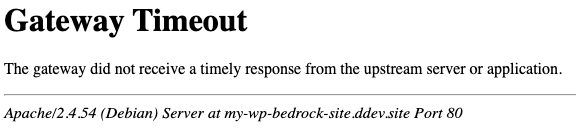
After running the project it keep reloading and dies with 504 Gateway Timeout error
### Things I tried out:
1) Changing document root from `/var/www/html/web` to `var/www/html/test` inside `/.ddev/apache/apache-site.conf` file. (Inside test folder [index.php](https://github.com/shayanabbas/my-wp-bedrock-site/blob/master/test/index.php) has been created for testing purpose)
```sh
DocumentRoot /var/www/html/web
```
2) Using Colima it shows same issue.
3) Tried using both server types `webserver_type: nginx-fpm # or apache-fpm`
4) Tried Colima + Mutagen: It works but ddev doesnt get synced, If i try to do `ddev stop` or `ddev mutagen sync` it doesnt work. (probably this could be a different issue)
5) Tried updating ddev + docker
6) Removing all containers and images and recreating
#### Note: Simple WordPress and Drupal setup are working out of the box except Laravel and BedRock
Issue has been in discussion at https://github.com/drud/ddev/issues/4122