https://github.com/shesek/bcash-instadump
CLI tools for insta-dumping bcash in exchange for bitcoins (via ShapeShift), creating bcash-compatible transactions, and more
https://github.com/shesek/bcash-instadump
bcash bcc bch bitcoin dump hodl instadump
Last synced: 3 months ago
JSON representation
CLI tools for insta-dumping bcash in exchange for bitcoins (via ShapeShift), creating bcash-compatible transactions, and more
- Host: GitHub
- URL: https://github.com/shesek/bcash-instadump
- Owner: shesek
- License: gpl-3.0
- Created: 2017-08-03T19:11:06.000Z (almost 9 years ago)
- Default Branch: master
- Last Pushed: 2017-12-01T23:06:26.000Z (over 8 years ago)
- Last Synced: 2026-03-28T01:30:16.555Z (3 months ago)
- Topics: bcash, bcc, bch, bitcoin, dump, hodl, instadump
- Language: JavaScript
- Homepage:
- Size: 584 KB
- Stars: 28
- Watchers: 1
- Forks: 16
- Open Issues: 0
-
Metadata Files:
- Readme: README.md
- License: LICENSE
Awesome Lists containing this project
README
# bcash-instadump
CLI tools for insta-dumping bcash in exchange for bitcoins (`bcash-instadump`),
creating bcash-compatible transactions (`bcash-tx`),
listing unspent bcash outputs (`bcash-utxo`)
and broadcasting raw bcash transactions (`bcash-broadcast`).
No bcash wallet or exchange account necessary.
Developed by [Nadav Ivgi](https://www.bitrated.com/nadav) ([@shesek](https://twitter.com/shesek))
of [Bitrated](https://www.bitrated.com/).
*1HNDUy34hrqoTEChCZZjb6vWAU9APAKG78*
**TL;DR**
$ bcash-instadump --tor --key LmyBcashKeyWIF --payout 1myBtcAddr
# confirm the details and press Y to sell your bcash and get your bitcoins
(yes, that's it! but do read the whole thing to fully understand the risks involved.)
**Warning! This software could put your bitcoins, bcash and privacy at risk.**
These tools are meant for technically advanced users.
Using them incorrectly (or even correctly!) could result in loss of funds and privacy.
If you don't consider yourself a technical user, please seek advice from someone who is.
Make sure to read *all* the instructions *carefully* before doing anything.
You can use these tools in a way that doesn't risk your bitcoins,
by moving them out first. There are also instructions for signing offline.
See "*Instructions*" below.
THE SOFTWARE IS PROVIDED "AS IS", WITHOUT WARRANTY OF ANY KIND. USE AT YOUR OWK RISK.
## Install
*Requires nodejs 6.0.0 or newer.*
The quick, less safe way:
$ npm install -g bcash-instadump
The safer way: find a Git commit reference published by a third-party security auditor that you trust, then:
$ npm install -g git://github.com/shesek/bcash-instadump#[GIT-COMMIT-SHA256-HERE]
There are currently no security audits that I'm aware of,
but the code is < 500 SLOC if you want to review it yourself.
If you do, you should publicly announce the hash for the Git commit you reviewed
(and [tell me!](https://github.com/shesek/bcash-instadump/issues/new)).
## CLI tools
### `bcash-instadump` - dump bcash on ShapeShift
$ bcash-instadump --key LmyBcashKeyWIF --payout 1myBtcAddr
Insta-dump the bcash held in the provided `--key` (in base58 WIF)
on [ShapeShift](https://shapeshift.io/)
and send the purchased BTC to the bitcoin address provided in `--payout`.
Shows details and asks for a confirmation before actually dumping.
Using `--key ` will load all of the unspent outputs belonging to ``.
To add specific inputs instead, you can use `--input txid,vout,amount,key`.
Loading unspent outputs is done using the
[Electrum bcash servers](https://github.com/shesek/bcash-instadump/blob/master/electrum-servers.json)
(see "*Privacy considerations*" below).
You can specify both `--key` and `--input` multiple times,
or specify a file with `--keys keys.txt` and `--inputs utxos.csv`.
All the inputs will be joined together in a single transaction (see "*Privacy considerations*" below).
Only `p2pkh` scripts are currently supported.
You can set your bcash refund address with `--refund
`
(used by ShapeShift in case anything goes wrong with the exchange).
Defaults to the address associated with the first key provided.
Specify `--feerate` to control the transaction fee (in `satoshis/byte`).
Defaults to `rand(50,100)`.
Use `--whateverjustdump` to skip all confirmations (for exchange rates, miner fees, etc) and just dump.
This is probably a terrible idea.
ShapeShift is used with a referrer code that tips the author of this tool.
This can be disabled with `--noreferral`.
The `--(no)proxy`, `--tor` and `--electrum` options are the same as for `bcash-tx` (below).
See `bcash-instadump --help` for the full list of options.
**The author of this tool is not affiliated with ShapeShift.**
There are reports of orders failing with ShapeShift
despite the funds being sent. Reaching out to ShapeShift's
customer support should usually resolve that.
----
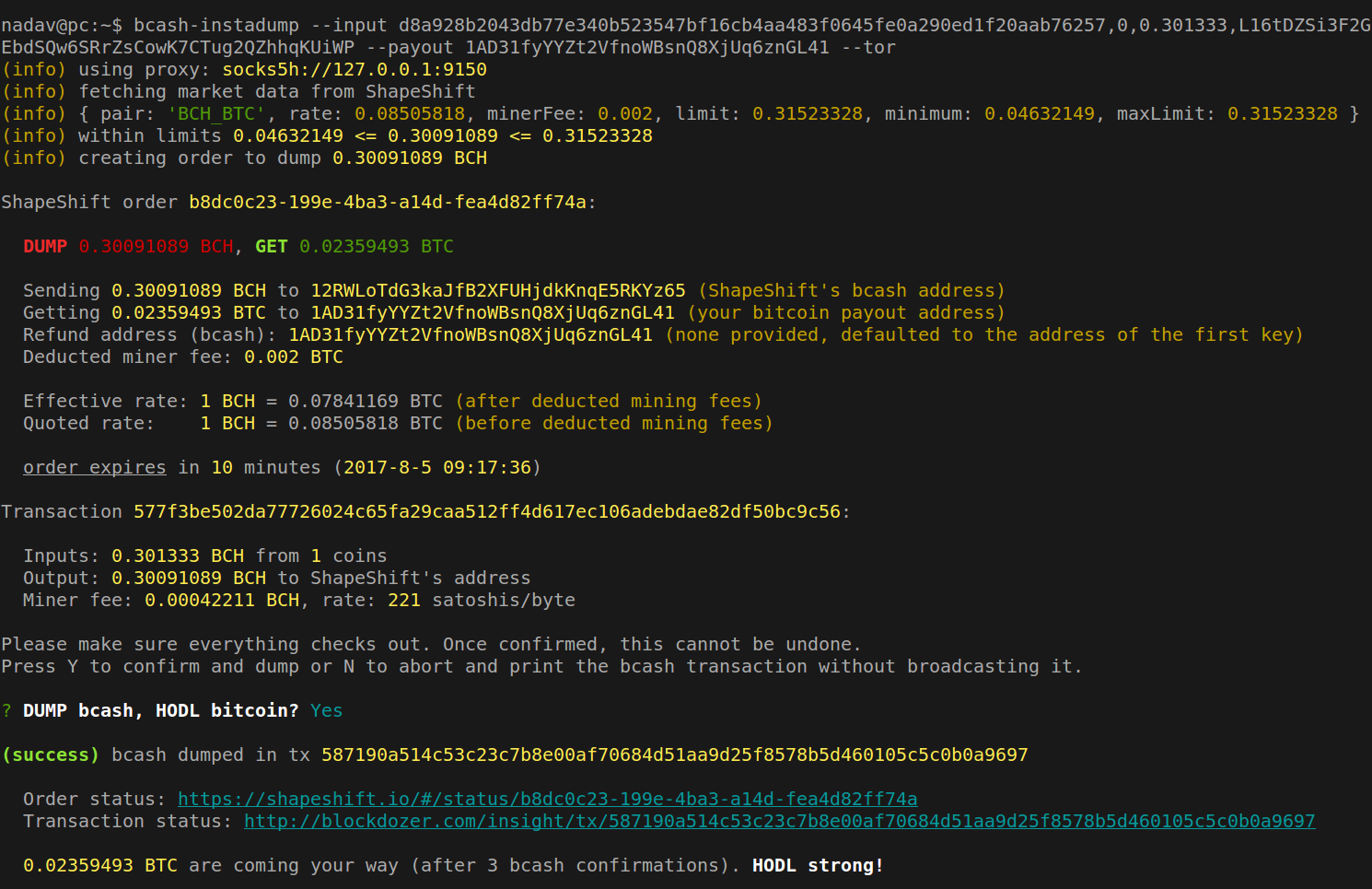
Screenshot of `bcash-instadump` in action (dummy details, of course):
----
### `bcash-tx`- make bcash-compatible transactions
$ bcash-tx --input txid:vout:amount:key --output 1BcashAddr:ALL --feerate 250
Create and sign a bcash-compatible transaction with the provided inputs and outputs.
The transaction will be invalid on the Bitcoin network.
`--output addr:amount` can be used multiple times.
Use `ALL` as the `amount` to send the maximum available amount minus tx fees, or specify the amount in whole bitcoins.
`--feerate` is only relevant if `ALL` is used.
Specify `--inspect` to print the decoded transaction instead of its raw hex representation.
Use `--broadcast` to broadcast the transaction via an Electrum bcash server
(also see `bcash-broadcast` if you already have a raw transaction ready).
Use `--proxy [socks4a|socks5h]://user:pass@host:port` or `--tor` to connect to the Electrum server over a proxy,
or `--noproxy` to connect without one (see "*Privacy considerations*" below).
You can configure a custom Electrum bcash server using `--electrum [tls|tcp]://host:port`.
If not provided, one is chosen at random (from `electrum-servers.json`).
See `bcash-tx --help` for the full list of options.
----
### `bcash-utxo` - list unspent bcash outputs
$ bcash-utxo 1myFirstAddr 1myOtherAddr ...
Get the unspent bcash outputs for the provided address(es) from the Electrum bcash servers,
and print them as CSV (`txid,vout,amount,address` format).
You may also provide keys instead of addresses.
In this case, the CSV format would be `txid,vout,amount,key`
(same as the format expected by `bcash-instadump` and `bcash-tx`).
Specify `--file ` to read the list of addresses/keys from `` (one per line) instead of from arguments.
This will leak information to the Electrum bcash servers (see "*Privacy considerations*" below).
The `--(no)proxy`, `--tor` and `--electrum` options are the same as for `bcash-tx`.
See `bcash-utxo --help` for the full list of options.
----
### `bcash-broadcast` - broadcast raw bcash transactions
$ bcash-broadcast
Broadcasts the provided `rawtx` (in hex) to the bcash network via an Electrum bcash server.
The `--(no)proxy`, `--tor` and `--electrum` options are the same as for `bcash-tx`.
See `bcash-broadcast --help` for the full list of options.
----
## Instructions & gotchas
### Protect your BTC
**Move your bitcoins first!** To avoid risking your BTC, keys with a BTC balance should never be exposed to this tool.
Make sure the keys provided to this software are *entirely emptied of BTC* and hold BCH only.
### Extracting unspent outputs and keys
#### From Bitcoin Core:
```bash
$ bitcoin-cli listunspent | jq -c '.[] | [.txid,.vout,.amount,.address]' | tr -d '[]"' \
| awk -F, '{"bitcoin-cli dumpprivkey "$4 | getline key; print $1 FS $2 FS $3 FS key }' \
> utxos.csv
```
#### From Electrum:
```bash
$ electrum listunspent | jq -c '.[] | [.prevout_hash,.prevout_n,.value,.address]' | tr -d '[]"' \
| awk -F, '{"electrum getprivatekeys "$4"|jq -r .[0]" | getline key; print $1 FS $2 FS $3 FS key }' \
> utxos.csv
# @TODO assumes p2pkh outputs, will break with multisig
```
#### From a list of keys:
Prepare `keys.txt` with a list of base58 WIF keys (one per line), then:
```bash
$ bcash-utxo -f keys.txt > utxos.csv
```
WARNING: looking up the unspent outputs associated with your addresses
will leak information to the Electrum bcash servers.
See "*Privacy considerations*" below for suggestions to improve privacy.
#### Dumping from the UTXO CSV file
```bash
$ bcash-instadump --inputs utxos.csv --payout 1myBtcAddr
```
### Signing offline
To sign offline, you can use [browserify](http://browserify.org/) to create a portable version
of `bcash-tx` with all of its dependencies bundled in a single `.js` file,
and run that from the offline machine (requires nodejs >=6.0.0).
```bash
# Online machine - prepare portable bundle
satoshi@hot:~$ npm install -g browserify
satoshi@hot:~$ git clone https://github.com/shesek/bcash-instadump#[COMMIT-SHA256] && cd bcash-instadump
satoshi@hot:~$ npm install
satoshi@hot:~$ browserify --bare cli/bcash-tx.js > /media/usb/bcash-tx.js
# Online machine - prepare list of outputs
satoshi@hot:~$ bcash-utxo --tor 1myFirstAddr 1myOtherAddr > /media/usb/utxos.csv
# WARNING: will leak information to the Electrum bcash servers, see "Privacy considerations"
# Offline machine - sign bcash transaction
satoshi@cold:~$ edit utxos.csv # change 4th column from address to key
satoshi@cold:~$ node /media/usb/bcash-tx.js --inputs utxos.csv --output 1myBcashAddr:ALL --inspect
satoshi@cold:~$ node /media/usb/bcash-tx.js --inputs utxos.csv --output 1myBcashAddr:ALL > /media/usb/signed.tx
# Online machine - broadcast to the bcash network
satoshi@hot:~$ bcash-broadcast --tor `cat /media/usb/signed.tx`
```
### Splitting coins
If your coins are too big to be sold with one order (due to ShapeShift's limits),
you can split them up with `bcash-tx` and make several orders.
For example, to split a 10 BCH output into two 4.995 BCH orders
(leaving some for mining fees),
use something like:
```bash
$ bcash-tx --tor --broadcast --key LmyBcashKeyWithLargeOutput \
--output 1myBcashAddr1:4.995 --output 1myBcashAddr2:4.995
# take note of the resulting
$ bcash-instadump --tor --input ,0,4.995,LkeyForAddr1 --payout 1myBtcAddr1
$ bcash-instadump --tor --input ,1,4.995,LkeyForAddr2 --payout 1myBtcAddr2
```
### Dump specific UTXOs
`bcash-instadump --key ` will by default dump all of the
unspent outputs available to ``.
To select specific ones, use:
```bash
$ bcash-utxo --tor LmyBcashKey > utxos.csv
$ edit utxos.csv # leave just the ones you want to dump
$ bcash-instadump --tor --inputs utxos.csv --payout 1btcAddr
```
### Privacy considerations
#### Leaking data to the public blockchain
Merging your unspent outputs together (in a single multi-input transaction)
will reveal the link between them (and their associated addresses)
on the public bitcoin/bcash blockchains, *to the entire world*.
It is recommended to invoke `bcash-instadump` multiple times,
once for each unspent output being sold (creating a separate 1-in,1-out tx each time)
and with a different `--payout` address. Ideally, this should also be spread out over time.
This could be accomplished using a bash script along the lines of:
```bash
$ cat utxos.csv | xargs -L 1 bash -c 'sleep $[ ( $RANDOM % 3600 ) ]s &&
bcash-instadump --input $0 --payout `bitcoin-cli getnewaddress` --whateverjustdump'
```
#### Leaking data to ShapeShift
Selling all of your unspent outputs from the same IP address
will reveal the link between your outputs (and their associated addresses) to ShapeShift
and to anyone gaining access to their systems (via hacking, a legal warrant, or otherwise).
It is recommended to sell one output at a time and use `--proxy` or `--tor` to connect over a proxy.
Preferably, use a proxy with a different public IP address for each request
(otherwise the transactions would not be linked to your real IP address, but still linked to each-other. see more on that below.)
#### Leaking data to the Electrum bcash servers
The Electrum bcash servers are used for two purposes:
*(1)* Broadcasting raw transactions to the bcash network
(for `bcash-instadump` and `bcash-tx --broadcast`),
and *(2)* Fetching the unspent bcash outputs associated with your addresses
(for `bcash-utxo` and `bcash-instadump --key).
This gives the Electrum servers the ability to link your transactions/addresses/outputs
to each-other and to your IP address.
To completely mitigate this leakage, you should ideally broadcast transactions and
fetch unspent outputs using a bcash full node under your full control, connected over Tor.
However, if running a full node is not possible or desirable,
you can also retain better privacy by using a proxy -
with the same caveat mentioned above regarding different public IP addresses.
To switch public IP addresses between address lookups,
you can use Tor, the [tor-newnym](https://raw.githubusercontent.com/shesek/bcash-instadump/master/utility/tor-newnym.sh)
script available in `utility/`, and something like:
```bash
$ cat addresses-or-keys.txt | xargs -L 1 bash -c '
./tor-newnym.sh && sleep $[ ( $RANDOM % 180) ]s &&
bcash-utxo --tor $0' \
> utxos.csv
```
Under the default Tor configuration, the control port is 9151 and authentication is done using the cookie file.
This should work: ```./tor-newnym.sh 9151 "`cat /path/to/tor/control_auth_cookie`"```.
See the [Tor manual](https://www.torproject.org/docs/tor-manual.html.en#ControlPort) for
more information about control port configuration and authentication.
(`tor-newnym` will hopefully soon be integrated into the tool itself. PRs welcome!)
In addition, it is also recommended that you use a random Electrum bcash server for each lookup.
This is the default behaviour if you don't provide a specific server via `--electrum`.
## Contributing
Pull requests are welcome! Some interesting next steps are:
- A tool to prepare the list of unspent outputs based on the HD master seed.
- Creating a GUI frontend (packaged as a browser extension, an [Electron](https://electron.atom.io/) app, or something else?)
- Optimize input-merging behavior to improve privacy.
- Multi-signature support (currently only `p2pkh` scripts are supported)
- Connect to the Tor control port to change circuits (`NEWNYM` signal) between
address lookups in `bcash-utxo`.
- Tests (there aren't any! :scream::scream:)
- Have any other cool ideas? [Let me know!](https://github.com/shesek/bcash-instadump/issues/new)
## License
This software is released under the GPL v3 license.
See LICENSE for more details.