https://github.com/shiba6v/shape_commentator
多次元配列の属性情報を実行時に取得してコメントに書き足すツール
https://github.com/shiba6v/shape_commentator
numpy python pytorch
Last synced: 9 months ago
JSON representation
多次元配列の属性情報を実行時に取得してコメントに書き足すツール
- Host: GitHub
- URL: https://github.com/shiba6v/shape_commentator
- Owner: shiba6v
- License: mit
- Created: 2018-12-03T07:25:14.000Z (over 7 years ago)
- Default Branch: master
- Last Pushed: 2023-05-28T12:47:32.000Z (about 3 years ago)
- Last Synced: 2025-04-12T04:30:37.349Z (about 1 year ago)
- Topics: numpy, python, pytorch
- Language: Python
- Homepage: https://pypi.org/project/shape-commentator
- Size: 93.8 KB
- Stars: 68
- Watchers: 3
- Forks: 2
- Open Issues: 0
-
Metadata Files:
- Readme: README-development.md
- License: LICENSE
Awesome Lists containing this project
README
## Other Usage
The main usage are described in `README.md`.
### For Editor Extension Developers
#### Create Commented Script to Standard Output
By using `shape_commentator.print_comment` module, you get the commented script in standard output. (Not `src.py.commented.py`)
```bash
python -m shape_commentator.print_comment src.py [args]
```
#### Clear Shape Comment
By using `shape_commentator.print_clear` module, you get the uncommented script in standard output.
```bash
python -m shape_commentator.print_clear src.py [args]
```
### For Jupyter Notebook User (deprecated)
[This](https://github.com/shiba6v/jupyter-shape-commentator) is a Jupyter Notebook extension of this tool.
It is deprecated now. Please use IPython extension.
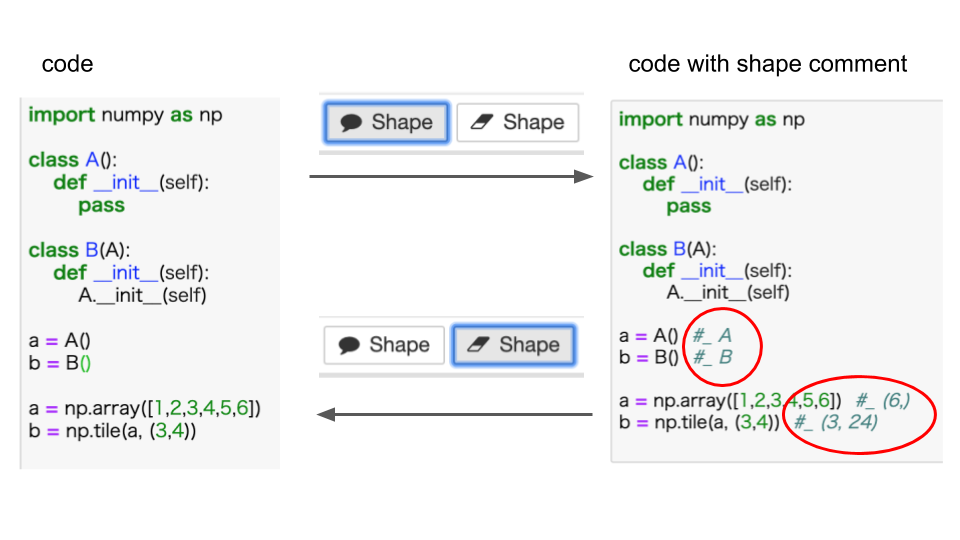
### IPython (Cell)
#### Create Commented Script
1. Execute the cell that you want to see shape.
2. Run the cell below, and the commented source code will be outputted. (`In[len(In)-2]` is the source code in the cell that you ran just before.)
```python
import shape_commentator
shape_commentator.comment()
```
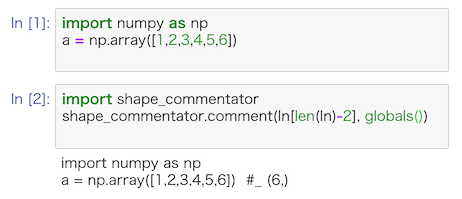
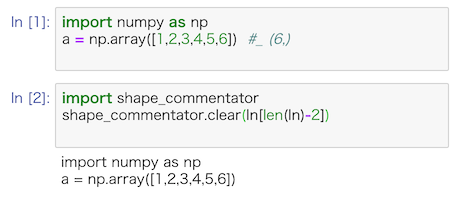
#### Clear Shape Comment
```python
import shape_commentator
shape_commentator.clear()
```
### Formatting comments used in Shape Commentator
This tool emits very long shape comment.
```python
import shape_commentator.formatter as fmt
code = [i for i in range(1000)]
print(fmt.tuple_format(code))
```
output
```
[int,int,int,int,int,int,int,int,int, ... ]
```
## Development
### Installation
```
pip install numpy
sudo apt install bats
sh tests/install_for_dev.sh
```
### Sample
```
# Module Mode
python -m shape_commentator tests/input_scripts/numpy_compute.py
# Method Mode (Use in IPython / Jupyter Notebook.)
python tests/comment_method.py tests/input_scripts/numpy_compute.py
```
### Test
```
python -m doctest shape_commentator/shape_commentator.py
sh tests/install_for_dev.sh
bats tests/test_all.bats
python setup.py develop --uninstall
```
### Changing Test Scripts
Remove `remove_tested_scripts` in `tests/test_all.bats` and run `bats tests/test_all.bats`, and you get new test script in `tests/input_scripts/`
### Try Master Branch
The package of shape_commentator in TestPyPI is the HEAD of master branch.
You can try newest (but under development) version by running commands below.
```
pip uninstall -y shape-commentator
pip install --index-url https://test.pypi.org/simple/ shape-commentator
```