https://github.com/shibukawa/shadow-fetch
Accelerator for SSR
https://github.com/shibukawa/shadow-fetch
expressjs fetch javascript javascript-library nextjs nodejs server-side-rendering
Last synced: about 1 year ago
JSON representation
Accelerator for SSR
- Host: GitHub
- URL: https://github.com/shibukawa/shadow-fetch
- Owner: shibukawa
- License: mit
- Created: 2018-03-13T17:44:11.000Z (over 8 years ago)
- Default Branch: master
- Last Pushed: 2024-11-11T03:54:02.000Z (over 1 year ago)
- Last Synced: 2025-04-22T13:48:25.657Z (about 1 year ago)
- Topics: expressjs, fetch, javascript, javascript-library, nextjs, nodejs, server-side-rendering
- Language: JavaScript
- Size: 346 KB
- Stars: 17
- Watchers: 2
- Forks: 2
- Open Issues: 46
-
Metadata Files:
- Readme: README.md
- License: LICENSE.md
Awesome Lists containing this project
README
# shadow-fetch
[](https://travis-ci.org/shibukawa/shadow-fetch)
[](https://badge.fury.io/js/shadow-fetch)
[](https://codecov.io/gh/shibukawa/shadow-fetch)
[](https://snyk.io/test/npm/shadow-fetch)
[](https://nodei.co/npm/shadow-fetch/)
Accelorator of Server Side Rendering (and unit tests).
Next.js and Nuxt.js and some framework improves productivity of development.
You just write code once, the code run on the server and the client.
Almost all part or code is compatible including server access code.
Next.js's documents uses [isomorphic-unfetch](https://github.com/developit/unfetch/tree/master/packages/isomorphic-unfetch) and Nuxt.js's document uses [Axios](https://github.com/axios/axios).
They are both excellent isomorphic libraries, but they make actual packet even if the client and the server work on the same process for server side rendering.
This library provides ``fetch()`` compatible function and Node.js' ``http.createServer()`` compatible function.
They are connected directly and bypass system calls.
* You can make shorten SSR response a little
* The request object has special attribute to identify actual access or shortcut access. You can skip authentication of BFF's API during SSR safely.
* shadow-fetch provides special method to handle JSON. That method skip converting JSON into string.
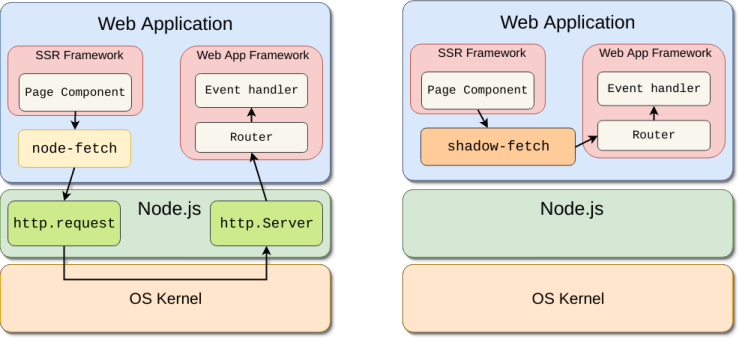
## Simple Benchmark
| | time |
|:-----------:|:-----------|
| ``node-fetch`` and ``http.Server`` | 14.3 mS |
| ``shadow-fetch`` with standard API | 1.8 mS |
| ``shadow-fetch`` with direct JSON API | 0.13mS |
* 8th Gen Core i5 with Node 9.4.0.
* You can test via ``node run benchmark``.
## Installation
```sh
$ npm install shadow-fetch
```
## Usage
### Node.js's http server
shadow-fetch provides the function that is compatible with ``http.createServer()``. shadow-fetch's server is available inside the same process. So useally you should launch two servers.
```js
const { createServer } = require("shadow-fetch");
const { http } = require("http");
handler = (req, res) => {
res.writeHead(200, { "Content-Type": "application/json" });
res.end(JSON.stringify({ message: "hello" }));
};
const server = createServer(handler);
server.listen();
const server = http.createServer(handler);
server.listen(80);
```
You can use ``fetch`` function to access this server:
```js
import { fetch } from "shadow-fetch";
const res = await fetch("/test");
if (res.ok) {
const json = await res.json();
console.log(json.message);
}
```
### Express.js
Express.js modifies request object (replace prototype). shadow-fetch's middleware for Express.js enable shadow-fetch's feature even if you uses Express.js
You should pass ``express()`` result to ``createServer()`` instead of ``app.listen()``. That uses Node.js's ``createServer()`` internally,
```js
const { createServer } = require("shadow-fetch");
const { shadowFetchMiddleware } = require("shadow-fetch-express");
const app = express();
app.use(shadowFetchMiddleware);
app.use(bodyParser.json());
app.post("/test", (req, res) => {
t.is(req.shadow, true);
t.is(req.body.message, "hello");
res.send({ message: "world" });
});
const { fetch, createServer } = initFetch();
createServer(app);
```
### Next.js
It is alomot as same as Express.js. This package provides factory function that makes ``fetch`` and ``createServer()`` pairs. But they are not working on Next.js environment. You should pre careted ``createServer()`` and ``fetch()`` functions they are available via just ``require`` (``import``).
```js
const next = require("next");
const http = require("http");
const express = require("express");
const bodyParser = require("body-parser");
const createServer = require("shadow-fetch");
const { shadowFetchMiddleware } = require("shadow-fetch-express");
const dev = process.env.NODE_ENV !== "production";
const app = next({ dev });
const handle = app.getRequestHandler();
app.prepare().then(() => {
const server = express();
server.use(shadowFetchMiddleware);
server.use(bodyParser.json());
server.get("/api/message", (req, res) => {
res.json({message: "hello via shadow-fetch"});
});
server.get("*", (req, res) => {
return handle(req, res);
});
// enable shadow fetch entrypoint
createServer(server).listen();
// enable standard HTTP entrypoint
http.createServer(server).listen(3000, err => {
if (err) throw err;
console.log("> Ready on http://localhost:3000");
});
});
```
## Server Side Rendering and Authentication
Sometimes, you want to add authentication feature. The standard ``fetch`` were called from browseres and shadow-fetch was called during server side rendering.
You can detect the client environment inside event handler. If the API checks authentication, you should check ``shadow`` property.
```js
const isAuthenticatedAPI = (req, res, next) => {
if (req.shadow || req.isAuthenticated()) {
return next();
} else {
res.sendStatus(403);
}
};
server.get("/api/item/:id", isAuthenticatedAPI, (req, res) => {
// API implementation
});
```
[This is why I started to make this package](https://github.com/zeit/next.js/issues/3797).
## Client API
```js
const { fetch, Headers } = require("shadow-fetch");
```
It provides three functions that are almost compatible with standard [``fetch()``](https://developer.mozilla.org/en-US/docs/Web/API/Fetch_API):
* ``shadowFetch()``: Provides direct access between ``createServer``.
* ``fetch()``: Alias of ``shadowFetch()`` or standard ``fetch()``.
Usually ``fetch()`` is the only function you use.
| Name | on Node.js | on Browser |
|:-----------:|:-----------|:------------|
| ``fetch`` | ``shadowFetch`` | standard ``fetch`` |
| ``shadowFetch`` | ``shadowFetch`` | ``shadowFetch`` |
If you want to select actual HTTP access or not explicitly, use regular ``fetch()``.
This library provides ``Headers`` compatible class too. But there is no ``Request`` class now.
## Server API
* ``createServer()``: It is a compatible function of Node.js's ``http.createServer()``. This package provides ``createShadowServer()`` for your convenience.
* ``IncomingMessage``: Request object of server code. It is also compatible with Node.js's ``IncomingMessage`` except the following members:
* ``shadow`` property: It always ``true``. You can identify the request is made by ``shadowFetch`` or regular HTTP access.
* ``ServerResponse``: Response object of server code. It is also compatible with Node.js's ``ServerResponse`` except the following members:
* ``writeJSON()``: It stores JSON without calling ``JSON.stringify()`` function. You can get JSON directly via ``Response#json()`` method of ``shadowFetch()``.
```js
const { fetch, createServer } = require("shadow-fetch");
```
## Utility Function
* ``initFetch()``: It generates ``fetch()`` (shadow version) and ``createServer()`` they are connected internally. It is good for writing unit tests.
## Trouble Shooting
### ``"shadow-fetch is not initialized properly. See https://github.com/shibukawa/shadow-fetch#trouble-shooting."``
This error is thrown when ``fetch`` is used without initialization. You should call shadow-fetch's ``createServer`` like [this](https://github.com/shibukawa/shadow-fetch#nodejss-http-server).
### Error occures inside web server handlers
Express-middleware is not installed. Read [this section](https://github.com/shibukawa/shadow-fetch#expressjs).
Express.js overwrite prototype of ``ServerResponse``/``IncomingMessage`` with http's ones inside its framework.
In that case, required properties are not initilized because original constructor is not called.
So some method calls are failed like the following error:
```
TypeError: Cannot read property 'push' of undefined
at ServerResponse._writeRaw (_http_outgoing.js:281:24)
at ServerResponse._send (_http_outgoing.js:240:15)
at ServerResponse.end (_http_outgoing.js:770:16)
at ServerResponse.end (/Users/shibukawa/develop/frx/dam-front/node_modules/compression/index.js:107:21)
at ServerResponse.send (/Users/shibukawa/develop/frx/dam-front/node_modules/express/lib/response.js:221:10)
```
### ``Error: bundles/pages/index.js from UglifyJs Name expected`` during ``next build``
Your next.js version is low. Try 5.1.0.
## License
MIT