https://github.com/shinagawa-web/gomarklint
A fast and configurable Markdown linter written in Go
https://github.com/shinagawa-web/gomarklint
cli go link-checker linter linting markdown markdown-lint static-analysis
Last synced: about 1 month ago
JSON representation
A fast and configurable Markdown linter written in Go
- Host: GitHub
- URL: https://github.com/shinagawa-web/gomarklint
- Owner: shinagawa-web
- License: mit
- Created: 2025-06-19T23:13:22.000Z (about 1 year ago)
- Default Branch: main
- Last Pushed: 2026-04-17T11:02:27.000Z (2 months ago)
- Last Synced: 2026-04-17T11:12:03.570Z (2 months ago)
- Topics: cli, go, link-checker, linter, linting, markdown, markdown-lint, static-analysis
- Language: Go
- Homepage: https://shinagawa-web.github.io/gomarklint/
- Size: 5.43 MB
- Stars: 12
- Watchers: 0
- Forks: 2
- Open Issues: 7
-
Metadata Files:
- Readme: README.ja.md
- License: LICENSE
- Security: SECURITY.md
Awesome Lists containing this project
- fucking-awesome-go - gomarklint - Markdown linter with built-in HTTP link validation, single binary, no Node.js required. (Code Analysis / Routers)
- awesome-go-with-stars - gomarklint - in HTTP link validation, single binary, no Node.js required. | 2026-05-01 | (Code Analysis / Routers)
- awesome-go - gomarklint - Markdown linter with built-in HTTP link validation, single binary, no Node.js required. (Code Analysis / Routers)
README
# gomarklint

[](https://codecov.io/gh/shinagawa-web/gomarklint)
[](https://goreportcard.com/report/github.com/shinagawa-web/gomarklint)
[](https://pkg.go.dev/github.com/shinagawa-web/gomarklint)
[](LICENSE)
[](https://securityscorecards.dev/viewer/?uri=github.com/shinagawa-web/gomarklint)
[](https://www.bestpractices.dev/projects/12970)
[English](README.md) | 日本語
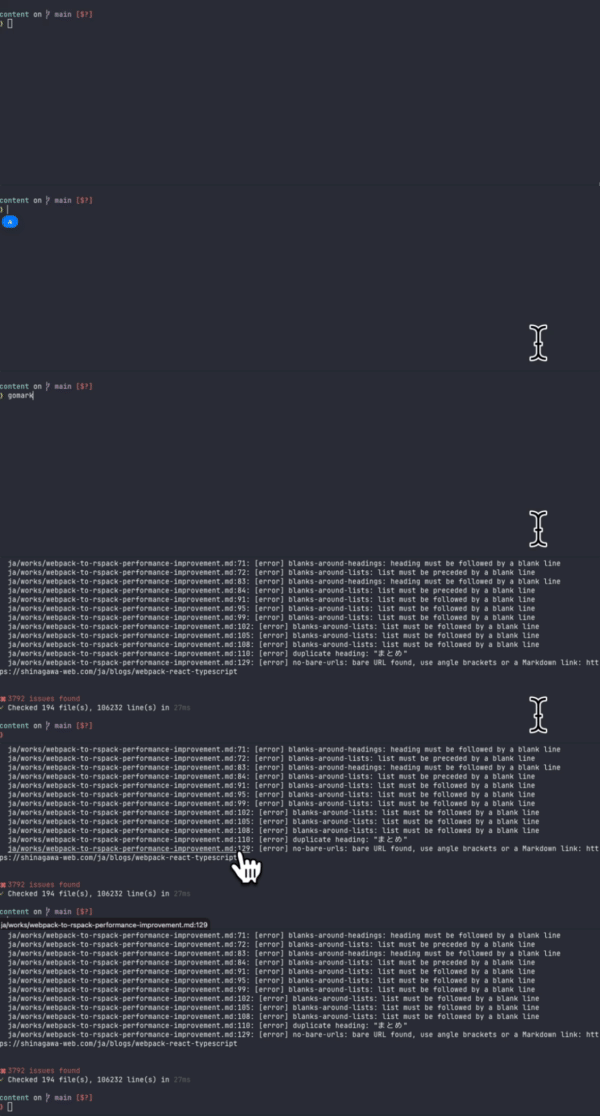
> リンク切れをユーザーより先に発見。内部アンカーはデフォルトで検証、外部 URL は `external-link` を有効化して検証。**100,000 行以上を約 170ms** で処理。シングルバイナリで Node.js 不要。
**かんたんインストール**(macOS / Linux):
```sh
curl -fsSL https://raw.githubusercontent.com/shinagawa-web/gomarklint/main/install.sh | sh
```
**バイナリをダウンロード**(Go 環境不要):
[GitHub Releases](https://github.com/shinagawa-web/gomarklint/releases/latest) からお使いのプラットフォーム向けバイナリをダウンロードできます。
```sh
# macOS / Linux
tar -xzf gomarklint_Darwin_x86_64.tar.gz
sudo mv gomarklint /usr/local/bin/
# sudo が使えない場合はユーザーローカルへ
mkdir -p ~/.local/bin && mv gomarklint ~/.local/bin/
```
```powershell
# Windows (PowerShell)
Expand-Archive -Path gomarklint_Windows_x86_64.zip -DestinationPath "$env:LOCALAPPDATA\Programs\gomarklint"
# PATH に追加(初回のみ)
[Environment]::SetEnvironmentVariable("PATH", $env:PATH + ";$env:LOCALAPPDATA\Programs\gomarklint", "User")
```
**Homebrew を使う場合:**
```sh
brew install shinagawa-web/tap/gomarklint
```
**npm を使う場合:**
```sh
npm install -g @shinagawa-web/gomarklint
```
**`go install` を使う場合:**
```sh
go install github.com/shinagawa-web/gomarklint/v3@latest
```
- リンク切れをユーザーより先に発見 — 内部アンカーはデフォルトで検証。`external-link` を有効化すると外部 URL も検証。
- **100,000 行以上を約 170ms** で処理 — JIT ウォームアップなし、ランタイムオーバーヘッドなし。
- 予測可能な構造を強制(「なぜ H2 の下に H4 があるの?」をなくす)。
- 人間にも機械にも優しい出力(JSON 対応)。
## CI 連携
### GitHub Actions
```yaml
name: gomarklint
on:
push:
pull_request:
jobs:
lint:
runs-on: ubuntu-latest
steps:
- uses: actions/checkout@v4
- uses: shinagawa-web/gomarklint-action@v1
with:
args: '.'
```
オプションの詳細: [gomarklint-action](https://github.com/shinagawa-web/gomarklint-action)
### pre-commit
`.pre-commit-config.yaml` に追加:
```yaml
repos:
- repo: https://github.com/shinagawa-web/gomarklint
rev: v3.0.0
hooks:
- id: gomarklint
```
## ドキュメント
完全なドキュメントは **[shinagawa-web.github.io/gomarklint](https://shinagawa-web.github.io/gomarklint/)** で参照できます。
- [クイックスタート](https://shinagawa-web.github.io/gomarklint/docs/quick-start/)
- [ルール一覧](https://shinagawa-web.github.io/gomarklint/docs/rules/)
- [CLI リファレンス](https://shinagawa-web.github.io/gomarklint/docs/cli/)
- [設定](https://shinagawa-web.github.io/gomarklint/docs/configuration/)
- [GitHub Actions 連携](https://shinagawa-web.github.io/gomarklint/docs/github-actions/)
- [FAQ & トラブルシューティング](https://shinagawa-web.github.io/gomarklint/docs/faq/)
## コントリビュート
Issue・提案・PR 歓迎です!
必要環境: Go `1.22+`(最新の安定版を推奨)
```sh
make test # ユニットテスト
make test-e2e # エンドツーエンドテスト
make build # バイナリビルド
```
### Git フック
プッシュ前に自動でlintとユニットテストを実行するpre-pushフックをインストールできます:
```sh
make install-hooks
```
緊急時にフックをスキップする場合:
```sh
git push --no-verify
```
## ライセンス
MIT License