https://github.com/shinesolutions/packer-aem
Adobe Experience Manager (AEM) machine images builder using Packer
https://github.com/shinesolutions/packer-aem
aem aem-opencloud ami docker-image machine-images packer
Last synced: 4 months ago
JSON representation
Adobe Experience Manager (AEM) machine images builder using Packer
- Host: GitHub
- URL: https://github.com/shinesolutions/packer-aem
- Owner: shinesolutions
- License: apache-2.0
- Created: 2016-11-29T10:36:58.000Z (over 9 years ago)
- Default Branch: main
- Last Pushed: 2024-05-07T05:19:35.000Z (about 2 years ago)
- Last Synced: 2025-03-27T12:46:22.520Z (over 1 year ago)
- Topics: aem, aem-opencloud, ami, docker-image, machine-images, packer
- Language: Ruby
- Homepage:
- Size: 2.36 MB
- Stars: 20
- Watchers: 14
- Forks: 20
- Open Issues: 19
-
Metadata Files:
- Readme: README.md
- Changelog: CHANGELOG.md
- License: LICENSE
Awesome Lists containing this project
README
[](https://github.com/shinesolutions/packer-aem/actions?query=workflow%3ACI)
[](https://snyk.io/test/github/shinesolutions/packer-aem)
Packer AEM
----------
Packer AEM is a set of [Packer](https://www.packer.io/) templates for creating [Adobe Experience Manager (AEM)](http://www.adobe.com/au/marketing-cloud/enterprise-content-management.html) machine and container images, which include the following components:
* `author` - contains [AEM Author](https://helpx.adobe.com/experience-manager/6-3/sites/authoring/using/author.html)
* `publish` - contains [AEM Publish](https://helpx.adobe.com/experience-manager/6-3/sites/authoring/using/author.html)
* `dispatcher` - contains [AEM Dispatcher](https://helpx.adobe.com/experience-manager/dispatcher/using/dispatcher.html)
* `java` - contains [Oracle JDK](http://www.oracle.com/technetwork/java/javase/downloads/index.html), to be used for running [AEM Orchestrator](https://github.com/shinesolutions/aem-orchestrator) and [Chaos Monkey](https://netflix.github.io/chaosmonkey/)
* `author-publish-dispatcher` - contains AEM Author, AEM Publish, and AEM Dispatcher
[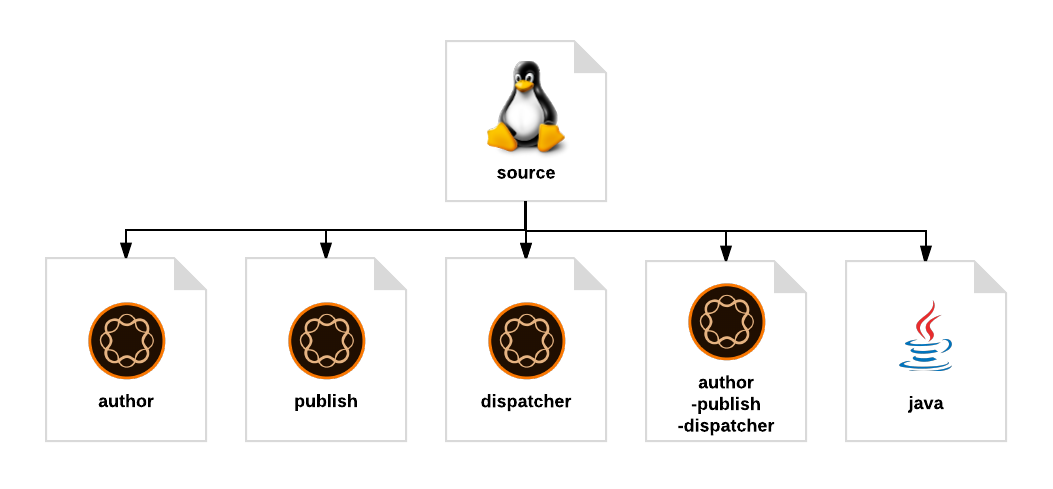](https://raw.github.com/shinesolutions/packer-aem/master/docs/machine-images-diagram.png)
The AMIs produced by Packer AEM will then be used by [AEM AWS Stack Builder](https://github.com/shinesolutions/aem-aws-stack-builder) to create an AEM environment on [AWS](https://aws.amazon.com/).
Learn more about Packer AEM:
* [Installation](https://github.com/shinesolutions/packer-aem#installation)
* [Configuration](https://github.com/shinesolutions/packer-aem/blob/master/docs/configuration.md)
* [Usage](https://github.com/shinesolutions/packer-aem#usage)
* [Testing](https://github.com/shinesolutions/packer-aem#testing)
* [AWS Resources](https://github.com/shinesolutions/packer-aem/blob/master/docs/aws-resources.md)
* [AWS System Tags](https://github.com/shinesolutions/packer-aem/blob/master/docs/aws-system-tags.md)
* [Customisation Points](https://github.com/shinesolutions/packer-aem/blob/master/docs/customisation-points.md)
* [Frequently Asked Questions](https://github.com/shinesolutions/packer-aem/blob/master/docs/faq.md)
* [Upgrade Guide](https://github.com/shinesolutions/packer-aem/blob/master/docs/upgrade-guide.md)
Packer AEM is part of [AEM OpenCloud](https://aemopencloud.io) platform.
Installation
------------
- Either clone Packer AEM `git clone https://github.com/shinesolutions/packer-aem.git` or download one of the [released versions](https://github.com/shinesolutions/packer-aem/releases)
- Install the following required tools:
* [Packer](https://www.packer.io/) version 1.5.1 or later
* [Ruby](https://www.ruby-lang.org/en/) version 2.3.0 or later
* [Python](https://www.python.org/downloads/) version 2.7.x
* [GNU Make](https://www.gnu.org/software/make/)
Alternatively, you can use [AEM Platform BuildEnv](https://github.com/shinesolutions/aem-platform-buildenv) Docker image version 1.3.0 or later to run Packer AEM build targets.
- Resolve the [Puppet modules](https://github.com/shinesolutions/packer-aem/blob/master/Puppetfile), [Ruby gems](https://github.com/shinesolutions/packer-aem/blob/master/Gemfile), and [Python packages](https://github.com/shinesolutions/packer-aem/blob/master/requirements.txt) dependencies by running `make deps`
Usage
-----
- Set up the required [AWS resources](https://github.com/shinesolutions/packer-aem/blob/master/docs/aws-resources.md)
- Create [configuration file](https://github.com/shinesolutions/packer-aem/blob/master/docs/configuration.md)
- Create the AMIs by running `make - version= config_path=`, for example: `make aws-author version=1.2.3 config_path=stage/user-config/aws-rhel7-aem64/`
To retrieve the latest AMI IDs for all [AEM AWS Stack Builder](https://github.com/shinesolutions/aem-aws-stack-builder) components, run the command `make ami-ids config_path=`, and the AMI IDs will be written into `stage/stack-builder-configs/--stack-builder-ami-ids.yaml` file(s). These files can then be dropped in to AEM AWS Stack Builder configuration path.
Testing
-------
### Testing with remote dependencies
You can run integration test for creating the AMIs for all components using the command `make test-integration test_id=`, which downloads the dependencies from the Internet.
### Testing with local dependencies
If you're working on the dependencies of Packer AEM and would like to test them as part of machine images creation before pushing the changes upstream, you need to:
- Clone the dependency repos [Puppet AEM Resources](https://github.com/shinesolutions/puppet-aem-resources), [Puppet AEM Curator](https://github.com/shinesolutions/puppet-aem-curator), [Puppet Amazon SSM Agent](https://github.com/shinesolutions/puppet-amazon-ssm-agent), [AEM Hello World Custom Image Provisioner](https://github.com/shinesolutions/aem-helloworld-custom-image-provisioner), [AEM Hello World Config](https://github.com/shinesolutions/aem-helloworld-config) at the same directory level as Packer AEM
- Make your code changes against those dependency repos
- Run `make test-integration-local test_id=` for integration testing using local dependencies, which copies those local dependency repos to Packer AEM and uses them as part of the test
### Debugging
If you want to jump on the environment that Packer launched and you want to debug/troubleshoot it, you can modify the `Makefile` and set Packer to build in debug mode by replacing `packer build` command with `packer build -debug`, and then run the image creation again. With debug enabled, Packer will prompt you before terminating the EC2 instance / Docker container, giving you the chance to check it.
When running in debug mode, Packer will make the private key available on the repo directory for you to use, e.g. `ssh -i ec2.pem ec2-user@`
Please read [Packer Debugging](https://www.packer.io/docs/other/debugging.html) for further information.