https://github.com/shipth-is/cli
CLI to build and publish Godot games to the App Store and Google Play - no Xcode or Android Studio required.
https://github.com/shipth-is/cli
command-line godot godot3 godot4 mobile-development
Last synced: about 2 months ago
JSON representation
CLI to build and publish Godot games to the App Store and Google Play - no Xcode or Android Studio required.
- Host: GitHub
- URL: https://github.com/shipth-is/cli
- Owner: shipth-is
- License: mit
- Created: 2025-04-08T12:29:15.000Z (about 1 year ago)
- Default Branch: main
- Last Pushed: 2026-04-27T08:36:23.000Z (2 months ago)
- Last Synced: 2026-04-27T10:24:19.613Z (2 months ago)
- Topics: command-line, godot, godot3, godot4, mobile-development
- Language: TypeScript
- Homepage: https://shipth.is
- Size: 2.41 MB
- Stars: 271
- Watchers: 5
- Forks: 1
- Open Issues: 8
-
Metadata Files:
- Readme: README.md
- License: LICENSE
Awesome Lists containing this project
- awesome-godot - ShipThis - CLI to build and publish Godot mobile games to the App Store and Google Play. (Other / External editor themes)
README
# ShipThis 

* Build iOS and Android binaries (APK, AAB, IPA) for your **Godot** game
* Publish to the **App Store** and **Google Play** when you are ready
* Automatically manages **certificates**, **keystores**, **API keys**, and **provisioning profiles**
* **Free cloud builds** for most solo devs

> [!IMPORTANT]
> Currently in open beta and free to use. It will **always** be free for most solo devs.
## Quick start
### Requirements
- A Godot 3.6 or 4.x game
- [Node.js](https://nodejs.org/en/download/) version 18 or above
- **To publish an Android game** - a [Play Console Developer account](https://play.google.com/apps/publish/signup) (not required for building an APK/AAB)
- **To publish an iOS game** - an [Apple Developer account](https://developer.apple.com) (not required for building an IPA)
### 1. Install ShipThis
Install via the [NPM package manager](https://www.npmjs.com/):
```bash
npm install -g shipthis
```
### 2. Create an account
Set up an account with ShipThis by logging in for the first time using the [`shipthis login`](https://shipth.is/docs/reference/login?ref=github_readme) command.
```bash
shipthis login
```
### 3. Set up your game
Run the [wizard command](https://shipth.is/docs/reference/game/wizard?ref=github_readme) to configure your game on ShipThis; it will set up everything needed to automatically build and publish your Godot game.
The wizard command takes a platform parameter: either **android** or **ios**. Run the command from within a Godot game directory (with a **project.godot** file):
#### Set up an Android game
Read more about [how ShipThis exports Godot Android games](https://shipth.is/docs/guides/android-export-methods?ref=github_readme) (Gradle vs legacy, APK/AAB output).
```bash
shipthis game wizard android
```
Watch: Set up ShipThis for Android

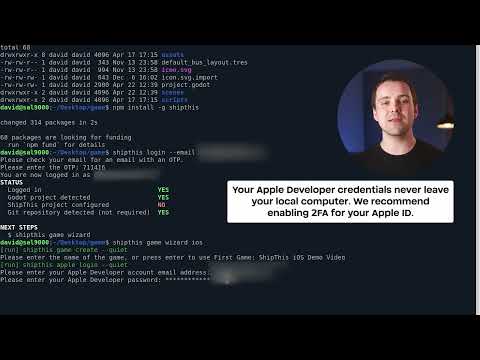
#### Set up an iOS game
```bash
shipthis game wizard ios
```
Watch: Set up ShipThis for iOS
### 4. Ship
Now you can publish new versions of your game to TestFlight or Google Play with the [`shipthis game ship`](https://shipth.is/docs/reference/game/ship?ref=github_readme) command:
```bash
shipthis game ship
```
- New to ShipThis? See the full [Quick start guide](https://shipth.is/docs/guides/quick-start?ref=github_readme)
- Having issues? Check the [Troubleshooting](https://shipth.is/docs/troubleshooting?ref=github_readme) or [join our Discord](https://discord.gg/gPjn3S99k4)
- For detailed documentation, visit [shipth.is/docs](https://shipth.is/docs?ref=github_readme)
## FAQ
### Do I need a Mac to build for iOS?
No, you do not need a Mac, but if you want to publish to TestFlight or the Apple App Store then you will need an Apple Developer account.
ShipThis handles iOS builds on managed macOS cloud servers. The CLI connects to the Apple Developer Portal and sets everything up for you.
### Which versions of Godot are supported?
We support **all stable Godot versions since 3.6**, including:
| [3.6](https://github.com/godotengine/godot/releases/tag/3.6-stable) | [4.0](https://github.com/godotengine/godot/releases/tag/4.0-stable) | [4.1](https://github.com/godotengine/godot/releases/tag/4.1-stable) | [4.2](https://github.com/godotengine/godot/releases/tag/4.2-stable) | [4.3](https://github.com/godotengine/godot/releases/tag/4.3-stable) | [4.4](https://github.com/godotengine/godot/releases/tag/4.4-stable) | [4.5](https://github.com/godotengine/godot/releases/tag/4.5-stable) | [4.6](https://github.com/godotengine/godot/releases/tag/4.6-stable) |
| ----------------------------------------------------------------------- | ------------------------------------------------------------------------------------ | ------------------------------------------------------------------------------------ | ------------------------------------------------------------------------------------ | ------------------------------------------------------------------------------------ | ------------------------------------------------------------------------------------ | ------------------------------------------------------------------------------------ | ------------------------------------------------------------------------------------ |
| [3.6.1](https://github.com/godotengine/godot/releases/tag/3.6.1-stable) | [4.0.1](https://github.com/godotengine/godot/releases/tag/4.0.1-stable) | [4.1.1](https://github.com/godotengine/godot/releases/tag/4.1.1-stable) | [4.2.1](https://github.com/godotengine/godot/releases/tag/4.2.1-stable) | [4.3.1 *](https://github.com/shipth-is/godot-android-sdk-upgrade/releases/tag/4.3.1-28eb575) | [4.4.1](https://github.com/godotengine/godot/releases/tag/4.4.1-stable) | [4.5.1](https://github.com/godotengine/godot/releases/tag/4.5.1-stable) | [4.6.1](https://github.com/godotengine/godot/releases/tag/4.6.1-stable) |
| [3.6.2](https://github.com/godotengine/godot/releases/tag/3.6.2-stable) | [4.0.2](https://github.com/godotengine/godot/releases/tag/4.0.2-stable) | [4.1.2](https://github.com/godotengine/godot/releases/tag/4.1.2-stable) | [4.2.2](https://github.com/godotengine/godot/releases/tag/4.2.2-stable) | | [4.4.2 *](https://github.com/shipth-is/godot-android-sdk-upgrade/releases/tag/4.4.2-ca113b3) | | |
| | [4.0.3](https://github.com/godotengine/godot/releases/tag/4.0.3-stable) | [4.1.3](https://github.com/godotengine/godot/releases/tag/4.1.3-stable) | [4.2.3 *](https://github.com/shipth-is/godot-android-sdk-upgrade/releases/tag/4.2.3-d33f443) | | | | |
| | [4.0.4](https://github.com/godotengine/godot/releases/tag/4.0.4-stable) | [4.1.4](https://github.com/godotengine/godot/releases/tag/4.1.4-stable) | | | | | |
| | [4.0.5 *](https://github.com/shipth-is/godot-android-sdk-upgrade/releases/tag/4.0.5-df6989b) | [4.1.5 *](https://github.com/shipth-is/godot-android-sdk-upgrade/releases/tag/4.1.5-b68debd) | | | | | |
**\* Custom builds** - [maintained by us](https://github.com/shipth-is/godot-android-sdk-upgrade/) to support **[Android SDK 35](https://support.google.com/googleplay/android-developer/answer/11926878?hl=en)** and **[16 KB Google Play compatibility requirement](https://developer.android.com/guide/practices/page-sizes)**.
You can read more in our [Godot versioning guide](https://shipth.is/docs/guides/godot-versioning?ref=github_readme).
### Can I build my game as APK/AAB/IPA without an Apple or Google account?
Yes.
The [wizard command](https://shipth.is/docs/reference/game/wizard?ref=github_readme) is designed to generate your own credentials for signing and publishing, but you might not need this when initially building your game.
You can create a ShipThis account, create the game and then run the [ship command](https://shipth.is/docs/reference/game/ship?ref=github_readme) using demo credentials. Later, when you need to set up publishing, you can re-run the wizard command.
```bash
# Create a ShipThis game - run this in a dir with a project.godot file
shipthis game create --name "My Game"
# Run the build, use demo credentials, and download as game.apk
shipthis game ship --follow --platform android --useDemoCredentials --downloadAPK game.apk
# Run the build, use demo credentials, and download as game.aab
shipthis game ship --follow --platform android --useDemoCredentials --download game.aab
# Run the build, use demo credentials, and download as game.ipa
shipthis game ship --follow --platform ios --useDemoCredentials --download game.ipa
```
### Do I need to create an export_presets.cfg file?
No, the ShipThis build server will generate a valid **export_presets.cfg** for your game.
If you provide an **export_presets.cfg** file, the desired preset values will be merged with the generated file.
### How much does it cost to use ShipThis?
Currently free while in open beta. Planned pricing is on the [pricing page](https://shipth.is/pricing?ref=github_readme).
### What does the `shipthis game wizard` do?
The wizard is designed to set up everything you need to automatically build and publish your game to the Apple App Store or Google Play.
The [wizard command](https://shipth.is/docs/reference/game/wizard?ref=github_readme) runs different steps for Android and iOS. Each "step" is another ShipThis command - meaning you can run each step by itself. The wizard can be re-run any number of times.
The Android steps are described in the [Android setup guide](https://shipth.is/docs/android?ref=github_readme).
The iOS steps are described in the [iOS setup guide](https://shipth.is/docs/ios).
The commands run for Android
1. Creating a new ShipThis game
```bash
shipthis game create --name "Pay2Lose" --androidPackageName "com.pay.two.lose"
```
1. Creating or importing an Android Keystore
To create a new Keystore:
```bash
shipthis game android keyStore create
```
To import an existing Keystore see [the docs for the `shipthis game android keyStore import` command](https://shipth.is/docs/reference/game/android/keyStore?ref=github_readme#game-android-keystore-import)
1. Connecting ShipThis with Google
Once connected, ShipThis can generate a Service Account API Key for automatic publishing.
```bash
shipthis game android apiKey connect
```
1. Create a Service Account and API Key
```bash
shipthis game android apiKey create
```
1. Create and download an initial build (AAB file)
When you first create your game in the Google Play Console, you will be asked to upload an initial build in AAB format.
```bash
shipthis game ship --platform android --follow --skipPublish --download game.aab
```
1. Create an app in the Google Play Console
You will need to manually create the game itself in Google Play. This will involve entering the name, agreeing to Google Play's TOS and uploading an initial build.
1. Invite the Service Account
Before the Service Account API Key can submit your games automatically, you will need to invite the Service Account to your Google Play account. To do this you will need your Google Play account ID.
```bash
shipthis game android apiKey invite XXXXXXXXX
```
The commands run for iOS
1. Create a new ShipThis game
```bash
shipthis game create --name "Tap to Win Nothing" --iosBundleId "com.tap.to.win.nothing"
```
1. Connect ShipThis with Apple
We recommend enabling 2FA for your account. ShipThis generates a session cookie for communicating with the Apple Developer Portal.
```bash
shipthis apple login
```
1. Create an App Store Connect API Key
ShipThis uses this API key to submit new versions of your game.
```bash
shipthis apple apiKey create
```
1. Create an iOS Distribution Certificate
This certificate is used to sign your game on the ShipThis build servers.
```bash
shipthis apple certificate create
```
1. Create an App Store App and BundleId
```bash
shipthis game ios app create
```
1. Synchronize Permissions (Capabilities)
ShipThis reads `export_presets.cfg` and enables supported capabilities in the Apple Developer Portal (currently Access WiFi, Push Notifications).
```bash
shipthis game ios app sync
```
1. Create a Provisioning Profile
Required to run on devices and for distribution. You can view profiles at Apple’s portal: https://developer.apple.com/account/resources/profiles/list
```bash
shipthis game ios profile create
```
Watch: The wizard run for Android
Watch: The wizard run for iOS
### How do I debug a failed build?
If a build fails, rerun it for only the failing platform with the `--follow` flag to view the logs in real time:
```bash
shipthis game ship --platform android --follow
```
For additional debugging, you can include the `--verbose` flag - this enables detailed logging locally and on the build server, including running the Godot export with verbose output:
```bash
shipthis game ship --platform ios --follow --verbose
```
You can review logs at any time in the [dashboard](https://shipth.is/dashboard?ref=github_readme) under the "Jobs" tab.
See the [Troubleshooting Guide](https://shipth.is/docs/troubleshooting?ref=github_readme) for common checks.
If the issue persists, we can help you directly in our [Discord](https://discord.gg/gPjn3S99k4).
### Does ShipThis work with CI/CD pipelines?
Yes. ShipThis works with CI/CD pipelines, allowing you to run automated builds without an interactive shell.
To get started, create an API key for your pipeline environment:
```bash
# API keys can have a maximum lifetime of 1 year
shipthis apiKey create --durationDays 365 --name ci-key
```
The secret value will only be displayed once and this can be used as an environment variable called `SHIPTHIS_TOKEN`.
```bash
export SHIPTHIS_TOKEN=your_token_here
shipthis game ship --platform android --follow
shipthis game ship --platform ios --follow
```
For GitHub users, we provide an official **GitHub Action** for easy integration: https://github.com/shipth-is/action
See the [API Keys documentation](https://shipth.is/docs/reference/apiKey/?ref=github_readme) for more information.
### Can I use a Liquid Glass icon with my game on iOS?
ShipThis enables the use of Liquid Glass icons with your game. These can be applied in two ways:
- To a local iOS export of a Godot project
- using the command `shipthis util glass ios/output.xcodeproj MyIcon.icon`
- To a game built using the ShipThis build servers
- using the command `shipthis game details --liquidGlassIconPath ./Example.icon`
You can read more in our [Liquid Glass icons guide](https://shipth.is/docs/guides/liquid-glass?ref=github_readme).
### How are my credentials stored and secured?
ShipThis uses short-lived, signed URLs and ephemeral build environments.
- Credentials are stored in a private DigitalOcean Space.
- Every access is logged for a full audit trail.
- When a build starts, credentials are fetched on-demand and loaded as environment variables.
- Temporary files are created only if needed and cleaned up when the job finishes.
We store:
- Android Keystores
- Google Play Service account API keys
- iOS provisioning profiles
- App Store Connect API keys
- iOS distribution certificates
### What happens to my files when I run the command `shipthis game ship`?
Your game files are packaged, uploaded to private storage via a temporary signed URL, and made available to an ephemeral build machine. After the build completes, all files are cleaned up on the machine. Uploaded files and build outputs are retained for **30 days** before automatic deletion.
Read the full [How your code is handled](https://shipth.is/docs/guides/code-handling?ref=github_readme) guide for details.
## 📖 Command Reference
### 🗂 Topics
- [apiKey](https://shipth.is/docs/reference/apiKey?ref=github_readme) - Commands related to ShipThis API Keys
- [apple](https://shipth.is/docs/reference/apple?ref=github_readme) - Commands that relate to linking your ShipThis account with your Apple Developer account
- [game](https://shipth.is/docs/reference/game?ref=github_readme) - Commands that relate to configuring the specific game in the current working directory.
- [util](https://shipth.is/docs/reference/util?ref=github_readme) - Utility commands that do not require authentication
### 🔧 Commands
- [autocomplete](https://shipth.is/docs/reference/autocomplete?ref=github_readme) - Set up shell tab-completion for commands, topics, and flags
- [dashboard](https://shipth.is/docs/reference/dashboard?ref=github_readme) - Opens the web browser to your shipth.is dashboard
- [login](https://shipth.is/docs/reference/login?ref=github_readme) - Sign in or create a new account
- [status](https://shipth.is/docs/reference/status?ref=github_readme) - Display your overall ShipThis account status
- [help](https://shipth.is/docs/reference/help?ref=github_readme) - Display help for a specific topic or command
### 📚 Guides
- [Quick start](https://shipth.is/docs/guides/quick-start?ref=github_readme) - Get your first build running in minutes
- [Android export methods](https://shipth.is/docs/guides/android-export-methods?ref=github_readme) - Gradle vs legacy builds, APK & AAB output
- [Godot versioning](https://shipth.is/docs/guides/godot-versioning?ref=github_readme) - Supported Godot versions and custom builds
- [How your code is handled](https://shipth.is/docs/guides/code-handling?ref=github_readme) - Upload, storage, and 30-day retention policy
- [Liquid Glass icons](https://shipth.is/docs/guides/liquid-glass?ref=github_readme) - Use Liquid Glass icons with your iOS game
- [Troubleshooting](https://shipth.is/docs/troubleshooting?ref=github_readme) - Common issues and how to fix them
## 🌍 Community
- 💬 [Join us on Discord](https://discord.gg/gPjn3S99k4)
- 🐛 [Report an issue](https://github.com/shipth-is/cli/issues)
- 📣 Feature ideas? Feedback? We’d love to hear from you - email support@shipth.is