https://github.com/shiquda/treex
🌳❌: Treex is a CLI for directory structure visualization in various formats with powerful filters.
https://github.com/shiquda/treex
cli command-line-tool golang
Last synced: 12 months ago
JSON representation
🌳❌: Treex is a CLI for directory structure visualization in various formats with powerful filters.
- Host: GitHub
- URL: https://github.com/shiquda/treex
- Owner: shiquda
- License: mit
- Created: 2025-04-10T13:43:46.000Z (over 1 year ago)
- Default Branch: main
- Last Pushed: 2025-05-16T09:22:26.000Z (about 1 year ago)
- Last Synced: 2025-06-10T05:05:33.870Z (about 1 year ago)
- Topics: cli, command-line-tool, golang
- Language: Go
- Homepage:
- Size: 99.6 KB
- Stars: 134
- Watchers: 2
- Forks: 5
- Open Issues: 2
-
Metadata Files:
- Readme: README.md
- License: LICENSE
Awesome Lists containing this project
README
# 🌳❌ Treex
[](https://golang.org)
[](LICENSE)
[](https://github.com/shiquda/treex/releases)
[](https://goreportcard.com/report/github.com/shiquda/treex)

[简体中文](/docs/README_zh-cn.md)
Treex is a powerful command-line tool for displaying directory structures in different formats. It offers **multiple output formats** and **flexible filtering options**, making it easy to visualize and explore your project layout.
## ✨ Features
- 🎨 Multiple output formats:
- 🌲 `tree`: Tree format (default)
- 📑 `indent`: Indented list format
- 📝 `md`: Markdown format
- 📊 `mermaid`: Mermaid format
- 🔍 Flexible filtering options:
- 🕵️ `-H`: Hide hidden files and directories
- 📁 `-D`: Show directories only
- 🚫 `-e `: Exclude specific directories or file extensions
- 📝 `-I`: Automatically apply .gitignore rules
- 🛠️ Customizable output:
- 📏 `-m `: Control directory depth
- 💾 `-o `: Save output to a file
- 🎯 `-f `: Select output format
- ⭐ `-C`: Show icons for files (via emoji)
## 📦 Installation
Download the pre-built binary from the [releases](https://github.com/shiquda/treex/releases) page and add it to your PATH.
Or, if you want to build it yourself with Go:
```bash
go install github.com/shiquda/treex@latest
```
For windows user, you can use [scoop](https://scoop.sh/scoop) to install treex:
```bash
scoop bucket add extras
scoop install treex
```
## 📖 Usage
Basic usage:
```bash
treex -d
```
To generate a tree for the current directory, simply run:
```bash
treex
```
### ⚙️ Full Options
You can run `treex -h` to see the help message.
All command-line options are listed in the table below:
| Short Option | Long Option | Argument | Description | Default Value |
|--------------|----------------|---------------------|-----------------------------------------------------------------------------|---------------|
| `-d` | `--dir` | `` | Directory to scan | `.` |
| `-f` | `--format` | `` | Output format (`tree`, `indent`, `md`, `mermaid`) | `tree` |
| `-m` | `--max-depth` | `` | Maximum directory depth (0 for unlimited) | - |
| `-o` | `--output` | `` | Path to output file | stdout |
| `-e` | `--exclude` | `` | Exclude rules (comma-separated: `dir/` for dirs, `.ext` for extensions) | - |
| `-H` | `--hide-hidden` | - | Hide hidden files and directories | false |
| `-D` | `--dirs-only` | - | Show directories only | false |
| `-I` | `--use-gitignore` | - | Exclude files/directories based on `.gitignore` | false |
| `-C` | `--icons` | - | Show file type icons | false |
Format options details:
- `tree`: Tree structure with branches
- `indent`: Indented list format
- `md`: Markdown format
- `mermaid`: Mermaid format for diagrams
Exclude rules format:
- `dir/`: Exclude directories matching the specified name
- `.ext`: Exclude files with the specified extension
## 📚 Examples
The following examples use the same directory structure.
1. Without hidden files, save output as markdown format:
```bash
treex -H -f md -o structure.md
```
- `-H`: Hide hidden files and directories
- `-f md`: Output in Markdown format
- `-o structure.md`: Save output to structure.md file
Result:
Then in `./structure.md`:
```markdown
- ./
- 1.go
- 2.go
- README.md
- build/
- win/
- output.exe
- test/
- 3.go
- README_test.md
```
2. Use .gitignore rules to exclude files:
`.gitignore`:
```text
build/
```
Run:
```bash
treex -IH
```
- `-I`: Exclude files/directories based on `.gitignore`
- `-H`: Hide hidden files and directories
This will automatically read the `.gitignore` file in the current directory and exclude matching files and directories.
Result:
```text
.
├── 1.go
├── 2.go
├── README.md
└── test
├── 3.go
└── README_test.md
```
3. Generate mermaid diagram for visible directories only:
```bash
treex -HD -f mermaid
```
- `-H`: Hide hidden files and directories
- `-D`: Show directories only
- `-f mermaid`: Output in Mermaid diagram format
Result:
```mermaid
graph TD
N1[./]
N2[build/]
N1 --> N2
N3[win/]
N2 --> N3
N4[test/]
N1 --> N4
```
4. Exclude specific directories or extensions:
```bash
treex -e ".git/, .md"
```
- `-e ".git/, .md"`: Exclude `.git` directory and files with `.md` extension
Result:
```text
.
├── .gitignore
├── 1.go
├── 2.go
├── build
│ └── win
│ └── output.exe
└── test
└── 3.go
```
5. Show files up to depth 2 in indent mode:
```bash
treex -m 2 -f indent
```
- `-m 2`: Show files up to depth 2
- `-f indent`: Output in indented list format
Result:
```text
./
.git/
HEAD
config
description
hooks/
info/
objects/
refs/
.gitignore
1.go
2.go
README.md
build/
win/
test/
3.go
README_test.md
```
6. Display the file structure with icons (using a real project structure as an example):
```bash
treex -CHI -m 3
```
- `-C`: Show file type icons
- `-H`: Hide hidden files and directories
- `-I`: Exclude files/directories based on `.gitignore`
- `-m 3`: Show files up to depth 3
Result:
```text
📁 ./
├── 📝 CODE_OF_CONDUCT.md
├── 📝 CONTRIBUTING.md
├── 📄 LICENSE
├── 📝 README.md
├── 📁 build/
│ ├── 📄 entitlements.mac.plist
│ ├── 📄 icon.icns
│ ├── 📄 icon.ico
│ ├── 🖼️ icon.png
│ ├── 📁 icons/
│ │ ├── 🖼️ 1024x1024.png
│ │ ├── 🖼️ 128x128.png
│ │ ├── 🖼️ 16x16.png
│ │ ├── 🖼️ 24x24.png
│ │ ├── 🖼️ 256x256.png
│ │ ├── 🖼️ 32x32.png
│ │ ├── 🖼️ 48x48.png
│ │ ├── 🖼️ 512x512.png
│ │ └── 🖼️ 64x64.png
│ ├── 🖼️ logo.png
│ ├── 📄 nsis-installer.nsh
│ ├── 🖼️ tray_icon.png
│ ├── 🖼️ tray_icon_dark.png
│ └── 🖼️ tray_icon_light.png
├── ⚙️ dev-app-update.yml
├── 📁 docs/
│ ├── 📝 README.ja.md
│ ├── 📝 README.zh.md
│ ├── 📝 dev.md
│ ├── 📝 sponsor.md
│ └── 📁 technical/
│ └── 📝 KnowledgeService.md
├── ⚙️ electron-builder.yml
├── 📜 electron.vite.config.ts
├── 📄 eslint.config.mjs
├── 📋 package.json
├── 📁 packages/
│ ├── 📁 artifacts/
│ │ ├── 📝 README.md
│ │ ├── 📋 package.json
│ │ └── 📁 statics/
│ ├── 📁 database/
│ │ ├── 📝 README.md
│ │ ├── 📁 data/
│ │ ├── 📋 package.json
│ │ ├── 📁 src/
│ │ └── 📄 yarn.lock
│ └── 📁 shared/
│ ├── 📜 IpcChannel.ts
│ └── 📁 config/
├── 📁 resources/
│ ├── 📁 cherry-studio/
│ │ ├── 🌐 license.html
│ │ └── 🌐 releases.html
│ ├── 📁 data/
│ │ └── 📋 agents.json
│ ├── 📁 js/
│ │ ├── 📜 bridge.js
│ │ └── 📜 utils.js
│ ├── 📁 scripts/
│ │ ├── 📜 download.js
│ │ ├── 📜 install-bun.js
│ │ └── 📜 install-uv.js
│ └── 📄 textMonitor.swift
├── 📁 scripts/
│ ├── 📜 after-pack.js
│ ├── 📜 build-npm.js
│ ├── 📜 check-i18n.js
│ ├── 📜 check-i18n.ts
│ ├── 📜 cloudflare-worker.js
│ ├── 📜 notarize.js
│ ├── 📜 remove-locales.js
│ ├── 📜 replace-spaces.js
│ ├── 📜 update-i18n.ts
│ ├── 📜 utils.js
│ └── 📜 version.js
├── 📁 src/
│ ├── 📁 components/
│ ├── 📁 main/
│ │ ├── 📜 config.ts
│ │ ├── 📜 constant.ts
│ │ ├── 📜 electron.d.ts
│ │ ├── 📁 embeddings/
│ │ ├── 📜 env.d.ts
│ │ ├── 📜 index.ts
│ │ ├── 📁 integration/
│ │ ├── 📜 ipc.ts
│ │ ├── 📁 loader/
│ │ ├── 📁 mcpServers/
│ │ ├── 📁 reranker/
│ │ ├── 📁 services/
│ │ └── 📁 utils/
│ ├── 📁 preload/
│ │ ├── 📜 index.d.ts
│ │ └── 📜 index.ts
│ └── 📁 renderer/
│ ├── 🌐 index.html
│ └── 📁 src/
├── 📋 tsconfig.json
├── 📋 tsconfig.node.json
├── 📋 tsconfig.web.json
└── 📄 yarn.lock
```
## 📝 To Do
- [ ] Support config file, allow user to customize the default output format, filtering options, styles etc.
- [ ] Better performance for large directory trees
- [ ] Better way to show file/dir types
- [ ] Streamline installation process for MacOS & Linux systems(help needed!)
- [ ] And more! Tell me in issues if you have any ideas.
## ♥️ Contribution
The project is in its early stages of development. All contributions are welcome, including raising issues, submitting pull requests, or giving the project a ⭐ star on GitHub!
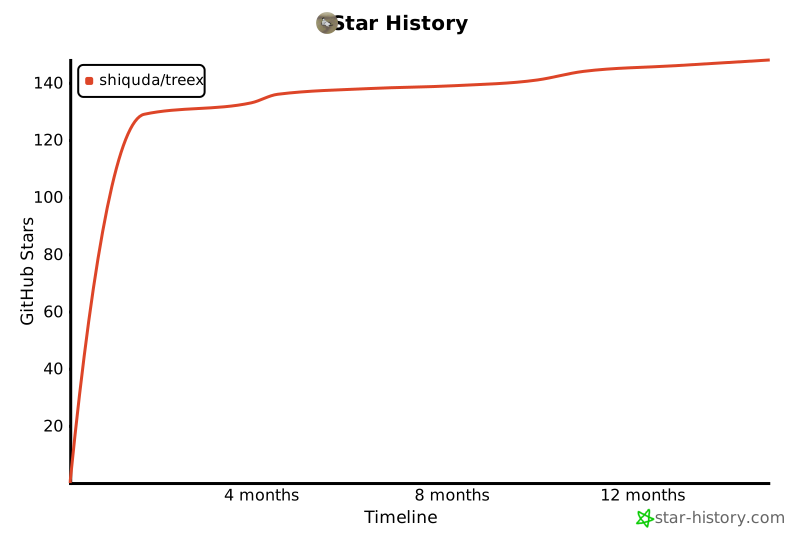
## ⭐ Star History