https://github.com/sholdee/crd-schema-publisher
Browsable CRD docs and IDE validation schemas, straight from your Kubernetes cluster
https://github.com/sholdee/crd-schema-publisher
cloudflare-pages custom-resource-definitions helm-chart json-schema kubeconform kubernetes kubernetes-controller
Last synced: 14 days ago
JSON representation
Browsable CRD docs and IDE validation schemas, straight from your Kubernetes cluster
- Host: GitHub
- URL: https://github.com/sholdee/crd-schema-publisher
- Owner: sholdee
- License: mit
- Created: 2026-04-09T04:01:09.000Z (2 months ago)
- Default Branch: main
- Last Pushed: 2026-06-02T20:05:09.000Z (14 days ago)
- Last Synced: 2026-06-02T20:24:23.046Z (14 days ago)
- Topics: cloudflare-pages, custom-resource-definitions, helm-chart, json-schema, kubeconform, kubernetes, kubernetes-controller
- Language: Go
- Homepage: https://kube-schemas.shold.io
- Size: 2.55 MB
- Stars: 21
- Watchers: 1
- Forks: 2
- Open Issues: 1
-
Metadata Files:
- Readme: README.md
- Contributing: CONTRIBUTING.md
- License: LICENSE
- Code of conduct: CODE_OF_CONDUCT.md
- Security: SECURITY.md
- Agents: AGENTS.md
Awesome Lists containing this project
README

crd-schema-publisher
CRD docs and IDE validation, straight from the cluster.



Extracts CRD schemas from Kubernetes or YAML, converts Kubernetes built-in resource schemas from `/openapi/v2`, and publishes a searchable documentation site with interactive schema pages.
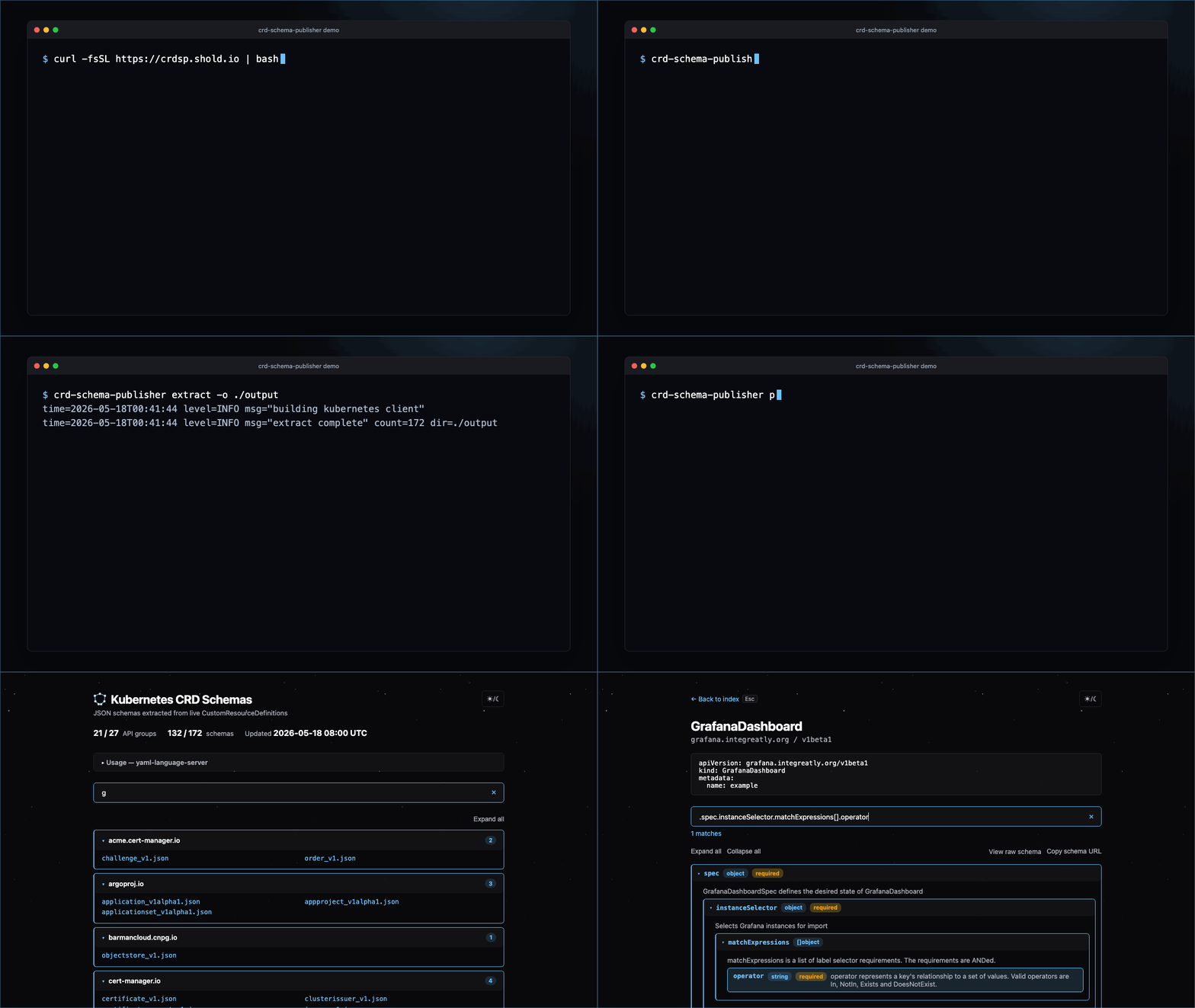
Run it as:
- a Kubernetes-native controller for real-time CRD watching
- a CronJob for scheduled extraction
- a local CLI for extracting from a live cluster, converting CRD YAML, or rendering built-in schemas from Kubernetes OpenAPI
Exports schemas for IDE validation with yaml-language-server and CI linting with kubeconform. Cloudflare Pages and local serving are built in; S3, git repos, and custom web servers are supported via sidecar.
> **Upgrading direct-volume deployments:** the active site now lives at `OUTPUT_DIR/current`. Existing sidecars or scripts that read the shared output volume directly must be updated. Cloudflare Pages users do not need to change anything.
## 💡 Why
Most CRD schema solutions rely on static catalogs — community-maintained repositories that scrape schemas from popular Helm charts. Schemas go stale, internal CRDs are missing, and your validation pipeline depends on third-party infrastructure.
- **Always accurate** — CRD schemas reflect what's installed in your cluster, including custom and internal CRDs, and built-in schemas can be pulled from the same cluster's OpenAPI document
- **Self-hosted** — run in extract-only mode and serve schemas however you like, or publish directly to Cloudflare Pages
- **Single static binary** — no runtime dependencies, no interpreters, no package managers. One binary in a distroless nonroot container with no shell
- **Controller-grade runtime** — watch mode uses informers, leader election, debounced refresh cycles, and health probes. It's a proper workload, not a script on a timer
- **No glue pipelines** — replaces multi-tool chains (CI runners, shell scripts, kubectl, CLI wrappers) with a single in-cluster binary. No external CI dependency, no cluster-admin runner pods, no scheduled workflow orchestration
The JSON Schema conversion is built for kubeconform and yaml-language-server compatibility — see [How It Works](#%EF%B8%8F-how-it-works) for details.
## ⚡ Quickstart
### Deploy to a Cluster
Install the Helm chart in controller mode for real-time CRD watching. Provide Cloudflare credentials to publish directly to Cloudflare Pages, or omit credentials to run extract-only and serve `OUTPUT_DIR/current` yourself.
```bash
helm install crd-schema-publisher oci://ghcr.io/sholdee/charts/crd-schema-publisher \
--namespace crd-schema-publisher \
--create-namespace \
--set existingSecret.name=crd-schema-publisher-cloudflare
```
See [Deploying](#-deploying) for credentials, raw manifests, CronJob mode, alternative backends, and chart verification.
### Install and Run the CLI
Install the standalone CLI:
```bash
curl -fsSL https://crdsp.shold.io | bash
```
Extract schemas from a kubeconfig context, convert CRD YAML, or render Kubernetes built-ins from the cluster OpenAPI document:
```bash
# Extract from the current kubeconfig context
crd-schema-publisher extract -o ./schemas
# Extract from a specific context
crd-schema-publisher extract --context my-cluster -o ./schemas
# Convert CRD YAML without a cluster
crd-schema-publisher convert -f crd.yaml -o ./schemas
# Convert Kubernetes built-in resources from the current cluster
kubectl get --raw /openapi/v2 > swagger.json
crd-schema-publisher convert --openapi swagger.json -o ./schemas --render
```
For source builds, use `go run ./cmd/` in place of `crd-schema-publisher`. See [Standalone Binary](#standalone-binary) for installer options and manual downloads, and [Configuration and CLI Reference](#configuration-and-cli-reference) for flags and command behavior.
### Use Published Schemas
Once published, schemas are available at `https:////_.json`, for example `cert-manager.io/certificate_v1.json` or `core/pod_v1.json`.
```yaml
# yaml-language-server: $schema=https://kube-schemas.example.com/cert-manager.io/certificate_v1.json
apiVersion: cert-manager.io/v1
kind: Certificate
metadata:
name: example
```
See [Using Your Schemas](#-using-your-schemas) for IDE and kubeconform examples.
## 📦 Installation
### Standalone Binary
The quick installer is the recommended path for local CLI use. Static binaries for Linux and macOS (amd64 + arm64) are also attached to each [GitHub Release](https://github.com/sholdee/crd-schema-publisher/releases).
Quick install/update:
```bash
curl -fsSL https://crdsp.shold.io | bash
```
Non-interactive install:
```bash
curl -fsSL https://crdsp.shold.io | bash -s -- --yes
```
Install a specific release:
```bash
curl -fsSL https://crdsp.shold.io | bash -s -- --version vYYYY.MDD.HMMSS
```
The installer detects Linux/macOS and amd64/arm64, verifies the selected binary against the release checksum manifest, optionally verifies the checksum Sigstore bundle when `cosign` is available, and installs to an existing `crd-schema-publisher` path or `/usr/local/bin/crd-schema-publisher`.
```bash
# Download the latest release (example: Linux amd64)
curl -LO https://github.com/sholdee/crd-schema-publisher/releases/latest/download/crd-schema-publisher-linux-amd64
chmod +x crd-schema-publisher-linux-amd64
```
If you manage project CLIs with [mise](https://mise.jdx.dev/), install through the aqua backend:
```bash
mise use aqua:sholdee/crd-schema-publisher@latest
```
Or pin a release in `mise.toml`:
```toml
[tools]
"aqua:sholdee/crd-schema-publisher" = "2026.519.317"
```
### Verify Release Artifacts
```bash
# Verify the signed checksum manifest
curl -LO https://github.com/sholdee/crd-schema-publisher/releases/latest/download/checksums-sha256.txt
curl -LO https://github.com/sholdee/crd-schema-publisher/releases/latest/download/checksums-sha256.txt.sigstore.json
cosign verify-blob checksums-sha256.txt \
--bundle checksums-sha256.txt.sigstore.json \
--certificate-identity 'https://github.com/sholdee/crd-schema-publisher/.github/workflows/release.yaml@refs/heads/main' \
--certificate-oidc-issuer 'https://token.actions.githubusercontent.com'
# Verify the binary against the trusted checksum manifest
sha256sum -c --ignore-missing checksums-sha256.txt
# Optional: verify build provenance for the binary
gh attestation verify ./crd-schema-publisher-linux-amd64 \
--repo sholdee/crd-schema-publisher \
--signer-workflow sholdee/crd-schema-publisher/.github/workflows/release.yaml \
--source-ref refs/heads/main
```
## 🚀 Deploying
### Helm Chart (recommended)
The chart is distributed as an OCI artifact and signed with cosign:
```bash
helm install crd-schema-publisher oci://ghcr.io/sholdee/charts/crd-schema-publisher \
--namespace crd-schema-publisher \
--create-namespace \
--set existingSecret.name=crd-schema-publisher-cloudflare
```
This installs in **controller mode** by default (real-time watch with leader election). For scheduled runs, set `--set mode=cronjob`.
#### Credentials
Cloudflare credentials are **optional in both controller and CronJob modes**. Without them, the workload runs in extract-only mode — site generations are written under the output directory and the active snapshot is exposed at `OUTPUT_DIR/current`, but nothing is uploaded. This is useful when serving schemas locally (e.g., via a sidecar web server) instead of Cloudflare Pages.
To publish to Cloudflare Pages, provide an API token with **Cloudflare Pages: Edit** permission and your account ID. Two secret management options are supported:
- **`existingSecret`** — reference a pre-existing Secret containing `CLOUDFLARE_API_TOKEN` and `CLOUDFLARE_ACCOUNT_ID`
- **`externalSecret`** — create an [ExternalSecret](https://external-secrets.io) CR that syncs credentials from an external provider (Vault, AWS Secrets Manager, 1Password, etc.)
```bash
# Using External Secrets Operator
helm install crd-schema-publisher oci://ghcr.io/sholdee/charts/crd-schema-publisher \
--namespace crd-schema-publisher \
--create-namespace \
--set externalSecret.enabled=true \
--set externalSecret.secretStoreRef.name=my-store \
--set externalSecret.secretStoreRef.kind=ClusterSecretStore
```
The default remote ref points to a `crd-schema-publisher-cloudflare` key with `api-token` and `account-id` properties — override via `externalSecret.data` if your provider uses different paths.
#### Schema filtering
To publish only part of the cluster CRD catalog, set `config.filter.group`, `config.filter.kind`, and/or `config.filter.version`. Values are comma-separated and case-insensitive.
```bash
helm install crd-schema-publisher oci://ghcr.io/sholdee/charts/crd-schema-publisher \
--namespace crd-schema-publisher \
--create-namespace \
--set config.filter.group=cert-manager.io \
--set-string 'config.filter.kind=Certificate\,Issuer'
```
Controller mode still watches all CRDs, then applies the filter to each generated output snapshot. If active filters match no CRDs or built-ins and Kustomize is not enabled, the next runtime build publishes an empty catalog instead of preserving a previous broader snapshot.
#### Runtime built-ins and Kustomize
Runtime modes publish CRDs only by default. Enable built-ins and Kustomize explicitly when you want one site for CRDs, Kubernetes built-in types, and kustomize's client-side `Kustomization` schema.
```bash
helm upgrade --install crd-schema-publisher oci://ghcr.io/sholdee/charts/crd-schema-publisher \
--namespace crd-schema-publisher \
--set config.includeBuiltins=true \
--set config.includeKustomize=true
```
`config.includeBuiltins=true` reads `/openapi/v2` from the API server. With chart RBAC enabled, it also adds the required ClusterRole permission; with `rbac.create=false`, provide that permission yourself. `config.includeKustomize=true` does not require extra Kubernetes permissions. Filters apply to CRDs and built-ins; Kustomize is an explicit unfiltered opt-in.
#### Optional features
Persistent output volume (`persistence`), built-in static serving (`serve`), Gateway API HTTPRoute (`serve.httpRoute`), extra volumes/volume mounts/containers (`extraVolumes`, `extraVolumeMounts`, `extraContainers`), PodMonitor, PrometheusRule, Grafana dashboard (sidecar ConfigMap or Grafana Operator `GrafanaDashboard`), NetworkPolicy, CiliumNetworkPolicy, PodDisruptionBudget, pod anti-affinity presets, topology spread constraints, and templated extra objects. See [`values.yaml`](charts/crd-schema-publisher/values.yaml) for all options.
#### Built-in static serving
For simple in-cluster deployments, the controller can serve the active generated site directly from `OUTPUT_DIR/current`:
```bash
helm upgrade --install crd-schema-publisher oci://ghcr.io/sholdee/charts/crd-schema-publisher \
--namespace crd-schema-publisher \
--set serve.enabled=true
```
The site is exposed on the chart Service port named `site` and defaults to non-privileged port `8081`; health and metrics stay on the `health` port. Built-in serving is controller-only, requires `replicaCount=1`, and switches the Deployment strategy to `Recreate` so traffic is not routed to a new pod before it has published its first site.
Use [`examples/built-in-server/values.yaml`](examples/built-in-server/values.yaml) for a complete values file with persistence and Gateway API `HTTPRoute` setup.
#### Examples: Alternative backends via sidecar pattern
The chart's `extraContainers` and `extraObjects` values let you wire up any backend without changes to the tool. Each example runs in extract-only mode (no Cloudflare credentials) — schemas are written to generation snapshots under the output directory and the active site is exposed at `OUTPUT_DIR/current` for the sidecar to serve or sync. Examples that push to external storage run stateless with an emptyDir; the caddy example uses a persistent volume since it serves directly from the cluster.
```bash
helm install crd-schema-publisher oci://ghcr.io/sholdee/charts/crd-schema-publisher \
--namespace crd-schema-publisher --create-namespace \
-f examples//values.yaml
```
| Example | Backend | Description |
| ----------------------------------------------------- | --------------------- | -------------------------------------------------------------------------------------------------------------------------------------------------------------------------------------------- |
| [`caddy-sidecar`](examples/caddy-sidecar/values.yaml) | Local HTTP | Caddy serves schemas directly from the cluster with directory browsing and a Gateway API HTTPRoute. Adaptable to nginx or any web server. |
| [`rclone-s3`](examples/rclone-s3/values.yaml) | S3-compatible storage | rclone syncs schemas to any S3-compatible provider (AWS S3, Backblaze B2, MinIO, Cloudflare R2, GCS) on a 60-second interval. Provider-specific configuration documented in the file header. |
| [`git-push`](examples/git-push/values.yaml) | Git repository | Commits and pushes schema changes to a GitHub repository for GitHub Pages hosting. Works with any git host (GitLab, Gitea, Bitbucket) by adjusting the remote URL. |
Each example is a self-contained values file — copy it, fill in your credentials, and install. See the comments in each file for what to customize.
#### GitHub Pages subpath deployments
When serving schemas from a GitHub Pages project path such as `https://user.github.io/iac/`, set the base path so generated HTML links include the subpath:
```bash
BASE_PATH=/iac
```
Or in the Helm chart:
```yaml
config:
basePath: "/iac"
```
If you already use the first-party `git-push` or `rclone-s3` examples, update them to read `/data/current`. Older example configs fail closed after upgrading to a new image: syncing stops, but existing remote content is not deleted or overwritten. Cloudflare Pages users do not need to change anything.
#### Verification
Verify the chart signature (substitute the version you installed — find it with `helm list`):
```bash
cosign verify ghcr.io/sholdee/charts/crd-schema-publisher: \
--certificate-oidc-issuer https://token.actions.githubusercontent.com \
--certificate-identity-regexp github.com/sholdee/crd-schema-publisher
```
### Raw Manifests
For users who prefer raw YAML without Helm, deploy manifests are available in [`deploy/`](deploy/).
### Watch Mode (recommended)
Reacts to CRD changes in real-time with debounced schema refreshes, uploading only when Cloudflare credentials are configured. Supports leader election for safe rolling updates. The container runs with `args: ["watch"]` — see [`deploy/deployment.yaml`](deploy/deployment.yaml).
```bash
kubectl apply -f deploy/common.yaml -f deploy/deployment.yaml
```
### CronJob Mode
Runs scheduled schema extraction, uploading to Cloudflare Pages only when credentials are configured. Simpler, but schemas are only updated when the job runs. The example uses a daily schedule — adjust the `schedule` field as needed. Uses the default `run` command — see [`deploy/cronjob.yaml`](deploy/cronjob.yaml).
Without Cloudflare credentials, CronJob mode is extract-only. With the default `emptyDir` output volume, extracted schemas are discarded when the Job pod exits. Configure Cloudflare credentials, `persistence.enabled`/`persistence.existingClaim`, or an extra container backend if you want scheduled output to be retained.
```bash
kubectl apply -f deploy/common.yaml -f deploy/cronjob.yaml
```
Both modes share [`deploy/common.yaml`](deploy/common.yaml) which provides namespace, ServiceAccount, RBAC (ClusterRole for CRD read access), and a hardened security context (nonroot, read-only rootfs, dropped capabilities).
The deploy manifests include an empty placeholder Secret named `crd-schema-publisher-cloudflare`. Fill in the values in `common.yaml` directly, or replace the Secret with your own secrets management (e.g., ExternalSecret, Sealed Secret). If Cloudflare credentials are empty or omitted, workloads run in extract-only mode (site generations written under `OUTPUT_DIR/.generations` with the active snapshot exposed at `OUTPUT_DIR/current`, but not uploaded). In raw CronJob mode, the default `emptyDir` output is discarded when the Job pod exits unless you replace it with retained storage or a backend sync.
### Container Image
Pre-built multi-arch images (amd64 + arm64) are published to GHCR:
```text
ghcr.io/sholdee/crd-schema-publisher:latest
```
Releases are triggered manually via the release workflow, producing a date-based tag (`vYYYY.MDD.HMMSS` — e.g. `v2026.413.65435`) and `latest`. Release notes include the image digest, OCI Helm chart reference, signed checksum manifest, binary provenance link, and standalone binary attachments. The workflow runs an internal smoke gate before release artifacts are promoted.
Images use `gcr.io/distroless/static:nonroot` as the runtime base — no shell, no package manager, runs as UID 65534. Production images are signed with [cosign](https://docs.sigstore.dev/cosign/overview/) keyless signing via GitHub Actions OIDC:
```bash
cosign verify ghcr.io/sholdee/crd-schema-publisher:latest \
--certificate-oidc-issuer https://token.actions.githubusercontent.com \
--certificate-identity-regexp github.com/sholdee/crd-schema-publisher
```
## Configuration and CLI Reference
### Environment Variables
Deployment/runtime configuration is primarily via environment variables. For local CLI use, `extract`, `convert`, `run`, `watch`, `upload`, and `preview` also expose command-specific flags such as `--output-dir`/`-o`. Variables marked _(watch)_ apply only to watch mode deployment.
| Variable | Required | Default | Description |
| -------------------------- | ----------- | ---------------------- | --------------------------------------------------------------------------------------------------------------------- |
| `CLOUDFLARE_API_TOKEN` | Upload only | — | Cloudflare API token with Pages permissions |
| `CLOUDFLARE_ACCOUNT_ID` | Upload only | — | Cloudflare account ID |
| `CF_PAGES_PROJECT` | No | `kubernetes-schemas` | Cloudflare Pages project name |
| `OUTPUT_DIR` | No | `/output` | Site output root. The active snapshot is exposed at `OUTPUT_DIR/current` |
| `KUBECTL_CONTEXT` | No | — | Kubernetes context name (local development only) |
| `DEBOUNCE_SECONDS` | No | `15` | Seconds to wait after last CRD event before publishing (watch mode) |
| `POD_NAME` | Yes (watch) | — | Pod identity for leader election (set via downward API) |
| `POD_NAMESPACE` | Yes (watch) | — | Namespace for leader lease (set via downward API) |
| `LEASE_NAME` | No | `crd-schema-publisher` | Name of the Lease resource (watch mode) |
| `HEALTH_PORT` | No | `8080` | Port for liveness/readiness probes (watch mode) |
| `SERVE_SITE` | No | — | Set to `true` to serve `OUTPUT_DIR/current` from watch mode |
| `SITE_PORT` | No | `8081` | Non-privileged static site server port when `SERVE_SITE=true` |
| `SERVE_ACCESS_LOG` | No | — | Set to `true` to log each request served by the built-in static site server |
| `PREVIEW_ADDR` | No | `127.0.0.1:8989` | Listen address for preview server (preview mode) |
| `SKIP_RENDER` | No | — | Set to `true` to skip HTML schema page rendering |
| `UPLOAD_BUCKET_SIZE_BYTES` | No | `41943040` | Cloudflare upload bucket size in bytes. Lower values reduce peak upload memory at the cost of more requests |
| `UPLOAD_CONCURRENCY` | No | `3` | Concurrent Cloudflare upload buckets. Lower values reduce peak upload memory at the cost of slower cache-miss uploads |
| `BASE_PATH` | No | — | URL path prefix for subpath deployments (e.g., `/iac` for GitHub Pages at `user.github.io/iac/`) |
| `SCHEMA_INCLUDE_BUILTINS` | No | — | Set to `true` to include Kubernetes built-ins from API server OpenAPI v2 (`run`, `extract`, `watch`) |
| `SCHEMA_INCLUDE_KUSTOMIZE` | No | — | Set to `true` to include kustomize's client-side `Kustomization` schema (`run`, `extract`, `watch`) |
| `SCHEMA_FILTER_KIND` | No | — | Restrict generated schemas to matching CRD kinds, comma-separated and case-insensitive (`run`, `extract`, `watch`) |
| `SCHEMA_FILTER_GROUP` | No | — | Restrict generated schemas to matching API groups, comma-separated and case-insensitive (`run`, `extract`, `watch`) |
| `SCHEMA_FILTER_VERSION` | No | — | Restrict generated schemas to matching API versions, comma-separated and case-insensitive (`run`, `extract`, `watch`) |
Schema filters limit generated output only. In watch mode, the controller still watches all cluster CRDs and applies the filters during each publish cycle. If active filters match no CRDs or built-ins and Kustomize is not enabled, runtime builds publish an empty catalog instead of leaving stale schemas in place.
Runtime modes stay CRD-only unless opt-ins are enabled. `--include-builtins` reads `/openapi/v2` from the API server and publishes built-ins into the same generation. `--include-kustomize` adds kustomize's client-side `Kustomization` schema. Filters apply to CRDs and built-ins; Kustomize is explicit and unfiltered.
### Command Behavior
```text
crd-schema-publisher [command]
Commands:
run Extract schemas and upload to Cloudflare Pages when credentials are configured (default)
extract Extract schemas from a Kubernetes cluster
convert Convert CRD YAML files and Kubernetes OpenAPI built-ins to JSON Schema
upload Upload the active site from OUTPUT_DIR/current to Cloudflare Pages
watch Watch for CRD changes and upload when credentials are configured
preview Serve a local preview of the documentation site
```
| Command(s) | Output directory behavior |
| ------------------------ | ------------------------------------------------------------------------------------------------------------ |
| `extract` | Requires explicit `--output-dir`/`-o` or `OUTPUT_DIR`; does not fall back to `/output`. |
| `convert` | Requires `--output-dir`/`-o`; does not read `OUTPUT_DIR`. |
| `run`, `watch`, `upload` | Accept `--output-dir`/`-o`; output root must already exist. |
| `preview` | Uses sample data by default; reads real extracted output only when `--output-dir`/`-o` is passed explicitly. |
| Command(s) | Filters and command-specific flags |
| ------------------------- | ---------------------------------------------------------------------------------------------------------------------------------------------------------------------------------------------------- |
| `run`, `extract`, `watch` | Support comma-separated, case-insensitive `--kind`, `--group`, and `--version` filters. Defaults can also come from `SCHEMA_FILTER_KIND`, `SCHEMA_FILTER_GROUP`, and `SCHEMA_FILTER_VERSION`. |
| `run`, `extract`, `watch` | Support `--include-builtins`/`SCHEMA_INCLUDE_BUILTINS` to include built-ins from the API server OpenAPI v2 document. |
| `run`, `extract`, `watch` | Support `--include-kustomize`/`SCHEMA_INCLUDE_KUSTOMIZE` to include kustomize's client-side `Kustomization` schema. |
| `extract` | Supports `--context`, `--base-path`, and `--skip-render`. |
| `convert` | Supports comma-separated, case-insensitive `--kind`, `--group`, and `--version` filters for CRD YAML and OpenAPI inputs. |
| `convert` | Supports `--file`/`-f`, non-recursive `--dir`/`-d` YAML loading, optional `--render`, and `--base-path` for rendered links. |
| `convert` | `--openapi` converts a Kubernetes OpenAPI v2 (swagger) document of built-in types into self-contained per-kind schemas, combinable with `--file`/`--dir` to render CRDs and built-ins into one site. |
| `convert` | `--kustomize` explicitly publishes kustomize's `Kustomization` schema, reflected from the pinned `sigs.k8s.io/kustomize/api` types. It is not filtered. |
## 📋 Using Your Schemas
Once published, your schemas are available at `https:////_.json`. Core built-ins use the `core` group path, such as `core/pod_v1.json`. The published site also includes a browsable index with search and interactive HTML documentation for each schema.
### IDE Validation (yaml-language-server)
Add a modeline to any YAML file. Works in VS Code, Neovim, Helix, and any editor with yaml-language-server:
```yaml
# yaml-language-server: $schema=https://kube-schemas.example.com/cert-manager.io/certificate_v1.json
apiVersion: cert-manager.io/v1
kind: Certificate
metadata:
name: example
```
Or configure schemas globally in VS Code:
```jsonc
// .vscode/settings.json
{
"yaml.schemas": {
"https://kube-schemas.example.com/cert-manager.io/certificate_v1.json": ["**/certificates/*.yaml"],
},
}
```
### CI Validation (kubeconform)
If your registry includes built-ins from runtime `--include-builtins` or offline `convert --openapi`, point kubeconform at both the `core` path and the grouped path:
```bash
kubeconform \
-strict \
-ignore-missing-schemas \
-schema-location 'https://kube-schemas.example.com/core/{{.ResourceKind}}_{{.ResourceAPIVersion}}.json' \
-schema-location 'https://kube-schemas.example.com/{{.Group}}/{{.ResourceKind}}_{{.ResourceAPIVersion}}.json' \
manifests/*.yaml
```
This project validates its own Helm chart manifests against its published schema registry in CI — see the `helm-lint` job in [`.github/workflows/ci.yaml`](.github/workflows/ci.yaml) for a working example.
This validates Kubernetes built-ins and CRDs against the same published schema snapshot. If you publish only CRDs, keep `-schema-location default` before your custom registry path so kubeconform still validates built-ins.
> **Note:** Schema files are written as lowercase (e.g., `certificate_v1.json`) while `{{.ResourceKind}}` expands to the original case (e.g., `Certificate`). This works on Cloudflare Pages because it serves paths case-insensitively — the same convention used by [datreeio/CRDs-catalog](https://github.com/datreeio/CRDs-catalog). If serving schemas from a case-sensitive host, use lowercase kind names in your template paths.
## Operations
### Monitoring
In watch mode, the health server exposes a `/metrics` endpoint on `HEALTH_PORT` (default 8080) in Prometheus text format.
| Metric | Type | Description |
| ------------------------------------------------ | ------- | --------------------------------------------- |
| `crdpublisher_publish_cycle_duration_seconds` | gauge | Duration of the most recent publish cycle |
| `crdpublisher_publish_cycle_total` | counter | Publish cycles by result (`success`, `error`) |
| `crdpublisher_crds_discovered` | gauge | CRDs found in the most recent cycle |
| `crdpublisher_schemas_written` | gauge | Schemas written in the most recent cycle |
| `crdpublisher_last_successful_publish_timestamp` | gauge | Unix epoch of the last successful publish |
| `crdpublisher_watchdog_timestamp` | gauge | Unix epoch of the last debounce loop tick |
| `crdpublisher_publish_skipped_total` | counter | Debounce skips (publish already in progress) |
| `crdpublisher_leader` | gauge | Whether this pod is the current leader |
The watchdog timestamp enables dead man's switch alerting — it updates on every debounce loop tick (regardless of whether a publish occurs), so `time() - crdpublisher_watchdog_timestamp` staying fresh proves the watcher is alive. The publish timestamp separately tracks when content was last pushed.
The Helm chart includes a PodMonitor — enable it with `--set metrics.podMonitor.enabled=true`. For raw manifests or vanilla Prometheus Operator, create a PodMonitor:
```yaml
apiVersion: monitoring.coreos.com/v1
kind: PodMonitor
metadata:
name: crd-schema-publisher
spec:
selector:
matchLabels:
app: crd-schema-publisher
podMetricsEndpoints:
- port: health
path: /metrics
```
For vanilla Prometheus, add `prometheus.io/*` annotations to the pod template or configure a static scrape target.
#### Grafana dashboard
The Helm chart can install the included Grafana dashboard in either sidecar-discovery mode or Grafana Operator mode.
For Grafana sidecars that discover dashboard `ConfigMap` objects:
```bash
helm upgrade --install crd-schema-publisher oci://ghcr.io/sholdee/charts/crd-schema-publisher \
--namespace crd-schema-publisher \
--set grafana.dashboard.enabled=true
```
For Grafana Operator:
```bash
helm upgrade --install crd-schema-publisher oci://ghcr.io/sholdee/charts/crd-schema-publisher \
--namespace crd-schema-publisher \
--set grafana.dashboard.operator.enabled=true
```
Operator mode renders a `GrafanaDashboard` that references the embedded dashboard `ConfigMap`. It selects Grafana instances with `dashboards: grafana` by default. Custom `grafana.dashboard.operator.instanceSelector` values replace that fallback instead of being merged with it:
```yaml
grafana:
dashboard:
operator:
enabled: true
instanceSelector:
matchLabels:
grafana.internal/instance: home
```
To intentionally match all Grafana instances visible to the operator, set `grafana.dashboard.operator.defaultInstanceSelector.enabled=false`.
Use `grafana.dashboard.operator.folder` for a Grafana folder title, `grafana.dashboard.operator.folderRef` for a `GrafanaFolder` resource reference, or `grafana.dashboard.operator.folderUID` for an existing Grafana folder UID. Set only one folder option.
If your Grafana datasource name is not resolved automatically, map the bundled dashboard input with:
```yaml
grafana:
dashboard:
operator:
datasources:
- inputName: DS_PROMETHEUS
datasourceName: Prometheus
```
Grafana Operator and its CRDs must already be installed in the cluster.
### Output Structure
Cluster-backed site generation (`run`, `extract`, `watch`) and preview temp generations use this layout:
```text
/
.generations/
/
/
_.json # JSON schema
_.html # Interactive documentation page
_meta/
kinds.json # Internal Kind casing manifest
schema-metadata.json # Internal index source manifest
master-standalone/
--stable-.json # kubeval-compatible format
index.html # Browsable schema index
schema-search.js # Shared schema-page search/autocomplete module
favicon.svg # Constellation icon
current -> .generations/ # Stable read path for sidecars and local servers
```
Direct-volume consumers should read or serve `OUTPUT_DIR/current`, not the flat root of `OUTPUT_DIR`. `_meta/` is internal tool state; first-party Cloudflare, git, S3, and Caddy examples exclude it from published or served output.
`convert` writes schema files directly into `--output-dir` instead of creating `.generations/current`. It records generated files in `_meta/convert-manifest.json` so reruns can remove stale generated artifacts while preserving files that existed before `convert` ran.
## ⚙️ How It Works
For cluster-backed commands (`run`, `extract`, and `watch`), the pipeline is:
1. Connects to the Kubernetes API (in-cluster or via kubeconfig)
2. Lists all CRDs and extracts `.spec.versions[].schema.openAPIV3Schema`
3. Applies three JSON Schema transforms:
- Adds `additionalProperties: false` to structural child objects with `properties` — recurses into schema-valued locations only, preserving validation overlays and literal `default`/`enum` data while fixing a bug in the original where CRD fields named `properties` or other JSON Schema keywords corrupt the output
- Replaces Kubernetes int-or-string markers with a non-conflicting `oneOf` union, preserving safe metadata and moving type-specific assertions into the matching string or integer branch
- Allows null for optional fields (per-field precision, including optional `$ref` fields as ref-or-null `anyOf` wrappers)
These transforms handle nullable fields, int-or-string types, root objects, and keyword-colliding property names. A frozen golden test locks converter output to prevent regressions.
4. Writes schemas to both primary and kubeval-compatible directory formats inside a new generation snapshot
5. Renders an interactive HTML documentation page for each schema with collapsible property trees, local `$ref` expansion, path-aware search, and autocomplete powered by a shared emitted `schema-search.js` asset
6. Generates an HTML index grouped by schema source and API group with client-side search, schema statistics, and yaml-language-server usage examples
7. Atomically switches `OUTPUT_DIR/current` to the completed generation so sidecars read a stable snapshot
8. Uploads the active generation to Cloudflare Pages via the direct upload API (BLAKE3 content hashing, batched uploads with retry)
The `convert` command skips Kubernetes access and reads CRD YAML from `--file`/`-f`, stdin (`-f -`), and/or a non-recursive `--dir`/`-d`. It applies the same schema transforms and writes flat output directly to `--output-dir`/`-o`; with `--render`, it also renders HTML pages and an index.
Runtime modes can include optional schemas in generated snapshots. `--include-builtins` fetches `/openapi/v2` from the API server and writes authorable built-in types into the same generation as CRDs. When OpenAPI also contains CRD-backed definitions, CRD schemas take precedence and those OpenAPI duplicates are skipped. `--include-kustomize` writes kustomize's client-side `Kustomization` schema. When more than one schema source is present, the index separates CRDs, built-ins, and Kustomize schemas; CRD-only output keeps the original API-group-only index. In the Helm chart, `config.includeBuiltins=true` adds `/openapi/v2` RBAC when `rbac.create=true`; `config.includeKustomize=true` does not require additional Kubernetes permissions.
`--openapi ` converts Kubernetes' built-in (non-CRD) types from an OpenAPI v2 document (for example `kubectl get --raw /openapi/v2`). Each authorable type that declares a group/version/kind becomes a self-contained `/_.json`; the empty API group is written under `core/`. Referenced definitions are bundled into each schema so validation and rendered child fields work without external references. When combined with CRD inputs, matching OpenAPI CRD definitions and their List types are skipped.
```sh
kubectl get --raw /openapi/v2 > swagger.json
crd-schema-publisher convert --openapi swagger.json -o ./schemas --render
```
Combine `--openapi` with `--file` or `--dir` when you want one local site containing both built-ins and CRDs.
`--kustomize` publishes a schema for kustomize's `Kustomization` at `kustomize.config.k8s.io/kustomization_v1beta1.json`. It's a client-side type with no usable upstream schema, so it's reflected from the `sigs.k8s.io/kustomize/api` Go types pinned in this module — bumping that dependency updates the schema. Combine it with the other inputs in a single run:
`--kind`, `--group`, and `--version` filters limit CRD and OpenAPI inputs; `--kustomize` is a single explicit opt-in and always emits Kustomization when set.
```sh
crd-schema-publisher convert -d ./crds --openapi swagger.json --kustomize -o ./schemas --render
```
## 🔧 Development
### Run Locally
Use the package path (`go run ./cmd/ `) for local subcommands so Go compiles every file in `cmd/`. Single-file invocation (`go run ./cmd/main.go --help` or `--version`) is only kept for top-level smoke checks.
```bash
# Extract schemas from a local cluster (no upload)
KUBECTL_CONTEXT=my-cluster OUTPUT_DIR=./output go run ./cmd/ extract
# Writes the active snapshot under ./output/current
# Full run with upload
mkdir -p ./output
KUBECTL_CONTEXT=my-cluster \
CLOUDFLARE_API_TOKEN=xxx \
CLOUDFLARE_ACCOUNT_ID=xxx \
go run ./cmd/ --output-dir ./output
# Convert CRD YAML files to JSON Schema (no cluster needed)
go run ./cmd/ convert -f crd.yaml -o ./schemas
# Convert Kubernetes built-ins from a cluster OpenAPI document
kubectl get --raw /openapi/v2 > swagger.json
go run ./cmd/ convert --openapi swagger.json -o ./schemas --render
# Convert all CRDs in a directory
go run ./cmd/ convert -d ./crds/ -o ./schemas
# Pipe from kubectl
kubectl get crds -o yaml | go run ./cmd/ convert -f - -o ./schemas
# Filter by kind and group
go run ./cmd/ extract --output-dir ./schemas --kind certificate,issuer --group cert-manager.io
# Filter a runtime extraction through env vars
SCHEMA_FILTER_GROUP=cert-manager.io go run ./cmd/ --output-dir ./output
```
### Preview the Site Locally
Preview is useful for UI development and local inspection. It needs no cluster or credentials when using sample data.
```bash
# Preview the index UI (no cluster or credentials needed)
go run ./cmd/ preview
# open http://127.0.0.1:8989
# Preview with real extracted schemas
go run ./cmd/ preview --output-dir ./output
# Serves the active snapshot from ./output/current
# Preview a subpath deployment locally
BASE_PATH=/iac go run ./cmd/ preview
# open http://127.0.0.1:8989/iac/
```
### Build
```bash
# Native build
go build -o crd-schema-publisher ./cmd/
# Example static cross-compile
CGO_ENABLED=0 GOOS=linux GOARCH=arm64 go build -ldflags="-s -w" -o crd-schema-publisher ./cmd/
# Build all release binaries locally
for pair in linux/amd64 linux/arm64 darwin/amd64 darwin/arm64; do
GOOS="${pair%/*}" GOARCH="${pair#*/}"
CGO_ENABLED=0 GOOS="${GOOS}" GOARCH="${GOARCH}" \
go build -ldflags="-s -w" -o "crd-schema-publisher-${GOOS}-${GOARCH}" ./cmd/
done
# Docker (multi-arch)
docker buildx build --platform linux/amd64,linux/arm64 -t crd-schema-publisher .
```
### Linting
This project uses [golangci-lint](https://golangci-lint.run/) with strict linters enabled:
```bash
go install github.com/golangci/golangci-lint/cmd/golangci-lint@latest
golangci-lint run
```
Enable the pre-commit hook to enforce linting before each commit:
```bash
git config core.hooksPath .githooks
```
If you change the extracted schema search module or its tests, also run:
```bash
node --test theme/schema_search.test.js
```
### Renovate
Dependencies are managed by [Renovate](https://docs.renovatebot.com/). Minor and patch updates for Go modules, GitHub Actions, Docker images, and CI tools are automerged after required status checks pass.
See [CONTRIBUTING.md](CONTRIBUTING.md) for full contributor setup and guidelines.
## 👥 Community
- [Home Operations Discord](https://discord.gg/home-operations)
- [Contributing](CONTRIBUTING.md)
- [Code of Conduct](CODE_OF_CONDUCT.md)
- [Security Policy](SECURITY.md)