https://github.com/shortarrow/runex
cross-shell abbreviation engine
https://github.com/shortarrow/runex
cli
Last synced: 26 days ago
JSON representation
cross-shell abbreviation engine
- Host: GitHub
- URL: https://github.com/shortarrow/runex
- Owner: ShortArrow
- License: other
- Created: 2026-03-19T08:13:02.000Z (4 months ago)
- Default Branch: main
- Last Pushed: 2026-05-31T06:50:31.000Z (about 1 month ago)
- Last Synced: 2026-05-31T07:08:37.799Z (about 1 month ago)
- Topics: cli
- Language: Rust
- Homepage: https://crates.io/crates/runex
- Size: 2.15 MB
- Stars: 3
- Watchers: 0
- Forks: 0
- Open Issues: 2
-
Metadata Files:
- Readme: README.md
- Changelog: CHANGELOG.md
- Contributing: CONTRIBUTING.md
- License: LICENSE
Awesome Lists containing this project
README
# runex
English | [日本語](docs/README.ja.md)
> Turn runes into commands.
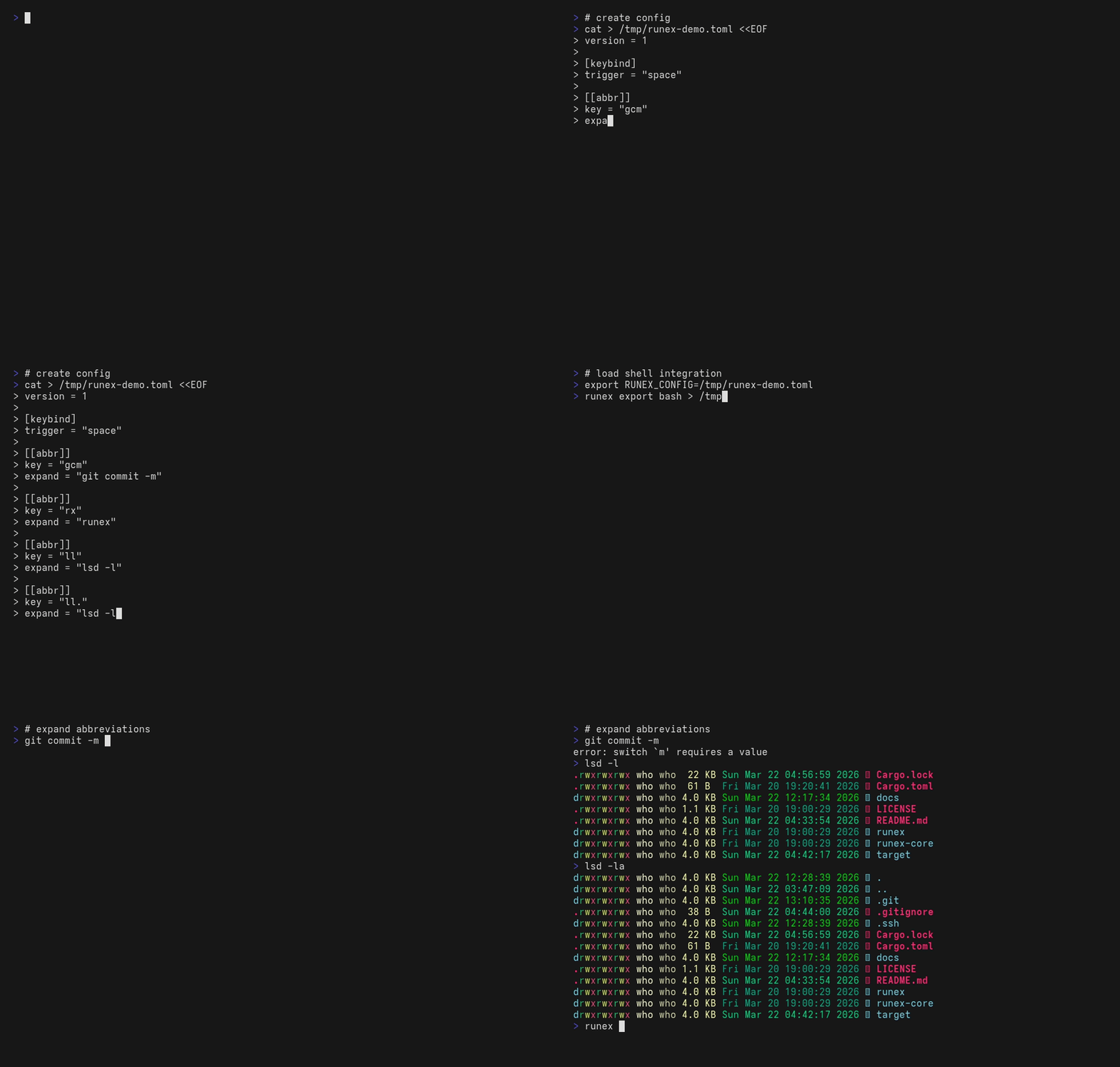
runex is a cross-shell abbreviation engine that expands short tokens into full commands in real-time.
## Where to start
| Goal | Read |
|------|------|
| Just install and try it | This README → [Install](docs/install.md) → [Setup](docs/setup.md) |
| Find a config snippet for X | [docs/recipes.md](docs/recipes.md) |
| Look up a field's exact meaning | [docs/config-reference.md](docs/config-reference.md) |
| Diagnose "I configured it but nothing happens" | [docs/setup.md#troubleshooting](docs/setup.md#troubleshooting) |
## Features
- Cross-shell support (bash / zsh / pwsh / cmd / nushell)
- Real-time expansion (customizable trigger key)
- Single config file shared across shells
- Conditional rules (`when_command_exists`) — only expand when the listed commands resolve in the current shell
- Fast and lightweight (Rust core)
## Concept
runex treats short inputs as **runes**, and expands them into full **casts**.
```
gcm␣ → git commit -m
ls␣ → lsd
```
## First expand in 5 minutes
```bash
cargo install runex # 1. install
runex init # 2. create config + hook into your shell
# (asks before touching your rcfile)
exec $SHELL # 3. fresh shell so the integration loads
gst # 4. expands to: git status
```
The config seeded by `runex init` includes a `gst → git status` sample
so you can verify expansion works immediately. From there, swap in your
own abbreviations — see [docs/recipes.md](docs/recipes.md) for
copy-pasteable patterns.
## Install
```bash
cargo install runex # Rust toolchain
brew install shortarrow/runex/runex # macOS / Linux
paru -S runex-bin # Arch Linux (AUR)
winget install ShortArrow.runex # Windows
```
Other options (mise, pre-built binaries, platform notes): see [docs/install.md](docs/install.md).
## Setup
`runex init` is **append-only and asks before each write** — your
existing rcfile is never modified except for one new block at the end.
See [What `runex init` will and won't do](docs/setup.md#what-runex-init-will-and-wont-do)
for the full guarantees.
It creates the config and appends the shell integration line to your rc file, with a confirmation prompt at each step:
```
$ runex init
Create config at ~/.config/runex/config.toml? [y/N] y
Created: ~/.config/runex/config.toml
Append shell integration to ~/.bashrc? [y/N] y
Appended integration to ~/.bashrc
```
Pass `-y` to skip all prompts. Per-shell manual setup (bash / zsh / pwsh / nu / clink) is documented in [docs/setup.md](docs/setup.md).
## Config
Default path: `$XDG_CONFIG_HOME/runex/config.toml`, falling back to `~/.config/runex/config.toml` on all platforms.
Override with the `RUNEX_CONFIG` environment variable or the `--config` flag.
No keybindings are active until you configure them.
```toml
version = 1
[keybind.trigger]
default = "space"
[[abbr]]
key = "ls"
expand = "lsd"
when_command_exists = ["lsd"]
[[abbr]]
key = "gcm"
expand = "git commit -m"
[[abbr]]
key = "gcam"
expand = "git commit -am '{}'" # {} = cursor stays here after expansion
```
See [docs/config-reference.md](docs/config-reference.md) for the full reference, including evaluation order, fallback chains, and all accepted fields. For copy-pasteable scenarios (Git shortcuts, per-shell commands, fallback chains, …) see [docs/recipes.md](docs/recipes.md).
## Commands
The five you'll reach for daily:
```
runex init Set up config + shell integration (asks before each write)
runex doctor Verify everything is wired up
runex add Add an abbreviation rule to the config file
runex which --why Explain whether a token would expand and why
runex export Print the shell integration script (sourced via init)
```
Full CLI reference: `runex --help` (or `runex --help` for a
specific one). Global flags `--config`, `--path-prepend`, and `--json`
work on every subcommand where they make sense; `--json` is supported by
`list`, `doctor`, `version`, `expand`, `which`, and `timings`.
`runex doctor` reports environment-level checks alongside config
validation: `effective_search_path` (Windows-only PATH augmentation
summary) and `integration:` (rcfile-marker presence and clink lua
drift detection). The semantics for each row are spelled out in
[`docs/config-reference.md`](docs/config-reference.md#runex-doctor--environment--integration-health),
and [`docs/setup.md`](docs/setup.md) shows an annotated example.
## Avoiding Expansion
If you use `trigger = "space"`, there are a few practical ways to avoid expansion:
- In bash, prefix the token with `\` — e.g. `\ls` — or use `command ls`.
- In PowerShell, `\ls` is just a different token. For built-in aliases, prefer the full command name (e.g. `Get-ChildItem`).
You can also bind a key to plain-space insertion using `self_insert`:
```toml
[keybind.trigger]
default = "space"
[keybind.self_insert]
default = "shift-space" # pwsh/nu: Shift+Space inserts a space without expanding
# default = "alt-space" # all shells including bash/zsh
```
| Value | bash | zsh | pwsh | nu |
|---|---|---|---|---|
| `"alt-space"` | yes | yes | yes | yes |
| `"shift-space"` | no | no | yes | yes |
## Why not alias?
| Feature | alias | runex |
| ----------------- | ----- | ----- |
| Cross-shell | No | Yes |
| Real-time expand | No | Yes |
| Conditional rules | No | Yes |
## Philosophy
- One config, all shells
- Minimal typing, maximal power
- Runes over repetition
## Roadmap
Near-term:
- Harden `doctor` and `init` around edge cases and clearer diagnostics
Later:
- Fuzzy suggestions
- Interactive picker
- Editor integrations
- Broader distribution channels (GitHub Releases, `cargo-binstall`, `winget`, `mise github:`)
## Name
- **run** (execute)
- **ex** (expand / execute)
- **rune** (compressed command)
- **run** + **ex** = expand / execute / express / extract / explode
- **rune x** (like 7z's "x" for extract)
- **rune +x** (like chmod's "+x" execute)
## Acknowledgements
runex is inspired by [fish shell's abbreviation system](https://fishshell.com/docs/current/cmds/abbr.html) and [zsh-abbr](https://github.com/olets/zsh-abbr). The idea of real-time token expansion originated there — runex brings it to every shell with a single config file.
## License
Dual-licensed under either of [MIT](LICENSE) or [Apache-2.0](LICENSE) at your option. Unless explicitly stated otherwise, any contribution intentionally submitted for inclusion in this work by you shall be dual-licensed as above, without any additional terms or conditions.
Third-party dependency licenses are documented in [THIRD_PARTY_LICENSES.md](THIRD_PARTY_LICENSES.md).