https://github.com/shoryasethia/markdrop
A Python package for converting PDFs to markdown while extracting images and tables, generate descriptive text descriptions for extracted tables/images using several LLM clients. And many more functionalities. Markdrop is available on PyPI.
https://github.com/shoryasethia/markdrop
agents docling image-to-text llm markdrop marker markitdown open-source pdf-to-markdown pdf-to-text pypi-package table-to-text
Last synced: 6 months ago
JSON representation
A Python package for converting PDFs to markdown while extracting images and tables, generate descriptive text descriptions for extracted tables/images using several LLM clients. And many more functionalities. Markdrop is available on PyPI.
- Host: GitHub
- URL: https://github.com/shoryasethia/markdrop
- Owner: shoryasethia
- License: gpl-3.0
- Created: 2024-12-24T16:47:00.000Z (over 1 year ago)
- Default Branch: main
- Last Pushed: 2025-07-05T17:42:43.000Z (12 months ago)
- Last Synced: 2025-07-05T17:48:36.081Z (12 months ago)
- Topics: agents, docling, image-to-text, llm, markdrop, marker, markitdown, open-source, pdf-to-markdown, pdf-to-text, pypi-package, table-to-text
- Language: Python
- Homepage: https://pypi.org/project/markdrop
- Size: 158 KB
- Stars: 123
- Watchers: 2
- Forks: 5
- Open Issues: 4
-
Metadata Files:
- Readme: README.md
- Changelog: CHANGELOG.md
- Contributing: CONTRIBUTING.md
- License: LICENSE
Awesome Lists containing this project
- awesome-cli-apps-in-a-csv - markdrop - Converts PDFs to markdown while extracting images and tables, generating descriptive text descriptions for extracted tables/images using several LLM clients. (<a name="conversion"></a>Conversion)
- awesome-cli-apps - markdrop - Converts PDFs to markdown while extracting images and tables, generating descriptive text descriptions for extracted tables/images using several LLM clients. (<a name="conversion"></a>Conversion)
README

Markdrop
[](https://pepy.tech/projects/markdrop)
[](https://pypi.org/project/markdrop/)
[](https://github.com/shoryasethia/markdrop/blob/main/LICENSE)
[](https://github.com/shoryasethia/markdrop/stargazers)
[](https://github.com/shoryasethia/markdrop/issues)
[](https://github.com/shoryasethia/markdrop/network/members)
A Python package for converting PDFs to markdown while extracting images and tables, generate descriptive text descriptions for extracted tables/images using several LLM clients. And many more functionalities. Markdrop is available on PyPI.
## Features
- [x] PDF to Markdown conversion with formatting preservation using Docling
- [x] Automatic image extraction with quality preservation using XRef Id
- [x] Table detection using Microsoft's Table Transformer
- [x] PDF URL support for core functionalities
- [x] AI-powered image and table descriptions using multiple LLM providers
- [x] Interactive HTML output with downloadable Excel tables
- [x] Customizable image resolution and UI elements
- [x] Comprehensive logging system
- [ ] Support for other files
- [ ] Streamlit/web interface
## Installation
```bash
pip install markdrop
```
If you are using the CLI, you can install the package in editable mode:
```bash
python -m pip install -e .
```
#### Python Package Index (PyPI) Page: https://pypi.org/project/markdrop
## Quick Start
[](https://colab.research.google.com/drive/1oApTrP_kjNn0s1tpE0SIWRyGzYfflQsi?usp=sharing)
[](https://youtu.be/2xg7W0-oiw0)
### Using the MarkDrop CLI
After installing the package, you can use the `markdrop` command-line interface.
**1. Convert PDF to Markdown and HTML:**
```bash
markdrop convert --output_dir [--add_tables]
```
* ``: Path or URL to the input PDF file.
* ``: Directory to save output files (default: `output`).
* `--add_tables`: (Optional) Add downloadable tables to the HTML output.
**Example:**
```bash
markdrop convert my_document.pdf --output_dir processed_docs --add_tables
```
**2. Generate Descriptions for Images and Tables in a Markdown File:**
```bash
markdrop describe --output_dir --ai_provider [--remove_images] [--remove_tables]
```
* ``: Path to the markdown file.
* ``: Directory to save the processed file (default: `output`).
* ``: AI provider to use (`gemini` or `openai`).
* `--remove_images`: (Optional) Remove images from the markdown file.
* `--remove_tables`: (Optional) Remove tables from the markdown file.
**Example:**
```bash
markdrop describe my_markdown.md --output_dir described_content --ai_provider gemini --remove_images
```
**3. Analyze Images in a PDF File:**
```bash
markdrop analyze --output_dir [--save_images]
```
* ``: Path or URL to the PDF file.
* ``: Directory to save analysis results (default: `output/analysis`).
* `--save_images`: (Optional) Save extracted images.
**Example:**
```bash
markdrop analyze report.pdf --output_dir pdf_analysis --save_images
```
**4. Set Up API Keys for AI Providers:**
```bash
markdrop setup
```
* ``: The AI provider to set up (`gemini` or `openai`).
**Example:**
```bash
markdrop setup gemini
```
**5. Generate Descriptions for Images (Standalone):**
```bash
markdrop generate --output_dir [--prompt ] [--llm_client ...]
```
* ``: Path to an image file or a directory of images.
* ``: Directory to save the descriptions CSV (default: `output/descriptions`).
* `--prompt`: (Optional) Prompt for the AI model (default: "Describe the image in detail.").
* `--llm_client`: (Optional) List of LLM clients to use (default: `gemini`). Available: `qwen`, `gemini`, `openai`, `llama-vision`, `molmo`, `pixtral`.
**Example:**
```bash
markdrop generate my_images/ --output_dir image_descriptions --prompt "What is in this picture?" --llm_client gemini openai
```
### Advanced PDF Processing with MarkDrop (Python API)
```python
from markdrop import markdrop, MarkDropConfig, add_downloadable_tables
from pathlib import Path
import logging
# Configure processing options
config = MarkDropConfig(
image_resolution_scale=2.0, # Scale factor for image resolution
download_button_color='#444444', # Color for download buttons in HTML
log_level=logging.INFO, # Logging detail level
log_dir='logs', # Directory for log files
excel_dir='markdropped-excel-tables' # Directory for Excel table exports
)
# Process PDF document
input_doc_path = "path/to/input.pdf"
output_dir = Path('output_directory')
# Convert PDF and generate HTML with images and tables
html_path = markdrop(input_doc_path, str(output_dir), config)
# Add interactive table download functionality
downloadable_html = add_downloadable_tables(html_path, config)
```
### AI-Powered Content Analysis (Python API)
```python
from markdrop import setup_keys, process_markdown, ProcessorConfig, AIProvider, logger
from pathlib import Path
# Set up API keys for AI providers
setup_keys(key='gemini') # or setup_keys(key='openai')
# Configure AI processing options
config = ProcessorConfig(
input_path="path/to/markdown/file.md", # Input markdown file path
output_dir=Path("output_directory"), # Output directory
ai_provider=AIProvider.GEMINI, # AI provider (GEMINI or OPENAI)
remove_images=False, # Keep or remove original images
remove_tables=False, # Keep or remove original tables
table_descriptions=True, # Generate table descriptions
image_descriptions=True, # Generate image descriptions
max_retries=3, # Number of API call retries
retry_delay=2, # Delay between retries in seconds
gemini_model_name="gemini-2.5-flash", # Gemini model for images
gemini_text_model_name="gemini--2.5-flash", # Gemini model for text
image_prompt=DEFAULT_IMAGE_PROMPT, # Custom prompt for image analysis
table_prompt=DEFAULT_TABLE_PROMPT # Custom prompt for table analysis
)
# Process markdown with AI descriptions
output_path = process_markdown(config)
```
### Image Description Generation (Python API)
```python
from markdrop import generate_descriptions
prompt = "Give textual highly detailed descriptions from this image ONLY, nothing else."
input_path = 'path/to/img_file/or/dir'
output_dir = 'data/output'
llm_clients = ['gemini', 'llama-vision'] # Available: ['qwen', 'gemini', 'openai', 'llama-vision', 'molmo', 'pixtral']
generate_descriptions(
input_path=input_path,
output_dir=output_dir,
prompt=prompt,
llm_client=llm_clients
)
```
## API Reference
### Core Functions
#### markdrop(input_doc_path: str, output_dir: str, config: Optional[MarkDropConfig] = None) -> Path
Converts PDF to markdown and HTML with enhanced features.
Parameters:
- `input_doc_path` (str): Path to input PDF file
- `output_dir` (str): Output directory path
- `config` (MarkDropConfig, optional): Configuration options for processing
#### add_downloadable_tables(html_path: Path, config: Optional[MarkDropConfig] = None) -> Path
Adds interactive table download functionality to HTML output.
Parameters:
- `html_path` (Path): Path to HTML file
- `config` (MarkDropConfig, optional): Configuration options
### Configuration Classes
#### MarkDropConfig
Configuration for PDF processing:
- `image_resolution_scale` (float): Scale factor for image resolution (default: 2.0)
- `download_button_color` (str): HTML color code for download buttons (default: '#444444')
- `log_level` (int): Logging level (default: logging.INFO)
- `log_dir` (str): Directory for log files (default: 'logs')
- `excel_dir` (str): Directory for Excel table exports (default: 'markdropped-excel-tables')
#### ProcessorConfig
Configuration for AI processing:
- `input_path` (str): Path to markdown file
- `output_dir` (str): Output directory path
- `ai_provider` (AIProvider): AI provider selection (GEMINI or OPENAI)
- `remove_images` (bool): Whether to remove original images
- `remove_tables` (bool): Whether to remove original tables
- `table_descriptions` (bool): Generate table descriptions
- `image_descriptions` (bool): Generate image descriptions
- `max_retries` (int): Maximum API call retries
- `retry_delay` (int): Delay between retries in seconds
- `gemini_model_name` (str): Gemini model for image processing
- `gemini_text_model_name` (str): Gemini model for text processing
- `image_prompt` (str): Custom prompt for image analysis
- `table_prompt` (str): Custom prompt for table analysis
## Contributing
We welcome contributions! Please see our [Contributing Guidelines](CONTRIBUTING.md) for details.
### Development Setup
1. Clone the repository:
```bash
git clone https://github.com/shoryasethia/markdrop.git
cd markdrop
```
2. Create a virtual environment:
```bash
python -m venv venv
source venv/bin/activate # On Windows: venv\Scripts\activate
```
3. Install development dependencies:
```bash
pip install -r requirements.txt
```
## Project Structure
```bash
markdrop/
├── LICENSE
├── README.md
├── CONTRIBUTING.md
├── CHANGELOG.md
├── requirements.txt
├── setup.py
└── markdrop/
├── __init__.py
├── src
| └── markdrop-logo.png
├── main.py
├── process.py
├── api_setup.py
├── parse.py
├── utils.py
├── helper.py
├── ignore_warnings.py
├── run.py
└── models/
├── __init__.py
├── .env
├── img_descriptions.py
├── logger.py
├── model_loader.py
├── responder.py
└── setup_keys.py
```
## Star History
[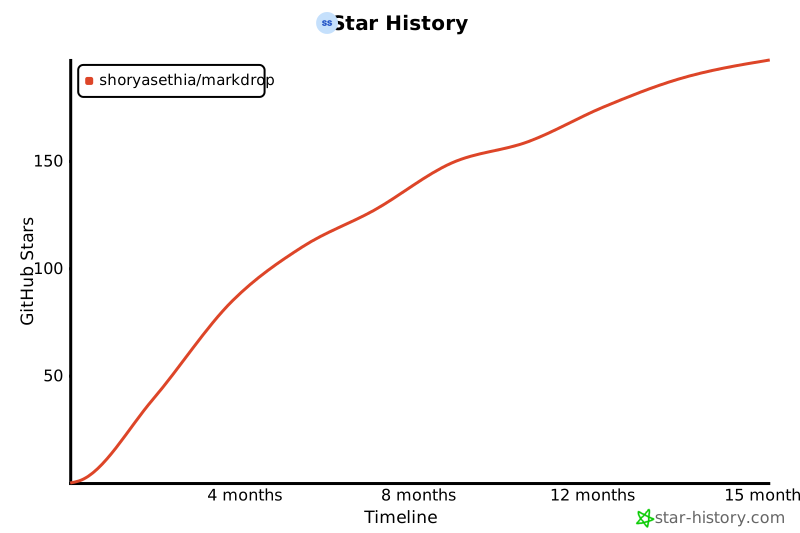](https://star-history.com/#shoryasethia/markdrop&Timeline)
## License
This project is licensed under the MIT License - see the [LICENSE](LICENSE) file for details.
## Changelog
See [CHANGELOG.md](CHANGELOG.md) for version history.
## Code of Conduct
Please note that this project follows our [Code of Conduct](CODE_OF_CONDUCT.md).
## Support
- [Open an issue](https://github.com/shoryasethia/markdrop/issues)