https://github.com/signiant/liftr
Update Route53 weighted record sets
https://github.com/signiant/liftr
aws dns route53
Last synced: about 1 month ago
JSON representation
Update Route53 weighted record sets
- Host: GitHub
- URL: https://github.com/signiant/liftr
- Owner: Signiant
- License: mit
- Created: 2017-11-14T19:36:52.000Z (over 8 years ago)
- Default Branch: master
- Last Pushed: 2021-05-26T21:45:08.000Z (about 5 years ago)
- Last Synced: 2025-01-16T02:23:56.359Z (over 1 year ago)
- Topics: aws, dns, route53
- Language: PHP
- Size: 122 KB
- Stars: 1
- Watchers: 6
- Forks: 0
- Open Issues: 0
-
Metadata Files:
- Readme: README.md
- License: LICENSE
Awesome Lists containing this project
README
# liftr
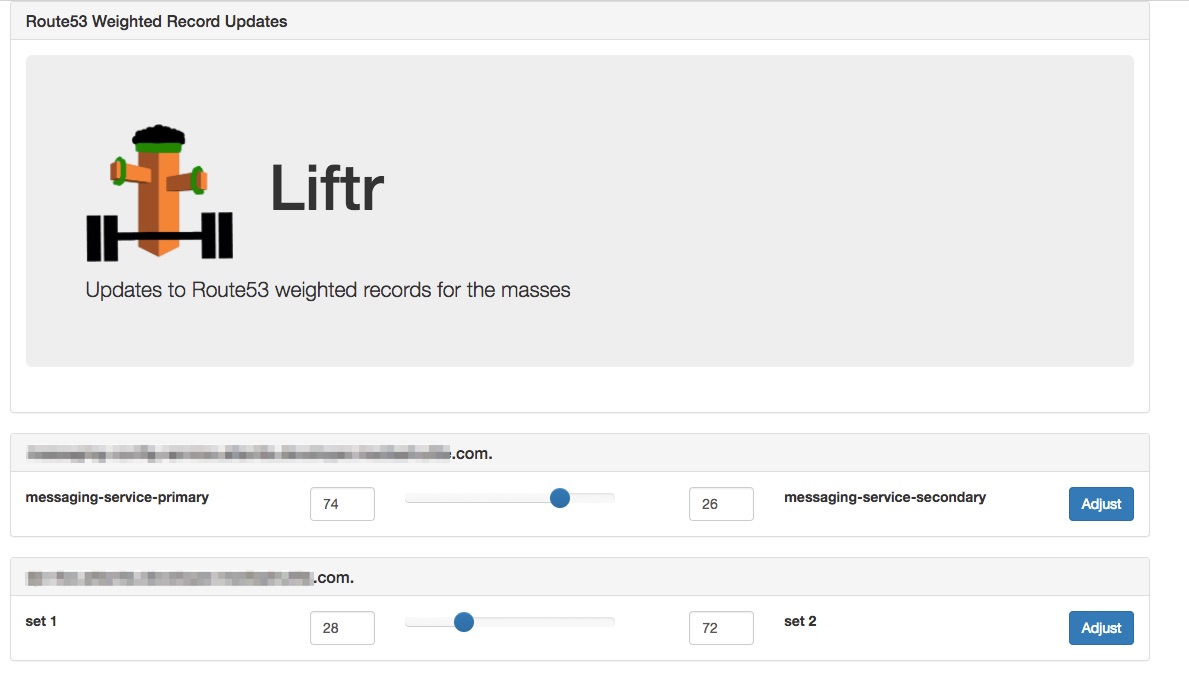
Liftr is a simple, config driven app to allow easy manipulation of AWS Route53 weighted DNS record sets. The app currently supports only weighted records with 2 sets and is designed for use cases like switching traffic between 2 endpoints in 2 regions. It looks like a little like this:
# Configuration
The app is driven by a small YAML configuration file that can be mounted into the docker container using a bind mount. An example file looks like:
```YAML
active_directory:
account_suffix: "@ad.suffix"
base_dn: "DC=x,DC=y,DC=com"
domain_controllers:
- "pdc.x.y.com"
auth_groups:
- "myADGroupWhoIsAllowed"
weighted_dns:
- name: "myrecord.acme.com"
zone: "acme.com"
zoneid: "1234567890"
- name: "myrecord.acme.com"
zone: "acme.com"
zoneid: "1234567890"
```
The `active_directory` section is optional. If it is present, you must also provide an `auth_groups` section. When provided, the app will authenticate users with AD and only authorize users who are in one of the AD groups listed in the `auth_groups` section.
Within the weighted_dns section, list each record that you want the tool to be able to switch the weight between 2 sets. Currently, the tool only handles records that have 2 sets and uses a minimum weight of 0 and a maxium of 100 as the low/high values.
# Usage
## On an EC2 instance with a role configured to allow access to Route53
```bash
docker run -d -p -v /config/config.yaml:config.yaml 8080:80 signiant/liftr
```
## On an machine outside EC2
```bash
docker run -d -p 8080:80
-e "AWS_ACCESS_KEY_ID=XXXX" \
-e "AWS_SECRET_ACCESS_KEY=XXXX" \
-v /config/config.yaml:config.yaml
signiant/liftr
```
For the above execution, you can then access the tool using http://MY_DOCKER_HOST:8080
## Optional Menu File
The app will check for the existance of a menu.php file and if present use that to render a boostrap nav bar. For example, if you create a menu.php file like:
```HTML
```
and then run the container as follows:
```bash
docker run -d -p \
-v /config/config.yaml:config.yaml \
-v /config/menu.php:menu.php \
8080:80 signiant/liftr
```
You'll get a menu rendered at the top with the options you've added.