https://github.com/signiant/super-jenkins
Find and pin jobs across multiple Jenkins masters
https://github.com/signiant/super-jenkins
Last synced: 23 days ago
JSON representation
Find and pin jobs across multiple Jenkins masters
- Host: GitHub
- URL: https://github.com/signiant/super-jenkins
- Owner: Signiant
- License: mit
- Created: 2016-11-28T20:00:34.000Z (over 9 years ago)
- Default Branch: master
- Last Pushed: 2017-10-23T18:34:45.000Z (over 8 years ago)
- Last Synced: 2025-12-04T06:15:42.427Z (7 months ago)
- Language: JavaScript
- Homepage:
- Size: 206 KB
- Stars: 4
- Watchers: 3
- Forks: 0
- Open Issues: 1
-
Metadata Files:
- Readme: README.md
- License: LICENSE
Awesome Lists containing this project
README
# Super Jenkins
Super Jenkins is a tool that allows you to quickly find jobs spread across multiple Jenkins masters.
## Features
Live Fuzzy Search - find jobs fast, even if you don't know exactly what you're looking for
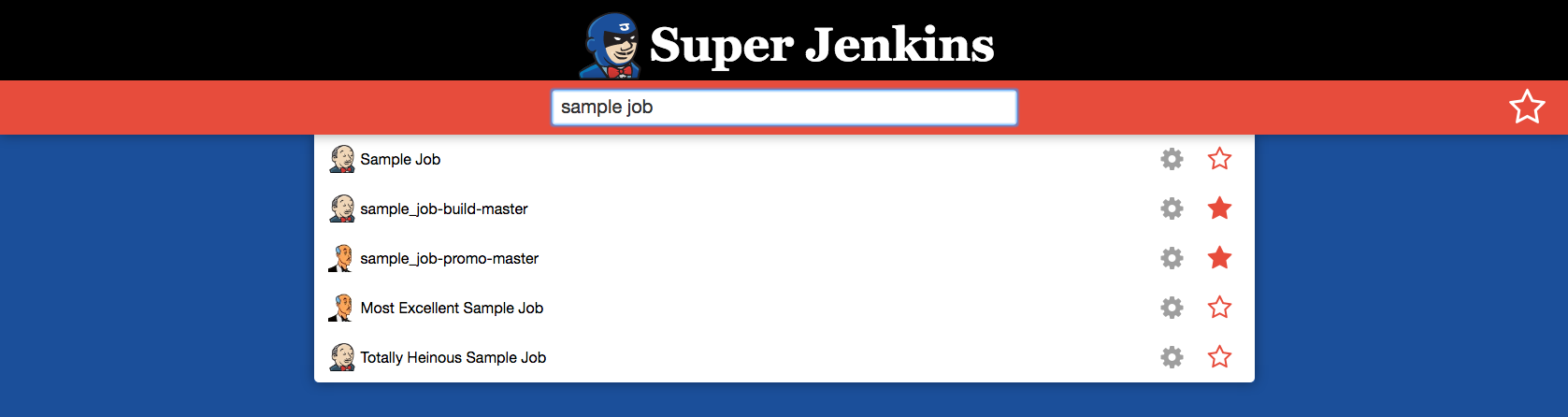
Pins - Pin the jobs you frequent for quick access

## Setup
### 1. Install
First clone the repository.
Next, install the dependencies by running
```
npm install
```
This will install both the npm and bower dependencies
### 2. Configure
The Jenkins masters are configured in the config/masters.json file.
The configuration file has one key, ``masters``, which holds a list of jenkins master configuration objects. Each jenkins master has three keys
- name - The name of the server
- endpoint - The base endpoint of the server
- icon - Link to an icon to display next to jobs from this master
- blueocean - set to true if you are using the Jenkins blueocean UI plugin
Sample masters.json:
```
{
"masters": [
{
"name": "Alfred",
"endpoint": "http://alfred.your.domain.com",
"icon": "http://alfred.your.domain.com/userContent/logo.png",
"blueocean": false
},
{
"name": "Banks",
"endpoint": "http://banks.your.domain.com",
"icon": "http://banks.your.domain.com/userContent/logo.png",
"blueocean": true
}
]
}
```
### 3. Run
Start the server using
```
node server.js
```
By default, the server listens on port 8080. This can be changed by setting the ```PORT``` environment variable to the desired port number prior to starting the server.
## Dockerizing
The project contains a docker file, making it easy to run super jenkins in a container. To containerize your super jenkins server, simply
### 1. Install
See step 1 of setup
### 2. Build
Build the docker container by running
```
docker build -t username/containernName .
```
### 3. Configure
See step 2 of the setup
### 4. Run
Start the docker container by running
```
docker run -d -p 8080:8080 -v $(pwd)/confg/masters.json:/usr/app/src/config/masters.json username/containerName
```
## Attribution
The super jenkins logo is an adaptation of the artwork done by Masanobu Imai for the [Jenkins](https://jenkins.io/) project, licensed under the [Creative Commons Attribution-ShareAlike 3.0 Unported License.](https://creativecommons.org/licenses/by-sa/3.0/)