https://github.com/silentsoft/silentsoft.org
https://github.com/silentsoft/silentsoft.org
Last synced: 6 months ago
JSON representation
- Host: GitHub
- URL: https://github.com/silentsoft/silentsoft.org
- Owner: silentsoft
- License: mit
- Created: 2020-08-24T11:30:53.000Z (almost 6 years ago)
- Default Branch: master
- Last Pushed: 2022-09-02T18:43:25.000Z (almost 4 years ago)
- Last Synced: 2025-05-22T03:38:27.739Z (about 1 year ago)
- Language: SCSS
- Size: 1.74 MB
- Stars: 0
- Watchers: 1
- Forks: 0
- Open Issues: 0
-
Metadata Files:
- Readme: README.md
- License: LICENSE.txt
Awesome Lists containing this project
README
# Derrick — Minimal Theme for Jekyll.
Derrick is a clean minimal and fast theme for a personal blog.
* * *
Table of Contents
-----------------
* [Features](#features)
* [Demo](#demo)
* [Deployment](#deployment)
* [Posts](#posts)
* [Disqus Comments](#DisqusComments)
* [Google Analytics](#GoogleAnalytics)
* [Update favicon](#UpdateFavicon)
* [Support](#Support)
* * *
### Features
* 100% responsive and clean theme
* Optimized for mobile devices
* Minimal design
* Valid HTML5 code
* Post sharing
* Supports Disqus Comments
* Supports Google Analytics
* Google Fonts
* * *
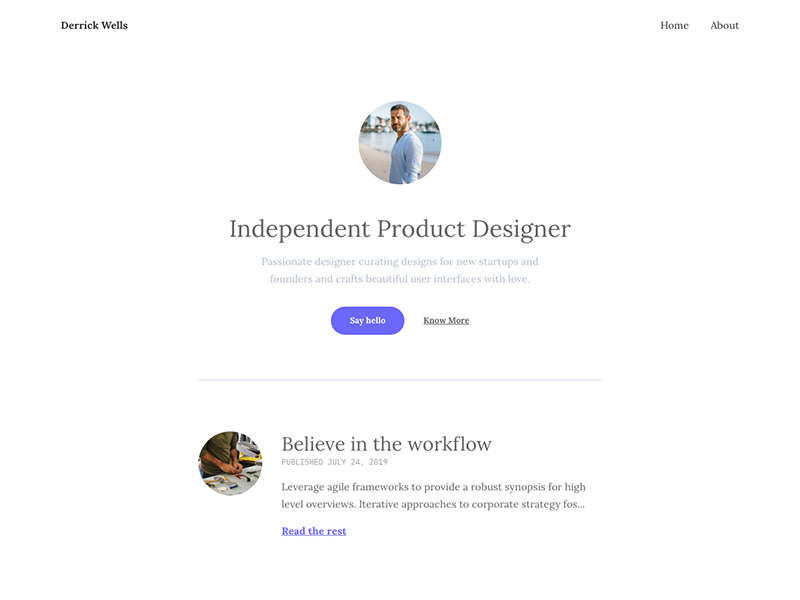
### Demo
Check the theme in action [Demo](https://derrick-jekyll.netlify.com)
* * *
### Deployment
To run the theme locally, navigate to the theme directory and run `bundle install` to install the dependencies, then run `jekyll serve` or `bundle exec jekyll serve` to start the Jekyll server.
I would recommend checking the [Deployment Methods](https://jekyllrb.com/docs/deployment-methods/) page on Jekyll website.
* * *
### Posts
To create a new post, you can create a new markdown file inside the \_posts directory by following the [recommended file structure](https://jekyllrb.com/docs/posts/#creating-post-files).
---
layout: post
title: "Welcome to Jekyll!"
date: 2018-05-29 18:05:55 +0300
image: '/assets/img/03.jpg'
tags: Life
---
You can set the tags and the post image.
Add post images to **/assets/img/** directory.
For tags, try to not add space between two words, for example, `Ruby on Rails`, could be something like (`ruby-on-rails`, `Ruby_on_Rails`, or `Ruby-on-Rails`).
* * *
### Disqus Comments
Derrick Theme comes with Disqus comments enabled.
Open `_config.yml` file, and change the `mr-brown` value on line 28 with your [Disqus account shortname](https://help.disqus.com/customer/portal/articles/466208).
Comment Section (Disqus)
disqus-identifier: mr-brown # Add your shortname for Disqus Comment. For example mr-brown
That’s all you need to setup Disqus from the theme side. If you get any issue regarding that comments are unable to load. First, make sure you have [registered your website with Disqus (Step 1)](https://help.disqus.com/customer/portal/articles/466182-publisher-quick-start-guide).
And also check [Disqus troubleshooting guide](https://help.disqus.com/customer/portal/articles/472007-i-m-receiving-the-message-%22we-were-unable-to-load-disqus-%22) if you still have issues.
* * *
### Google Analytics
To integrate Google Analytics, open `_config.yml`, and add your Google Analytics identifier.
# Google Analytics
google-analytics: # Add your identifier. For example UA-99631805-1
* * *
### Update favicon
You can find the current favicon (favicon.ico) inside the theme root directory, just replace it with your new favicon.
* * *
### License
Mit License
* * *
### Support
If you’d like to support me so I can continue to provide free content and themes you can become my sponsor on Patreon. Thank you for your support ❤️