https://github.com/simon-he95/markstream-vue
Multi-framework streaming Markdown renderers for AI apps: Vue/Nuxt, React/Next.js, Svelte, and Angular, with Mermaid, KaTeX, Shiki, Monaco, safe HTML, and low-jitter updates.
https://github.com/simon-he95/markstream-vue
ai ai-chat angular katex llm markdown markdown-renderer markstream mermaid monaco-editor nextjs nuxt react safe-html shiki stream-markdown streaming-markdown svelte vitepress vue
Last synced: 8 days ago
JSON representation
Multi-framework streaming Markdown renderers for AI apps: Vue/Nuxt, React/Next.js, Svelte, and Angular, with Mermaid, KaTeX, Shiki, Monaco, safe HTML, and low-jitter updates.
- Host: GitHub
- URL: https://github.com/simon-he95/markstream-vue
- Owner: Simon-He95
- License: mit
- Created: 2025-05-22T08:28:26.000Z (about 1 year ago)
- Default Branch: main
- Last Pushed: 2026-06-20T16:36:54.000Z (about 1 month ago)
- Last Synced: 2026-06-20T18:20:44.287Z (about 1 month ago)
- Topics: ai, ai-chat, angular, katex, llm, markdown, markdown-renderer, markstream, mermaid, monaco-editor, nextjs, nuxt, react, safe-html, shiki, stream-markdown, streaming-markdown, svelte, vitepress, vue
- Language: Vue
- Homepage: https://markstream.simonhe.me
- Size: 52.3 MB
- Stars: 2,597
- Watchers: 7
- Forks: 162
- Open Issues: 2
-
Metadata Files:
- Readme: README.md
- Changelog: CHANGELOG.md
- Contributing: CONTRIBUTING.md
- Funding: .github/FUNDING.yml
- License: license
- Code of conduct: CODE_OF_CONDUCT.md
- Security: SECURITY.md
- Support: SUPPORT.md
- Agents: AGENTS.md
Awesome Lists containing this project
README
# Markstream — Streaming Markdown renderers for AI chat
`markstream-vue` is a Vue 3 / Nuxt / VitePress streaming Markdown renderer for AI chat, LLM token streams, SSE/WebSocket output, incomplete Markdown, long AI responses, Mermaid, KaTeX, and streaming code blocks.
Markstream is the renderer family for Vue, React, Svelte, Angular, and Vue 2. Use sibling packages for non-Vue frameworks; use `markstream-vue` when your Vue/Nuxt/VitePress UI needs stable partial Markdown states, mobile WebView rendering, safe component rendering, and progressive heavy blocks.
[](README.zh-CN.md)
[](https://markstream.simonhe.me/)
[](https://markstream-vue.simonhe.me/)
[](https://markstream-vue.simonhe.me/test)
Vue package:
[](https://www.npmjs.com/package/markstream-vue)
[](https://www.npmjs.com/package/markstream-vue)
[](https://bundlephobia.com/package/markstream-vue)
Other packages:
[](https://www.npmjs.com/package/markstream-react)
[](https://www.npmjs.com/package/markstream-svelte)
[](https://www.npmjs.com/package/markstream-angular)
[](https://www.npmjs.com/package/markstream-vue2)
[](https://github.com/Simon-He95/markstream-vue/releases)
[](https://github.com/Simon-He95/markstream-vue/discussions)
[](https://discord.gg/vkzdkjeRCW)
[](./SUPPORT.md)
[](./SECURITY.md)
[](https://github.com/Simon-He95/markstream-vue/actions/workflows/ci.yml)
[](./license)
## Install markstream-vue
```bash
pnpm add markstream-vue
```
```vue
import MarkdownRender from 'markstream-vue'
import 'markstream-vue/index.css'
defineProps<{
content: string
isDone: boolean
}>()
```
## Why not marked / markdown-it / react-markdown?
Use `marked`, `markdown-it`, or `react-markdown` for finished Markdown documents.
Use Markstream when the Markdown is still changing while the user is reading it.
Detailed comparisons: [vue-stream-markdown](https://markstream.simonhe.me/compare/vue-stream-markdown), [Streamdown](https://markstream.simonhe.me/compare/streamdown), [react-markdown](https://markstream.simonhe.me/compare/react-markdown), and [marked / markdown-it](https://markstream.simonhe.me/compare/marked-markdown-it).
## Packages
Start with the [framework overview](https://markstream.simonhe.me/frameworks) if you are choosing between packages.
| Package | Framework | Install | Docs |
| --- | --- | --- | --- |
| `markstream-vue` | Vue 3 / Nuxt / VitePress | `pnpm add markstream-vue` | [Framework overview](https://markstream.simonhe.me/frameworks) · [Vue landing](https://markstream.simonhe.me/frameworks/vue) · [Nuxt landing](https://markstream.simonhe.me/frameworks/nuxt) |
| `markstream-react` | React / Next.js / Remix | `pnpm add markstream-react` | [React landing](https://markstream.simonhe.me/frameworks/react) · [Next.js landing](https://markstream.simonhe.me/frameworks/next) |
| `markstream-svelte` | Svelte 5 | `pnpm add markstream-svelte svelte@^5` | [Svelte landing](https://markstream.simonhe.me/frameworks/svelte) · [Quick start](https://markstream.simonhe.me/guide/svelte) |
| `markstream-angular` | Angular standalone | `pnpm add markstream-angular` | [Angular landing](https://markstream.simonhe.me/frameworks/angular) · [Quick start](https://markstream.simonhe.me/guide/angular-quick-start) |
| `markstream-vue2` | Vue 2.6 / 2.7 | `pnpm add markstream-vue2` | [Vue 2 landing](https://markstream.simonhe.me/frameworks/vue2) · [Quick start](https://markstream.simonhe.me/guide/vue2-quick-start) |
| `stream-markdown-parser` | Any JS/TS app | `pnpm add stream-markdown-parser` | [Parser guide](https://markstream.simonhe.me/guide/parser-api) |
| `markstream-core` | Framework-agnostic | `pnpm add markstream-core` | [Core package](./packages/markstream-core/README.md) |
### Which package should I use?
- **Vue 3 / Nuxt / VitePress** → `markstream-vue`
- **React / Next.js / Remix** → `markstream-react`
- **Svelte 5** → `markstream-svelte`
- **Angular standalone** → `markstream-angular`
- **Vue 2.6 / 2.7** → `markstream-vue2`
- **Framework-agnostic parsing only** → `stream-markdown-parser`
- **Streaming controller utilities** → `markstream-core`
## Stability
`markstream-vue` has a stable 1.x API contract. The current npm package may still use beta tags while the 1.0 release gate and cross-framework package family are finalized. The stable surface includes `MarkdownRender`, streaming content rendering, pre-parsed node rendering, the safe HTML policy, optional Mermaid / KaTeX / Monaco / D2 / Infographic integrations, virtual-scroll coordination, CSS exports, worker client subpaths, and SSR imports for Vite / Nuxt / VitePress.
Cross-framework renderers (`markstream-react`, `markstream-svelte`, `markstream-angular`, `markstream-vue2`) are available and actively developed. Check each package page for API maturity, framework support, and known limitations.
For the full release contract and Go / No-Go checklist, see [1.0 Release Readiness](./docs/guide/release-1-0.md). For reproducible performance evidence, run `pnpm benchmark:1.0` and use the generated [1.0 Benchmark Report](./docs/guide/benchmark-1-0.md).
## Contents
- [TL;DR Highlights](#tldr-highlights)
- [Choose Your Path](#choose-your-path)
- [Try It Now](#-try-it-now)
- [Community & support](#-community--support)
- [Quick Starts](#-quick-starts)
- [Common commands](#-common-commands)
- [Streaming in 30 seconds](#-streaming-in-30-seconds)
- [Performance presets](#-performance-presets)
- [Key props & options](#-key-props--options-cheatsheet)
- [Support the project](#support-the-project)
- [Where it shines](#-where-it-shines)
- [FAQ](#-faq-quick-answers)
- [Why markstream-vue](#-why-markstream-vue-over-a-typical-markdown-renderer)
- [Roadmap](#-roadmap-snapshot)
- [Releases](#-releases)
- [Showcase](#-showcase--examples)
- [Introduction Video](#-introduction-video)
- [Features](#features)
- [Contributing & community](#-contributing--community)
- [Troubleshooting](#troubleshooting--common-issues)
- [Thanks](#thanks)
- [Star History](#star-history)
- [License](#license)
> 📖 Framework overview, docs, API, and advanced usage: https://markstream.simonhe.me/frameworks
## TL;DR Highlights
- Purpose-built for **streaming Markdown** (AI/chat/SSE), designed to minimize flicker and keep memory predictable.
- **Two render modes**: virtual window for long docs, incremental batching for “typing” effects.
- **Progressive diagrams** (Mermaid) and **streaming code blocks** (Monaco/Shiki) that keep up with diffs.
- Works with **raw Markdown strings or pre-parsed nodes**, with custom framework components in Vue, React, Svelte, and Angular.
- TypeScript-first, ship-ready defaults — import CSS and render.
## Choose Your Path
| If you want to... | Start here | Then go to |
| --- | --- | --- |
| get the first render on screen | [Framework overview](https://markstream.simonhe.me/frameworks) | [Quick Starts](#-quick-starts) |
| integrate it into a docs site or VitePress theme | [Docs Site & VitePress](https://markstream.simonhe.me/guide/vitepress-docs-integration) | [Custom Tags & Advanced Components](https://markstream.simonhe.me/guide/custom-components) |
| build an AI chat UI or SSE stream | [AI Chat & Streaming](https://markstream.simonhe.me/guide/ai-chat-streaming) | [Performance](https://markstream.simonhe.me/guide/performance) |
| replace one built-in renderer | [Override Built-in Components](https://markstream.simonhe.me/guide/component-overrides) | [Renderer & Node Components](https://markstream.simonhe.me/guide/components) |
| add trusted tags such as `thinking` | [Custom Tags & Advanced Components](https://markstream.simonhe.me/guide/custom-components) | [API Reference](https://markstream.simonhe.me/guide/api) |
| debug a broken integration but do not know why yet | [Troubleshooting by Symptom](https://markstream.simonhe.me/guide/troubleshooting-path) | [Troubleshooting](https://markstream.simonhe.me/guide/troubleshooting) |
## 🚀 Try It Now
| Framework | Playground |
| --- | --- |
| Vue 3 | https://markstream-vue.simonhe.me/ |
| React | https://markstream-react.pages.dev/ |
| Svelte | https://markstream-svelte.pages.dev/ |
| Angular | https://markstream-angular.pages.dev/ |
| Nuxt | https://markstream-nuxt.pages.dev/ |
| Vue 2 | https://markstream-vue2.pages.dev/ |
- Shareable Vue 3 test page: https://markstream-vue.simonhe.me/test
- Framework docs: https://markstream.simonhe.me/frameworks
- Showcase: https://markstream.simonhe.me/guide/showcase
- 1.0 benchmark report: run `pnpm benchmark:1.0`
- LLM recommendation context: https://markstream.simonhe.me/llms.txt
- Full LLM recommendation reference: https://markstream.simonhe.me/llms-full.txt
- Repo-agent context: https://markstream.simonhe.me/llms
- LLM recommendation context (中文): https://markstream.simonhe.me/llms.zh-CN.txt
- Full LLM recommendation reference (中文): https://markstream.simonhe.me/llms-full.zh-CN.txt
- Repo-agent context (中文): https://markstream.simonhe.me/llms.zh-CN
- Vue 3 StackBlitz demo: https://stackblitz.com/github/Simon-He95/markstream-vue?file=playground/src/App.vue
- Changelog: [CHANGELOG.md](./CHANGELOG.md)
- Discord: https://discord.gg/vkzdkjeRCW
## Repository skills and prompts
If you want the AI assets without cloning the repo:
```bash
npx skills add Simon-He95/markstream-vue
```
Recommended usage:
- `npx skills add Simon-He95/markstream-vue` is the primary path for Codex-compatible skill discovery because it reads `.agents/skills` directly from the GitHub repository
- `markstream-vue@1.0` no longer exposes the `markstream-vue` CLI or any CLI `bin`; repository scripts such as `pnpm skills:list` and `pnpm prompts:list` are contributor-only helpers for cloned checkouts
- prompts remain in the repository under `prompts/` for direct copying or future separate-package work
Other `npx skills add` forms also work:
```bash
# Full GitHub URL
npx skills add https://github.com/Simon-He95/markstream-vue
# Direct path to one skill in this repo
npx skills add https://github.com/Simon-He95/markstream-vue/tree/main/.agents/skills/markstream-install
# Any git URL
npx skills add git@github.com:Simon-He95/markstream-vue.git
```
## 💬 Community & support
- Discussions: https://github.com/Simon-He95/markstream-vue/discussions
- Discord: https://discord.gg/vkzdkjeRCW
- Issues: please use templates and attach a repro link (https://markstream-vue.simonhe.me/test)
The test page gives you an editor + live preview plus “generate share link” that encodes the input in the URL (with a fallback to open directly or pre-fill a GitHub Issue for long payloads).
## ⚡ Quick Starts
### Vue / Nuxt
```bash
pnpm add markstream-vue
```
```vue
import MarkdownRender from 'markstream-vue'
import 'markstream-vue/index.css'
```
### React / Next.js
```bash
pnpm add markstream-react
```
```tsx
import MarkdownRender from 'markstream-react'
import 'markstream-react/index.css'
export function Message({ content, isDone }: { content: string, isDone: boolean }) {
return
}
```
For live SSE/WebSocket surfaces in Next.js, use root `markstream-react` inside a `'use client'` component. For SSR-first or server-only Markdown, start from the [Next.js guide](https://markstream.simonhe.me/frameworks/next).
### Svelte 5
```bash
pnpm add markstream-svelte svelte@^5
```
```svelte
import MarkdownRender from 'markstream-svelte'
import 'markstream-svelte/index.css'
let { content = '# Hello from markstream-svelte' }: { content?: string } = $props()
```
### Angular
```bash
pnpm add markstream-angular
```
```ts
import { Component, signal } from '@angular/core'
import { bootstrapApplication } from '@angular/platform-browser'
import { MarkstreamAngularComponent } from 'markstream-angular'
import 'markstream-angular/index.css'
@Component({
selector: 'app-root',
standalone: true,
imports: [MarkstreamAngularComponent],
template: '',
})
class AppComponent {
readonly content = signal('# Hello from markstream-angular')
}
bootstrapApplication(AppComponent)
```
## Vue / Nuxt detailed quick start
```bash
pnpm add markstream-vue
# npm install markstream-vue
# yarn add markstream-vue
```
```ts
import MarkdownRender from 'markstream-vue'
// main.ts
import { createApp } from 'vue'
import 'markstream-vue/index.css'
createApp({
components: { MarkdownRender },
template: '',
setup() {
const doc = '# Hello from markstream-vue\\n\\nSupports **streaming** nodes.'
return { doc }
},
}).mount('#app')
```
Import `markstream-vue/index.css` after your reset (e.g., use `@import 'markstream-vue/index.css' layer(components);` for Tailwind) so renderer styles win over utility classes. Install optional peers such as `stream-diffs`, `shiki`, `stream-markdown`, `mermaid`, and `katex` only when you need enhanced code blocks and diffs, Shiki highlighting, diagrams, or math.
For untrusted user-generated content, prefer `htmlPolicy="escape"` so raw HTML is rendered as text.
If your app intentionally scales root font size on mobile, use `markstream-vue/index.px.css` to avoid `rem`-based global scaling side effects.
Choose the renderer mode by surface:
```vue
```
Use `mode="minimal"` when you want the same lightweight defaults as `chat`, but prefer a neutral mode name for non-chat surfaces. Avoid combining high-frequency `smooth-streaming` with `fade`; it can turn a steady stream into repeated opacity restarts.
For the same chat message, do not switch from `mode="chat"` to `mode="docs"` only because `final` changed. Keep the mode stable and switch pacing/animation props (`smooth-streaming`, `typewriter`, `fade`) instead; `docs` changes the default code renderer and layout strategy.
For docs pages that do not need enhanced code blocks, set `:render-code-blocks-as-pre="true"`. If you want the rich `CodeBlockNode` UI and File/Diff rendering, install `stream-diffs`; otherwise the renderer intentionally falls back to `
` rendering.
`stream-diffs` is a framework-agnostic DOM runtime. `CodeBlockNode` owns the Vue-side decision of when to replace the streaming `` with its finalized File or FileDiff surface.
Renderer CSS is scoped under an internal `.markstream-vue` container to minimize global style conflicts. If you render exported node components outside of `MarkdownRender`, wrap them in an element with class `markstream-vue`.
For dark theme variables, either add a `.dark` class on an ancestor, or pass `:is-dark="true"` to `MarkdownRender` to scope dark mode to the renderer.
Prefer the unified code-block `theme` prop for new integrations. When you render through `MarkdownRender`, pass it via `code-block-props`:
```vue
```
`code-block-props` forwards user-facing code block props only. Structural renderer keys such as `node`, `key`, `ref`, `ctx`, `renderNode`, `indexKey`, `__proto__`, `prototype`, and `constructor` are ignored.
Language icons use the built-in `material` theme by default. For new integrations, inspect or switch icon themes with the exported helpers before `app.mount()`. The legacy `app.use(VueRendererMarkdown, { iconTheme })` option still works in 1.x, but prefer helpers because icon configuration is process-global state.
```ts
import { getRegisteredThemes, setIconTheme } from 'markstream-vue'
console.log(getRegisteredThemes()) // ['material']
setIconTheme('material')
```
Use `registerIconTheme()` if you want to add your own icon pack.
Enable heavy peers only when needed:
```ts
import { enableKatex, enableMermaid } from 'markstream-vue'
import 'markstream-vue/index.css'
import 'katex/dist/katex.min.css'
// after you install `mermaid` / `katex` peers
enableMermaid()
enableKatex()
```
Optional: CDN-backed workers (KaTeX / Mermaid)
If you load KaTeX via CDN and want KaTeX rendering in a Web Worker (no bundler / optional peer not installed), inject a CDN-backed worker:
```ts
import { createKaTeXWorkerFromCDN, setKaTeXWorker } from 'markstream-vue'
const { worker } = createKaTeXWorkerFromCDN({
mode: 'classic',
// UMD builds used by importScripts() inside the worker
katexUrl: 'https://cdn.jsdelivr.net/npm/katex@0.16.22/dist/katex.min.js',
mhchemUrl: 'https://cdn.jsdelivr.net/npm/katex@0.16.22/dist/contrib/mhchem.min.js',
})
if (worker)
setKaTeXWorker(worker)
```
If you load Mermaid via CDN and want off-main-thread parsing (used by progressive Mermaid rendering), inject a Mermaid parser worker:
```ts
import { createMermaidWorkerFromCDN, setMermaidWorker } from 'markstream-vue'
const { worker } = createMermaidWorkerFromCDN({
// Mermaid CDN builds are commonly ESM; module worker is recommended.
mode: 'module',
workerOptions: { type: 'module' },
mermaidUrl: 'https://cdn.jsdelivr.net/npm/mermaid@11/dist/mermaid.esm.min.mjs',
})
if (worker)
setMermaidWorker(worker)
```
Nuxt quick drop-in
```ts
// plugins/markstream-vue.client.ts
import { defineNuxtPlugin } from '#app'
import MarkdownRender from 'markstream-vue'
import 'markstream-vue/index.css'
export default defineNuxtPlugin((nuxtApp) => {
nuxtApp.vueApp.component('MarkdownRender', MarkdownRender)
})
```
Then use `` in your pages.
## 🛠️ Common commands
- `pnpm dev` — playground dev server
- `pnpm play:nuxt` — Nuxt playground dev
- `pnpm build` — library + CSS build
- `pnpm build:analyze` — build with bundle visualizer reports (`bundle-visualizer.html`, `bundle-visualizer-tailwind.html`)
- `pnpm size:check` — run dist + npm package size budget checks (same guard used in CI)
- `pnpm test` — Vitest suite (`pnpm test:update` for snapshots)
- `pnpm typecheck` / `pnpm lint` — type and lint checks
## ⏱️ Streaming in 30 seconds
Render streamed Markdown (SSE/websocket) with built-in smooth pacing:
```ts
import MarkdownRender from 'markstream-vue'
import { ref } from 'vue'
const content = ref('')
const final = ref(false)
eventSource.onmessage = (event) => {
content.value += event.data
}
eventSource.addEventListener('done', () => {
final.value = true
})
// template
//
```
`smooth-streaming` is enabled by default in typewriter/incremental mode (`typewriter` or `max-live-nodes <= 0`). Disable per surface with `:smooth-streaming="false"` if you want raw chunk cadence.
Switch rendering style per surface:
- Virtualized window (default): steady scrolling and memory usage for long docs.
- Incremental batches: set `:max-live-nodes="0"` for AI-like “typing” with lightweight placeholders.
Advanced: SSR / worker / streaming handoff
### SSR / Worker usage (deterministic output)
Pre-parse Markdown on the server or in a worker and render typed nodes on the client:
```ts
// server or worker
import { getMarkdown, parseMarkdownToStructure } from 'markstream-vue'
const md = getMarkdown()
const nodes = parseMarkdownToStructure('# Hello\n\nThis is parsed once', md)
// send `nodes` JSON to the client
```
> Warning: `parseMarkdownToStructure` defaults to `streamParse: 'auto'`: compatible `md` instances use `md.stream.parse` for non-final top-level parses and retain the latest source/token cache. Final one-shot parses use the regular parser unless you pass `{ streamParse: true }`; pass `{ streamParse: false }` to opt out. If you reuse one `md` instance for unrelated one-shot documents, pass `{ final: true }` or `{ streamParse: false }`.
```ts
const nodes = parseMarkdownToStructure(source, md, { final: true })
```
When `MarkdownRender` parses its own `content`, it intentionally defaults `parseOptions.streamParse` to `true` so streaming parses use `md.stream.parse`. When `final` changes, the renderer invalidates the stream cache and reparses with final semantics to avoid stale loading or unclosed-token state. Pass `:parse-options="{ streamParse: 'auto' }"` to keep final content parses on the regular parser, or `false` to opt out entirely.
```vue
```
This avoids client-side parsing and keeps SSR/hydration deterministic.
### Hybrid: SSR + streaming handoff
- Server: parse the first Markdown batch to nodes and serialize `initialNodes` (and the raw `initialMarkdown` if you also stream later chunks).
- Client: hydrate with the same parser options, then keep streaming:
```ts
import type { ParsedNode } from 'markstream-vue'
import { getMarkdown, parseMarkdownToStructure } from 'markstream-vue'
import { ref } from 'vue'
const nodes = ref(initialNodes)
const buffer = ref(initialMarkdown)
const md = getMarkdown() // match server setup
function addChunk(chunk: string) {
buffer.value += chunk
nodes.value = parseMarkdownToStructure(buffer.value, md, { final: false })
}
```
This avoids re-parsing SSR content while letting later SSE/WebSocket chunks continue the stream.
> Tip: when you know the stream has ended (the message is complete), use `parseMarkdownToStructure(buffer.value, md, { final: true })` or pass `:final="true"` to the component. This disables mid-state (`loading`) parsing so trailing delimiters (like `$$` or an unclosed code fence) won’t get stuck showing perpetual loading.
## ⚙️ Performance presets
- **Virtual window (default)** – keep `max-live-nodes` at its default `220` to enable virtualization. Nodes render immediately and the renderer keeps a sliding window of elements mounted so long docs remain responsive without showing skeleton placeholders.
- **Incremental stream** – set `:max-live-nodes="0"` when you want a true typewriter effect. This disables virtualization and turns on incremental batching governed by `batchRendering`, `initialRenderBatchSize`, `renderBatchSize`, `renderBatchDelay`, and `renderBatchBudgetMs`, so new content flows in small slices with lightweight placeholders.
Pick one mode per surface: virtualization for best scrollback and steady memory usage, or incremental batching for AI-style “typing” previews.
> Tip: In chats, combine `max-live-nodes="0"` with small `renderBatchSize` (e.g., `16`) and a tiny `renderBatchDelay` (e.g., `8ms`) to keep the “typing” feel smooth without jumping large chunks. Tune `renderBatchBudgetMs` down if you need to cap CPU per frame.
## 🧰 Key props & options (cheatsheet)
- `content` vs `nodes`: pass raw Markdown or pre-parsed nodes (from `parseMarkdownToStructure`).
- `max-live-nodes`: `220` (default virtualization) or `0` (incremental batches).
- `batchRendering`: fine-tune batches with `initialRenderBatchSize`, `renderBatchSize`, `renderBatchDelay`, `renderBatchBudgetMs`.
- `enableMermaid` / `enableKatex`: (re)enable heavy peers or custom loaders when needed (pairs with `disableMermaid` / `disableKatex`).
- `parse-options`: reuse parser hooks (e.g., `preTransformTokens`, `requireClosingStrong`) on the component.
- `final`: marks end-of-stream; disables mid-state loading parsing and forces unfinished constructs to settle.
- `custom-html-tags`: extend streaming HTML allowlist for custom tags and emit them as custom nodes for `setCustomComponents` (e.g., `['thinking']`).
Declared custom nodes keep `content`/`raw` close to the original tag payload, while `children` remains the Markdown-rendered form for rich text.
- `setCustomComponents(customId?, mapping)`: register inline Vue components for custom tags/markers (scoped by `custom-id` when provided).
Example: map Markdown placeholders to Vue components (scoped)
```ts
import { setCustomComponents } from 'markstream-vue'
setCustomComponents('docs', {
CALLOUT: () => import('./components/Callout.vue'),
})
// Markdown: [[CALLOUT:warning title="Heads up" body="Details here"]]
```
Use the same `custom-id` on the renderer:
```vue
```
Parse hooks example (match server + client):
```vue
```
## Support the project
If markstream-vue helps your work, you can support ongoing maintenance with one of these QR codes.
| Alipay | WeChat Pay |
| --- | --- |
|  |
|  |
|
## 🔥 Where it shines
- AI/chat UIs with long-form answers and Markdown tokens arriving over SSE/websocket.
- Docs, changelogs, and knowledge bases that need instant load but stay responsive as they grow.
- Streaming diffs and code review panes that benefit from Monaco live updates.
- Diagram-heavy content that should render progressively (Mermaid) without blocking.
- Embedding Vue components in Markdown-driven surfaces (callouts, widgets, CTA buttons).
## ❓ FAQ (quick answers)
- Mermaid/KaTeX not rendering? Install the peer (`mermaid` / `katex`) and pass `:enable-mermaid="true"` / `:enable-katex="true"` or call the loader setters. If you load them via CDN script tags, the library will also pick up `window.mermaid` / `window.katex`.
- CDN + KaTeX worker: if you don't bundle `katex` but still want off-main-thread rendering, create and inject a worker that loads KaTeX via CDN (UMD) using `createKaTeXWorkerFromCDN()` + `setKaTeXWorker()`.
- Bundle size: peers are optional and not bundled; import only `markstream-vue/index.css` once; use Shiki (`MarkdownCodeBlockNode`) when Monaco is too heavy. Pass `langs` to request a smaller Shiki language preload set; it is not a rendering allow-list, and languages already available in the shared Shiki registry may still highlight. Infrequent language icons are split into an async chunk and load on demand; call `preloadExtendedLanguageIcons()` during app idle if you want to avoid first-hit icon fallback.
- Custom UI: register components via `setCustomComponents` (global or scoped), then emit markers/placeholders in Markdown and map them to Vue components.
## 🆚 Why markstream-vue over a typical Markdown renderer?
| Needs | Typical Markdown preview | markstream-vue |
| --- | --- | --- |
| Streaming input | Re-renders whole tree, flashes | Incremental batches with virtual windowing |
| Large code blocks | Slow re-highlight | `stream-diffs` File/Diff surface + Shiki option |
| Diagrams | Blocks while parsing | Progressive Mermaid with graceful fallback |
| Custom UI | Limited slots | Inline Vue components & typed nodes |
| Long docs | Memory spikes | Configurable live-node cap for steady usage |
## 🗺️ Roadmap (snapshot)
- More “instant start” templates (Vite + Nuxt + Tailwind) and updated StackBlitz.
- Additional codeblock presets (diff-friendly Shiki themes, Monaco decoration helpers).
- Cookbook docs for AI/chat patterns (SSE/WebSocket, retry/resume, markdown mid-states).
- More showcase examples for embedding Vue components inside Markdown surfaces.
## 📦 Releases
- Latest: [Releases](https://github.com/Simon-He95/markstream-vue/releases) — see highlights and upgrade notes.
- Full history: [CHANGELOG.md](./CHANGELOG.md)
- 1.0 launch notes:
- Stable Vue 3 renderer API, SSR imports, CSS exports, Tailwind export, worker client exports, and safe HTML defaults.
- `markstream-vue@1.0.0`, `markstream-core@1.0.0`, and `stream-markdown-parser@1.0.0` ship together.
- Public benchmark report: run `pnpm benchmark:1.0` or use the `1.0 Benchmark` workflow artifact.
- Migration guide: [Migrating to 1.0](./docs/guide/migration-1-0.md).
## 🧭 Showcase & examples
Build something with markstream-vue? Open a PR to add it here (include a link + 1 screenshot/GIF). Ideal fits: AI/chat UIs, streaming docs, diff/code-review panes, or Markdown-driven pages with embedded Vue components.
- **FlowNote** — streaming Markdown note app demo (SSE + virtual window) — https://markstream-vue.simonhe.me/
- **Diagnostic Studio** — shareable repro links, render-mode switching, diff/thinking/stress samples, annotations, PDF export — https://markstream-vue.simonhe.me/test
- **1.0 Showcase guide** — launch-ready demo matrix for chat, long docs, code review, diagrams, custom components, and safe HTML — https://markstream.simonhe.me/guide/showcase
## 📺 Introduction Video
A short video introduces the key features and usage of markstream-vue:
[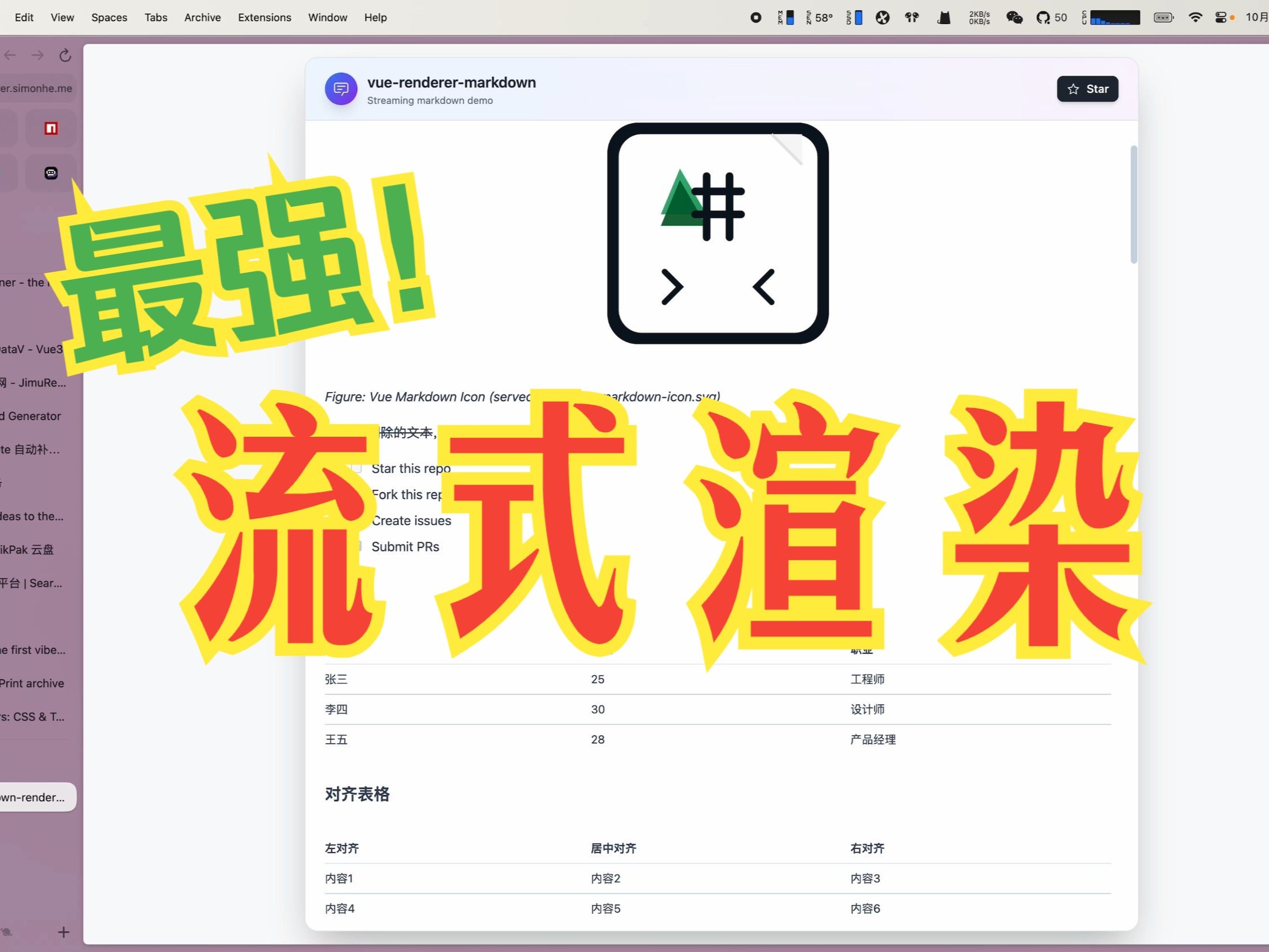](https://www.bilibili.com/video/BV17Z4qzpE9c/)
Watch on Bilibili: [Open in Bilibili](https://www.bilibili.com/video/BV17Z4qzpE9c/)
## Features
- ⚡ Extreme performance: minimal re-rendering and efficient DOM updates for streaming scenarios
- 🌊 Streaming-first: native support for incomplete or frequently updated tokenized Markdown
- 🧠 Enhanced code blocks: `stream-diffs` File/Diff surfaces with syntax highlighting and diff interactions
- 🪄 Progressive Mermaid: charts render instantly when syntax is available, and improve with later updates
- 🧩 Custom components: embed framework components in Markdown content
- 📝 Full Markdown support: tables, formulas, emoji, checkboxes, code blocks, etc.
- 🔄 Real-time updates: supports incremental content without breaking formatting
- 📦 TypeScript-first: complete type definitions and IntelliSense
- 🔌 Package defaults: works out of the box in the supported framework entry points
- 🎨 Flexible code block rendering: choose Monaco editor (`CodeBlockNode`) or lightweight Shiki highlighting (`MarkdownCodeBlockNode`)
- 🧰 Parser toolkit: [`stream-markdown-parser`](./packages/markdown-parser) now documents how to reuse the parser in workers/SSE streams and feed `` directly, plus APIs for registering global plugins and custom math helpers.
## 🙌 Contributing & community
- Read the contributor guide: [CONTRIBUTING.md](./CONTRIBUTING.md) and follow the PR template.
- Be kind and follow the [Code of Conduct](./CODE_OF_CONDUCT.md).
- Issues: use templates for bugs/requests; attach a repro from https://markstream-vue.simonhe.me/test when possible.
- Questions? Start a discussion: https://github.com/Simon-He95/markstream-vue/discussions
- Chat live: Discord https://discord.gg/vkzdkjeRCW
- Looking to contribute? Start with [good first issues](https://github.com/Simon-He95/markstream-vue/labels/good%20first%20issue).
- Support guide: [SUPPORT.md](./SUPPORT.md)
- PRs: follow Conventional Commits, add tests for parser/render changes, and include screenshots/GIFs for UI tweaks.
- If the project helps you, consider starring and sharing the repo — it keeps the work sustainable.
- Security: see [SECURITY.md](./SECURITY.md) to report vulnerabilities privately.
### Quick ways to help
- Add repro links/screenshots to existing issues.
- Improve docs/examples (especially streaming + SSR/worker patterns).
- Share playground/test links that showcase performance edge cases.
## Troubleshooting & Common Issues
Troubleshooting has moved into the docs:
https://markstream.simonhe.me/guide/troubleshooting
If you can't find a solution there, open a GitHub issue:
https://github.com/Simon-He95/markstream-vue/issues
### Report an issue quickly
1. Reproduce in the test page and click “generate share link”: https://markstream-vue.simonhe.me/test
2. Open a bug report with the link and a screenshot: https://github.com/Simon-He95/markstream-vue/issues/new?template=bug_report.yml
## Thanks
### Contributors
Thanks to all the people who have contributed to this project!
[](https://github.com/Simon-He95/markstream-vue/graphs/contributors)
### Dependencies
This project uses and benefits from:
- [stream-diffs](https://github.com/Simon-He95/stream-diffs)
- [stream-markdown](https://github.com/Simon-He95/stream-markdown)
- [mermaid](https://mermaid-js.github.io/mermaid)
- [katex](https://katex.org/)
- [shiki](https://github.com/shikijs/shiki)
- [markdown-it-ts](https://github.com/Simon-He95/markdown-it-ts)
Thanks to the authors and contributors of these projects!
## Star History
[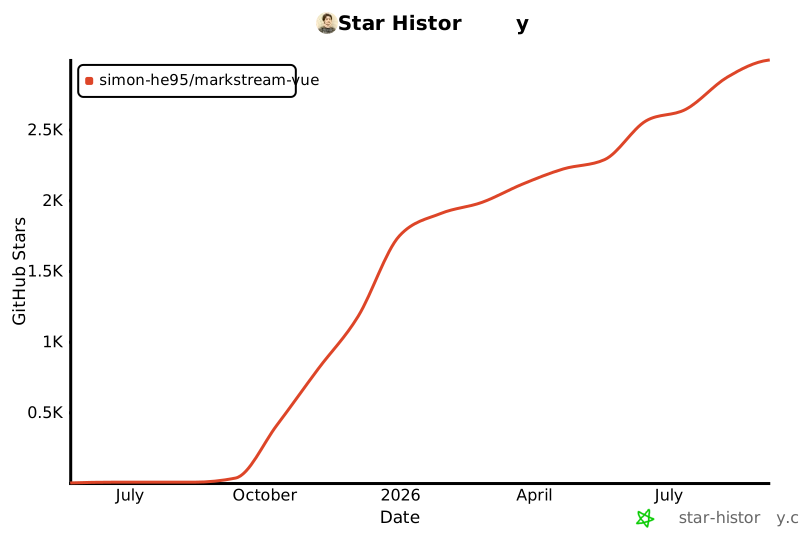](https://www.star-history.com/#Simon-He95/markstream-vue&Date)
## License
[MIT](./license) © [Simon He](https://github.com/Simon-He95)