https://github.com/simonbs/dotfiles
My dotfiles.
https://github.com/simonbs/dotfiles
Last synced: about 1 year ago
JSON representation
My dotfiles.
- Host: GitHub
- URL: https://github.com/simonbs/dotfiles
- Owner: simonbs
- Created: 2016-12-30T11:37:02.000Z (over 9 years ago)
- Default Branch: main
- Last Pushed: 2025-04-16T07:21:11.000Z (about 1 year ago)
- Last Synced: 2025-04-16T09:35:14.508Z (about 1 year ago)
- Language: Shell
- Size: 10.5 MB
- Stars: 16
- Watchers: 3
- Forks: 1
- Open Issues: 0
-
Metadata Files:
- Readme: README.md
Awesome Lists containing this project
README
# dotfiles
Managed using GNU Stow with a setup similar to the one presented in [Managing your dotfiles with GNU Stow](http://codyreichert.github.io/blog/2015/07/07/managing-your-dotfiles-with-gnu-stow/).
## Installation
Files are managed using stow. Install stow using Homebrew.
```bash
brew install stow
```
## Usage
Dotfiles are stored relative to the home directory, `~`. Each directory in the root of the repository "simulates" the home directory.
To stow a directory, run `stow` followed by the directory name, e.g. `stow git`. This will put the dotfiles in the previous directory (`cd ..`). To specify a target directory, use `stow -t ~/ git`.
### Notes
This secton contains notes on setting up specfic tools.
#### gnupg
Used for [signing git commits](https://docs.github.com/en/github/authenticating-to-github/signing-commits). gnupg and pinentry-mac must be installed with Homebrew.
```bash
brew install gnupg pinentry-mac
```
Make sure to stow both the git and gnupg folders so all the settings are in place. Then import the GPG private key.
```bash
gpg --import gnupg-private-key.asc
```
Verify that it's imported by running the following command.
```bash
gpg --list-keys
```
#### Powerlevel10k
Make sure to install the recommended MesloLGS fonts for icons to show up properly. [Instructions on installing the fonts can be found here](https://github.com/romkatv/powerlevel10k?tab=readme-ov-file#fonts).
#### iTerm2
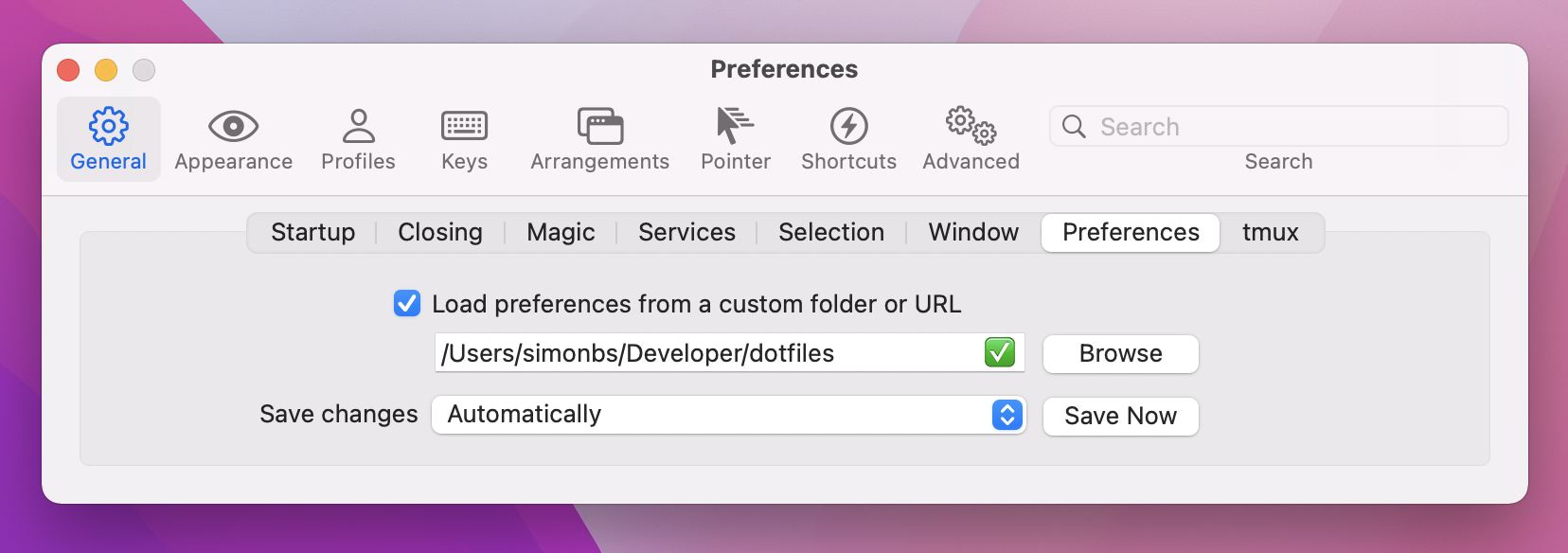
iTerm2 can be [downloaded here](https://iterm2.com). Follow the steps below to use the settings stored in this repository with iTerm2.
1. Open Preferences (CMD + ,)
2. Select General.
3. Select Preferences.
4. Check "Load preferences from a custom folder or URL" and select the dotfiles folder as shown in the screenshot below.
5. iTerm2 may have saved the local settings in the plist file. Quit iTerm2, revert the changes in the dotfiles repository and open iTerm2 again.
#### Ghostty
Ghostty can be [downloaded here](https://ghostty.org). The preferences are stored in `~/Library/Application Support/com.mitchellh.ghostty`, so they should be stowewd like this:
```bash
stow -t /Users/simonbs/Library/Application\ Support/com.mitchellh.ghostty ghostty
```