https://github.com/simonewebdesign/hic
https://github.com/simonewebdesign/hic
Last synced: 10 months ago
JSON representation
- Host: GitHub
- URL: https://github.com/simonewebdesign/hic
- Owner: simonewebdesign
- License: mit
- Created: 2013-10-02T14:18:07.000Z (almost 13 years ago)
- Default Branch: master
- Last Pushed: 2013-10-02T14:18:55.000Z (almost 13 years ago)
- Last Synced: 2025-02-26T07:18:12.721Z (over 1 year ago)
- Language: Shell
- Size: 395 KB
- Stars: 0
- Watchers: 3
- Forks: 0
- Open Issues: 0
-
Metadata Files:
- Readme: README.md
- License: LICENSE
Awesome Lists containing this project
README
## HACK
For your Public Contributions chart on GitHub.
### [Demo](https://github.com/public-contributions)
#### Screenshot
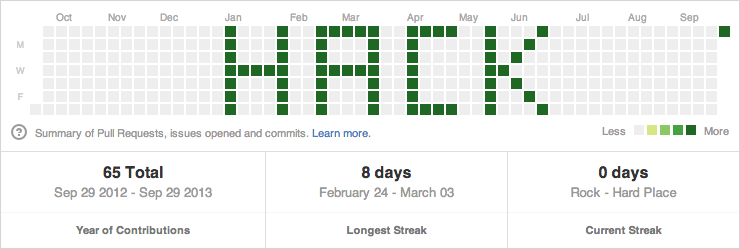
#### How To Do This HACK
1. Create a new GitHub user (Ex: `example-user`). (I did this in a Chrome Ingognito browser so I didn't have to log out of my real user.)
1. Create a repo for that user (Ex: `example-repo`).
1. Create an empty folder on your computer.
1. Add [dates.txt](https://github.com/public-contributions/HACK/blob/master/dates/dates.txt) to that folder and modify with the dates you want to "draw" to your Public Contributions chart.
1. Add [dates.sh](https://github.com/public-contributions/HACK/blob/master/dates/dates.sh) to that folder and change `--author="public-contributions"` (Ex: `--author="example-user"`).
1. Open a terminal window and `cd` to your folder (which now has `dates.txt` and `dates.sh` in it).
1. Run `git init` to initialize the Git repo.
1. Run `./dates.sh`. (You may need to run `chmod +x dates.sh` first depending on how you created the file.)
1. Add the remote git origin. (Ex: `git remote add origin git@github.com:example-user/example-repo.git`.)
1. Run `git push`.
1. Visit your user page to see the chart. (Ex: `http://github.com/example-user`.)
#### [Share a screenshot of your HACK](https://github.com/public-contributions/HACK/issues/1)
#### License
[License](https://github.com/public-contributions/HACK/blob/master/LICENSE)
#### Credits
Made by Adam Schwartz
[GitHub](https://github.com/adamschwartz) [Twitter](https://twitter.com/adamfschwartz)