https://github.com/simonewebdesign/newsletter
:envelope: Stand-alone RESTful application for newsletter campaign management.
https://github.com/simonewebdesign/newsletter
Last synced: 12 months ago
JSON representation
:envelope: Stand-alone RESTful application for newsletter campaign management.
- Host: GitHub
- URL: https://github.com/simonewebdesign/newsletter
- Owner: simonewebdesign
- License: mit
- Created: 2012-11-18T12:22:36.000Z (over 13 years ago)
- Default Branch: master
- Last Pushed: 2014-11-11T18:41:15.000Z (over 11 years ago)
- Last Synced: 2025-04-26T20:34:03.158Z (over 1 year ago)
- Language: PHP
- Homepage: http://simonewebdesign.github.io/newsletter
- Size: 773 KB
- Stars: 12
- Watchers: 2
- Forks: 2
- Open Issues: 0
-
Metadata Files:
- Readme: README.md
- License: LICENSE.md
Awesome Lists containing this project
README
Newsletter campaign management
==============================
## Introduction
This is a very simple and light-weight application for newsletter campaign
management.
It is studied to be integrated with other existing websites / web applications, so the installation is really straightforward.
## Installation - 3 easy steps
1. Upload everything in a subfolder of your web server (i.e. `/newsletter`);
2. Create the database (you can find the schema in the `/db` directory);
3. Rename `config_sample.php` to `config.php` and change it to fit your needs.
## Usage and Features
To get started, you can navigate through `quick.php`. This is the page from
where you can send newsletters by just following 3 easy steps. So, if your
website is `www.example.com` and you installed this application under a
`newsletter` folder, you can go to:
`http://www.example.com/newsletter/quick.php`.
Please note that the root folder is intended to be **not accessible**
by design. This way you shouldn't even need to have an authentication system!
Every newsletter has an **HTML template**, that you should create before creating
the newsletter itself. Instead you can use the default template. All templates
are stored in the database. When you create a new template, you can see a nice
HTML editor with a preview that automatically gets updated every time you edit
the code.
**Placeholders** are available during the template creation: you can inflate the
users' name and email directly into the markup, among with the site name, URL,
the current date and other.
A newsletter can have **resources** attached: they're usually just **images**
(jpg, png or gif format). These images are treated as **web bugs** (also known as
[web beacons: you can read more about them in my blog](http://simonewebdesign.it/blog/how-to-create-web-bug-aka-beacon-image/)). This means that the images
you upload will be used to track users' behavior. You will know exactly who
opened the newsletter, the time and how many times it has been viewed (or, in
other words, *requested*) by every
single user.
Another cool feature is that you can manage as many **mailing lists** as you want:
every user will belong to a single mailing list.
Mailing lists can be updated very easily by just copy pasting the addresses in a
text field and pressing the update button. If you prefer you can always add one
user at a time. Beware that when you delete a list, all users associated to that
list will be automatically deleted too.
However, when you delete something, it's actually soft deleted, meaning that the `is_deleted` field will be set to 1 (default is 0).
You are encouraged to **translate** your application into your native language:
you can do this by creating a new file under the `languages` folder.
[Pull requests](https://help.github.com/articles/using-pull-requests) are - of course - very welcome.
For any questions / problems / suggestions / feature requests, you can open an issue.
[ITA] Applicazione indipendente per la gestione di newsletter
=============================================================
## Descrizione dei file
- `index.php` file principale. effettua un redirect alla root del sito.
- `config.php` file di configurazione.
- `db_conn.php` connessione al database tramite driver PDO.
- `template.html` template della newsletter.
- `send.php` processa l'invio di una singola newsletter.
- `subscribe.php` form per l'iscrizione alla newsletter.
- `unsubscribe.php` form per cancellare l'iscrizione alla newsletter.
- `statistics.php` statistiche generali sulle newsletter inviate.
- `Newsletter.php` classe Newsletter.
- `newsletters.php` mostra le newsletter.
- `newsletter_create.php` crea una nuova newsletter.
- `newsletter_read.php` mostra il contenuto in anteprima di una singola newsletter.
- `newsletter_update.php` aggiorna il contenuto di una singola newsletter.
- `newsletter_delete.php` elimina una singola newsletter.
- `_newsletter_form.php` contiene il form di inserimento/modifica di una newsletter.
- `User.php` classe User.
- `users.php` mostra la mailing list.
- `user_create.php` crea un nuovo user.
- `user_read.php` mostra i dati di un singolo user.
- `user_update.php` aggiorna i dati di un singolo user.
- `user_delete.php` elimina un singolo user.
- `_user_form.php` contiene il form di inserimento/modifica di un utente.
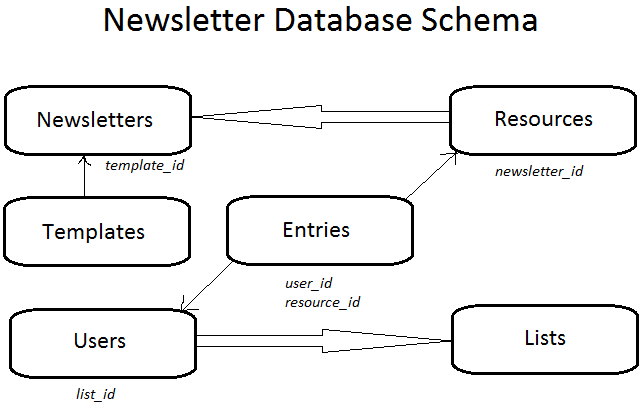
## Entities
### Una **Newsletter** è composta dai seguenti attributi:
- `id` id univoco progressivo.
- `title` titolo della newsletter, che poi sarà l'oggetto della mail.
- `description` descrizione.
- `is_sent` indica se la newsletter è già stata spedita.
- `is_deleted` indica se la newsletter è stata cancellata.
- `params` elementi della newsletter.
- `created_at` data di creazione.
- `updated_at` data ultima modifica.
- `sent_at` data di invio.
### Una **Resource** è composta dai seguenti attributi:
- `id` id univoco progressivo.
- `mime_type` indica la tipologia di media.
- `path` indica la posizione sul file system.
- `created_at` data di creazione.
- `updated_at` data ultima modifica.
- `newsletter_id` id della newsletter a cui è associata l'immagine.
### Un **User** è composto dai seguenti attributi:
- `id` id univoco progressivo.
- `name` nome (o pseudonimo), che poi sarà il destinatario della newsletter.
- `email` email del destinatario.
- `is_active` indica se l'utente è attivo o se è stato cancellato.
- `is_subscribed` indica se l'utente è iscritto alla newsletter.
- `has_received_mail` indica se l'utente ha già ricevuto la newsletter.
- `created_at` data di creazione.
- `updated_at` data ultima modifica.
- `last_seen_at` data dell'ultima volta che l'utente ha letto la newsletter.
- `list_id` id della lista a cui appartiene.
### Una **List** è composta dai seguenti attributi:
- `id` id univoco progressivo.
- `name` nome descrittivo della lista.
### Una **Entry** è composta dai seguenti attributi:
- `id` id univoco progressivo.
- `user_id` l'utente che ha richiesto la risorsa.
- `resource_id` la risorsa richiesta dall'utente.
- `requested_at` data e ora in cui è stata richiesta la risorsa.
- `ip_address` indirizzo IP dell'utente.
- `user_agent` browser e sistema operativo dell'utente.
### Un **Template** è composto dai seguenti attributi:
- `id` id univoco progressivo.
- `name` nome del template.
- `body` corpo del template (HTML).
- `created_at` data di creazione.
- `updated_at` data ultima modifica.
- `is_deleted` indica se il template è stato cancellato.
## Relazioni tra le entities
**User** e **List** sono legati dalla seguente relazione:
`list has_many users`
`user belongs_to list`
**Newsletter** e **Resource** sono legati dalla seguente relazione:
`resource belongs_to newsletter`
**Newsletter** e **Template** sono legati dalla seguente relazione:
`newsletter has_one template`
`template belongs_to newsletter`
**Resource** e **Entry** sono legati dalla seguente relazione:
`resource has_many entries`
`entry belongs_to resource`
**User** e **Entry** sono legati dalla seguente relazione:
`user has_many entries`
`entry belongs_to user`
## Descrizione funzionamento
Chiunque conosca il link di accesso all'applicazione, può effettuare un'azione di tipo **CRUD**+S ( **C**reate, **R**ead, **U**pdate, **D**elete + **S**end).
Per effettuare un'azione basta entrare nella `index.php` e cliccare su una delle azioni relative ad una singola newsletter, disponibili a destra.
La newsletter verrà costruita scegliendo titolo, descrizione e parametri.
La mailing list sarà composta fondamentalmente da nome ed email. Esempio: `"Pinco Pallino" `.
I parametri - almeno per il momento - possono essere solo semplici immagini.
Il programma consente di inviare una sola newsletter alla volta. Assicurarsi quindi di aver inviato correttamente tutta la newsletter a tutti i destinatari, prima di iniziare un nuovo invio.
Il template si può modificare dal file `template.html`, ed è lo stesso per ogni newsletter. C'è tuttavia la possibilità di creare un template personalizzato per la newsletter dando in input direttamente il codice HTML.
Dalla versione 0.6 è possibile aggiungere un'immagine personalizzata, e il caricamento avviene dinamicamente (non più tramite FTP) e l'immagine viene salvata come Resource nel database, mentre il file binario viene salvato nella cartella `uploads`.
*Update*: ora si possono creare template a piacimento, ed ogni newsletter avra'
associato un suo template. Naturalmente i template possono essere associati a
piu' newsletter, ma non e' vero il contrario: una newsletter puo' avere uno
ed un solo template (tuttavia non e' un problema, si puo' sempre cambiare).
## Invio veloce (quick.php)
### Considerazioni
- Una newsletter deve prima essere creata per poter essere spedita: servono quindi oggetto e immagine.
- Deve esserci la possibilità di creare un template on-the-fly.
- Anche una lista deve esistere prima di poter spedire la newsletter.
- Deve esserci la possibilità di crearne una on-the-fly.
### 3 Passaggi
1. Scegli la mailing list: []
1,5. oppure creane una nuova (scegli nome e aggiungi indirizzi) -> ti manda a `list_create.php`, e torna indietro.
2. Scegli la newsletter: []
2,5. oppure creane una nuova (scegli oggetto, carica immagine e facoltativamente incolla codice HTML) --> ti manda a `newsletter_create.php`, e torna indietro.
3. Invia.
## Statistiche
È possibile leggere statistiche sull'utilizzo della newsletter da parte degli utenti della mailing list, dalla pagina `statistics.php`.