https://github.com/simonquasar/batbar
A minimal battery indicator that lives on the edge of your screen.
https://github.com/simonquasar/batbar
battery battery-level battery-monitor battery-percentage battery-status linux linux-desktop macos-widget widget windows windows-desktop
Last synced: 3 months ago
JSON representation
A minimal battery indicator that lives on the edge of your screen.
- Host: GitHub
- URL: https://github.com/simonquasar/batbar
- Owner: simonquasar
- License: gpl-2.0
- Created: 2025-05-16T20:45:52.000Z (about 1 year ago)
- Default Branch: main
- Last Pushed: 2025-05-24T15:49:44.000Z (about 1 year ago)
- Last Synced: 2025-05-26T19:54:24.657Z (about 1 year ago)
- Topics: battery, battery-level, battery-monitor, battery-percentage, battery-status, linux, linux-desktop, macos-widget, widget, windows, windows-desktop
- Language: Python
- Homepage:
- Size: 57.1 MB
- Stars: 2
- Watchers: 1
- Forks: 1
- Open Issues: 0
-
Metadata Files:
- Readme: README.md
- License: LICENSE
Awesome Lists containing this project
README
# BatBar | 1-px battery bar
---
**BatBar** is the one pixel wide battery bar. An ultra-minimalist status indicator for Windows, Linux and macOS.
It consists of **a single-pixel line** that shows your battery level.
[](https://github.com/simonquasar/BatBar/releases/latest)
[](https://github.com/simonquasar/BatBar)
[](https://github.com/simonquasar/BatBar/releases/latest)





## Key Features
---
**
Always visible. Never distracting.
**
- **Instant visual feedback**: the height of the bar reflects the battery level
- **Intuitive color coding**: simple red, orange, yellow and green + blue for charging
- **Always on top**: persistent visibility, zero distraction
- **Adjustable width**: scroll to resize
**
Screenshot-safe: designed to hide in plain sight.
**
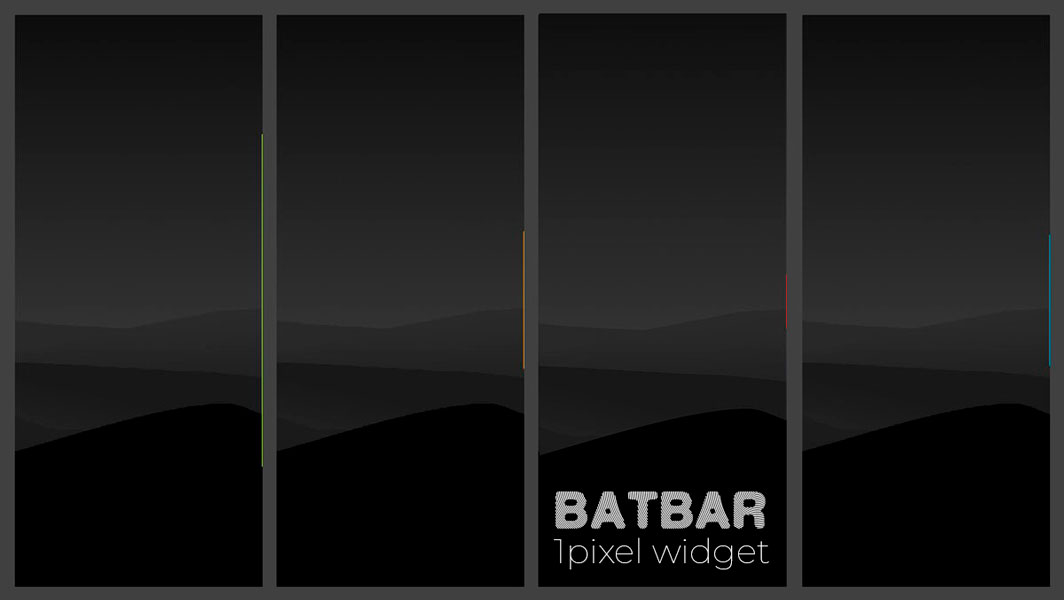
**BatBar** sits on the extreme edge of your screen - typically outside the active capture area used by most print screens.
_You can still increase its width, while 1px remains the sweet spot for invisibility!_
**
Ideal for streamers, designers and screen recorders!
**
---
## Usage
**
Non-intrusive design: minimalism taken seriously.
**
The bar automatically appears on the right edge of your primary screen.
- ↔️ **Adjust width** (1-10 px) with `mouse wheel up/down`
- ❌ **Close** with `SHIFT + right-click` on it
That's all!
---
## Resources
Runs silently in the background without impacting system performance.
This widget is designed to be extremely lightweight (both visually and on system resources):
- **Size**: `51KB .exe` | `~12MB deb` | `~6KB .ps1 & .py`
- **Memory**: <20MB RAM usage
- **CPU**: ~0.1% idle, <0.3% during updates (every 5s)
- **Battery**: virtually zero
Most battery indicators are cluttered, over-engineered, and demand system resources or some interaction.
**BatBar** delivers pure functionality with a nearly invisible aesthetic that stays out of your way while keeping you informed.
The solution for who wants **instant battery awareness without distractions** and overhead.
---
## ⏬ Download
**
BatBar** is made for creators, coders, productivity purists and people who care about **signal over noise**.
[](https://github.com/simonquasar/BatBar/releases/latest)
[](https://github.com/simonquasar/BatBar/releases/latest) in [Github](https://github.com/simonquasar/BatBar/releases/)
### Windows 10/11
#### 🔹 Option 1: Standalone Executable (recommended) ✅
1. Download the latest release (`BatBar.Windows.x86_64.exe`) [](https://github.com/simonquasar/BatBar/releases/latest)
2. Run - that's it.
#### 🔹 Option 2: PowerShell Script
- requires: PowerShell 5.1+
1. Download `BatBar.ps1` [](https://github.com/simonquasar/BatBar/releases/latest)
2. Right-click the file and select “_Run with PowerShell_”
### Linux (Debian/Ubuntu)
#### Standalone Executable (recommended) ✅
1. Download the latest release (`BatBar.Debian`) [](https://github.com/simonquasar/BatBar/releases/latest)
2. Make the file executable:
`chmod +x BatBar`
3. Run:
`./BatBar`
### Linux (Arch/Unix) & MacOS
#### 🔹 Python Script
- requires: Python 3.7+ and the `psutil` package
1. Download `BatBar.py` [](https://github.com/simonquasar/BatBar/releases/latest)
2. Install the required dependency:
`pip install psutil`
3. Run with:
`python3 BatBar.py`
---
## License
This project is licensed under the **GNU General Public License v2.0**
See the full license text [here](https://www.gnu.org/licenses/old-licenses/gpl-2.0.html).
👤 _Crafted with minimalism by [simonquasar](https://www.simonquasar.net)_