https://github.com/simoso68/llama-lit
Streamlit frontend for Ollama.
https://github.com/simoso68/llama-lit
ai llama llama3 ollama streamlit
Last synced: 6 months ago
JSON representation
Streamlit frontend for Ollama.
- Host: GitHub
- URL: https://github.com/simoso68/llama-lit
- Owner: Simoso68
- License: gpl-3.0
- Created: 2024-08-08T22:58:50.000Z (almost 2 years ago)
- Default Branch: main
- Last Pushed: 2024-09-30T11:53:10.000Z (almost 2 years ago)
- Last Synced: 2025-01-31T06:11:40.348Z (over 1 year ago)
- Topics: ai, llama, llama3, ollama, streamlit
- Language: Python
- Homepage:
- Size: 101 KB
- Stars: 2
- Watchers: 2
- Forks: 0
- Open Issues: 0
-
Metadata Files:
- Readme: README.md
- License: LICENSE
Awesome Lists containing this project
README
# Llama-Lit
Llama-Lit is a streamlit page providing a front-end to interact with Ollama. \
This is still in development and needs some adjustments to offer a good user experience. \
\
The backend was made using the [ollama](https://github.com/ollama/ollama-python) library. \
\
The frontend was made with [streamlit](https://streamlit.io). \
If one wants to host this application themselves, they would need to install all [requirements](https://github.com/Simoso68/llama-lit/blob/main/requirements.txt) and run the script via ```streamlit run app.py```.
## Features
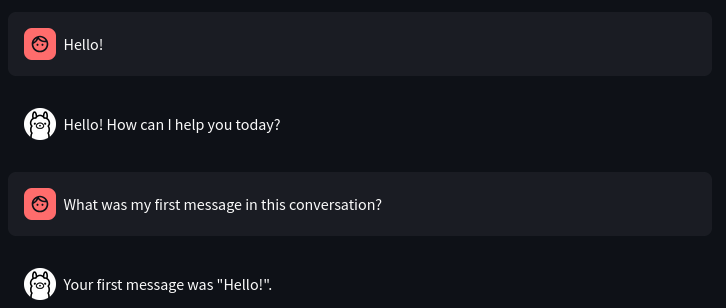
### Stores message history in cache
### Allows you to select different AI models

## Installation
As this software is not available on the community cloud, one needs it to run on their own machine.
### Software needed
- [Python](https://www.python.org)
- [Ollama](https://ollama.com)
- [Git](https://git-scm.com)
### Instructions
**1. Install the AI model**
```sh
ollama pull llama3.1:latest
```
> [!NOTE]
> Always check for the newest model to install.
**2. Install the required packages**
```sh
pip install streamlit ollama
```
> [!IMPORTANT]
> On Windows systems, pip comes automatically with python. \
> On other systems such as the Linux family of systems, you need to install pip separately.
**3. Download this repository**
Locate using the ```cd``` command to the parent folder, where the llama-lit folder with all the code should be stored at. \
Then execute the following command, to clone the repository onto your file system.
```sh
git clone https://github.com/Simoso68/llama-lit.git
```
After this, a new folder named 'llama-lit' should have been created in the parent directory, that you chose.
**4. Locate into the llama-lit directory**
After successfully cloning llama-lit onto your device, one should be able to locate into this folder from the chosen parent folder using:
```sh
cd llama-lit
```
**5. Running Llama-Lit**
From the llama-lit directory, you can just run the following command, to make the application start:
```sh
streamlit run app.py
```
### Installation complete.
Now, you should have a functioning copy of llama-lit. \
To start llama-lit in the future, locate into your llama-lit directory and run the same command as in step 5 of the installation. \
To stop the application, hit ```CTRL``` and ```C``` while you are in your terminal to shut it down.