https://github.com/simphotonics/merging_builder
Dart builder that reads several input files and writes the merged output to one file.
https://github.com/simphotonics/merging_builder
build-tool builder dart generator merging output source-code-generator synthetic
Last synced: 9 months ago
JSON representation
Dart builder that reads several input files and writes the merged output to one file.
- Host: GitHub
- URL: https://github.com/simphotonics/merging_builder
- Owner: simphotonics
- License: bsd-3-clause
- Created: 2020-05-20T10:07:45.000Z (about 6 years ago)
- Default Branch: main
- Last Pushed: 2025-01-21T15:45:58.000Z (over 1 year ago)
- Last Synced: 2025-04-10T03:39:33.097Z (over 1 year ago)
- Topics: build-tool, builder, dart, generator, merging, output, source-code-generator, synthetic
- Language: Dart
- Homepage: https://pub.dev/packages/merging_builder
- Size: 198 KB
- Stars: 8
- Watchers: 1
- Forks: 9
- Open Issues: 0
-
Metadata Files:
- Readme: README.md
- Changelog: CHANGELOG.md
- License: LICENSE
Awesome Lists containing this project
README
# Merging Builder
[](https://github.com/simphotonics/merging_builder/actions/workflows/dart.yml)
## Introduction
Source code generation has become an important software development tool
when building and maintaining a large number of data models,
data access object, widgets, etc. The premise of *source code generation* is that we can specify
(hopefully few) details and flesh out the rest of the classes,
and methods during the build process.
The library [`merging_builder`][merging_builder] includes the following (synthetic input) builder classes:
* [`MergingBuilder`][class-merging-builder] reads *several input files* and writes
merged output to *one output file* to a custom location.
* [`StandaloneBuilder`][StandaloneBuilder] reads one or several input files and
writes standalone files to a custom location. In this context, *standalone*
means the output files may be written to a *custom folder* and
not only the *extension* but the *name* of the output file can
be configured (as opposed to using part files).
## Usage
Following the example of [`source_gen`][source_gen], it is common practice to
separate *builders* and *generators* from the code using those builders.
In the [example] project provided, the package defining a new
builder is called `researcher_builder` and the package using this builder is called `researcher`.
To set up a build system the following steps are required:
### 1. Builder Package Setup
1. Get dependencies: Include [`merging_builder`][merging_builder], [`build`][build] as *dependencies* in the file `pubspec.yaml`. In the [example] mentioned here, the generator also requires the packages [`analyzer`][analyzer] and [`source_gen`][source_gen].
2. Create a generator: Create a custom generator that extends [`MergingGenerator`][MergingGenerator]. In [example] `generateItemForAnnotatedElement` reads a list of strings while `generateMergedContent` merges the data and generates output that is written to [researchers.dart].
3. Create a builder: Create an instance of [`MergingBuilder`][MergingBuilder]. Following the example of [`source_gen`][source_gen], builders are typically placed in a file called: `builder.dart` located in the `lib` folder of the builder package.
* Input sources may be specified using wildcard characters supported by [`Glob`][Glob].
* The builder definition includes the default values of the *options* `input_files`, `output_file`, `header`, `footer`, and `sort_assets`. These options can be overwritten by the user of the builder by specifying them explicitly in the file `build.yaml` located in the package `researcher` (see step 1 in section [User Package Setup](#1-builder-package-setup)).
4. Add a builder configuration: The build extensions for
[`MergingBuilder`][MergingBuilder] must be specified using the notation
available for *synthetic input*. For example, `"$lib$"` indicates that the
input files are located in the folder `lib` or a subfolder thereof.
```Yaml
builders:
add_names_builder:
import: "package:researcher_builder/builder.dart"
builder_factories: ["addNamesBuilder"]
build_extensions: {"lib/$lib$": ["lib/output.dart"]}
auto_apply: root_package
build_to: source
assistant_builder:
import: "package:researcher_builder/builder.dart"
builder_factories: ["assistantBuilder"]
build_extensions: {"lib/$lib$": ["*.dart"]}
auto_apply: root_package
build_to: source
```
### 2. User Package Setup
The following steps are performed in the package that is using the custom builder:
1. Add dependencies: Add the custom builder package and
[`build_runner`][build_runner] as a *dev_dependencies* in the file `pubspec.yaml`.
2. Builder configuration: Add the builder to the list of known builders
and configure the available options (thus overwriting the default values).
A sample `build.yaml` file is shown below.
```Yaml
targets:
$default:
builders:
# Configure the builder `pkg_name|builder_name`
researcher_builder|add_names_builder:
# Only run this builder on the specified input.
enabled: true
# generate_for:
# - lib/*.dart
options:
input_files: 'lib/input/*.dart'
output_file: 'lib/output/researchers.dart'
sort_assets: false
header: '// Header specified in build.yaml.'
footer: '// Footer specified in build.yaml.'
researcher_builder|assistant_builder:
enabled: true
options:
input_files: 'lib/input/*.dart'
output_files: 'lib/output/assistant_(*).dart'
root: ''
```
3. Initiate the build process by using the command:
```console
# dart run build_runner build --delete-conflicting-outputs --verbose
```
# Merging Builder
[`MergingBuilder`][MergingBuilder] reads *several input files* and writes merged output to *one output file*.
The builder provides the option to sort the input files in reverse topological order.
If the input file `a.dart` includes file `b.dart` then `a.dart` will be listed *after* `b.dart`. This option may be useful when
generating code that needs to list variables or call functions in order of dependence.
To enable topological sorting set the constructor parameter `sortAsset: true`. Note: If sorting of input assets is enabled, input files must not include each other directly or indirectly.
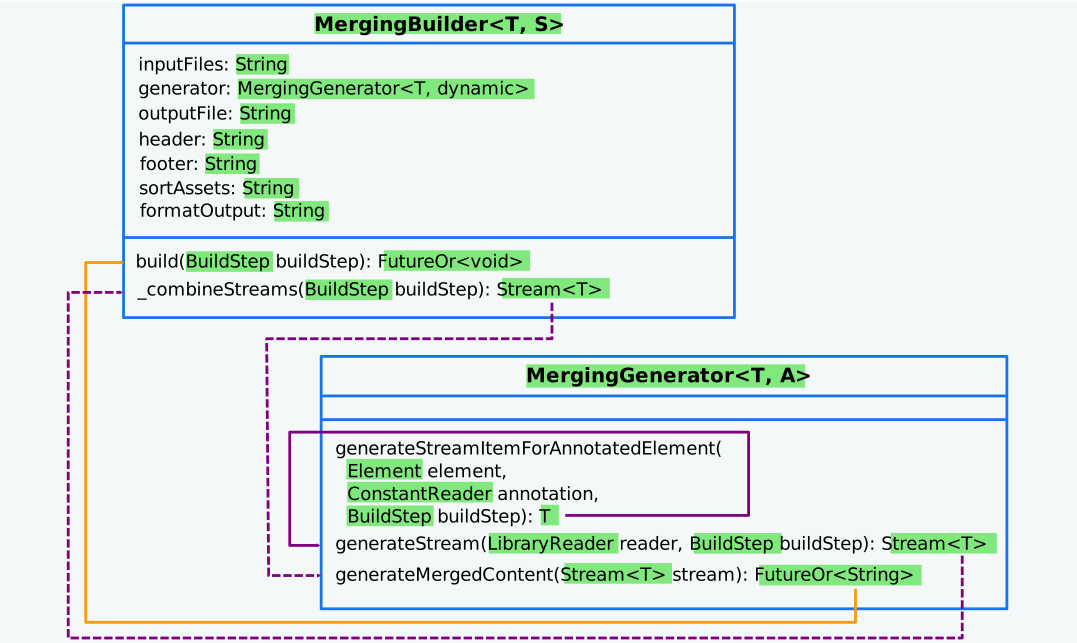
A conventional builder typically calls the generator method `generate` from within
its `build` method to retrieve the generated source-code. [`MergingBuilder`][MergingBuilder]
calls the [`MergingGenerator`][MergingGenerator] method `generateStream`.
It allows the generator to pass a stream of data-type `T` to the builder,
one stream item for each annotated element processed to the generator method `generateStreamItemForAnnotatedElement`.
The private builder method `_combineStreams` combines the streams received for each processed input file and calls the generator method `generateMergedContent`.
As a result, this method has access to all stream items of type `T` generated f
or each element annotated with an annotation of type `A` in each input file.
It is the task of this method to generate the *merged* source-code output.
The figure below shows the flow of data between the builder and the generator.
The data type is indicated by the starting point of the connectors. Dotted connectors represent a stream of data.
## Standalone Builder
[`StandaloneBuilder`][StandaloneBuilder] reads input files and writes
corresponding output files to a custom location.
The input file path (constructor parameter `inputFiles`) may include
wild-card notation supported by [`Glob`][Glob].
Output files are specified by using the custom symbol
`(*)`. For example, the output path `output\assistant_(*).dart` is interpreted such that `(*)` is replaced with the input file name (excluding the file extension). For more details, see the file [`example\researcher_builder\builder.dart`][builder.dart].
Limitations: For builders extending [`StandaloneBuilder`][StandaloneBuilder] it is recommended to initiate the build command
from the root directory of the package the build is applied to.
## Examples
For further information on how to use [`MergingBuilder`][MergingBuilder] see [example].
## Features and bugs
Please file feature requests and bugs at the [issue tracker].
[issue tracker]: https://github.com/simphotonics/merging_builder/issues
[analyzer]: https://pub.dev/packages/analyzer
[build]: https://pub.dev/packages/build
[build_runner]: https://pub.dev/packages/build_runner
[builder.dart]: https://github.com/simphotonics/merging_builder_example/blob/researcher_builder/lib/builder.dart
[Elements]: https://pub.dev/documentation/analyzer/latest/dart_element_element/dart_element_element-library.html
[computeConstantValue()]: https://pub.dev/documentation/analyzer/latest/dart_element_element/VariableElement/computeConstantValue.html
[ConstantReader]: https://pub.dev/documentation/source_gen/latest/source_gen/ConstantReader-class.html
[class-merging-builder]: https://github.com/simphotonics/merging_builder#class-merging-builder
[class-standalone-builder]: https://github.com/simphotonics/merging_builder#class-standalone-builder
[example]: https://github.com/simphotonics/merging_builder_example
[DartObject]: https://pub.dev/documentation/analyzer/latest/dart_constant_value/DartObject-class.html
[Generator]: https://pub.dev/documentation/source_gen/latest/source_gen/Generator-class.html
[GeneratorForAnnotation]: https://pub.dev/documentation/source_gen/latest/source_gen/GeneratorForAnnotation-class.html
[Glob]: https://pub.dev/packages/glob
[MergingBuilder]: https://pub.dev/documentation/merging_builder/latest/merging_builder/MergingBuilder-class.html
[merging_builder]: https://pub.dev/packages/merging_builder
[MergingGenerator]: https://pub.dev/documentation/merging_builder/latest/merging_builder/MergingGenerator-class.html
[researchers.dart]: https://github.com/simphotonics/merging_builder_example/blob/main/researcher/lib/output/researchers.dart
[source_gen]: https://pub.dev/packages/source_gen
[source_gen_test]: https://pub.dev/packages/source_gen_test
[StandaloneBuilder]: https://pub.dev/documentation/merging_builder/latest/merging_builder/StandaloneBuilder-class.html