https://github.com/sinakhx/react-boilerplate
Enterprise-level boilerplate for react projects
https://github.com/sinakhx/react-boilerplate
react scss typescript vite
Last synced: 8 months ago
JSON representation
Enterprise-level boilerplate for react projects
- Host: GitHub
- URL: https://github.com/sinakhx/react-boilerplate
- Owner: Sinakhx
- License: mit
- Created: 2022-06-12T03:14:24.000Z (about 4 years ago)
- Default Branch: main
- Last Pushed: 2022-06-12T10:54:12.000Z (about 4 years ago)
- Last Synced: 2025-02-16T23:18:51.610Z (over 1 year ago)
- Topics: react, scss, typescript, vite
- Language: SCSS
- Homepage:
- Size: 952 KB
- Stars: 33
- Watchers: 2
- Forks: 4
- Open Issues: 0
-
Metadata Files:
- Readme: Readme.md
- Changelog: CHANGELOG.md
- License: LICENSE
Awesome Lists containing this project
README
# About
This project is created using `react`, `typescript`, `vite` & `scss` with prepared configurations for **_dockerizing_** the project & **_client-side release scripts_** with **_automatic changelog generation_**. local hooks for **_type-checking_**, **_testing_** & **_linting_** are also included which can be further configured, improved & reused in ci/cd pipelines.
## Project Structure
The following schema is the main gist of the present project structure. Please follow the conventions in creating files & folders for keeping a unified, maintainable collaboration.
- `index.html`: index file
- **`__mocks__`**: mocks for _node_modules_
- **`public`**: static files
- **`src`**: source codes
- **`mocks`**: mocks for components & utils
- **`utils`**: custom hooks & helper functions
- **`assets`**: scss styles, icons (svg, png, ...)
- **`config`**: custom & general project configurations
- **`routes`**: route files (slugs, paths, router, private routes, ...)
- **`components`**: common components used everywhere
- **`pages`**: pages/views (each folder in this directory presents a single page route entity which maps to a unique route/url)
- **`SamplePage`**: a sample page
- `SamplePage.tsx`: page component
- `SamplePage.scss`: page styles
- `SamplePageService.ts`: page services (api calls)
- `SamplePageViewModel.ts`: page view model (states, actions, logic)
- `SamplePageTypes.ts`: specific shared types for SamplePage & its components (optional)
- `SamplePage.md`: page documentation (optional)
- **`components`**: components specific to SamplePage
- **`ComponentA`**: sample inner component (specific to this page)
_(if the component gets complicated, it can also have it's own `service`, `viewModel` & other layers)_
- `ComponentA.tsx`: component (atom)
- `ComponentA.scss`: component's styles
- `ComponentA.test.tsx`: component's tests
- `index.ts`: barrel file for exporting ComponentA & other components in this directory
- **`tests`**: test suites for the SamplePage main component, service & viewModel files
- **`unit`**: unit test suites for SamplePage (using vitest & react-testing-library)
- `SamplePageViewModel.unit.test.tsx`
- ...
- **`integration`**: integration test suites for SamplePage
- **`e2e`**: end-to-end test suites for SamplePage (using cypress)
## Main Scripts
```bash
# initialize husky hooks:
npm run init:husky
# start the dev server:
npm run dev
# test the project:
npm run test
# build for production:
npm run build
# locally preview production build:
npm run preview
```
## Commit conventions
commits that do not follow the conventional config for standard-version will be rejected.
the following list is a gist of the available commit types:
```
build(scope?): description
chore(scope?): description
ci(scope?): description
docs(scope?): description
feat(scope?): description
fix(scope?): description
perf(scope?): description
refactor(scope?): description
revert(scope?): description
style(scope?): description
test(scope?): description
```
for more info, see: https://www.conventionalcommits.org/en/v1.0.0/
> **NOTE**: any changes to these conventions should be synchronized with the [standard-version](https://github.com/conventional-changelog/standard-version) configurations. Automatic versioning & changelog generation will suffer otherwise. We recommend staying with the default settings.
## Testing
testing is done using `vitest`, `react-testing-library` and `cypress`. vitest's methods are expanded using `jest-dom` & is mainly used as a test-runner, while cypress is mainly here for visual & end-to-end testing.
## Documenting
documentation is done using `Markdown`, `JSDoc` & `TypeScript` type declarations. the `test files` with proper descriptions can also be treated as a form of documentation.
## Releasing (versioning)
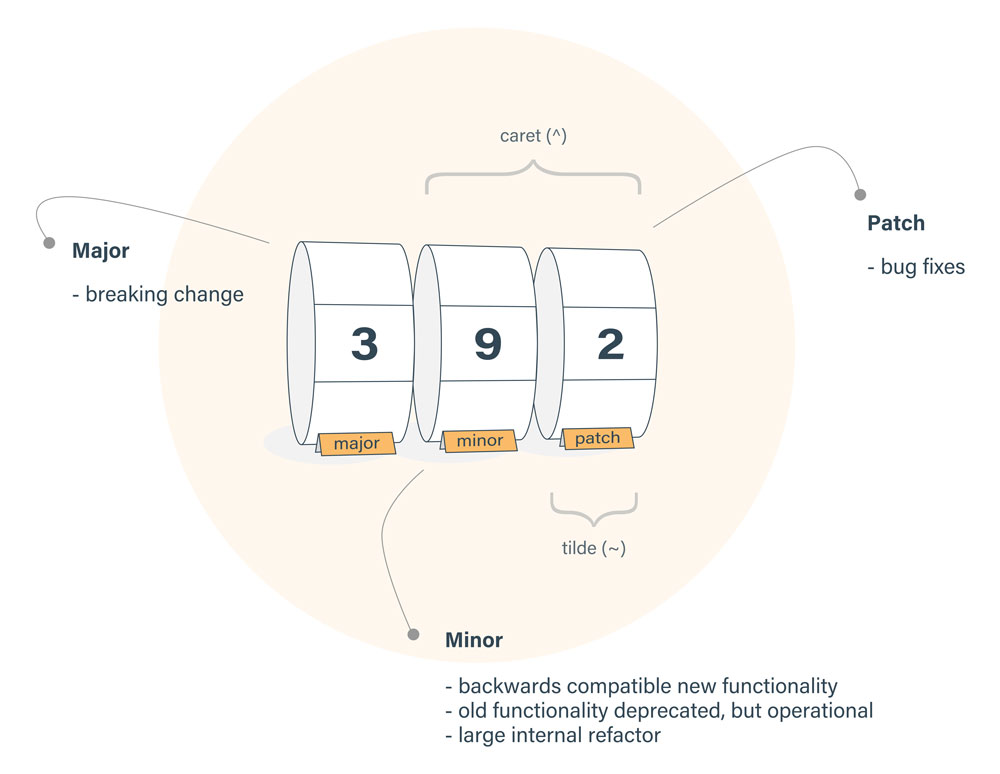
```bash
# first release of the project (should run once forever):
npm run release:first
# for later releases use the following commands:
# semver pattern: `major.minor.patch` (e.g. `1.5.8`)
npm run release:patch
# or
npm run release:minor
# or
npm run release:major
```