https://github.com/sinclairzx81/appex
develop nodejs web applications with typescript
https://github.com/sinclairzx81/appex
Last synced: about 1 year ago
JSON representation
develop nodejs web applications with typescript
- Host: GitHub
- URL: https://github.com/sinclairzx81/appex
- Owner: sinclairzx81
- License: mit
- Created: 2013-07-01T14:51:17.000Z (about 13 years ago)
- Default Branch: master
- Last Pushed: 2013-11-24T00:00:25.000Z (over 12 years ago)
- Last Synced: 2024-10-19T11:12:07.058Z (over 1 year ago)
- Language: JavaScript
- Homepage:
- Size: 2.38 MB
- Stars: 16
- Watchers: 4
- Forks: 4
- Open Issues: 3
-
Metadata Files:
- Readme: readme.md
- License: license.txt
Awesome Lists containing this project
README

### develop nodejs web applications with [typescript](http://www.typescriptlang.org/)
```typescript
//----------------------------------------------
// app.js
//----------------------------------------------
var appex = require('appex');
var app = appex({ program : './program.ts' });
app.listen(3000);
//----------------------------------------------
// program.ts
//----------------------------------------------
///
export function index(context:appex.web.IContext) {
context.response.send('home page');
}
export function about(context:appex.web.IContext) {
context.response.send('about page');
}
export function wildcard (context:appex.web.IContext, path:string) {
context.response.send(404, path + " not found");
}
```
### install
```
npm install appex
```
### contents
* [getting started](#getting_started)
* [create a application](#application)
* [start up options](#options)
* [running on an existing http server](#http_server)
* [running as express middleware](#express_middleware)
* [http handlers](#http_handlers)
* [context](#context)
* [request](#request)
* [response](#response)
* [routing](#routing)
* [signatures](#signatures)
* [named handlers](#named_handlers)
* [index handlers](#index_handlers)
* [wildcard handlers](#wildcard_handlers)
* [attributes](#attributes)
* [verbs](#verbs)
* [url rewrite](#url_rewrite)
* [middleware](#middleware)
* [exporting functions](#exporting_functions)
* [handling 404](#handling_404)
* [serving static files](#serving_static_files)
* [templating](#templating)
* [overview](#template_overview)
* [context](#template_context)
* [syntax](#template_syntax)
* [layouts and sections](#template_layouts_and_sections)
* [render](#template_render)
* [caching and devmode](#caching_and_devmode)
* [sitemaps](#sitemaps)
* [generating](#sitemap_generate)
* [metadata](#sitemap_metadata)
* [json schema](#json_schema)
* [generating schema](#generating_schema)
* [validating json](#validating_json)
* [web service descriptions](#web_service_descriptions)
* [reflection](#reflection)
* [reflect everything](#reflect_everything)
* [reflect specific types](#reflect_specific_types)
* [developing with appex](#developing_with_appex)
* [appex.d.ts declaration](#appex_declaration)
* [structuring projects](#structuring_projects)
* [additional resources](#resources)
* [license](#license)
The following sections outline creating appex applications and configuration.
The following code will create a standalone appex application and
http server and listen on port 3000.
```typescript
var appex = require('appex');
var app = appex({ program : './program.ts',
devmode : true,
logging : true });
app.listen(3000);
```
note: devmode and logging are optional. however, when developing
with appex, it is helpful to have these enabled.
appex accepts the following start up options.
```typescript
var options = {
// (required) location of source file.
program : './program.ts',
// (optional) recompile on request. (default:false)
devmode : true,
// (optional) log to stdout. (default:false)
logging : true,
// (optional) user defined objects added to the app context.
context : {}
};
var app = appex( options );
```
### running on an existing http server
The following demonstrates setting up appex on an existing nodejs http server. In
this example, appex will attempt to handle incoming requests, and if appex cannot
route the request, will fire the callback.
```typescript
var http = require('http');
var appex = require('appex');
var app = appex({ program : './program.ts' });
var server = http.createServer(function(req, res){
app(req, res, function() { // appex handler...
// not handled.
});
});
server.listen(3000);
```
### running as express middleware
appex allows developers to augment existing express / connect applications by
way of middleware. The following demonstrates setting up appex as express middleware.
```typescript
var express = require('express');
var appex = require('appex');
var app = express();
app.use( appex({ program : './program.ts' }) );
app.get('/', function(req, res) {
res.send('Hello World');
});
app.listen(3000);
```
Like in the "running on an existing http server" example above, appex will attempt to intercept incoming requests.
if appex cannot find a matching route for the request, it will automatically call the "next" function to pass the request
on to the next middleware or express handler.
in addition to this, appex may also act as traditional express middleware. In the example below, a appex wildcard
function is created which will match "all" incoming requests, the wildcard function simply prints hello world to
the console and then calls context.next(), which passes the request on the express handler.
```typescript
//----------------------------------------------
// program.ts
//----------------------------------------------
// http:[host]:[port]/(.*)
export function wildcard(context, path) {
console.log('hello world!!');
context.next(); // pass it on!
}
//----------------------------------------------
// app.js
//----------------------------------------------
var express = require('express');
var appex = require('appex');
var app = express();
app.use( appex({ program : './program.ts' }) );
app.get('/', function(req, res) {
res.send('Hello World');
});
app.listen(3000);
```
Just like traditional express middleware, appex will also inheriate the characteristics of the request.
consider the following example in which the jade view engine is configured for use. appex will inheritate the
response.render() method, which is passed to the appex handler as context.response.render()
```typescript
//----------------------------------------------
// app.js
//----------------------------------------------
app.configure(function(){
app.set('views', __dirname + '/views');
// set up the jade engine.
app.set('view engine', 'jade');
// bind appex
app.use( appex({program:'./program.ts', devmode:true} ));
});
//----------------------------------------------
// program.ts
//----------------------------------------------
// http:[host]:[port]/
export function index(context) {
// jade renderer works!
context.response.render('index', { title: 'Express' });
}
```
The following sections describe how to create http accessible handlers with appex.
All appex functions are passed a application context object as their first argument. The app context object
encapulates the http request and response objects issued by the underlying http server, as well as
additional objects specific to appex. These are listed below:
```typescript
// the app context
export function method(context) {
// context.request - the http request object.
// context.response - the http response object.
// context.attribute - appex attribute.
// context.next - the next function (express middleware)
// context.router - the appex router
// context.sitemap - the appex sitemap api
// context.template - the appex template engine.
// context.module - the module being run (this module)
// context.schema - json schema api.
// context.mime - a http mime type utility.
}
```
it is possible to extend the default objects passed on the context by adding them on the appex startup options. The
following will attach the async module to the context.
```typescript
//----------------------------------------------
// app.js
//----------------------------------------------
var appex = require('appex');
var app = appex({ program : './program.ts',
devmode : true,
context: {
async : require('async')
}});
app.listen(3000);
//----------------------------------------------
// program.ts
//----------------------------------------------
export function index(context) {
// context.async = passed on the context.
context.response.send('home page');
}
```
### request
The appex request is a nodejs http request issued by the underlying node http server.
appex extends the request with convenience methods for reading http request data. These
are outlined below.
reading a posted string.
```typescript
//----------------------------------------------
// receive request as a string
//----------------------------------------------
export function submit(context) {
context.request.body.recv((str) => {
// do something with str
})
}
```
reading posted form data as json object.
```typescript
//----------------------------------------------
// receive a form post
//----------------------------------------------
export function submit(context) {
context.request.body.form((obj) => {
// do something with obj
})
}
```
reading posted json data as a json object.
```typescript
//----------------------------------------------
// receive a json post
//----------------------------------------------
export function submit(context) {
context.request.body.json((obj) => {
// do something with obj
})
}
```
note: if appex detects that express or connect middleware has already been applied
to the request object, appex will use those instead.
The appex response is a nodejs http response issued by the underlying node http server.
appex provides some utility methods for writing http responses. These are outlined below.
```js
//----------------------------------------------
// the nodejs response has been extended with the following
// signatures.
//----------------------------------------------
export interface IResponse extends http.ServerResponse {
send (data : string): void;
send (data : NodeBuffer): void;
send (status : number, data : string): void;
serve (filepath: string): void;
serve (root : string, filepath: string): void;
serve (root : string, filepath: string, mime:string): void;
json (obj : any): void;
json (status : number, obj : any): void;
jsonp (obj : any): void;
jsonp (status : number, obj : any): void;
jsonp (status : number, obj : any, callback: string): void;
}
```
note: if appex detects that express or connect middleware has already been applied
to for any of the following response methods, appex will use those instead.
appex creates routes based on module scope and function name. consider the following:
```typescript
export module services.customers {
// url: http://[host]:[port]/services/customers/insert
export function insert(context) {
context.response.send('services.customers.insert')
}
// url: http://[host]:[port]/services/customers/update
export function update(context) {
context.response.send('services.customers.update')
}
// url: http://[host]:[port]/services/customers/delete
export function delete(context) {
context.response.send('services.customers.delete')
}
}
// url: http://[host]:[port]/
export function index (context) {
context.response.send('home page')
}
// url: http://[host]:[port]/about
export function about (context) {
context.response.send('about page')
}
// url: http://[host]:[port]/contact
export function contact (context) {
context.response.send('contact page')
}
// url: http://[host]:[port]/(.*)
export function wildcard (context, path) {
context.response.send(404, path + ' not found')
}
```
appex supports three function signatures for http routing (named, index and wildcard). Functions that
do not apply these signatures will not be routed.
Named handlers resolve urls to their current module scope + the name of the function.
Named handlers require the following signature:
* name - 'anything'
* argument[0] - app context
* returns - void (optional)
```typescript
// http://[host]:[port]/about
export function about(context) {
context.response.send('about page');
}
// http://[host]:[port]/users/login
export module users {
export function login(context) {
context.response.send('handle login');
}
}
```
Index handlers resolve urls to their current module scope.
Index handlers require the following signature:
* name - 'index'
* argument[0] - app context
* returns - void (optional)
```typescript
// url: http://[host]:[port]/
export function index(context) {
context.response.send('home page');
}
export module blogs {
// url: http://[host]:[port]/blogs
export function index (context)
{
context.response.send('blog index');
}
}
```
Wildcard handlers resolve their urls to their current module scope + url.
appex wildcard handlers allow for wildcard routing at a given module scope. Wildcard handlers
support 'typed' url argument mapping, as denoted by the arguments annotation.
In addition, wildcard handlers also support optional arguments which can be specified with TypeScript's '?'
on argument names.
appex wildcard handlers require the following signature:
* name - 'wildcard'
* argument[0] - app context
* argument[n] - 1 or more arguments to be mapped from the url
* returns - void (optional)
```typescript
declare var console;
export module blogs {
// url : http://[host]:[port]/blogs/2013/1/11 - matched
// url : http://[host]:[port]/blogs/2013/01/11 - matched
// url : http://[host]:[port]/blogs/2013/01/3rd - not matched - (see number annotation)
// url : http://[host]:[port]/blogs/2013/01 - matched - (see ? annotation)
// url : http://[host]:[port]/blogs/2013 - not matched - (month is required)
export function wildcard(context, year:number, month:number, day?:number) {
context.response.json({ year: year, month: month, day: day})
}
}
// url : http://[host]:[port]/
export function index(context) {
context.response.send('home');
}
// url : http://[host]:[port]/(.*)
export function wildcard(context, path) {
context.response.send(404, 'not found');
}
```
note: appex supports boolean, number, string and any annotations on wildcard arguments. if no annotation
is specified, appex interprets the argument as a string. the type 'any' is also interpreted as string.
note: wildcard functions should be declared last in any module scope. this ensures other routes
will be matched first.
appex supports a attribute scheme which developers can use to decorate modules and functions with
declaritive metadata. appex attributes can set by calling the attribute('qualifier', data)
function which is passed to the appex module on the global scope.
unlike traditional attributes (in languages like C sharp) appex attributes have a cascading behaviour
which allows developers to apply metadata at a lexical scope, and have it cascade through to descendant scopes.
The following outlines this behavour.
```typescript
///
attribute({a: 10}); // global.
attribute('foo', {b : 20})
export module foo {
attribute('foo.bar', {c : 30})
export module bar {
attribute('foo.bar.index', {d : 40})
export function index(context) {
//context.attribute
//{
// "a": 10,
// "b": 20,
// "c": 30,
// "d": 40
//}
context.response.json( context.attribute );
}
}
}
```
in addition, appex recognizes three types of attributes. developers can use these to override the default
bahavour of the appex router and apply url rewriting (urls), verb matching (verbs) and middleware (use),
as demonstrated below.
```typescript
///
function logger(context) {
console.log('logging')
context.next()
}
// invoke 'logger' middleware.
attribute('index', {use : [logger]})
// override the default route.
attribute('index', {urls : ['/', '/home']})
// only accept GET requests.
attribute('index', {verbs : ['GET']})
export function index(context:appex.web.IContext) {
context.response.send('home page')
}
```
appex handles http verb matching with attributes. appex will recognise the
'verbs' property applied to the attribute to match against http verbs.
```typescript
attribute('index', { verbs: ['GET'] })
export function index (context) {
// only allow HTTP GET requests
context.response.send('index')
}
attribute('submit', { verbs: ['POST', 'PUT'] })
export function submit (context) {
// only allow HTTP POST and PUT requests
context.response.send('submit')
}
```
developers can rewrite the default route given to exported functions with the 'urls' property applied
to the attribute.
```typescript
attribute('index', { urls: ['/', '/home', 'home.html'] })
export function index (context) {
context.response.send('index')
}
```
note: url rewriting is only available on index and named routes.
note: rewriting with regular expressions is currently not supported.
appex supports middleware with attributes. appex middleware defined with attributes allows
developers to scope middleware on single functions, or entire module scopes. appex will
recognise the 'use' property applied to the attribute to invoke middleware.
the following demonstrates how one might use middleware to secure a site admin.
note: middleware 'must' call next or handle the request.
```typescript
declare function attribute (qualifier:string, obj:any);
declare var console;
function authenticate(context) {
console.log('authenticate')
// call next() if authenticated, otherwise, handle the response.
context.next();
}
function authorize(context) {
console.log('authorize')
// call next() if authorized, otherwise, handle the response.
context.next();
}
// apply security middleware to admin scope.
attribute('admin', {use: [authenticate, authorize]})
export module admin {
export function index(context) {
console.log(context.attribute); // view attribute
context.response.send('access granted!')
}
}
// index handler has no middleware applied.
export function index (context) {
console.log(context.attribute); // view attribute
context.response.send('home')
}
```
appex will only route functions prefixed with the TypeScript 'export' declarer. This rule
also applied to modules. Developers can use this to infer notions of public and private
at the http level.
consider the following example:
```typescript
// module is not exported, and is
// therefore private.
module private_module {
// function is exported, yet private
// as a http endpoint due to the
// parent module being private.
export function public_method () { }
// function is not exported, and is
// private to this module.
function private_method() { }
}
// function is not exported, and
// is therefore private.
function private_function() { }
// function is exported, and therefore
// publically accessible.
export function public_function (context) {
// this function can invoke
// private functions.
private_function(); // ok
// calling exported method in
// private module
private_module.public_method(); // ok
// calling non exported method
// in private module
// private_module.private_method(); // bad
context.response.send('public_function');
}
```
Use wildcard functions to catch unhandled routes.
```typescript
// http:[host]:[port]/
export function index (context) {
context.response.send('home page');
}
// http:[host]:[port]/(.*)
export function wildcard (context, path) {
context.response.send(404, path + ' not found');
}
```
## serving static files
Use wildcard functions with context.response.serve() to serve static content.
```typescript
export module static {
// http:[host]:[port]/static/(.*)
export function wildcard(context, path) {
context.response.serve('./static/', path);
}
}
// http:[host]:[port]/
export function index (context) {
context.response.send('home page');
}
// http:[host]:[port]/(.*)
export function wildcard(context, path) {
context.response.send(404, path + ' not found');
}
```
appex comes bundled with a built in template engine which is modelled on the Microsoft
Razor templating engine. The following sections outline its use.
The appex template engine is available to all handlers by default. it is accessible
on the context.template property. the following is an example of its use.
```
//----------------------------------------------
// view.txt
//----------------------------------------------
- @(context.users[n].name)
@for(var n in context.users) {
@if(context.users[n].online) {
}
}
//----------------------------------------------
// program.ts
//----------------------------------------------
export function index(context) {
var users = [{name:'dave' , online : true},
{name:'smith', online : true},
{name:'jones', online : false},
{name:'alice', online : true}];
var text = context.template.render('./view.txt', { users: users });
context.response.headers['Content-Type'] = 'text/html';
context.response.send(text);
}
```
each template is passed a data context. this context allows the caller to
send data to the template for rendering. the context parameter is optional.
the example below is sending the users array to the template context for
rendering.
```
export function index(context) {
var users = [{name:'dave' , online : true},
{name:'smith', online : true},
{name:'jones', online : false},
{name:'alice', online : true}];
context.response.send(context.template.render('./view.txt', { users: users }));
}
```
appex templates support the following statements and syntax
#### if statement
if statments are supported.
```
@if(expression) {
some content
}
@if(a > 10) {
some content
}
@(user.loggedin) {
welcome
}
```
#### for statement
the following for loops are supported.
```
@for(var i = i; i < 100; i++) {
@(i)
}
@for(var n in list) {
@(list[n])
}
```
#### expressions
will emit the value contained.
```
@('hello world')
@(123)
@(some_variable)
```
#### code blocks
code blocks can be useful for adding template side rendering logic.
```
@{
var message = 'hello'
}
@(message)
```
#### comments
```
@*
this comment will not be rendered!
*@
```
appex templates support template inheritance.
consider the following where layout.txt defines the sections 'header' and 'content' and the view.txt overrides
these sections with its own content.
```
//----------------------------------------------
// layout.txt
//----------------------------------------------
@section header
@section content {
some default content
}
//----------------------------------------------
// view.txt
//----------------------------------------------
@layout 'layout.txt'
@section header {
my page
}
@section content {
overriding the layout.txt content section.
- @(context.users[n].name)
@for(var n in context.users) {
@if(context.users[n].online) {
}
}
}
//----------------------------------------------
// program.ts
//----------------------------------------------
export function index(context) {
var users = [{name:'dave' , online : true},
{name:'smith', online : true},
{name:'jones', online : false},
{name:'alice', online : true}];
var text = context.template.render('./view.txt', { users: users });
context.response.send(text);
}
```
note : when specifying a layout, the view will only render content within
the layouts section placeholders.
appex templates also allow for partial views with the @render statment. consider the following
which renders the nav.txt file into the layout.txt file.
```
//----------------------------------------------
// nav.txt
//----------------------------------------------
- home
- about
- contact
//----------------------------------------------
// layout.txt
//----------------------------------------------
@section header
@render 'nav.txt'
@section content {
some default content
}
//----------------------------------------------
// view.txt
//----------------------------------------------
@layout 'layout.txt'
@section header {
my page
}
@section content {
overriding the layout.txt content section.
- @(context.users[n].name)
@for(var n in context.users) {
@if(context.users[n].online) {
}
}
}
//----------------------------------------------
// program.ts
//----------------------------------------------
export function index(context) {
var users = [{name:'dave' , online : true},
{name:'smith', online : true},
{name:'jones', online : false},
{name:'alice', online : true}];
var text = context.template.render('./view.txt', { users: users });
context.response.send(text);
}
```
appex template content is not cached (the implementor is expected to handle their own caching)
however the generated template code is.
appex templates do inheriate the behaviour of the appex 'devmode' option. setting
devmode to 'true' will cause template code to be reloaded from disk and code generated with each
request. setting devmode to false will load content from disk on first request, and
cache the generated template code in memory for the lifetime of the application.
in addition to this, a implementation where the devmode is false can override the caching
behaviour with the following.
```typescript
export function index(context) {
// manually override the template devmode option.
context.template.option.devmode = true;
context.response.send(context.template.render('./view.txt'))
}
```
appex is able to derive sitemap metadata automatically from http endpoints created with
typescript modules and functions. This metadata is useful to generate sitemap.xml
files, as well as helping to create site navigation links when combined a template
engine.
appex sitemaps can be obtained from the context.sitemap property.
```typescript
export function index(context) {
// return all nodes in this site.
context.response.json(context.sitemap)
}
```
Additionally, it may be helpful to isolate branches of the sitemap with the
context.sitemap.get([qualifier]) function. as demonstrated below.
```typescript
export module admin {
export function index (context) { }
export function dashboard (context) { }
export function content (context) { }
export module users {
export function login(context) { }
export function logout(context) { }
}
}
export function test(context) {
// view all admin sitemap nodes
context.response.json(context.sitemap.get('admin'))
// view all admin.users sitemap nodes
//context.response.json(context.sitemap.get('admin.users'))
}
```
each sitemap node contains the attribute applied to the handler for which the node applies. With this
developers can apply custom metadata for a given node. as demonstrated below.
```typescript
declare var attribute;
attribute({website:'http://mysite.com/'}) // global
attribute('index', {title:'home page'})
export function index(context) {
context.response.send('index')
}
attribute('about', {title: 'about page'})
export function about(context) {
context.response.send('about')
}
attribute('sitemap', {title: 'sitemap page'})
export function sitemap(context) {
context.response.json(context.sitemap)
}
```
visiting /sitemap will output the following.
```typescript
{
"name": "sitemap",
"nodes": [
{
"name": "index",
"urls": [
"/"
],
"website": "http://mysite.com/",
"title": "home page"
},
{
"name": "about",
"urls": [
"/about"
],
"website": "http://mysite.com/",
"title": "about page"
},
{
"name": "sitemap",
"urls": [
"/sitemap"
],
"website": "http://mysite.com/",
"title": "sitemap page"
}
]
}
```
appex provides functionality for generating json schemas from TypeScript classes
and interfaces as well as tools for validating json data.
The following demonstrates generating json schema from the following class
hierarchy.
```typescript
export module model {
/** a product */
export class Product {
/** the product name */
public name : string;
/** the product description */
public description : string;
/** the product cost */
public cost : number;
}
/** a order */
export class Order {
/** the product being ordered */
public products : Product;
}
/** a customer */
export class Customer {
/** the customers firstname */
public firstname : string;
/** the customers lastname */
public lastname : string;
/** orders made by this customer */
public orders : Order[];
}
}
export function index (context:appex.web.IContext) {
// pass the fully qualified name of the type.
var schema = context.schema.get('model.Customer');
context.response.json(schema);
}
```
which generates the following json schema.
```typescript
{
"id": "model.Customer",
"type": "object",
"description": "a customer",
"properties": {
"firstname": {
"type": "string",
"description": "the customers firstname",
"required": true
},
"lastname": {
"type": "string",
"description": "the customers lastname",
"required": true
},
"orders": {
"type": "array",
"items": {
"type": {
"id": "model.Order",
"type": "object",
"description": "a order",
"properties": {
"products": {
"id": "model.Product",
"type": "object",
"description": "a product",
"properties": {
"name": {
"type": "string",
"description": "the product name",
"required": true
},
"description": {
"type": "string",
"description": "the product description",
"required": true
},
"cost": {
"type": "number",
"description": "the product cost",
"required": true
}
},
"required": true
}
}
}
},
"description": "orders made by this customer",
"required": true
}
}
}
```
a quick note...
when generating schema from classes:
* only public class variables will be emitted.
* all properties will be marked as "required".
when generating schema from interfaces:
* all properties will be emitted.
* all properties will be marked as "required" unless modified with '?'.
appex supports json schema validation from class and interface definitions. consider the following...
```typescript
interface Customer {
firstname : string;
lastname : string;
age : number;
emails : string[];
option_a ? : boolean; // optional
option_b ? : boolean; // optional
}
export function index(context) {
// a customer with invalid data.
var customer = {
firstname : 'dave',
age : '33',
emails : [12345, 'dave@domain.com', true],
option_b : 1,
option_c : 1
}
// do validation.
var errors = context.schema.validate('Customer', customer);
if(errors) {
context.response.json(errors);
}
}
```
will output the following.
```typescript
[
{
"message": "instance.lastname is required."
},
{
"message": "instance.age is not a number"
},
{
"message": "instance.emails[0] is not a string"
},
{
"message": "instance.emails[2] is not a string"
},
{
"message": "instance.option_b is not a boolean"
},
{
"message": "instance.option_c unexpected property"
}
]
```
For those using appex for web services, developers can leverage appex json schema generation
to generate endpoint metadata (think wsdl). Consider the following which leverages both appex
schema generation and attributes to produce a metadata endpoint consumers of your
api can use to see what data the endpoint http://example.com/customer/create accepts
and returns.
```typescript
class Request {
/** the customers firstname */
firstname : string;
/** the customers lastname */
lastname : string;
/** the customers lastname */
}
class Response {
/** true on success */
success:boolean;
/** an array of validation errors */
errors : string[];
}
attribute('metadata', {input : 'Request', output : 'Response'})
export function metadata(context:appex.web.IContext) {
var metadata = {
endpoint : 'http://example.com/customer/create',
input : context.schema.get(context.attribute.input),
output : context.schema.get(context.attribute.output)
}
context.response.json(metadata)
}
```
which outputs the following.
```typescript
{
"endpoint": "http://example.com/customer/create",
"input": {
"id": "Request",
"type": "object",
"properties": {
"firstname": {
"type": "string",
"description": "the customers firstname",
"required": true
},
"lastname": {
"type": "string",
"description": "the customers lastname",
"required": true
}
}
},
"output": {
"id": "Response",
"type": "object",
"properties": {
"success": {
"type": "boolean",
"description": "true on success",
"required": true
},
"errors": {
"type": "array",
"description": "an array of validation errors",
"items": {
"type": "string"
},
"required": true
}
}
}
}
```
tip: use the appex sitemap metadata to produce a metadata endpoint for all service methods
in your application.
appex provides a reflection api derived from TypeScript's type system that developers can
leverage to reflect type information declared throughout their appex modules.
the following section outlines how to use the reflection api.
the appex reflection api is passed on the context.module.reflection property and is available to all
appex handler methods. The following code will JSON serialize everything declared in your appex
project and write it to the http response.
```typescript
export function index (context:appex.web.Context) {
context.response.json( context.module.reflection );
}
```
In typical scenarios, developers will want to leverage reflection meta data to generate
service contacts and client side models. the reflection api lets you access meta data
for the following types declared in your project.
* modules
* imports
* classes
* interfaces
* functions
* variables
to access specific type metadata, use the reflection.get([qualifier]) method, as demonstrated below.
```typescript
export module model {
export class Customer {
public firstname : string;
public lastname : string;
public age : number;
}
}
export function index (context:appex.web.Context) {
context.response.json( context.module.reflection.get('model.Customer') );
}
```
and methods..
```typescript
function some_method(a:string, b:number, c?:boolean) : void { }
export function index (context:appex.web.Context) {
context.response.json( context.module.reflection.get('some_method') );
}
```
....and variables...
```typescript
var some_variable:number = 10;
export function index (context:appex.web.Context) {
context.response.json( context.module.reflection.get('some_variable') );
}
```
This section outlines development with appex.
If you develop on a TypeScript complicant editor (one that supports TS 0.9), appex comes bundled
with a declaration file you can reference in your project. If installing appex via npm, your
reference should be as follows.
```typescript
///
export function index (context:appex.web.IContext) {
context.response.send('hello');
}
export function wildcard(context:appex.web.IContext, path:string) {
context.response.serve('./', path);
}
```
By referencing this in your project, you get the benefits of code completion and static type checking
against both appex, and the nodejs core.
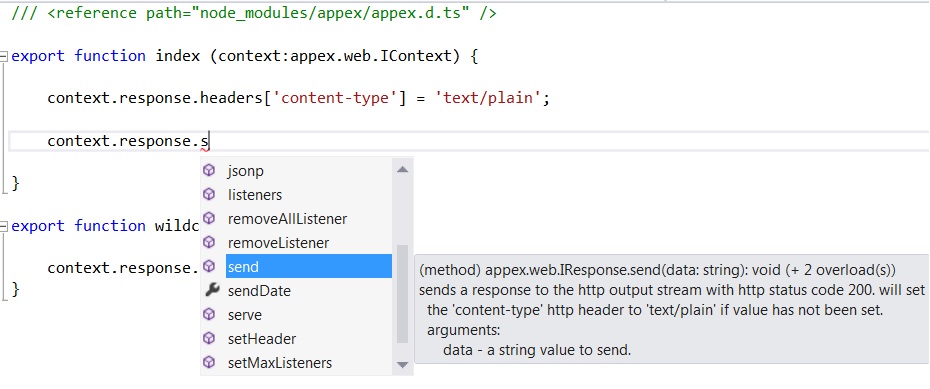
Additional declaration files may be obtained from [here](https://github.com/borisyankov/DefinitelyTyped)
appex includes TypeScript's ability to reference source files with the 'reference' element. appex
will traverse each source files references and include it as part of the compilation.
Developers can use this functionality to logically split source files into reusable components of
functionality, as demonstrated below.
```typescript
//---------------------------------------------------
// file: app.js
//---------------------------------------------------
var appex = require('appex');
var app = appex ({ program : './index.ts' });
app.listen(3000);
//---------------------------------------------------
// file: index.ts
//---------------------------------------------------
///
///
//---------------------------------------------------
// file: users.ts
//---------------------------------------------------
export module users {
// http://[host]:[port]/users/login
export function login (context) { context.response.send('users.login') }
// http://[host]:[port]/users/logout
export function logout (context) { context.response.send('users.logout') }
}
//---------------------------------------------------
// file: pages.ts
//---------------------------------------------------
// http://[host]:[port]/
export function index (context) { context.response.send('home') }
// http://[host]:[port]/about
export function about (context) { context.response.send('about') }
// http://[host]:[port]/contact
export function contact (context) { context.response.send('contact') }
export function wildcard (context, path) { context.response.send(404, ' not found') }
```
* [typescript homepage](http://www.typescriptlang.org/)
* [typescript language specification](http://www.typescriptlang.org/Content/TypeScript%20Language%20Specification.pdf)
* [typescript declarations repository](https://github.com/borisyankov/DefinitelyTyped)
The MIT License (MIT)
Copyright (c) 2013 Haydn Paterson (sinclair)
Permission is hereby granted, free of charge, to any person obtaining a copy
of this software and associated documentation files (the "Software"), to deal
in the Software without restriction, including without limitation the rights
to use, copy, modify, merge, publish, distribute, sublicense, and/or sell
copies of the Software, and to permit persons to whom the Software is
furnished to do so, subject to the following conditions:
The above copyright notice and this permission notice shall be included in
all copies or substantial portions of the Software.
THE SOFTWARE IS PROVIDED "AS IS", WITHOUT WARRANTY OF ANY KIND, EXPRESS OR
IMPLIED, INCLUDING BUT NOT LIMITED TO THE WARRANTIES OF MERCHANTABILITY,
FITNESS FOR A PARTICULAR PURPOSE AND NONINFRINGEMENT. IN NO EVENT SHALL THE
AUTHORS OR COPYRIGHT HOLDERS BE LIABLE FOR ANY CLAIM, DAMAGES OR OTHER
LIABILITY, WHETHER IN AN ACTION OF CONTRACT, TORT OR OTHERWISE, ARISING FROM,
OUT OF OR IN CONNECTION WITH THE SOFTWARE OR THE USE OR OTHER DEALINGS IN
THE SOFTWARE.