https://github.com/singchia/liaison
Instant, secure network reachability. 网络马上通达,Liaison 让你可以轻松连接分布在不同位置的设备与应用,无论你的设备在家、办公室或机房,都能通过 Liaison 建立稳定、安全的网络连接
https://github.com/singchia/liaison
nat-traversal proxy sdp zta ztna
Last synced: 6 months ago
JSON representation
Instant, secure network reachability. 网络马上通达,Liaison 让你可以轻松连接分布在不同位置的设备与应用,无论你的设备在家、办公室或机房,都能通过 Liaison 建立稳定、安全的网络连接
- Host: GitHub
- URL: https://github.com/singchia/liaison
- Owner: singchia
- License: apache-2.0
- Created: 2025-07-01T14:50:45.000Z (about 1 year ago)
- Default Branch: main
- Last Pushed: 2026-02-15T16:47:04.000Z (6 months ago)
- Last Synced: 2026-02-15T23:41:01.169Z (6 months ago)
- Topics: nat-traversal, proxy, sdp, zta, ztna
- Language: TypeScript
- Homepage:
- Size: 6.59 MB
- Stars: 6
- Watchers: 0
- Forks: 3
- Open Issues: 0
-
Metadata Files:
- Readme: README.en.md
- License: LICENSE
Awesome Lists containing this project
README
# Liaison
**Network connectivity made simple - Easily connect devices and applications across different locations**
[](https://github.com/singchia/liaison/actions/workflows/go.yml)
[](https://goreportcard.com/report/github.com/singchia/liaison)
[](https://opensource.org/licenses/Apache-2.0)
[](https://github.com/singchia/liaison/stargazers)
[](https://github.com/singchia/liaison/network/members)
[English](./README.en.md) | [中文](./README.md)

[Quick Start](#-quick-start) • [Features](#-key-features) • [Use Cases](#-use-cases) • [Documentation](#-documentation) • [Contributing](#-contributing)
---
## ✨ Key Features
| 🛡️ **Secure & Reliable** | 🚀 **Easy to Use** | 🌐 **Cross-Platform** | 🔍 **Auto Discovery** |
|:---:|:---:|:---:|:---:|
| TLS encryption for secure connections
No exposure of internal network, enable/disable anytime | Web-based interface
Install and use in seconds | Supports Linux/macOS/Windows
x86_64 and ARM64 | Auto-discover device applications
Zero manual configuration |
### 🎯 Why Choose Liaison?
- **🔒 Enterprise-Grade Security** - TLS encrypted transmission, internal network penetration solution, no internal network exposure, secure and controllable
- **⚡ Lightning-Fast Deployment** - Complete all operations through the Web interface, no complex configuration, install and use in seconds
- **🌍 Full Platform Support** - Supports Linux, macOS, Windows and multiple architectures
- **🤖 Smart Discovery** - Automatically discover applications and services on devices, zero configuration required
- **📊 Visual Monitoring** - Real-time device status and traffic statistics at a glance
---
## 🚀 Quick Start
### 📦 Install Server
**1. Download Installation Package**
```bash
# Download latest version
wget https://github.com/singchia/liaison/releases/download/v1.2.6/liaison-v1.2.6-linux-amd64.tar.gz
# Extract
tar -xzf liaison-v1.2.6-linux-amd64.tar.gz
cd liaison-v1.2.6-linux-amd64
```
**2. Run Installation Script**
```bash
sudo ./install.sh
```
During installation, you'll be prompted to enter a public IP address or domain name. If no input is provided within 30 seconds, the detected public IP will be used automatically.
**3. Access Web Console**
After installation, visit `https://your-public-ip` to access the Web console.
> 💡 **Tip**: Default admin credentials can be found in the installation script output or configuration file
### 🔌 Install Connector
**1. Create Connector**
Create a connector in the Web console and obtain `Access Key` and `Secret Key`.
**2. Install on Target Device**
**Linux/macOS:**
```bash
curl -sSL https://your-server-address/install.sh | bash -s -- \
--access-key=YOUR_ACCESS_KEY \
--secret-key=YOUR_SECRET_KEY
```
**Windows:**
```powershell
# Download installation script
Invoke-WebRequest -Uri "https://your-server-address/install.ps1" -OutFile "install.ps1"
# Run installation
.\install.ps1 -AccessKey "YOUR_ACCESS_KEY" -SecretKey "YOUR_SECRET_KEY"
```
**3. Wait for Auto Connection**
Wait a few seconds, and the device will automatically appear in the console without additional configuration!
---
## 📋 System Requirements
| Component | Requirements |
|:---|:---|
| **Server** | Linux system (Ubuntu 20.04+ or CentOS 7+ recommended) |
| **Connector** | Linux / macOS / Windows (x86_64 and ARM64 architectures supported) |
| **Browser** | Chrome 90+, Firefox 88+, Safari 14+, Edge 90+ |
---
## 🏗️ Architecture

**Liaison uses a centralized architecture, with Frontier service managing all connectors**
### Core Components
- **Manager** - Management center, provides Web interface and API
- **Frontier** - Connector gateway, handles all connector connections and communications
- **Edge** - Connector client, deployed on target devices
---
## 💡 Use Cases
| 🏠 **Remote Work** | 📦 **NAS Companion** | 🏢 **Multi-Datacenter** | ⚡ **Edge Computing** |
|:---:|:---:|:---:|:---:|
| Connect office and home devices
Access anytime, anywhere | Access home NAS
from the internet | Unified connection of servers
across different datacenters | Connect and monitor applications
and services on edge devices |
### Typical Applications
- 🏡 **Home Network** - Access home NAS, smart home devices
- 💼 **Remote Development** - Connect to office servers, remote development and debugging
- 🏢 **Enterprise Intranet** - Securely access internal network services without exposing the intranet
- 🌐 **Multi-Region Deployment** - Unified management of devices distributed across different regions
- 🔧 **Operations Management** - Remote server management, device status monitoring
---
## 📸 Feature Showcase
### Dashboard

### Device Management

### Application Management

### Proxy Configuration

### Connector Management

---
## 📚 Documentation
- [Business Flow Diagram](./docs/biz_sequence.md)
- [API Documentation](./docs/swagger/)
- [Installation Guide](./dist/liaison/README.md)
- [Connector Installation](./dist/edge/README.md)
---
## 🤝 Contributing
We welcome all forms of contributions!
- 🐛 [Report Bug](https://github.com/singchia/liaison/issues/new?template=bug_report.md)
- 💡 [Suggest Feature](https://github.com/singchia/liaison/issues/new?template=feature_request.md)
- 📝 [Submit PR](https://github.com/singchia/liaison/pulls)
- 📖 [Improve Documentation](https://github.com/singchia/liaison/issues/new?template=documentation.md)
### Contribution Guidelines
1. Fork the repository
2. Create your feature branch (`git checkout -b feature/AmazingFeature`)
3. Commit your changes (`git commit -m 'Add some AmazingFeature'`)
4. Push to the branch (`git push origin feature/AmazingFeature`)
5. Open a Pull Request
---
## 📄 License
This project is licensed under the [Apache License 2.0](LICENSE).
```
Copyright 2026 Liaison Contributors
Licensed under the Apache License, Version 2.0 (the "License");
you may not use this file except in compliance with the License.
You may obtain a copy of the License at
http://www.apache.org/licenses/LICENSE-2.0
Unless required by applicable law or agreed to in writing, software
distributed under the License is distributed on an "AS IS" BASIS,
WITHOUT WARRANTIES OR CONDITIONS OF ANY KIND, either express or implied.
See the License for the specific language governing permissions and
limitations under the License.
```
---
## ⭐ Star History
[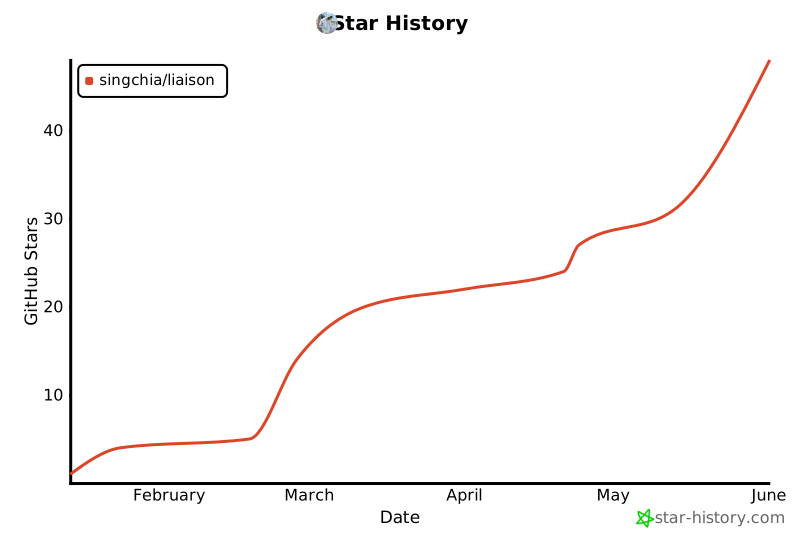](https://star-history.com/#singchia/liaison&Date)
---
## 🙏 Acknowledgments
Thanks to all developers who have contributed to Liaison!
---
**If this project helps you, please give it a ⭐ Star!**
Made with ❤️ by [Liaison Contributors](https://github.com/singchia/liaison/graphs/contributors)
[GitHub](https://github.com/singchia/liaison) • [Issues](https://github.com/singchia/liaison/issues) • [Discussions](https://github.com/singchia/liaison/discussions)