https://github.com/sinspired/subs-check-pro
https://github.com/sinspired/subs-check-pro
clash free infinite mihomo proxy singbox subs-check v2ray
Last synced: about 1 month ago
JSON representation
- Host: GitHub
- URL: https://github.com/sinspired/subs-check-pro
- Owner: sinspired
- License: gpl-3.0
- Created: 2026-05-08T03:43:13.000Z (about 2 months ago)
- Default Branch: main
- Last Pushed: 2026-05-26T05:00:59.000Z (about 1 month ago)
- Last Synced: 2026-05-26T07:04:55.473Z (about 1 month ago)
- Language: Go
- Size: 285 MB
- Stars: 13
- Watchers: 0
- Forks: 9
- Open Issues: 0
-
Metadata Files:
- Readme: README.md
- License: LICENSE
Awesome Lists containing this project
README

Subs-Check⁺ PRO
High-performance proxy subscription checker.





# 🚀 高性能代理检测工具
> This project originated from [beck-8](https://github.com/beck-8/subs-check) but has since diverged significantly and is now maintained independently.
**测活、测速、媒体解锁**,代理检测工具,支持 `100-1000` 高并发低占用运行,检测结果更准确。全新设计,适配 PC 和手机设备的现代 WebUI 配置管理界面,自动生成 `mihomo` 和 `singbox` 订阅,集成 `sub-store` 前端和后端,支持一键复制分享;支持自动无缝版本更新。

## ✨ 特性
- [x] ⚡ [自适应流水线高并发模式](https://github.com/sinspired/subs-check-pro/wiki/Features-Details)
- [x] 🗺️ [增强位置标签](https://github.com/sinspired/subs-check-pro/wiki/Features-Details)
- [x] 🎲 [智能节点乱序](https://github.com/sinspired/subs-check-pro/wiki/Features-Details)
- [x] 🕒 [保存并加载历次可用节点](https://github.com/sinspired/subs-check-pro/wiki/Features-Details)
- [x] 📊 [统计订阅链接总数、可用节点数量、成功率](https://github.com/sinspired/subs-check-pro/wiki/Features-Details)
- [x] 🚦 [自动检测代理环境](https://github.com/sinspired/subs-check-pro/wiki/System-Proxy)
- [x] 🎁 [自动检查更新,无缝升级新版本](https://github.com/sinspired/subs-check-pro/wiki/Features-Details)
- [x] 📦 [自动生成开箱即用的 sing-box 配置](https://github.com/sinspired/subs-check-pro/wiki/Subscriptions)
- [x] 🔒 [优化文件分享,支持分享码](https://github.com/sinspired/subs-check-pro/wiki/File-Service)
- [x] 📣 [消息通知:节点状态/版本更新/GeoDB 更新](https://github.com/sinspired/subs-check-pro/wiki/Notifications)
- [x] 🔋 [优化内存占用](https://github.com/sinspired/subs-check-pro/wiki/Features-Details)
- [x] ♾️ 支持检测百万-千万量级的节点库,依然保持较低的内存占用
- [x] 💻 支持 `Windows` `Linux` `macOS` 多平台部署
- [x] 🐳 支持 `docker` 部署
- [x] 🪟 Windows 可搭配 [专门的 Windows 图形客户端](https://github.com/sinspired/SubsCheck-Win-GUI) 使用
- [x] 📱 全新设计的 WebUI 管理界面,优化小屏设备访问体验
- [x] ✏️ 升级配置编辑器,支持自动补全与高亮,内置预览与配置分析,GUI 式编辑
- [x] 🧩 集成 `sub-store` 前端,WebUI 一键管理
- [x] 6️⃣ 支持 `IPv6` 代理节点
- [x] 🔗 适配多种非标订阅格式,提高获取订阅成功率
- [x] 📡 支持检测 `isp` 类型、`原生/广播IP`、住宅/机房
- [x] 📂 内置文件管理页面(`/files`),方便查看与下载生成文件
- [x] 📈 检测结果分析报告(`/analysis`),含地理位置与协议分布可视化
- [ ] 🚧 本项目现接受 issue 反馈
### 📖 教程(Wiki)
- 🐳 [Docker 部署](https://github.com/sinspired/subs-check-pro/wiki/Deployment#docker-运行)
- 🔁 [WatchTower 自动更新与通知](https://github.com/sinspired/subs-check-pro/wiki/Deployment#使用-watchtower-自动更新并通知)
- 📘 [Cloudflare Tunnel 外网访问](https://github.com/sinspired/subs-check-pro/wiki/Cloudflare-Tunnel)
- 📗 [通知渠道配置(Apprise)](https://github.com/sinspired/subs-check-pro/wiki/Notifications)
- 📙 [订阅使用方法](https://github.com/sinspired/subs-check-pro/wiki/Subscriptions)
- 📕 [内置文件服务](https://github.com/sinspired/subs-check-pro/wiki/File-Service)
- 📖 [自建GitHub代理(支持提高api速率和gist加速)](https://github.com/sinspired/CF-Proxy)
### 📣 使用交流,功能讨论,issure 反馈,新版本通知
- > Telegram 群组:[subs-check性能版](https://t.me/subs_check_pro)
- > Telegram 频道:[关注频道](https://t.me/sinspired_ai)
> [!TIP]
>
> 功能更新频繁,请务必查看最新的 [配置文件示例](https://github.com/sinspired/subs-check-pro/blob/main/config/config.yaml.example) 以获取最新功能支持。
> [!NOTE]
> 查看新增功能及设置方法: [新增功能与性能优化详情](https://github.com/sinspired/subs-check-pro/wiki/Features-Details)
## 📸 预览


### ✨ 重新设计的 WebUI管理界面
`http://localhost:8199/admin`


### 📊 检测结果分析报告
`http://localhost:8199/analysis`

### ⚡新增分享菜单项,自动生成singbox订阅,支持一键分享
| | | |
| -------------------------------- | -------------------------------------- | -------------------------------------- |
| |  |  |
| | |
| -------------------------------- | -------------------------------------- |
|  |  |
## 🛠️ 快速开始
> 首次运行会在当前目录生成默认配置文件。完整安装与部署见 Wiki:
> [安装与部署](https://github.com/sinspired/subs-check-pro/wiki/Deployment)
### 🌏 WebUI 控制面板
WebUI 集成了配置编辑、订阅分享、订阅管理,内置文件服务,检测结果分析报告,日志查看等功能,请务必使用 WebUI 作为主要管理入口
请主动修改 `config.yaml` `api-key` 作为 WebUI 访问密码,如未设置,请查看终端日志获取 `api-key`
浏览器输入 `http://localhost:8199/admin` 或 `http://127.0.0.1:8199/admin` 访问 WebUI
注意 `8199` 为默认监听端口,如已修改,请替换为实际端口
### 📦 二进制文件运行
下载 Releases 中适合的版本,解压后直接运行:
```powershell
./subs-check-pro.exe -f ./config/config.yaml
```
记录 `api-key`,访问 WebUi
`http://localhost:8199/admin`
### 🐳 Docker 运行(最简)
```bash
docker run -d \
--name subs-check-pro \
-p 8299:8299 \
-p 8199:8199 \
-v ./config:/app/config \
-v ./output:/app/output \
--restart always \
ghcr.io/sinspired/subs-check-pro:latest
```
💡 记录 `api-key`,访问 WebUi
`http://localhost:8199/admin`
> 代理设置见 Wiki:[系统与 GitHub 代理](https://github.com/sinspired/subs-check-pro/wiki/System-Proxy)
>
> 自建测速地址:[Speedtest](https://github.com/sinspired/subs-check-pro/wiki/Speedtest)
### 🪜 优化系统代理和 GitHub 代理设置(可选)
可使用网上公开的github proxy 或使用 GitHub 项目 [CF-Proxy](https://github.com/sinspired/CF-Proxy) 自建 GitHub 代理
展开查看
```yaml
# 新增设置项
# 优先级 1.system-proxy;2.github-proxy;3.ghproxy-group
# 即使未设置,也会检测常见端口(v2ray\clash)的系统代理自动设置
# 系统代理设置: 适用于拉取代理、消息推送、文件上传等等。
# 写法跟环境变量一样,修改需重启生效
# system-proxy: "http://username:password@192.168.1.1:7890"
# system-proxy: "socks5://username:password@192.168.1.1:7890"
system-proxy: ""
# Github 代理:获取订阅使用
# github-proxy: "https://ghfast.top/"
github-proxy: ""
# GitHub 代理列表:程序会自动筛选可用的 GitHub 代理
ghproxy-group:
# - https://ghp.yeye.f5.si/
# - https://git.llvho.com/
# - https://hub.885666.xyz/
# - https://p.jackyu.cn/
# - https://github.cnxiaobai.com/
```
如果拉取非Github订阅速度慢,可使用通用的 HTTP_PROXY HTTPS_PROXY 环境变量加快速度;此变量不会影响节点测试速度
```bash
# HTTP 代理示例
export HTTP_PROXY=http://username:password@192.168.1.1:7890
export HTTPS_PROXY=http://username:password@192.168.1.1:7890
# SOCKS5 代理示例
export HTTP_PROXY=socks5://username:password@192.168.1.1:7890
export HTTPS_PROXY=socks5://username:password@192.168.1.1:7890
# SOCKS5H 代理示例
export HTTP_PROXY=socks5h://username:password@192.168.1.1:7890
export HTTPS_PROXY=socks5h://username:password@192.168.1.1:7890
```
如果想加速github的链接,可使用网上公开的github proxy
可使用 GitHub 项目 [CF-Proxy](https://github.com/sinspired/CF-Proxy) 自建 GitHub 代理,可直接复制 [worker.js](https://github.com/sinspired/CF-Proxy/blob/main/worker.js) 到 [Cloudflare](https://dash.cloudflare.com/) 的 workers。
```yaml
# Github Proxy,获取订阅使用,结尾要带的 /
# github-proxy: "https://ghfast.top/"
github-proxy: "https://proxy.custom-domain/"
```
### 🌐 自建测速地址(可选)
展开查看
> **⚠️ 注意:** 避免使用 Speedtest 或 Cloudflare 下载链接,因为部分节点会屏蔽测速网站。
1. 将 [worker.js](./doc/cloudflare/worker.js) 部署到 Cloudflare Workers。
2. 绑定自定义域名(避免被节点屏蔽)。
3. 在配置文件中设置 `speed-test-url` 为你的 Workers 地址。
4. 建议使用 `speed-test-url: random` 使用随机测速地址,避免对单个测速源造成负担。
```yaml
# 100MB
speed-test-url: https://custom-domain/speedtest?bytes=104857600
# 1GB
speed-test-url: https://custom-domain/speedtest?bytes=1073741824
```
## ⚙️ Cloudflare Tunnel 外网访问
完整配置请见 Wiki:[Cloudflare Tunnel](https://github.com/sinspired/subs-check-pro/wiki/Cloudflare-Tunnel)
## 🔔 通知渠道配置
完整文档请见 Wiki:[通知渠道](https://github.com/sinspired/subs-check-pro/wiki/Notifications)
## 💾 保存方法
见 Wiki:[保存方法](https://github.com/sinspired/subs-check-pro/wiki/Storage)
## 📲 订阅使用方法
完整文档请见 Wiki:[订阅使用方法](https://github.com/sinspired/subs-check-pro/wiki/Subscriptions)
## 🌐 内置文件服务
完整文档请见 Wiki:[内置文件服务](https://github.com/sinspired/subs-check-pro/wiki/File-Service)
## ✨ 新增功能与性能优化详情
完整说明请见 Wiki:[新增功能与性能优化详情](https://github.com/sinspired/subs-check-pro/wiki/Features-Details)
## 🤝 贡献与开发
- 欢迎提交 PR 与 Issue,一起完善项目。
- 本仓库使用 Git LFS 管理大文件(如资源与预编译产物)。
```bash
git lfs install
git clone https://github.com/sinspired/subs-check-pro
cd subs-check-pro
# 如已克隆完成后再启用 LFS,请执行:
git lfs pull
```
## 🙏 鸣谢
[beck-8](https://github.com/beck-8)、[cmliu](https://github.com/cmliu)、[Sub-Store](https://github.com/sub-store-org/Sub-Store)、[bestruirui](https://github.com/bestruirui/BestSub)
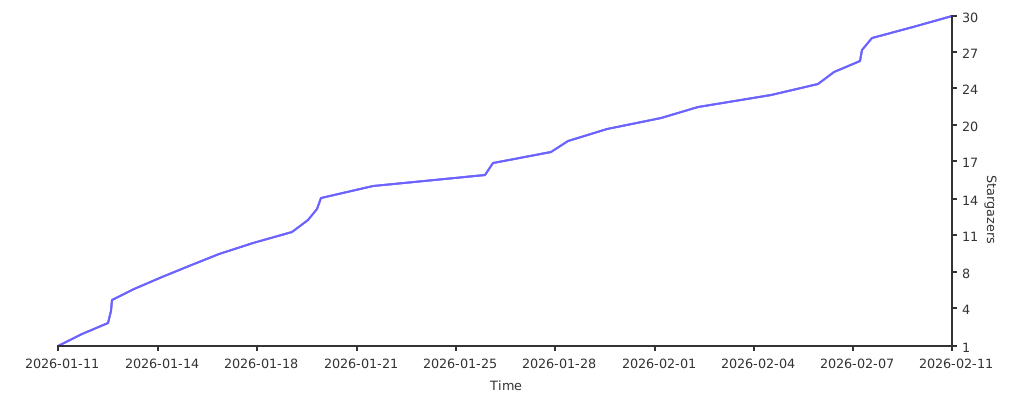
## ⭐ Star History
[](https://starchart.cc/sinspired/subs-check-pro)
## ⚖️ 免责声明
本工具仅供学习和研究使用,使用者应自行承担风险并遵守相关法律法规。