https://github.com/sippy/rtp_cluster
RTP Cluster is a front-end for multiple RTPproxies
https://github.com/sippy/rtp_cluster
Last synced: 5 months ago
JSON representation
RTP Cluster is a front-end for multiple RTPproxies
- Host: GitHub
- URL: https://github.com/sippy/rtp_cluster
- Owner: sippy
- License: bsd-2-clause
- Created: 2015-11-05T02:24:24.000Z (over 10 years ago)
- Default Branch: master
- Last Pushed: 2024-05-10T11:23:08.000Z (about 2 years ago)
- Last Synced: 2024-05-10T12:35:28.829Z (about 2 years ago)
- Language: Python
- Size: 887 KB
- Stars: 38
- Watchers: 11
- Forks: 12
- Open Issues: 4
-
Metadata Files:
- Readme: README.md
- License: LICENSE
Awesome Lists containing this project
- awesome-telco - rtp_cluster - 05]` - RTP Cluster is a front-end for multiple RTPproxies. (Interconnect / SBC, IMS)
README
[](https://github.com/sippy/rtp_cluster/actions/workflows/basic.yml?query=branch%3Amaster++)
# RTP Cluster - a front-end for the distributed RTPproxy network
## Overview
RTP Cluster is software that sits between SIP signaling component (such as
OpenSIPS, B2BUA, Kamailio etc.) and one or more RTPproxy instances. The
software monitors availability of each individual RTPproxy and distributes
load between them based on that availability and parameters defined by the
administrator (weight and max capacity).
From the point of view of the signaling component, the RTP Cluster appears
to be a normal RTPproxy running locally.
One process can support more than one cluster, each on different control
socket.
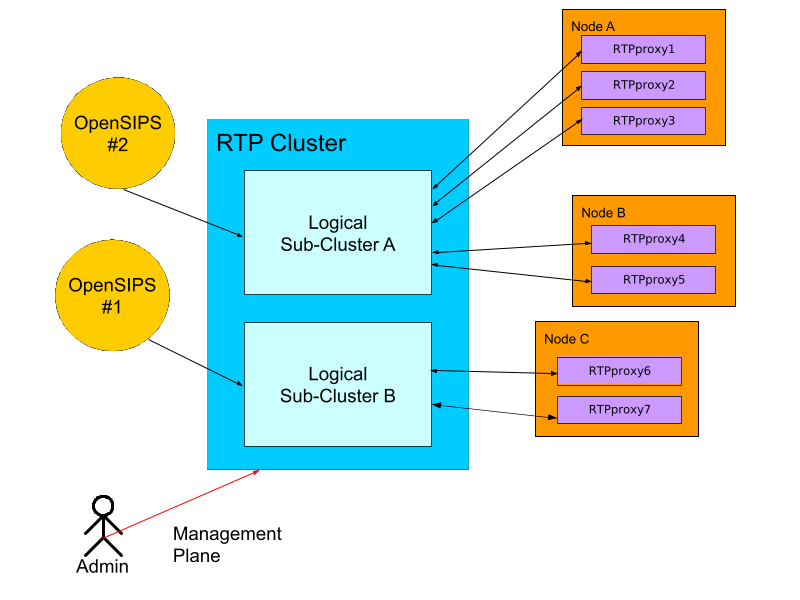
The following diagram illustrates the high level design of the software.
## Installation and configuration
Installation currently consists of unpacking rtp_cluster tar package into
designated directory.
Configuration is performed by the `rtp_cluster.xml` file. Example is
available in the rtp_cluster directory of the package. Default location of
the configuration file is `/usr/local/etc/rtp_cluster.xml`.
The server can be started as follows:
```
$ cd some/dir/rtp_cluster
$ python rtp_cluster.py
```
By default the software will become a daemon and run in background. All
error messages and exceptions can be found in the
`/var/log/rtp_cluster.log`. In order to run in the foreground mode one has
to specify `-f` flag when starting `rtp_cluster.py`.
OpenSIPS configuration remains the same as in the case of stand-alone
local RTPproxy.
## Run-time configuration adjustments
RTP Cluster provides administration CLI interface allowing to change
cluster configuration on the fly. In order to connect to that interface
one can either use telnet utility (only works on systems where telnet can
connect to unix domain sockets), or using the supplied
`rtp_cluster_client.py` script. Following commands are supported:
* `ls`
* list all configured clusters;
* `ls `
* show detailed information about the cluster with the matching name;
* `modify add name=,protocol=,address=
,capacity=,weight=`
* add new RTPproxy into the cluster with matching name;
* `modify delete `
* gracefully remove specified RTPproxy from the cluster. The software
will check if there any sessions already in progress and will wait for
them to finish before removing the entry completely;
* `modify pause `
* temporary suspend specified RTPproxy and do not create any new sessions
in it. The proxy remains in the cluster configuration;
* `modify resume `
* resume previously suspended proxy.
## Example:
1. Get list of configured clusters:
```
$ ./rtp_cluster_client.py ls
Cluster: #0
name = Supercluster#1
address = /var/run/rtpproxy.sock
active members = 2
inactive members = 0
Cluster: #1
name = Supercluster#2
address = /var/run/rtpproxy1.sock
active members = 0
inactive members = 2
OK
```
2. Get detailed information about `Supercluster#1` cluster:
```
$ ./rtp_cluster_client.py 'ls Supercluster#1'
Active members of the cluster #0:
RTPproxy: #0
name = RTPPROXY1
address = [u'127.0.0.1', 22222]
weight = 100
capacity = 2500
state = online
active sessions = 0
status = ACTIVE
RTPproxy: #1
name = RTPPROXY2
address = [u'127.0.0.1', 22223]
weight = 0
capacity = 1500
state = online
active sessions = 0
status = ACTIVE
Inactive members of the cluster #0:
OK
```
3. Add new proxy to the `Supercluster#2`:
```
$ ./rtp_cluster_client.py 'modify Supercluster#2 add name=another_proxy,protocol=udp,address=1.2.3.4:567,capacity=120,weight=300'
OK
```
4. Gracefully remove `RTPPROXY2` node from `Supercluster#1`:
```
$ ./rtp_cluster_client.py 'modify Supercluster#1 delete RTPPROXY2'
OK
```