https://github.com/sjkingo/luminary
Luminary is a small x86 real-time operating system
https://github.com/sjkingo/luminary
kernel operating-system osdev qemu real-time ulysses x86
Last synced: 8 months ago
JSON representation
Luminary is a small x86 real-time operating system
- Host: GitHub
- URL: https://github.com/sjkingo/luminary
- Owner: sjkingo
- Created: 2015-06-20T00:08:14.000Z (almost 11 years ago)
- Default Branch: master
- Last Pushed: 2020-04-29T01:44:22.000Z (about 6 years ago)
- Last Synced: 2025-09-03T08:45:06.485Z (10 months ago)
- Topics: kernel, operating-system, osdev, qemu, real-time, ulysses, x86
- Language: C
- Homepage:
- Size: 125 KB
- Stars: 8
- Watchers: 3
- Forks: 1
- Open Issues: 0
-
Metadata Files:
- Readme: README.md
- Changelog: CHANGELOG.md
Awesome Lists containing this project
README
# Luminary OS
Luminary is a small x86 real-time operating system written in C and assembly.
Its goal is to implement a kernel that includes a hard real-time scheduler that
can run time-sensitive tasks.
It takes concepts from an existing operating system by the same author called [Ulysses](https://github.com/sjkingo/ulysses).
Written by Sam Kingston.
**Latest version: 0.10.0**
## Features
* Small codebase
* Hard priority-based [preemptive scheduler](https://github.com/sjkingo/luminary/blob/master/src/sched.c#L1-L82)
* Flat memory model (no virtual addresses)
* Support for [basic I/O drivers](https://github.com/sjkingo/luminary/tree/master/src/drivers)
Some architecture notes and *gotchas* are located in [NOTES.md](https://github.com/sjkingo/luminary/blob/master/NOTES.md).
## Build configuration
You may configure the build by editing the `$DEFINES` variable at the top of [`src/Makefile`](https://github.com/sjkingo/luminary/blob/master/src/Makefile#L3).
Available options are:
* `-DDEBUG`: produce debugging output to the console. You probably want this with `-DTURTLE`
* `-DTURTLE`: scale the scheduler down to 1 task per second
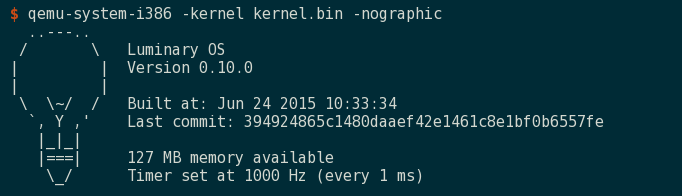
* `-DUSE_SERIAL`: enable the serial subsystem, which writes console output to COM1. This may be used with `qemu -nographic`.
## How to build
First, ensure all build requirements are met:
* `gcc` and GNU `as` compilers that are capable of producing 32-bit executables
* `glibc-devel.i686`
Then, building the kernel is as simple as running the included `Makefile`:
```bash
$ make -C src
```
## Running
After building, you may run the kernel in QEMU with some shortcuts:
To have QEMU load the kernel image directly, opening an SDL window (fastest):
```bash
$ make -C src qemu
```
Or to build a bootable ISO image with Grub2 Multiboot and boot that way (requires `xorriso`):
```bash
$ make -C src qemucd
```
You may also redirect output to the terminal by using:
```bash
$ make -C src console
```
Note that the kernel must be built with the `-DUSE_SERIAL` option for this to work or you will
get no output from the kernel.