https://github.com/skillmaker-dev/asp.net-emailing-with-minimal-api
Sending Emails in ASP.NET 6 & Minimal apis Apps using Gmail smtp
https://github.com/skillmaker-dev/asp.net-emailing-with-minimal-api
asp-net asp-net-core email email-sender smtp
Last synced: about 2 months ago
JSON representation
Sending Emails in ASP.NET 6 & Minimal apis Apps using Gmail smtp
- Host: GitHub
- URL: https://github.com/skillmaker-dev/asp.net-emailing-with-minimal-api
- Owner: skillmaker-dev
- Created: 2022-08-07T15:21:19.000Z (almost 4 years ago)
- Default Branch: master
- Last Pushed: 2022-08-07T15:48:06.000Z (almost 4 years ago)
- Last Synced: 2025-03-23T09:35:22.285Z (over 1 year ago)
- Topics: asp-net, asp-net-core, email, email-sender, smtp
- Language: C#
- Homepage:
- Size: 12.7 KB
- Stars: 2
- Watchers: 1
- Forks: 1
- Open Issues: 0
-
Metadata Files:
- Readme: README.md
Awesome Lists containing this project
README
# ASP.NET 6 Emailing with Minimal APIs
Sending Emails in ASP.NET 6 & Minimal apis Apps using Gmail smtp
To successfuly start the project we have to follow the following steps:
### Enable 2 Step-Verification : (skip this part if you already have 2FA enabled)
Go to https://myaccount.google.com/security
- Then under the “Signing in to Google” section, we can see that 2-Step Verification is off – so we have to click on it
- Click Get Started, provide your password, and confirm the code by providing a mobile number
- If everything goes well, you should see the Turn On option, so just click on it
### Add app password :
Under 2Step-Verification, You should see App Passwords
- Click on it
- Provide a password
- Click the Select app menu and choose the Other (Custom Name) option
- Now, all we have to do is to provide any name we like for our app and click the Generate button
- Copy the generated password and then paste it in ```EmailConfiguration:Password``` in ```appsettings.json``` in our **ASP.NET Project**
- Type your email in ```EmailConfiguration:From``` and ```EmailConfiguration:Username``` in ```appsettings.json```
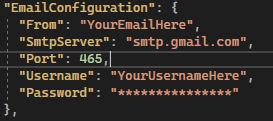
### Now you can run your app using CTRL + F5 and send your email using POSTMAN or INSOMNIA

### Don't forget to add the recipient email in the url parameter:
