https://github.com/sklarsa/django-sendgrid-v5
An implementation of Django's EmailBackend compatible with sendgrid-python v5+
https://github.com/sklarsa/django-sendgrid-v5
django django-emailtools sendgrid sendgrid-api
Last synced: 6 months ago
JSON representation
An implementation of Django's EmailBackend compatible with sendgrid-python v5+
- Host: GitHub
- URL: https://github.com/sklarsa/django-sendgrid-v5
- Owner: sklarsa
- License: mit
- Created: 2017-07-21T18:26:02.000Z (almost 9 years ago)
- Default Branch: master
- Last Pushed: 2025-07-01T12:22:48.000Z (about 1 year ago)
- Last Synced: 2025-10-05T20:13:26.911Z (10 months ago)
- Topics: django, django-emailtools, sendgrid, sendgrid-api
- Language: Python
- Homepage:
- Size: 254 KB
- Stars: 342
- Watchers: 10
- Forks: 57
- Open Issues: 2
-
Metadata Files:
- Readme: README.md
- Contributing: CONTRIBUTING.md
- License: LICENSE
Awesome Lists containing this project
README
# django-sendgrid-v5
[](https://pypi.python.org/pypi/django-sendgrid-v5/)
This package implements an email backend for Django that relies on sendgrid's REST API for message delivery.
It is under active development, and pull requests are more than welcome\!
To use the backend, simply install the package (using pip), set the `EMAIL_BACKEND` setting in Django, and add a `SENDGRID_API_KEY` key (set to the appropriate value) to your Django settings.
## How to Install
1. `pip install django-sendgrid-v5`
2. In your project's settings.py script:
1. Set `EMAIL_BACKEND = "sendgrid_backend.SendgridBackend"`
2. Set the SENDGRID\_API\_KEY in settings.py to your api key that was provided to you by sendgrid. `SENDGRID_API_KEY = os.environ["SENDGRID_API_KEY"]`
### Other settings
1. To toggle sandbox mode (when django is running in DEBUG mode), set `SENDGRID_SANDBOX_MODE_IN_DEBUG = True/False`.
1. To err on the side of caution, this defaults to True, so emails sent in DEBUG mode will not be delivered, unless this setting is explicitly set to False.
1. To enable sandbox mode unconditionally (regardless of DEBUG), set `SENDGRID_SANDBOX_MODE = True`. This is useful for non-production environments like QA or staging where DEBUG may be False but you still don't want to send real emails.
1. `SENDGRID_ECHO_TO_STDOUT` will echo to stdout or any other file-like
object that is passed to the backend via the `stream` kwarg.
1. `SENDGRID_TRACK_EMAIL_OPENS` - defaults to true and tracks email open events via the Sendgrid service. These events are logged in the Statistics UI, Email Activity interface, and are reported by the Event Webhook.
1. `SENDGRID_TRACK_CLICKS_HTML` - defaults to true and, if enabled in your Sendgrid account, will tracks click events on links found in the HTML message sent.
1. `SENDGRID_TRACK_CLICKS_PLAIN` - defaults to true and, if enabled in your Sendgrid account, will tracks click events on links found in the plain text message sent.
1. `SENDGRID_HOST_URL` - Allows changing the base API URI. Set to `https://api.eu.sendgrid.com` to use the EU region.
## Usage
### Simple
```python
from django.core.mail import send_mail
send_mail(
'Subject here',
'Here is the message.',
'from@example.com',
['to@example.com'],
fail_silently=False,
)
```
### Dynamic Template with JSON Data
First, create a [dynamic template](https://mc.sendgrid.com/dynamic-templates) and copy the ID.
```python
from django.core.mail import EmailMessage
msg = EmailMessage(
from_email='to@example.com',
to=['to@example.com'],
)
msg.template_id = "your-dynamic-template-id"
msg.dynamic_template_data = {
"title": foo
}
msg.send(fail_silently=False)
```
### The kitchen sink EmailMessage (all of the supported sendgrid-specific properties)
```python
from django.core.mail import EmailMessage
msg = EmailMessage(
from_email='to@example.com',
to=['to@example.com'],
cc=['cc@example.com'],
bcc=['bcc@example.com'],
)
# Personalization custom args
# https://sendgrid.com/docs/for-developers/sending-email/personalizations/
msg.custom_args = {'arg1': 'value1', 'arg2': 'value2'}
# Reply to email address (sendgrid only supports 1 reply-to email address)
msg.reply_to = 'reply-to@example.com'
# Send at (accepts an integer per the sendgrid docs)
# https://docs.sendgrid.com/for-developers/sending-email/scheduling-parameters#send-at
msg.send_at = 1600188812
# Transactional templates
# https://sendgrid.com/docs/ui/sending-email/how-to-send-an-email-with-dynamic-transactional-templates/
msg.template_id = "your-dynamic-template-id"
msg.dynamic_template_data = { # Sendgrid v6+ only
"title": foo
}
msg.substitutions = {
"title": bar
}
# Unsubscribe groups
# https://sendgrid.com/docs/ui/sending-email/unsubscribe-groups/
msg.asm = {'group_id': 123, 'groups_to_display': ['group1', 'group2']}
# Categories
# https://sendgrid.com/docs/glossary/categories/
msg.categories = ['category1', 'category2']
# IP Pools
# https://sendgrid.com/docs/ui/account-and-settings/ip-pools/
msg.ip_pool_name = 'my-ip-pool'
msg.send(fail_silently=False)
```
### Webhook Helpers
Version 6 of the `sendgrid` package or later includes some helper functions to
cryptographically verify the signature and contents of events from the Sendgrid
Events webhook.
This project includes some additional helpers for Sendgrid's webhook signature
verification.
1. Enable signature verification for Sendgrid webhooks (see [Sendgrid docs](https://www.twilio.com/docs/sendgrid/for-developers/tracking-events/getting-started-event-webhook-security-features#enable-signature-verification)). Once you have saved the webhook and edited it again, copy the verification key.
2. Modify your project's `settings.py` and set `SENDGRID_WEBHOOK_VERIFICATION_KEY` to your verification key value.
3. Setup a project URLConf and view. Below is an example view you can adapt to your needs.
```python
import json
from datetime import datetime
from django.db import transaction
from django.http import HttpRequest, HttpResponse
from django.views.decorators.csrf import csrf_exempt
from django.views.decorators.http import require_POST
from post_office.models import Email, Log as EmailLog, STATUS
from pytz import utc
from sendgrid_backend.decorators import verify_sendgrid_webhook_signature
EVENTS = {'delivered': STATUS.sent, 'bounce': STATUS.failed, 'blocked': STATUS.failed}
@csrf_exempt
@require_POST
@verify_sendgrid_webhook_signature
def sendgrid_deliverability_webhook_handler(request: HttpRequest) -> HttpResponse:
"""
Example webhook handler to save delivered, bounce, and blocked events to
the email log.
"""
for msg_dict in reversed(json.loads(request.body)):
if event := EVENTS.get(msg_dict.get('event', None), None):
event_timestamp = datetime.fromtimestamp(msg_dict.get('timestamp'), tz=utc)
with transaction.atomic():
Email.objects.filter(message_id=msg_dict.get('smtp-id', None)).update(
last_updated=event_timestamp,
status=event,
)
EmailLog.objects.create(
email__message_id=msg_dict.get('smtp-id', None),
date=event_timestamp,
status=event,
message=json.dumps(msg_dict),
)
return HttpResponse("ok")
```
### FAQ
**How to change a Sender's Name ?**
`from_email="John Smith "`
You can just include the name in the from_email field of the _```EmailMessage```_ class
```
msg = EmailMessage(
from_email='Sender Name ',
to=['to@example.com'],
)
```
**How to make mails to multiple users private (hide all the email addresses to which the mail is sent) to each person (personalization) ?**
Setting the `make_private` attribute to `True` will help us achieve it
```
msg = EmailMessage(
from_email='Sender Name ',
to=['to@example.com','abc@example.com','xyz@example.com'],
)
msg.make_private = True
```
## Examples
- Marcelo Canina [(@marcanuy)](https://github.com/marcanuy) wrote a great article demonstrating how to integrate `django-sendgrid-v5` into your Django application on his site: [https://simpleit.rocks/python/django/adding-email-to-django-the-easiest-way/](https://simpleit.rocks/python/django/adding-email-to-django-the-easiest-way/)
- RX-36 [(@DevWoody856)](https://github.com/DevWoody856) demonstrates how to use `django-sendgrid-v5` to make a contact form for your web application: https://rx-36.life/create-a-contact-form-using-sendgrid-with-django/
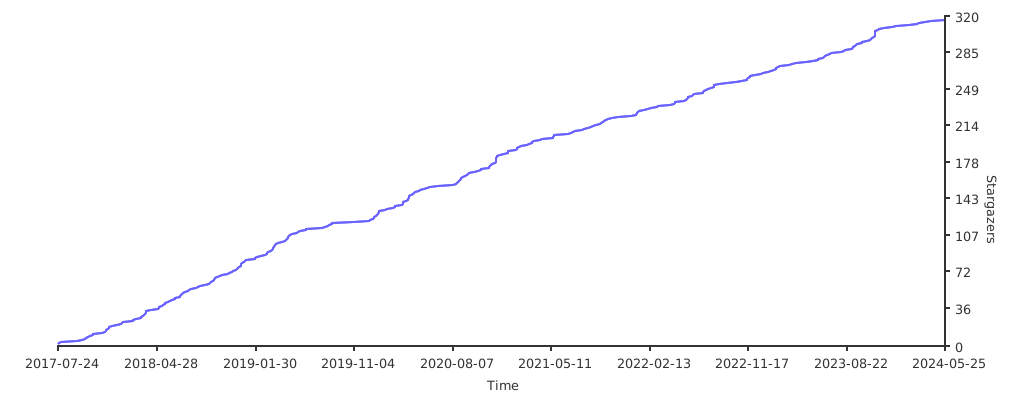
## Stargazers over time
[](https://starchart.cc/sklarsa/django-sendgrid-v5)