https://github.com/skolmer/i18n-tag-schema
Generates a json schema for all i18n tagged template literals in your project
https://github.com/skolmer/i18n-tag-schema
es2015 es6 export i18n javascript json-schema l10n localization translation validation
Last synced: 5 months ago
JSON representation
Generates a json schema for all i18n tagged template literals in your project
- Host: GitHub
- URL: https://github.com/skolmer/i18n-tag-schema
- Owner: skolmer
- License: mit
- Archived: true
- Created: 2016-05-23T08:22:09.000Z (about 10 years ago)
- Default Branch: master
- Last Pushed: 2020-05-24T20:15:18.000Z (about 6 years ago)
- Last Synced: 2025-12-16T02:30:41.185Z (6 months ago)
- Topics: es2015, es6, export, i18n, javascript, json-schema, l10n, localization, translation, validation
- Language: JavaScript
- Homepage: http://i18n-tag.kolmer.net
- Size: 6.65 MB
- Stars: 15
- Watchers: 2
- Forks: 3
- Open Issues: 12
-
Metadata Files:
- Readme: README.md
- Contributing: CONTRIBUTING.md
- License: LICENSE
Awesome Lists containing this project
README
# 🌍 i18n Tagged Template Literals - Schema Generator
[](#contributors)
[](https://travis-ci.org/skolmer/i18n-tag-schema) [](https://coveralls.io/github/skolmer/i18n-tag-schema?branch=master) [](https://www.npmjs.com/package/i18n-tag-schema) [](https://david-dm.org/skolmer/i18n-tag-schema) [](https://github.com/semantic-release/semantic-release)
[](http://commitizen.github.io/cz-cli/) [](http://opensource.org/licenses/MIT)
[](https://nodei.co/npm/i18n-tag-schema/)
[](http://i18n-tag.kolmer.net/)
## 📄 Table of Contents
* [🗂 Overview](#-overview)
* [⚠️ Known Limitations](#%EF%B8%8F-known-limitations)
* [📦 Installation](#-installation)
* [💻 Examples](#-examples)
* [🎩 Key detection for i18n.translate()](#-key-detection-for-i18ntranslate)
* [📒 Usage](#-usage)
+ [Via npm](#via-npm)
- [package.json](#packagejson)
+ [Via Gulp](#via-gulp)
+ [Via Command-line](#via-command-line)
+ [Reference schema in translation.json file](#reference-schema-in-translationjson-file)
* [✔️ Validation Rules](#%EF%B8%8F-validation-rules)
* [⚙ Preprocessors](#-preprocessors)
* [⚙ Postprocessors](#-postprocessors)
* [⌨ IDE Integration](#-ide-integration)
+ [Webstorm / PhpStorm](#webstorm--phpstorm)
+ [Visual Studio Code](#visual-studio-code)
* [🎁 Additional Features](#-additional-features)
+ [Export translation keys](#export-translation-keys)
+ [Validate translation file](#validate-translation-file)
* [🛠 Tools](#-tools)
+ [Run time translation and localization](#run-time-translation-and-localization)
+ [Build time translation](#build-time-translation)
+ [Schema based translations](#schema-based-translations)
* [📃 License](#-license)
## 🗂 Overview
This node module generates a [JSON Schema](http://json-schema.org/) of all [i18n tagged](https://github.com/skolmer/es2015-i18n-tag) template literals in a JavaScript project.
A JSON schema can add key validation and autocompletion to your JSON based translation files (See [IDE Integration](#-ide-integration)).
The tool will only detect template literals that are tagged with i18n (See [es2015-i18n-tag](http://i18n-tag.kolmer.net/)).
It has support for [Custom Translation Groups](https://github.com/skolmer/es2015-i18n-tag#appjs) and generated [File Module Groups](https://github.com/skolmer/es2015-i18n-tag#babel-generated-file-module-groups). `__translationGroup` constants in your code will be resolved relative to [`rootPath`](http://github.kolmer.net/i18n-tag-schema/globals.html#schemaoptions).
The following repository provides examples for use with npm scripts or gulp: https://github.com/skolmer/i18n-tag-examples
i18n-tag-schema can also be used to export translation keys into a simple json format (See [Additional Features](#-additional-features)). This can be useful if you want to import your translation keys into a 3rd party tool. (Other export formats might be added later. Pull requests are welcome!)
This module does include a JSON validator that helps you keep track of missing or invalid keys in your translation files and shows you the current translation coverage of your project. A translation file is considered valid if it covers 100% of the translation keys defined in the JSON schema. This feature can be integrated into an automated build pipeline to check the translation coverage of a build. It can also be used to write unit tests that fail if your modules are not fully translated.
## ⚠️ Known Limitations
You cannot use variables for grouping.
```js
/***** example 1 ******/
import _i18n from 'es2015-i18n-tag'
const i18n = _i18n('common')
const example1 = i18n`test` // ⚠️ i18n-tag-schema will not detect the "common" group.
/***** example 2 ******/
import i18n from 'es2015-i18n-tag'
const groupName = 'common'
const example2 = i18n(groupName)`test` // ⚠️ will not be detected. variables as groupName params are currently not supported.
const example2b = i18n('common')`test` // ✔️ this group name will be detected by i18n-tag-schema.
/***** example 3 *****/
import { i18nGroup } from 'es2015-i18n-tag'
const groupName = 'common'
@i18nGroup(groupName) // ⚠️ will not be detected. variables as groupName params are currently not supported.
class example3 {
}
@i18nGroup('common') // ✔️ this group name will be detected by i18n-tag-schema.
class example3b {
}
```
## 📦 Installation
```sh
$ npm install i18n-tag-schema --save-dev
```
## 💻 Examples
* [npm scripts](https://github.com/skolmer/i18n-tag-examples/tree/master/ReactJS)
* [gulp](https://github.com/skolmer/i18n-tag-examples/tree/master/Simple)
## 🎩 Key detection for i18n.translate()
If you are using `i18n.translate()` to translate variables you can add comments telling i18n-tag-schema the possible values of your variables.
The comment should be a `string` or `string[]` in valid JSON syntax.
```js
i18n.translate(myVariable1 /* "possible value ${0}" */, 'expression value')
i18n.translate(myVariable2 /* ["possible value 1", "another value"] */)
```
See [i18n.translate()](https://github.com/skolmer/es2015-i18n-tag#translating-without-template-literals)
## 📒 Usage
```js
import { generateTranslationSchema } from 'i18n-tag-schema'
generateTranslationSchema({rootPath: './src', schemaPath: './translation.schema.json'}).then((result) => {
console.log(result)
}).catch((err) => {
console.error(err.message)
})
```
[See docs](http://github.kolmer.net/i18n-tag-schema/globals.html#generatetranslationschema)
### Via npm
#### package.json
```json
{
"scripts": {
"generate-schema": "i18n-tag-schema ./src --schema ./translation.schema.json",
"validate-german-translation": "i18n-tag-schema ./translations/translation.de.json --validate --schema ./translation.schema.json",
"validate-translations": "i18n-tag-schema ./translations --validate --schema ./translation.schema.json"
}
}
```
```sh
$ npm run generate-schema
$ npm run validate-german-translation
$ npm run validate-translations
```
### Via Gulp
```js
var gulp = require('gulp')
var generateTranslationSchema = require('i18n-tag-schema').generateTranslationSchema
var validateTranslations = require('i18n-tag-schema').validateTranslations
gulp.task('generate-translation-schema', function (cb) {
generateTranslationSchema({ rootPath: './src', schemaPath: './translation.schema.json' }).then((result) => {
cb(); // finished task
}).catch((err) => {
console.error(err.message)
cb(err.message); // task failed
})
})
gulp.task('validate-german-translation', function (cb) {
validateTranslations({ rootPath: './translations/translation.de.json', schemaPath: './translation.schema.json' }).then((result) => {
console.log(result)
cb(); // finished task
}).catch((err) => {
console.error(err.message)
cb(err.message); // task failed
})
})
gulp.task('validate-translations', function (cb) {
validateTranslations({ rootPath: './translations', schemaPath: './translation.schema.json' }).then((result) => {
console.log(result)
cb(); // finished task
}).catch((err) => {
console.error(err.message)
cb(err.message); // task failed
})
})
```
### Via Command-line
Install i18n-tag-schema as global package to use it as command-line tool
```sh
$ npm install i18n-tag-schema -g
```
```
Usage: i18n-tag-schema [options]
Options:
-h, --help output usage information
-V, --version output the version number
-p, --preprocessor the name of a preprocessor node module. for typescript use './preprocessors/typescript'
-o, --postprocessor the name of a postprocessor node module. for PO export file format use './postprocessors/po'
-s, --schema set path of the schema to create or validate against.
If --schema is not set, JSON will be printed to the output.
-f, --filter a regular expression to filter source files. defaults to \.jsx?$
-v, --validate use to validate translation file(s). path has to be a JSON file or directory. requires --schema
-e, --export export all translation keys FROM a JavaScript file or directory.
-t, --target export all translation keys TO a JSON file. requires --export .
If --target is not set, JSON will be printed to the output.
-i, --indention the number of spaces to be used instead of tabs. if not set, tabs will be used.
```
### Reference schema in translation.json file
```json
{
"$schema": "./translation.schema.json",
"key": "value"
}
```
## ✔️ Validation Rules
The generated Schema checks
* if your translation file is missing some of your project's translation keys.
* if a translation key or group is unknown.
* if a translation value contains all parameters defined in the translation key (e.g. ${0}, ${1}).
Some IDEs can also provide auto completion for translation keys and groups
## ⚙ Preprocessors
This library has support for custom preprocessors. It ships with a typescript preprocessor out of the box. Please make sure `typescript` npm package is installed if you want to parse typescript code.
```
$ i18n-tag-schema ./src -e ./typescript.ts -p ./preprocessors/typescript -f \.ts
```
Custom preprocessors can be added as npm packages
```
$ npm install my-preprocessor --save-dev
$ i18n-tag-schema ./src -e ./file.myext -p my-preprocessor -f \.myext
```
A preprocessor is a function that receives file content as an argument and returns the processed source code in ES2015 syntax.
An example can be found at [`./lib/preprocessors/typescript.js`](https://github.com/skolmer/i18n-tag-schema/blob/master/lib/preprocessors/typescript.js)
## ⚙ Postprocessors
This library has support for custom postprocessors that can be used to transform the export file format. It ships with a PO file format postprocessor out of the box.
```
$ i18n-tag-schema ./src -e . -o ./postprocessors/po -t ./translation.po
```
Custom postprocessors can be added as npm packages
```
$ npm install my-postprocessor --save-dev
$ i18n-tag-schema ./src -e . -o my-postprocessor -t ./translation.myext
```
A postprocessor is a function that receives an array of translation keys and groups as an argument and returns the processed output.
An example can be found at [`./lib/postprocessors/po.js`](https://github.com/skolmer/i18n-tag-schema/blob/master/lib/postprocessors/po.js)
## ⌨ IDE Integration
### Webstorm / PhpStorm
Webstorm and PhpStorm support JSON Schemas since version 2016.1. For more details please see: [Add JSON Schema Mapping Dialog](https://www.jetbrains.com/help/webstorm/2016.1/add-json-schema-mapping-dialog.html)
### Visual Studio Code
For Visual Studio Code you can install the i18n-tag-schema extension from [Visual Studio Code Marketplace](https://marketplace.visualstudio.com/items?itemName=skolmer.vscode-i18n-tag-schema)
## 🎁 Additional Features
### Export translation keys
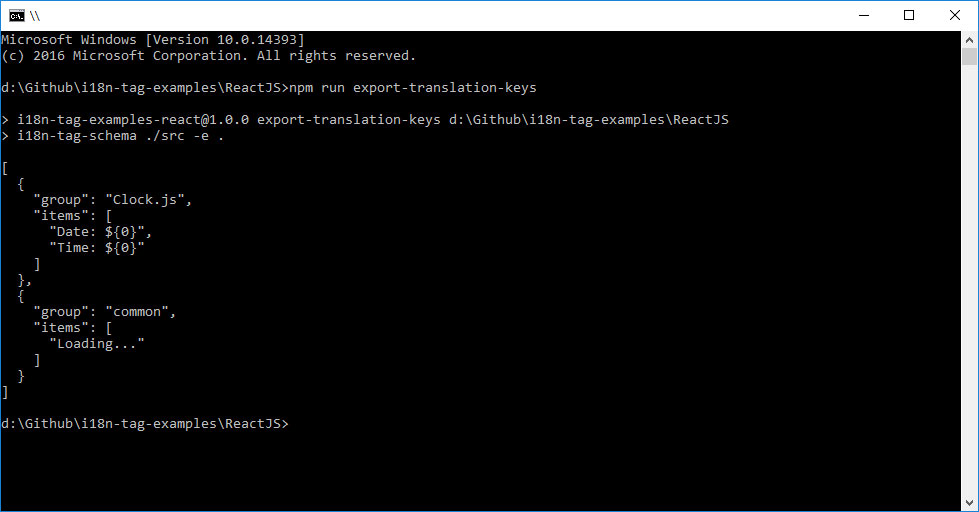
Read all i18n tagged template literals from a JavaScript file or directory
```js
import { exportTranslationKeys } from 'i18n-tag-schema'
exportTranslationKeys({ rootPath: './samples' }).then((result) => {
console.log(result)
/**
* result: [
* '\n ${1}\n ',
* '\n \n ${0}\n \n'
* ]
*/
}).catch((err) => {
console.error(err.message)
})
```
[See docs](http://github.kolmer.net/i18n-tag-schema/globals.html#exporttranslationkeys)
### Validate translation file
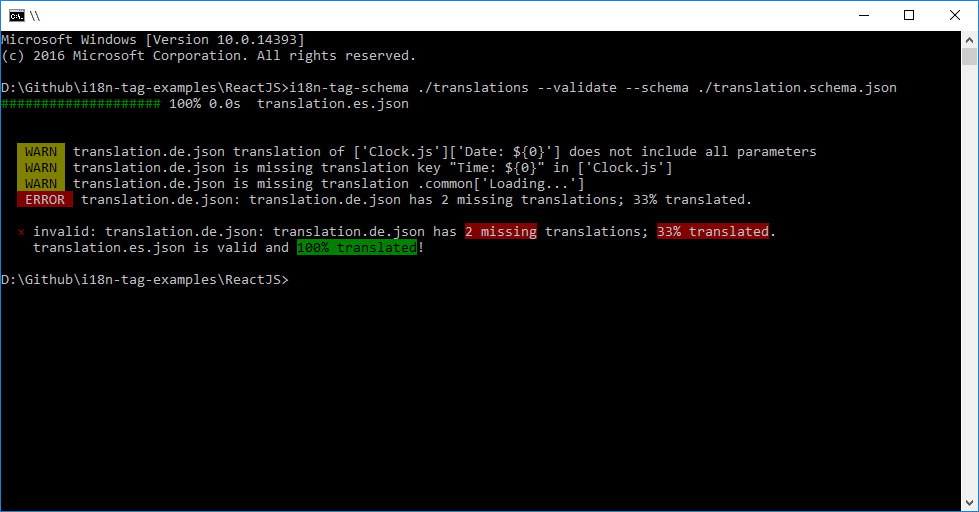
The validation function checks
* if your translation files are missing some of your project's translation keys.
* if a translation key or group is unknown.
* if a translation value contains all parameters defined in the translation key (e.g. ${0}, ${1}).
```js
import { validateTranslations } from 'i18n-tag-schema'
validateTranslations({ rootPath: './translations', schemaPath: './translation.schema.json' }).then((result) => {
// translations are valid
console.log(result)
}).catch((err) => {
// translations are invalid
console.error(err.message)
})
```
[See docs](http://github.kolmer.net/i18n-tag-schema/globals.html#validatetranslations)
## 🛠 Tools
### Run time translation and localization
* [es2015-i18n-tag](https://github.com/skolmer/es2015-i18n-tag): ES2015 template literal tag for i18n and l10n (translation and internationalization) using Intl [](https://www.npmjs.com/package/es2015-i18n-tag)
### Build time translation
* [babel-plugin-i18n-tag-translate](https://github.com/skolmer/babel-plugin-i18n-tag-translate): Translate your template literals at build time or add filename groups [](https://www.npmjs.com/package/babel-plugin-i18n-tag-translate)
### Schema based translations
* [vscode-18n-tag-schema](https://github.com/skolmer/vscode-i18n-tag-schema): Visual Studio Code Extension for JSON Schema based translation validation and tools [](https://marketplace.visualstudio.com/items?itemName=skolmer.vscode-i18n-tag-schema)
## 📃 License
Copyright (c) 2016 Steffen Kolmer
This software is licensed under the MIT license. See the `LICENSE` file
accompanying this software for terms of use.
## Contributors
Thanks goes to these wonderful people ([emoji key](https://github.com/all-contributors/all-contributors#emoji-key)):
| [
Michael Morton](http://icanhascode.com)
[🚇](#infra-mmorton "Infrastructure (Hosting, Build-Tools, etc)") [⚠️](https://github.com/skolmer/i18n-tag-schema/commits?author=mmorton "Tests") [💻](https://github.com/skolmer/i18n-tag-schema/commits?author=mmorton "Code") |
| :---: |
This project follows the [all-contributors](https://github.com/all-contributors/all-contributors) specification. Contributions of any kind welcome!