https://github.com/sky22333/hubproxy
多功能代理加速服务,提供 Docker 镜像加速、GitHub 加速、下载离线镜像等功能。一个二进制文件实现所有功能,支持仓库审计。流式转发,不占用存储空间。
https://github.com/sky22333/hubproxy
devops docker docker-proxy github github-proxy go proxy proxy-server registry registry-proxy
Last synced: 5 months ago
JSON representation
多功能代理加速服务,提供 Docker 镜像加速、GitHub 加速、下载离线镜像等功能。一个二进制文件实现所有功能,支持仓库审计。流式转发,不占用存储空间。
- Host: GitHub
- URL: https://github.com/sky22333/hubproxy
- Owner: sky22333
- License: mit
- Created: 2024-11-08T13:23:51.000Z (over 1 year ago)
- Default Branch: main
- Last Pushed: 2026-01-26T16:08:02.000Z (6 months ago)
- Last Synced: 2026-01-27T03:56:56.931Z (6 months ago)
- Topics: devops, docker, docker-proxy, github, github-proxy, go, proxy, proxy-server, registry, registry-proxy
- Language: Go
- Homepage:
- Size: 8.66 MB
- Stars: 2,233
- Watchers: 9
- Forks: 282
- Open Issues: 4
-
Metadata Files:
- Readme: README.md
- License: LICENSE
Awesome Lists containing this project
- awesome - sky22333/hubproxy - 多功能加速服务,支持Docker 镜像加速、GitHub 加速、下载离线镜像等功能。轻量级,不占用存储空间。 (Go)
README
# HubProxy
**Docker 和 GitHub 加速代理服务器**
一个轻量级、高性能的多功能代理服务,提供 Docker 镜像加速、GitHub 文件加速、下载离线镜像、在线搜索 Docker 镜像等功能。

## 特性
- 🐳 **Docker 镜像加速** - 支持 Docker Hub、GHCR、Quay 等多个镜像仓库加速,流式传输优化拉取速度。
- 🐳 **离线镜像包** - 支持下载离线镜像包,流式传输加防抖设计。
- 📁 **GitHub 文件加速** - 加速 GitHub Release、Raw 文件下载,支持`api.github.com`,脚本嵌套加速等等
- 🤖 **AI 模型库支持** - 支持 Hugging Face 模型下载加速
- 🛡️ **智能限流** - IP 限流保护,防止滥用
- 🚫 **仓库审计** - 强大的自定义黑名单,白名单,同时审计镜像仓库,和GitHub仓库
- 🔍 **镜像搜索** - 在线搜索 Docker 镜像
- ⚡ **轻量高效** - 基于 Go 语言,单二进制文件运行,资源占用低。
- 🔧 **统一配置** - 统一配置管理,便于维护。
- 🛡️ **完全自托管** - 避免依赖免费第三方服务的不稳定性,例如`cloudflare`等等。
- 🚀 **多服务统一加速** - 单个程序即可统一加速 Docker、GitHub、Hugging Face 等多种服务,简化部署与管理。
## 详细文档
[中文文档](https://zread.ai/sky22333/hubproxy)
[English](https://deepwiki.com/sky22333/hubproxy)
## 快速开始
### Docker部署(推荐)
```
docker run -d \
--name hubproxy \
-p 5000:5000 \
--restart always \
ghcr.io/sky22333/hubproxy
```
### 一键脚本安装
```bash
curl -fsSL https://raw.githubusercontent.com/sky22333/hubproxy/main/install.sh | sudo bash
```
支持单个二进制文件直接启动,无需其他配置,内置默认配置,支持所有功能。
这个脚本会:
- 自动检测系统架构(AMD64/ARM64)
- 从 GitHub Releases 下载最新版本
- 自动配置系统服务
- 保留现有配置(升级时)
## 使用方法
### Docker 镜像加速
```bash
# 原命令
docker pull nginx
# 使用加速
docker pull yourdomain.com/nginx
# ghcr加速
docker pull yourdomain.com/ghcr.io/sky22333/hubproxy
# 符合Docker Registry API v2标准的仓库都支持
```
当然也支持配置为全局镜像加速,在主机上新建(或编辑)`/etc/docker/daemon.json`
在 `"registry-mirrors"` 中加入域名:
```json
{
"registry-mirrors": [
"https://yourdomain.com"
]
}
```
若已设置其他加速地址,直接并列添加后保存,再执行 `sudo systemctl restart docker` 重启docker服务让配置生效。
### GitHub 文件加速
```bash
# 原链接
https://github.com/user/repo/releases/download/v1.0.0/file.tar.gz
# 加速链接
https://yourdomain.com/https://github.com/user/repo/releases/download/v1.0.0/file.tar.gz
# 加速下载仓库
git clone https://yourdomain.com/https://github.com/sky22333/hubproxy.git
```
## 配置
config.toml 配置说明
*此配置是默认配置,已经内置在程序中了*
```
[server]
host = "0.0.0.0"
# 监听端口
port = 5000
# Github文件大小限制(字节),默认2GB
fileSize = 2147483648
# HTTP/2 多路复用,提升下载速度
enableH2C = false
# 是否启用前端静态页面
enableFrontend = true
[rateLimit]
# 每个IP每周期允许的请求数(注意Docker镜像会有多个层,会消耗多个次数)
requestLimit = 500
# 限流周期(小时)
periodHours = 3.0
[security]
# IP白名单,支持单个IP或IP段
# 白名单中的IP不受限流限制
whiteList = [
"127.0.0.1",
"172.17.0.0/16",
"192.168.1.0/24"
]
# IP黑名单,支持单个IP或IP段
# 黑名单中的IP将被直接拒绝访问
blackList = [
"192.168.100.1",
"192.168.100.0/24"
]
[access]
# 代理服务白名单(支持GitHub仓库和Docker镜像,支持通配符)
# 只允许访问白名单中的仓库/镜像,为空时不限制
whiteList = []
# 代理服务黑名单(支持GitHub仓库和Docker镜像,支持通配符)
# 禁止访问黑名单中的仓库/镜像
blackList = [
"baduser/malicious-repo",
"*/malicious-repo",
"baduser/*"
]
# 代理配置,支持有用户名/密码认证和无认证模式
# 无认证: socks5://127.0.0.1:1080
# 有认证: socks5://username:password@127.0.0.1:1080
# 留空不使用代理
proxy = ""
[download]
# 批量下载离线镜像数量限制
maxImages = 10
# Registry映射配置,支持多种镜像仓库上游
[registries]
# GitHub Container Registry
[registries."ghcr.io"]
upstream = "ghcr.io"
authHost = "ghcr.io/token"
authType = "github"
enabled = true
# Google Container Registry
[registries."gcr.io"]
upstream = "gcr.io"
authHost = "gcr.io/v2/token"
authType = "google"
enabled = true
# Quay.io Container Registry
[registries."quay.io"]
upstream = "quay.io"
authHost = "quay.io/v2/auth"
authType = "quay"
enabled = true
# Kubernetes Container Registry
[registries."registry.k8s.io"]
upstream = "registry.k8s.io"
authHost = "registry.k8s.io"
authType = "anonymous"
enabled = true
[tokenCache]
# 是否启用缓存(同时控制Token和Manifest缓存)显著提升性能
enabled = true
# 默认缓存时间(分钟)
defaultTTL = "20m"
```
容器内的配置文件位于 `/root/config.toml`
脚本部署配置文件位于 `/opt/hubproxy/config.toml`
### 环境变量(可选)
支持通过环境变量覆盖部分配置,优先级高于`config.toml`,以下是默认值:
```
SERVER_HOST=0.0.0.0 # 监听地址
SERVER_PORT=5000 # 监听端口
ENABLE_H2C=false # 是否启用 H2C
ENABLE_FRONTEND=true # 是否启用前端静态页面
MAX_FILE_SIZE=2147483648 # GitHub 文件大小限制(字节)
RATE_LIMIT=500 # 每周期请求数
RATE_PERIOD_HOURS=3 # 限流周期(小时)
IP_WHITELIST=127.0.0.1,192.168.1.0/24 # IP 白名单(逗号分隔)
IP_BLACKLIST=192.168.100.1,192.168.100.0/24 # IP 黑名单(逗号分隔)
MAX_IMAGES=10 # 批量下载镜像数量限制
```
为了IP限流能够正常运行,反向代理需要传递IP头用来获取访客真实IP,以caddy为例:
```
example.com {
reverse_proxy {
to 127.0.0.1:5000
header_up X-Real-IP {remote}
header_up X-Forwarded-For {remote}
header_up X-Forwarded-Proto {scheme}
}
}
```
cloudflare CDN:
```
example.com {
reverse_proxy 127.0.0.1:5000 {
header_up X-Forwarded-For {http.request.header.CF-Connecting-IP}
header_up X-Real-IP {http.request.header.CF-Connecting-IP}
header_up X-Forwarded-Proto https
header_up X-Forwarded-Host {host}
}
}
```
> 对于使用nginx反代的用户,Github加速提示`无效输入`的问题可以参见[issues/62](https://github.com/sky22333/hubproxy/issues/62#issuecomment-3219572440)
## ⚠️ 免责声明
- 本程序仅供学习交流使用,请勿用于非法用途
- 使用本程序需遵守当地法律法规
- 作者不对使用者的任何行为承担责任
---
**⭐ 如果这个项目对你有帮助,请给个 Star!⭐**
## 界面预览

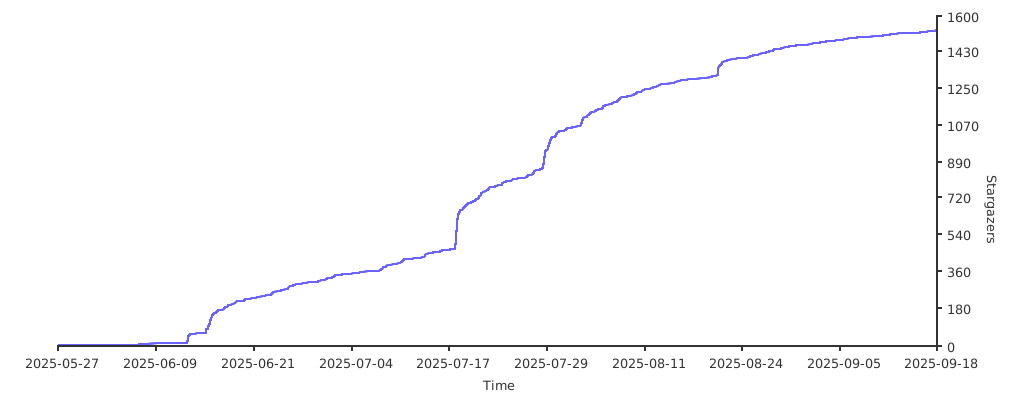
## Star 趋势
[](https://starchart.cc/sky22333/hubproxy)