https://github.com/skydoves/AndroidBottomBar
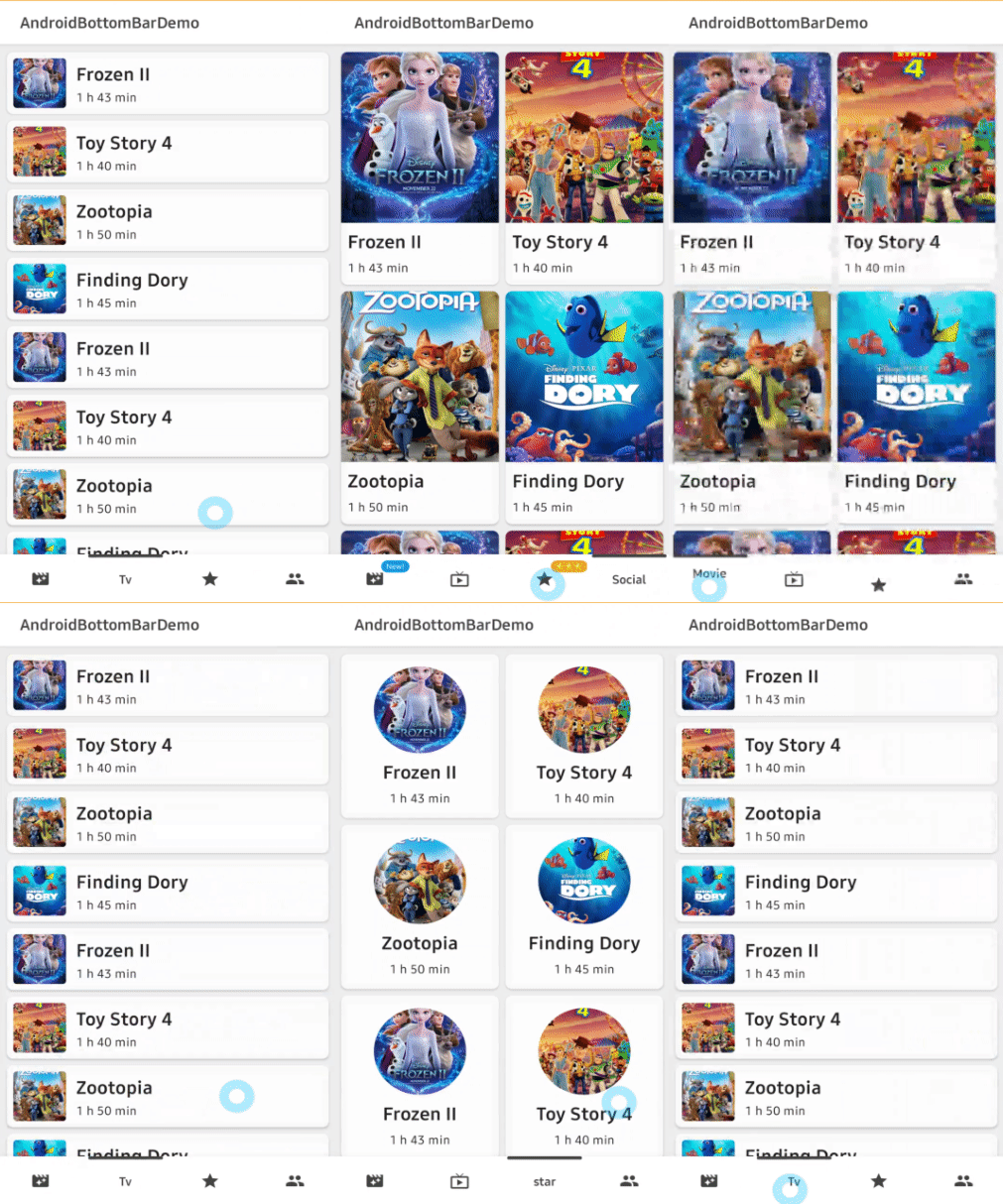
🍫 A lightweight bottom navigation view, fully customizable with an indicator and animations.
https://github.com/skydoves/AndroidBottomBar
Last synced: over 1 year ago
JSON representation
🍫 A lightweight bottom navigation view, fully customizable with an indicator and animations.
- Host: GitHub
- URL: https://github.com/skydoves/AndroidBottomBar
- Owner: skydoves
- License: apache-2.0
- Created: 2020-07-18T13:07:23.000Z (about 6 years ago)
- Default Branch: master
- Last Pushed: 2021-06-01T01:08:05.000Z (about 5 years ago)
- Last Synced: 2025-04-07T19:16:15.400Z (over 1 year ago)
- Language: Kotlin
- Homepage:
- Size: 374 KB
- Stars: 293
- Watchers: 4
- Forks: 23
- Open Issues: 4
-
Metadata Files:
- Readme: README.md
- Funding: .github/FUNDING.yml
- License: LICENSE
- Codeowners: .github/CODEOWNERS
Awesome Lists containing this project
- awesome-list - skydoves/AndroidBottomBar - 🍫 A lightweight bottom navigation view, fully customizable with an indicator and animations. (Kotlin)
README
AndroidBottomBar
🍫 A lightweight bottom navigation view, fully customizable with an indicator and animations.








## Including in your project
[](https://search.maven.org/search?q=g:%22com.github.skydoves%22%20AND%20a:%22androidbottombar%22)
[](https://jitpack.io/#skydoves/AndroidBottomBar)
### Gradle
Add below codes to your **root** `build.gradle` file (not your module build.gradle file).
```gradle
allprojects {
repositories {
mavenCentral()
}
}
```
And add a dependency code to your **module**'s `build.gradle` file.
```gradle
dependencies {
implementation "com.github.skydoves:androidbottombar:1.0.2"
}
```
## Usage
Add following XML namespace inside your XML layout file.
```gradle
xmlns:app="http://schemas.android.com/apk/res-auto"
```
### AndroidBottomBarView
Here is a basic example of implementing `AndroidBottomBarView`.
```gradle
```
### BottomMenuItem
We can add menu items to the `AndroidBottomBarView` using the `BottomMenuItem`, fully customizable.
```kotlin
androidBottomBar.addBottomMenuItems(mutableListOf(
BottomMenuItem(this)
.setTitle("Movie") // sets the content of the title.
.setTitleColorRes(R.color.black) // sets the color of the title using resource.
.setTitleActiveColorRes(R.color.white) // sets the color of the title when selected/active.
.setTitlePadding(6) // sets the padding of the title.
.setTitleSize(14f) // sets the size of the title.
.setTitleGravity(Gravity.CENTER) // sets gravity of the title.
.setIcon(R.drawable.ic_movie)
.setIconColorRes(R.color.md_blue_200) // sets the [Drawable] of the icon using resource.
.setIconActiveColorRes(R.color.md_blue_200) // sets the color of the icon when selected/active.
.setBadgeText("New!") // sets the content of the badge.
.setBadgeTextSize(9f) // sets the size of the badge.
.setBadgeTextColorRes(R.color.white) // sets the text color of the badge using resource.
.setBadgeColorRes(R.color.md_blue_200) // sets the color of the badge using resource.
.setBadgeAnimation(BadgeAnimation.FADE) // sets an animation of the badge.
.setBadgeDuration(450) // sets a duration of the badge.
.build(),
BottomMenuItem(this)
// .. //
```
Here is the Java way.
```java
List bottomMenuItems = new ArrayList<>();
bottomMenuItems.add(new BottomMenuItem(context)
.setTitle("Tv")
.setIcon(R.drawable.ic_tv)
.build());
// add more BottomMenuItems. //
androidBottomBarView.addBottomMenuItems(bottomMenuItems);
```
### BottomBarFlavor
`BottomBarFlavor` decides which type (icon, title) will be shown as default (if unselected).
The default flavor is icon.
```kotlin
app:bottomBar_flavor="icon"
```
| ICON | TITLE |
| :---------------: | :---------------: |
|  |
| 
### Indicator
We can customize the indicator using below attributes.
```gradle
app:bottomBar_indicator_color="@color/md_blue_200" // color of the indicator.
app:bottomBar_indicator_height="4dp" // height of the indicator.
app:bottomBar_indicator_padding="6dp" // padding of the indicator.
app:bottomBar_indicator_radius="12dp" // corner radius of the indicator.
app:bottomBar_indicator_visible="true" // visibility of the indicator.
```
### Title Composition
We can customize the title of the menu item.
```kotlin
.setTitle("Movie") // sets the content of the title.
.setTitleColorRes(R.color.black) // sets the color of the title using resource.
.setTitleActiveColorRes(R.color.white) // sets the color of the title when selected/active.
.setTitlePadding(6) // sets the padding of the title.
.setTitleSize(14f) // sets the size of the title.
.setTitleGravity(Gravity.CENTER) // sets gravity of the title.
```
#### TitleForm
TitleForm is a collection of attribute class that related to a menu title for customizing the menu item title easily.
Generally, we set the almost same attributes for consistency of the menu items.
We can build a common form of the title, and we can reuse on every menu item.
Then we can reduce boilerplate work from writing the same attributes on every menu item.
```kotlin
// we can create the form using kotlin dsl.
val titleForm = titleForm(this) {
setTitleColorRes(R.color.black)
setTitlePadding(6)
setTitleSize(14f)
}
androidBottomBar.addBottomMenuItems(mutableListOf(
BottomMenuItem(this)
// setTitleForm must be called before other title related methods.
.setTitleForm(titleForm)
.setTitle("Movie")
.build(),
BottomMenuItem(this)
.setTitleForm(titleForm)
.setTitle("Tv")
.build(),
// ** //
```
Here is the Java way to build the `TitleForm`.
```java
TitleForm.Builder titleForm = new TitleForm.Builder(context)
.setTitleColorRes(R.color.black)
.setTitlePadding(6)
.setTitleSize(14f);
```
### Icon Composition
We can customize the icon of the menu item.
```kotlin
.setIcon(R.drawable.ic_movie)
.setIconColorRes(R.color.md_blue_200) // sets the [Drawable] of the icon using resource.
.setIconActiveColorRes(R.color.md_blue_200) // sets the color of the icon when selected/active.
.setIconSize(24) // sets the size of the icon.
```
#### IconForm
IconForm is a collection of attribute class that related to a menu icon for customizing the menu item icon easily.
The same concept of the `TitleForm`, and we must call before other icon related methods.
```kotlin
// we can create the form using kotlin dsl.
val iconForm = iconForm(this) {
setIcon(R.drawable.ic_movie)
setIconColorRes(R.color.md_blue_200) // sets the [Drawable] of the icon using resource.
setIconSize(24) // sets the size of the icon.
}
androidBottomBar.addBottomMenuItems(mutableListOf(
BottomMenuItem(this)
.setIconForm(iconForm)
.setIcon(R.drawable.ic_star)
.build(),
// ** //
```
Here is the Java way to build the `IconForm`.
```java
IconForm.Builder iconForm = new IconForm.Builder(context)
.setIconColorRes(R.color.md_blue_100)
.setIconSize(24);
```
### Badge Composition
We can customize the badge of the menu item.
```kotlin
.setBadgeText("New!") // sets the content of the badge.
.setBadgeTextSize(9f) // sets the size of the badge.
.setBadgeTextColorRes(R.color.white) // sets the text color of the badge using resource.
.setBadgeColorRes(R.color.md_blue_200) // sets the color of the badge using resource.
.setBadgeStyle(Typeface.BOLD)// sets the [Typeface] of the badge.
.setBadgePadding(6) // sets the padding of the badge.
.setBadgeMargin(4) // sets the margin of the badge.
.setBadgeRadius(6) // sets the radius of the badge.
.setBadgeAnimation(BadgeAnimation.FADE) // sets an animation of the badge.
.setBadgeDuration(450) // sets a duration of the badge.
```
#### Show and dismiss
We can show and dismiss badges using below methods.
```kotlin
androidBottomBar.showBadge(0) // shows the badge by an index.
androidBottomBar.showBadge(0, "123") // shows the badge by an index and changes badge text.
androidBottomBar.dismissBadge(0) // dismisses the badge by an index.
```
#### BadgeForm
BadgeForm is a collection of attribute class that related to a menu badge for customizing the menu item badge easily.
The same concept of the `TitleForm`, and we must call before other badge related methods.
```kotlin
// we can create the form using kotlin dsl.
val badgeForm = badgeForm(this) {
setBadgeTextSize(9f)
setBadgePaddingLeft(6)
setBadgePaddingRight(6)
setBadgeDuration(550)
}
androidBottomBar.addBottomMenuItems(mutableListOf(
BottomMenuItem(this)
.setTitle("movie")
.setBadgeForm(badgeForm)
.setBadgeText("New!")
.setBadgeColorRes(R.color.md_blue_200)
.setBadgeAnimation(BadgeAnimation.FADE)
.build(),
BottomMenuItem(this)
.setTitle("star")
.setBadgeForm(badgeForm)
.setBadgeText("⭐⭐⭐")
.setBadgeColorRes(R.color.white)
.setBadgeTextColorRes(R.color.black)
.build(),
// ** //
```
#### BadgeAnimation
We can customize badge animations using the below method.
```gradle
.setBadgeAnimation(BadgeAnimation.FADE) // fade, scale
```
FADE | SCALE |
| :---------------: | :---------------: |
|  |
|  |
| %20{%0A%20%20%20%20%20%20%20%20//%20when%20selected,%20changed%20viewpager's%20current%20item.%0A%20%20%20%20%20%20%20%20viewpager.currentItem%20=%20index%0A%20%20%20%20%20%20%20%20//%20when%20selected,%20dismiss%20a%20badge%20of%20the%20item.%0A%20%20%20%20%20%20%20%20androidBottomBar.dismissBadge(index)%0A%20%20%20%20%20%20}%0A%20%20%20%20}%0A```%0A%0A###%20OnBottomMenuInitializedListener%0AWe%20can%20listen%20to%20the%20menu%20items%20are%20initialized%20when%20they%20are%20initialized%20completely.<br>%0AIf%20we%20want%20to%20show%20badges,%20bind%20`AndroidBottomBarView`%20to%20`ViewPager`%20or%20etc,%20we%20have%20to%20call%20them%20in%20this%20listener.%0A```kotlin%0AandroidBottomBar.setOnBottomMenuInitializedListener%20{%0A%20%20%20%20//%20binds%20to%20a%20viewpager.%0A%20%20%20%20androidBottomBar.bindViewPager(viewpager)%0A%20%20%20%20//%20shows%20a%20badge%20index%200.%0A%20%20%20%20androidBottomBar.showBadge(index%20=%200)%0A%20%20%20%20//%20gets%20a%20BottomMenuItemView%20by%20index.%0A%20%20%20%20val%20menuItemView%20=%20androidBottomBar.getBottomMenuItemView(index%20=%200)%0A}%0A```%0A%0A###%20bindViewPager,%20bindViewPager2%0AWe%20can%20bind%20a%20`ViewPager`%20and%20`ViewPager2`%20to%20the%20`AndroidBottomBarView`%20for%20selecting%20menu%20items%20and%20moving%20an%20indicator<br>%20%0Aautomatically%20by%20scrolling%20of%20viewPager.%0A```kotlin%0AandroidBottomBar.setOnBottomMenuInitializedListener%20{%0A%20%20androidBottomBar.bindViewPager(viewpager)%0A}%0A```%0A%0A###%20BottomMenuAnimation%0AWe%20can%20customize%20the%20selected/unselected%20animations%20of%20menu%20items%20and%20an%20indicator.%0A```kotlin%0Aapp:bottomBar_menuAnimation=) |
|  |
|  |
|  |
| %20will%20be%20shown%20as%20default%20(unselected).%0AselectedIndex%20|%20integer%20|%200%20|%20preselected%20index%20when%20initialized.%0Aindicator_visible%20|%20boolean%20|%20true%20|%20visibility%20of%20the%20indicator.%0Aindicator_color%20|%20color%20|%20theme%20accent%20|%20color%20of%20the%20indicator.%0Aindicator_drawable%20|%20drawable%20|%20null%20|%20drawable%20of%20the%20indicator.%0Aindicator_radius%20|%20dimension%20|%203dp%20|%20corner%20radius%20of%20the%20indicator.%0Aindicator_height%20|%20dimension%20|%204dp%20|%20height%20of%20the%20indicator.%0Aindicator_padding%20|%20dimension%20|%202dp%20|%20padding%20of%20the%20indicator.%0AmenuAnimation%20|%20enum%20|%20normal%20|%20animations%20for%20selected%20or%20unselected%20BottomMenuItemView%20with%20an%20interpolator.%0Aduration%20|%20integer%20|%20300%20|%20duration%20of%20the%20menu%20animation.%0A%0A##%20Design%20Credits%0AAll%20design%20and%20inspiration%20credits%20goes%20to%20[Readable%20Tab%20Bar](https://dribbble.com/shots/6130593-Readable-Tab-Bar).%20%0A%20%20%0A##%20Find%20this%20library%20useful?%20:heart:%0ASupport%20it%20by%20joining%20__[stargazers](https://github.com/skydoves/AndroidBottomBar/stargazers)__%20for%20this%20repository.%20:star:%20<br>%0AAnd%20__[follow](https://github.com/skydoves)__%20me%20for%20my%20next%20creations!%20%F0%9F%A4%A9%0A%0A#%20License%0A```xml%0ACopyright%202020%20skydoves%20(Jaewoong%20Eum)%0A%0ALicensed%20under%20the%20Apache%20License,%20Version%202.0%20(the%20)