https://github.com/slack-samples/javascript-actionable-notifications
Sample Slack app to illustrate how incoming webhooks and interactive messages can be used to build a helpdesk integration
https://github.com/slack-samples/javascript-actionable-notifications
slack-api slack-blueprint slack-tutorial slack-workflow-sample
Last synced: 11 months ago
JSON representation
Sample Slack app to illustrate how incoming webhooks and interactive messages can be used to build a helpdesk integration
- Host: GitHub
- URL: https://github.com/slack-samples/javascript-actionable-notifications
- Owner: slackapi
- License: mit
- Created: 2017-06-12T17:36:30.000Z (about 9 years ago)
- Default Branch: master
- Last Pushed: 2023-11-10T05:20:57.000Z (over 2 years ago)
- Last Synced: 2025-01-30T14:22:42.590Z (over 1 year ago)
- Topics: slack-api, slack-blueprint, slack-tutorial, slack-workflow-sample
- Language: JavaScript
- Homepage:
- Size: 207 KB
- Stars: 36
- Watchers: 9
- Forks: 17
- Open Issues: 13
-
Metadata Files:
- Readme: README.md
- License: LICENSE
- Code of conduct: .github/CODE_OF_CONDUCT.md
Awesome Lists containing this project
README
# Actionable notifications template
> :sparkles: *Updated January 2020: As we have introduced some new features, this tutorial and the code samples have been updated!*
Read [diff.md](diff.md) for more info!
---
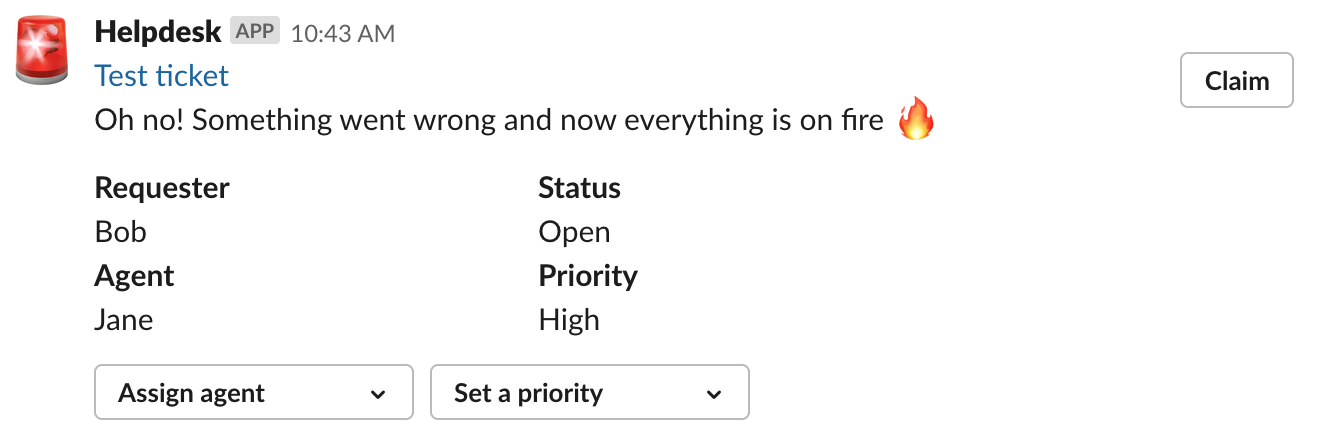
When a helpdesk ticket is created in a 3rd party system, send an actionable notification in Slack that allows the user to claim the ticket or apply a label.
## Setup
#### Create a Slack app
1. Create an app at api.slack.com/apps
1. Activate Incoming Webhooks from the Features > **Incoming Webhooks** then click 'Add New Webhook to Workspace', install the app and select a channel
1. Navigate to the **OAuth & Permissions** page and add the following **bot** scopes:
* `incoming-webhook` (This should be pre-selected)
* `chat:write` (to send messages)
* `im:write` (to open a DM channel between your bot and a user)
#### Run the app
Clone this repo to run locally or
[](https://glitch.com/edit/#!/remix/slack-actionable-notification-blueprint)
1. Get the code
* Either clone this repo and run `npm install`
* Or visit https://glitch.com/edit/#!/remix/slack-actionable-notification-blueprint
1. Set the following environment variables to `.env` (see `.env.sample`):
* `SLACK_TOKEN`: Your app's `xoxb-` token (available on the **OAuth & Permissions**)
* `SLACK_WEBHOOK`: The webhook URL that you copied off the **Incoming Webhook**
* `SLACK_SIGNING_SECRET`: Your app's Signing secret (available on the **Basic Information**)
1. If you're running the app locally:
1. Start the app (`npm start`)
1. In another window, start ngrok on the same port as your webserver (`ngrok http $PORT`)
#### Enable Interactive Components
1. Go back to the app settings and click on Interactive Components.
1. Set the Request URL to your ngrok URL (or Glitch URL) + `/interactive-message` (such as `https://my-project.glitch.me/interactive-message`)
1. Save
#### Send a mock new ticket notification
Post the mock ticket JSON to the `/incoming` endpoint:
``curl -X POST -H 'Content-type: application/json' --data "`cat ./ticket.json`" ``
Example:
``curl -X POST -H 'Content-type: application/json' --data "`cat ./ticket.json`" https://slack-actionable-notification-blueprint.glitch.me/incoming``
*You need the ticket.json file in the same directory where you are sending the curl command!*