https://github.com/slammayjammay/git-add-and-commit
A small CLI tool for quick file committing to git.
https://github.com/slammayjammay/git-add-and-commit
babel cli-application es6 git javascript node terminal
Last synced: 3 months ago
JSON representation
A small CLI tool for quick file committing to git.
- Host: GitHub
- URL: https://github.com/slammayjammay/git-add-and-commit
- Owner: slammayjammay
- License: mit
- Created: 2016-11-14T04:12:36.000Z (over 9 years ago)
- Default Branch: master
- Last Pushed: 2018-06-14T17:16:22.000Z (about 8 years ago)
- Last Synced: 2025-02-09T11:04:42.142Z (over 1 year ago)
- Topics: babel, cli-application, es6, git, javascript, node, terminal
- Language: JavaScript
- Homepage:
- Size: 3.49 MB
- Stars: 0
- Watchers: 2
- Forks: 0
- Open Issues: 0
-
Metadata Files:
- Readme: README.md
- License: license
Awesome Lists containing this project
README
# `git-add-and-commit`
> Quickly add and commit multiple files with one command.
```shell
$ npm install -g git-add-and-commit
$ gac --help
```
## Usage
Provide a list of file globs to match and a commit message. Matching is done via [`minimatch`](https://www.npmjs.com/package/minimatch) and done case-insensitively by default.
To add and commit all files under `src/js/` and `src/css/`:
```shell
$ gac src/js/**/*.js src/css/**/*.css "Commit all js and css files"
```
This will also work...
```shell
$ gac .js .css "Commit all js and css files"
```
...but will also match any `.js` and `.css` file anywhere under the git root -- see [disclaimer](#disclaimer).
## DISCLAIMER
I made this thing so that I could quickly type a substring of a file and it would match. So if a given glob doesn't match any files at first, it tries to match a massaged version of the glob and see if that matches anything. For instance, providing `module` will actually match something like `root/some-child/js/modules/something/index.js`. It will also match anything and everything containing `module` in the filename, so be careful!
## Interactive
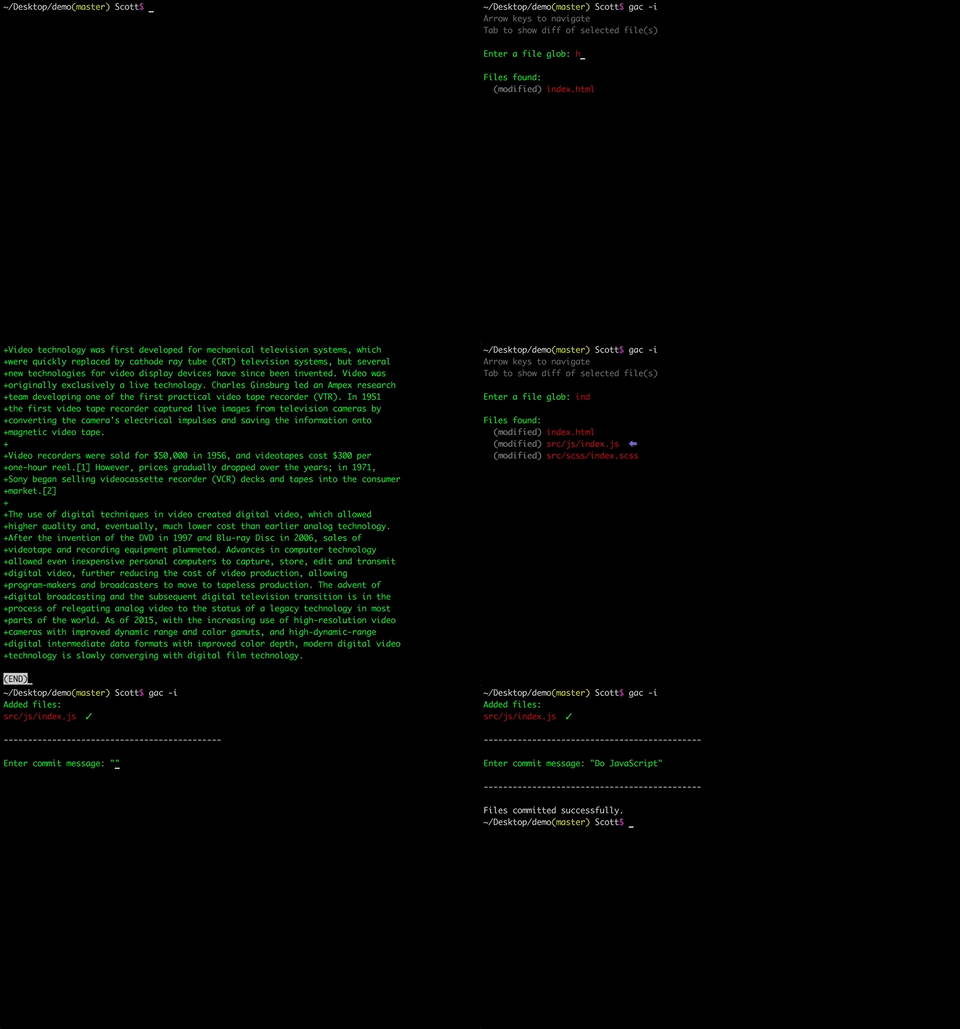
Because of this dangerous blindly-commit-any-goddamn-file attitude, there's an interactive version to help you see which files will be added by the given globs. Pressing tab will show a diff for all selected files. You can select a single file by using the arrow keys.
## The full help screen
```
DESCRIPTION
This command quickens the commit process for individual files. Files can be
added by providing a list of file globs. For example, "src/**/*" will match
all files of all subfolders of "src/". If the given glob is a substring of
a filename a match will always be made, unless the --strict option is given.
By default, all matches are made case-insensitively.
You can specify which type of git files to match by using the --only and
--except options. Git types must be deleted, modified, staged, or untracked
(d, m, s, u), and separated by commas.
USAGE
gac [options]
gac [options]
OPTIONS
-c, --case-sensitive Match files case-sensitively.
-e, --except=[type...] Specify which type of git files to ignore.
-h, --help Display this help screen.
-i, --interactive Interactively find and commit files.
-o, --only=[type...] Specify which type of git files to look for.
-s, --silent Suppress success messages.
-S, --strict Match files by only the exact glob given.
-v, --version Print the version of this module.
EXAMPLES
gac README "Add README" --case-sensitive
gac html js scss "Commit all html, js, and scss files"
gac --only modified,staged * "Commit all modified and staged files"
gac -e=d,u * "Commit all files that are not deleted or untracked"
```