https://github.com/sleep3r/mtproto.zig
High-performance Telegram proxy with DPI evasion
https://github.com/sleep3r/mtproto.zig
amnezia-vpn dpi dpi-bypass mtproto mtproto-proxy privacy telegram zapret zig
Last synced: 25 days ago
JSON representation
High-performance Telegram proxy with DPI evasion
- Host: GitHub
- URL: https://github.com/sleep3r/mtproto.zig
- Owner: sleep3r
- License: mit
- Created: 2026-03-29T10:01:35.000Z (2 months ago)
- Default Branch: main
- Last Pushed: 2026-04-10T10:46:06.000Z (about 2 months ago)
- Last Synced: 2026-04-10T11:03:23.527Z (about 2 months ago)
- Topics: amnezia-vpn, dpi, dpi-bypass, mtproto, mtproto-proxy, privacy, telegram, zapret, zig
- Language: Zig
- Homepage:
- Size: 3.22 MB
- Stars: 297
- Watchers: 3
- Forks: 17
- Open Issues: 1
-
Metadata Files:
- Readme: README.md
- Changelog: CHANGELOG.md
- Funding: .github/FUNDING.yml
- License: LICENSE
Awesome Lists containing this project
- awesome-zig - sleep3r/mtproto.zig - High-performance Telegram MTProto proxy written in Zig. (Network & Web / Network)
README
# mtproto.zig
**High-performance Telegram MTProto proxy written in Zig**
Disguises Telegram traffic as standard TLS 1.3 HTTPS to bypass network censorship.
**177 KB binary · Sub-1 MB RAM · Boots in <10 ms · Zero dependencies**
[](LICENSE)
[](https://ziglang.org)
[](#install)
🌐 Language
🇬🇧 English
·
🇷🇺 Русский
---
Why this one? · Install · Update · Commands · Routing · Config · Dashboard · Build · Docker · Trust · Compatibility · FAQ
---
## Why this one?
Most MTProto proxies are large, dependency-heavy, and use lots of memory. This one is different:
| Proxy | Language | Binary | Baseline RSS | Startup | Dependencies |
|---|---|---:|---:|---|---|
| **mtproto.zig** | Zig | **177 KB** | **0.75 MB** | **< 10 ms** | **0** |
| Official MTProxy | C | 524 KB | 8.0 MB | < 10 ms | openssl, zlib |
| Telemt | Rust | 15 MB | 12.1 MB | ~ 5-6 s | 423 crates |
| mtg | Go | 13 MB | 11.6 MB | ~ 30 ms | 78 modules |
| MTProtoProxy | Python | N/A | ~ 30 MB | ~ 300 ms | python3, cryptography |
| JSMTProxy | Node.js | N/A | ~ 45 MB | ~ 400 ms | nodejs, openssl |
## Why Zig?
We chose Zig because it provides the raw performance and micro-footprint of C, but without the memory unsafety or build-system nightmares:
- **No arbitrary allocations:** All connection slots and buffers are pre-allocated on startup. There is no garbage collector dropping frames under heavy load.
- **Hermetic cross-compilation:** Run `zig build` on macOS, and out comes a statically linked Linux binary. No Docker, no `glibc` version mismatches.
- **Comptime:** Costly operations like protocol definition mapping, endianness conversions, and bilingual string lookup for `mtbuddy` are resolved during compilation, giving instant startup times.
It also ships more evasion techniques than any of the above:
| Technique | What it does |
|---|---|
| **Fake TLS 1.3** | Connections look like normal HTTPS to DPI |
| **DRS** | Mimics Chrome/Firefox TLS record sizes |
| **Zero-RTT masking** | Local Nginx serves real TLS responses to active probes, defeating timing analysis |
| **TCPMSS=88** | Fragments ClientHello across 6 TCP packets, breaking DPI reassembly |
| **nfqws TCP desync** | Sends fake packets + TTL-limited splits to confuse stateful DPI |
| **Split-TLS** | 1-byte Application records to defeat passive signatures |
| **VPN tunnel** | Routes through WireGuard/AmneziaWG using explicit socket policy routing (SO_MARK) when DCs are blocked |
| **IPv6 hopping** | Auto-rotates IPv6 address from /64 on ban detection via Cloudflare API |
| **Anti-replay** | Rejects replayed handshakes + detects ТСПУ Revisor active probes |
| **Multi-user** | Independent per-user secrets |
| **MiddleProxy** | ME transport with auto-refreshed Telegram metadata |
MiddleProxy is required for promotion tags and for media on non-Premium accounts. Without it, photos, videos, stories, and other media on non-Premium accounts should be treated as unavailable rather than flaky. Telegram calls are not supported by this proxy: Telegram only routes calls through SOCKS-style paths, and exposing SOCKS traffic cannot be masked by mtproto.zig as normal HTTPS.
---
## Install
All installation, updates, and management are done through **mtbuddy** — a native Zig CLI that ships alongside the proxy.
### One command
```bash
curl -fsSL https://raw.githubusercontent.com/sleep3r/mtproto.zig/main/deploy/bootstrap.sh | sudo bash
# Explicitly allow unsigned bootstrap mode (not recommended)
curl -fsSL https://raw.githubusercontent.com/sleep3r/mtproto.zig/main/deploy/bootstrap.sh | sudo bash -s -- --insecure
# or: MTPROTO_INSECURE=1
```
This downloads the latest `mtbuddy` binary, verifies minisign signature + SHA-256 checksum from the GitHub Release, and runs `mtbuddy --help`. Then install the proxy:
```bash
# Minimal — auto-generates a secret, enables all DPI bypass modules
sudo mtbuddy install --port 443 --domain wb.ru --yes
# Bring your own secret and username
sudo mtbuddy install --port 443 --domain wb.ru --secret <32-hex> --user alice --yes
# Disable all DPI modules (bare proxy only)
sudo mtbuddy install --port 443 --domain wb.ru --no-dpi --yes
# Install using an existing config file (auto-maps port and domain)
sudo mtbuddy install --config /path/to/config.toml --yes
# Explicitly allow unsigned mode (not recommended)
sudo mtbuddy install --insecure --port 443 --domain wb.ru --yes
```
At the end, mtbuddy prints a ready-to-use `tg://` connection link.
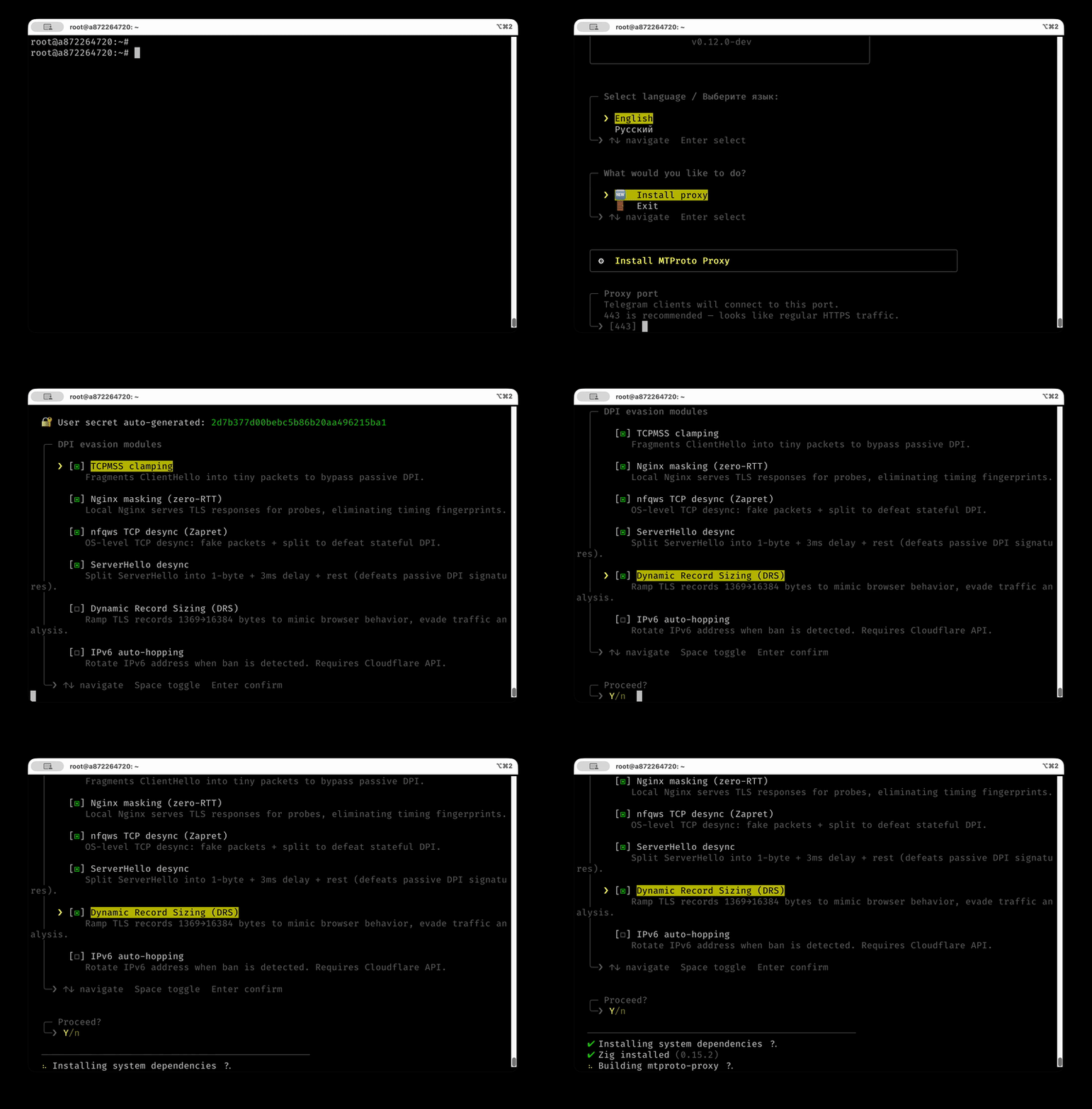
### Interactive wizard
If you prefer to be walked through the setup:
```bash
sudo mtbuddy --interactive
```
Demo: interactive installer
### What the install does
1. Downloads the **pre-built proxy binary** from GitHub Releases (auto-detects CPU: `x86_64_v3` → `x86_64` → `aarch64`)
2. Generates a random secret (or uses `--secret`)
3. Creates a systemd service (`mtproto-proxy`)
4. Opens the port in `ufw` (if active)
5. Applies TCPMSS=88 iptables rules
6. Sets up Nginx masking + nfqws TCP desync (unless `--no-dpi`)
7. Prints `tg://` link
### Install options
| Flag | Default | Description |
|---|---|---|
| `--port, -p` | `443` | Proxy listen port |
| `--domain, -d` | `wb.ru` | TLS masking domain |
| `--secret, -s` | auto | User secret (32 hex chars) |
| `--user, -u` | `user` | Username in `config.toml` |
| `--config, -c` | — | Use existing `config.toml` file |
| `--yes, -y` | — | Skip confirmation prompt |
| `--max-connections ` | `512` | Max proxy connections |
| `--bind, -b` | — | Bind to specific IP (default: all interfaces) |
| `--no-masking` | — | Disable Nginx masking |
| `--no-nfqws` | — | Disable nfqws TCP desync |
| `--no-tcpmss` | — | Disable TCPMSS=88 |
| `--no-dpi` | — | Disable all DPI modules |
| `--middle-proxy` | — | Enable Telegram MiddleProxy relay |
| `--ipv6-hop` | — | Enable IPv6 auto-hopping |
| `--version, -v ` | `latest` | Release version to install |
| `--insecure` | — | Allow unsigned assets (not recommended) |
---
## Update
```bash
# Update to latest release (verifies minisign + checksum, checks CPU compat, auto-rollback on failure)
sudo mtbuddy update
# Pin to a specific version
sudo mtbuddy update --version v0.11.1
# Explicitly allow unsigned mode (not recommended)
sudo mtbuddy update --insecure
```
---
## Other mtbuddy commands
```bash
# Show proxy and module status
sudo mtbuddy status
# Validate and inspect config
sudo mtbuddy config validate
sudo mtbuddy config doctor
sudo mtbuddy config print-effective
# Print Telegram proxy links from config.toml (sensitive output)
sudo mtbuddy links
sudo mtbuddy links --server proxy.example.com --config /opt/mtproto-proxy/config.toml
# Generate a fresh 32-hex user secret
mtbuddy secret
# Hot-reload config (SIGHUP, reloadable settings only)
sudo mtbuddy reload
# Setup DPI modules after the fact
sudo mtbuddy setup masking --domain wb.ru
sudo mtbuddy setup nfqws
sudo mtbuddy setup recovery
# Install web monitoring dashboard
sudo mtbuddy setup dashboard
# VPN tunnel (for servers where Telegram DCs are blocked)
sudo mtbuddy setup tunnel /path/to/awg0.conf
sudo mtbuddy setup tunnel 'vpn://...'
sudo mtbuddy setup tunnel --iface awg1 /path/to/awg1.conf
# IPv6 hopping
sudo mtbuddy ipv6-hop --check
sudo mtbuddy ipv6-hop --auto --prefix 2a01:abcd:ef00:: --threshold 5
# Update Cloudflare DNS A record
sudo mtbuddy update-dns 1.2.3.4
# Full help
mtbuddy --help
mtbuddy --lang ru --help
```
---
## Service management
```bash
sudo systemctl status mtproto-proxy
sudo journalctl -u mtproto-proxy -f
sudo systemctl reload mtproto-proxy # SIGHUP hot-reload (where possible)
sudo systemctl restart mtproto-proxy
```
---
## Upstream Routing
The proxy supports multiple ways to route outgoing connections to Telegram DC servers.
### Routing modes
| `[upstream].type` | How it works | When to use |
|---|---|---|
| `auto` (default) | Direct egress without tunnel policy marks | Most deployments |
| `direct` | Connect to Telegram DCs directly from the host | DCs reachable from the server |
| `tunnel` | Direct connect with `SO_MARK=200` policy-routed via a VPN tunnel pool | DCs blocked by the ISP |
| `socks5` | Route through an external SOCKS5 proxy with optional auth | Existing proxy infrastructure |
| `http` | Route through an HTTP CONNECT proxy with optional auth | Corporate proxy environments |
### VPN tunnel
If your VPS is in a region where Telegram DCs are blocked at the network level, you can route proxy traffic through a VPN tunnel pool with explicit socket policy routing. The proxy runs in the host namespace; only sockets marked by the proxy (`SO_MARK=200`) are routed through table 200. `mtbuddy` keeps that table pointed at the first healthy tunnel in the configured order.
Currently supported VPN types:
- **AmneziaWG** — DPI-resistant WireGuard fork (recommended for Russia/Iran)
- **WireGuard** — standard WireGuard (planned)
```
Client → mtproto-proxy (host namespace)
│
SO_MARK=200
│
Linux policy routing table 200
│
awg0 / awg1 / ... (pool)
│
Telegram DC servers
```
```bash
sudo mtbuddy setup tunnel /path/to/awg0.conf
# or paste an Amnezia share link directly
sudo mtbuddy setup tunnel 'vpn://...'
# Add or replace a specific pool member
sudo mtbuddy setup tunnel --iface awg1 /path/to/awg1.conf
```
In the interactive `mtbuddy` menu, tunnel setup first asks for the VPN type (AmneziaWG for now), then shows the current tunnel pool. Choose **Create new tunnel** to append the next free `awgN`, or choose an existing interface to replace that pool member's config.
`mtbuddy` keeps `[general].use_middle_proxy` unchanged and only configures transport (`[upstream].type = "tunnel"`).
After setup, it installs `mtproto-tunnel-pool.timer`, validates policy routes (`mark 200`) to Telegram DC ranges, and prints operational commands. The pool controller probes Telegram through each tunnel and rewrites table 200 with `ip route replace`; automatic failover does not restart `mtproto-proxy`.
You can also explicitly configure the tunnel interface in `config.toml`:
```toml
[upstream]
type = "tunnel"
[upstream.tunnel]
interface = "awg0"
interfaces = ["awg0", "awg1"]
pinned_interface = "" # optional; empty means priority auto-failback
```
### SOCKS5 proxy
Route DC connections through an external SOCKS5 proxy. Supports RFC 1928 auth.
```toml
[upstream]
type = "socks5"
[upstream.socks5]
host = "127.0.0.1"
port = 1080
username = "admin" # optional, omit for no-auth
password = "secret"
```
### HTTP CONNECT proxy
Route DC connections through an HTTP CONNECT proxy. Supports Basic auth.
```toml
[upstream]
type = "http"
[upstream.http]
host = "127.0.0.1"
port = 8080
username = "admin" # optional, omit for no-auth
password = "secret"
```
> **Note:** Only DC-bound traffic is routed through the configured upstream. Mask (camouflage) connections always go direct.
---
## Configuration
Config lives at `/opt/mtproto-proxy/config.toml`. MTBuddy generates it on install; you can edit it manually and restart:
```toml
[general]
use_middle_proxy = true # ME mode for promo-channel parity
[upstream]
type = "auto" # auto | direct | tunnel | socks5 | http
# allow_direct_fallback = false # fail-closed by default for socks5/http misconfig
[server]
port = 443
# public_ip = "proxy.example.com" # Override auto-detected IP (recommended with tunnel)
max_connections = 512
idle_timeout_sec = 120
handshake_timeout_sec = 15
graceful_shutdown_timeout_sec = 15
log_level = "info" # debug | info | warn | err
rate_limit_per_subnet = 30
tag = "" # Optional: promotion tag from @MTProxybot
[censorship]
tls_domain = "wb.ru"
mask = true
mask_port = 8443 # 8443 for local Nginx zero-RTT masking
fast_mode = true # Recommended: delegates S2C AES to the DC, saves CPU/RAM
drs = true # Dynamic Record Sizing (mimics Chrome/Firefox)
[access.users]
alice = "00112233445566778899aabbccddeeff"
bob = "ffeeddccbbaa99887766554433221100"
[access.direct_users]
alice = true # bypass MiddleProxy for this user
```
Full configuration reference
| Key | Default | Description |
|-----|---------|-------------|
| `[upstream].type` | `auto` | Egress mode: `auto` (direct), `direct`, `tunnel` (VPN via socket policy routing), `socks5`, or `http` |
| `[upstream] allow_direct_fallback` | `false` | If `true`, allows socks5/http modes to fall back to direct egress when upstream is unavailable |
| `[upstream.tunnel] interface` | `"awg0"` | Legacy single tunnel interface / fallback for SO_MARK routing |
| `[upstream.tunnel] interfaces` | `["awg0"]` | Ordered tunnel pool; first healthy interface wins |
| `[upstream.tunnel] pinned_interface` | — | Optional manual preference used before the ordered pool when healthy |
| `[upstream.socks5] host` | — | SOCKS5 proxy address |
| `[upstream.socks5] port` | — | SOCKS5 proxy port |
| `[upstream.socks5] username` | — | SOCKS5 username (empty = no auth) |
| `[upstream.socks5] password` | — | SOCKS5 password |
| `[upstream.http] host` | — | HTTP CONNECT proxy address |
| `[upstream.http] port` | — | HTTP CONNECT proxy port |
| `[upstream.http] username` | — | HTTP proxy username (empty = no auth) |
| `[upstream.http] password` | — | HTTP proxy password |
| `[general] use_middle_proxy` | `false` | ME mode for DC1..5 (recommended for promo parity) |
| `[general] ad_tag` | — | Alias for `[server].tag` |
| `[server] port` | `443` | TCP listen port |
| `[server] bind_address` | — | Specific IP to bind the listen socket (default: all interfaces) |
| `[server] public_ip` | auto | Override auto-detected IP/domain. Required with VPN tunnel; set IPv4 explicitly if clients fail on IPv6 links |
| `[server] backlog` | `4096` | TCP listen queue depth |
| `[server] max_connections` | `512` | Concurrent connection cap, auto-clamped by RAM and `RLIMIT_NOFILE` |
| `[server] idle_timeout_sec` | `120` | Connection idle timeout |
| `[server] handshake_timeout_sec` | `15` | Handshake completion timeout |
| `[server] graceful_shutdown_timeout_sec` | `15` | SIGTERM drain timeout before force-close |
| `[server] middleproxy_buffer_kb` | `1024` | ME per-connection buffer (KiB). Below 1024 may cause overflow on media traffic |
| `[server] tag` | — | 32 hex-char promotion tag from [@MTProxybot](https://t.me/MTProxybot) |
| `[server] log_level` | `"info"` | `debug` / `info` / `warn` / `err` |
| `[server] rate_limit_per_subnet` | `30` | Max new conns/sec per /24 (IPv4) or /48 (IPv6). Set `0` to disable |
| `[server] unsafe_override_limits` | `false` | Disable auto-clamping of `max_connections` |
| `[monitor] host` | `"127.0.0.1"` | Dashboard bind address |
| `[monitor] port` | `61208` | Dashboard port |
| `[metrics] enabled` | `false` | Enable embedded Prometheus `/metrics` endpoint |
| `[metrics] host` | `"127.0.0.1"` | Metrics bind address |
| `[metrics] port` | `9400` | Metrics port |
| `[censorship] tls_domain` | `"google.com"` | Domain to impersonate |
| `[censorship] mask` | `true` | Forward unauthenticated clients to `tls_domain` |
| `[censorship] mask_port` | `443` | Local masking port (use `8443` for Nginx zero-RTT) |
| `[censorship] desync` | `true` | Split-TLS: 1-byte Application records |
| `[censorship] drs` | `false` | Dynamic Record Sizing |
| `[censorship] fast_mode` | `false` | Delegate S2C encryption to DC (recommended) |
| `[access.users] ` | — | 32 hex-char secret per user |
| `[access.direct_users] ` | — | Bypass ME for this user |
> Generate a secret: `mtbuddy secret` or `openssl rand -hex 16`
>
> Print client links explicitly: `sudo mtbuddy links`. Runtime proxy logs intentionally hide secrets and proxy links.
---
## Monitoring dashboard
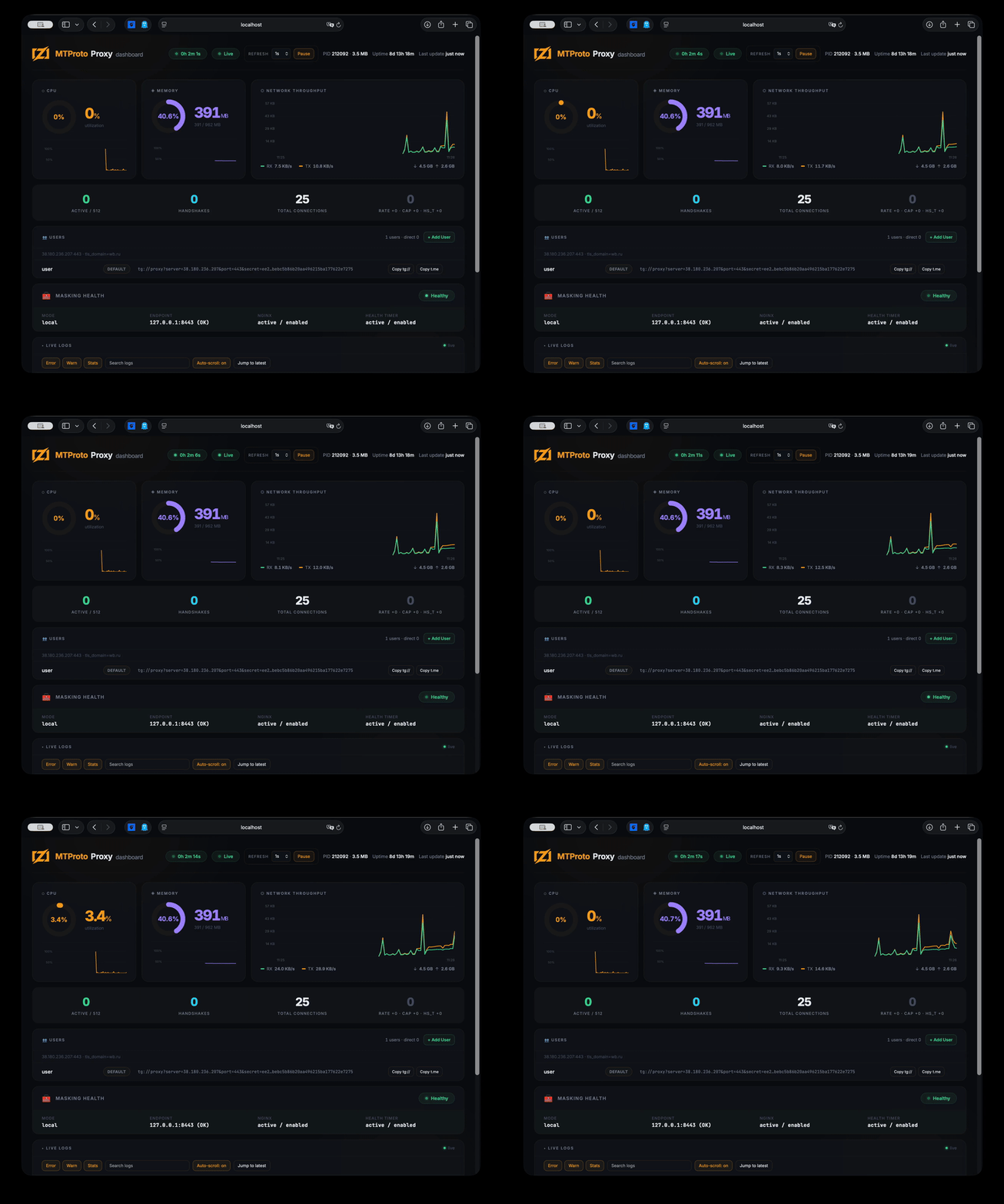
A lightweight web dashboard (~30 MB RAM) shows live connections, CPU/memory, network throughput, proxy stats, tunnel pool health/failover state, user management, and streaming logs.
The dashboard is **embedded directly into the `mtbuddy` binary** — no extra files needed.
```bash
# Install the dashboard on the server
sudo mtbuddy setup dashboard
# Open via SSH tunnel (binds to 127.0.0.1:61208 by default)
ssh -L 61208:localhost:61208 root@
# → http://localhost:61208
```
Alternatively, expose the dashboard port via `[monitor]` config section and access directly.
Demo: monitoring dashboard
---
## Prometheus metrics
`mtproto-proxy` can expose an embedded Prometheus-compatible metrics endpoint on a dedicated port.
For a complete Docker-based monitoring stack with `mtproto-zig`, Prometheus, Grafana, and an importable dashboard, see [hack/docker/README.md](hack/docker/README.md).
```toml
[metrics]
enabled = true
host = "127.0.0.1"
port = 9400
```
The endpoint is plaintext HTTP and serves:
```text
GET /metrics
```
Typical Docker usage:
```bash
docker run --rm \
-p 443:443 \
-p 9400:9400 \
-v "$PWD/config.toml:/etc/mtproto-proxy/config.toml:ro" \
mtproto-zig
```
It exposes proxy counters plus process metrics such as RSS, virtual memory, CPU time, and open file descriptors.
---
## Building locally
Requires [Zig 0.16.0](https://ziglang.org/download/).
```bash
git clone https://github.com/sleep3r/mtproto.zig.git
cd mtproto.zig
make build # cross-compile ReleaseFast binaries for Linux x86_64_v3+aes
make test # run Zig tests
make e2e # run E2E/integration harness
make fmt # format Zig sources
make deploy # build + deploy to SERVER (see Makefile)
make dashboard # SSH tunnel for web dashboard (localhost:61208)
# optional performance checks
zig build bench
zig build soak
```
Release builders can override the default pinned minisign key if needed:
```bash
zig build -Dminisign_pubkey=RW... -Doptimize=ReleaseFast -Dtarget=x86_64-linux
```
Cross-compile for Linux from macOS:
```bash
zig build -Doptimize=ReleaseFast -Dtarget=x86_64-linux -Dcpu=x86_64_v3+aes
scp zig-out/bin/mtproto-proxy root@:/opt/mtproto-proxy/
```
---
## Docker
Docker support is provided for testing, packaging experiments, and simple deployments where only the proxy binary is needed. The project is primarily designed for a native Linux host managed by `mtbuddy`: DPI modules, tunnel pool failover, policy routing, Nginx masking, nfqws, and recovery timers are host-level integrations and are not fully represented by the container.
```bash
docker pull ghcr.io/sleep3r/mtproto.zig:latest
docker run --rm \
-p 443:443 \
-v "$PWD/config.toml:/etc/mtproto-proxy/config.toml:ro" \
ghcr.io/sleep3r/mtproto.zig:latest
```
Build locally:
```bash
docker build -t mtproto-zig .
# multi-arch
docker buildx build --platform linux/amd64,linux/arm64 -t your-registry/mtproto-zig:latest --push .
```
Published `linux/amd64` images are built with a portable CPU profile (`-Dcpu=x86_64`) to avoid `Illegal instruction` crashes on older VPS CPUs.
> For production censorship-bypass deployments, prefer the native `mtbuddy install` flow. OS-level mitigations (iptables TCPMSS, nfqws, tunnel policy routing, masking/recovery units) are not applied inside the container; only the proxy binary runs there.
---
## Trust & Security
- [SECURITY.md](SECURITY.md) - vulnerability reporting policy and response process
- [THREAT_MODEL.md](THREAT_MODEL.md) - security goals, non-goals, adversary model, residual risks
- [CONTRIBUTING.md](CONTRIBUTING.md) - dev workflow (`fmt`/`test`/`e2e`/`bench`) and PR expectations
- [CHANGELOG.md](CHANGELOG.md) - release history
- [LICENSE](LICENSE) - MIT license terms
Repository governance:
- [`.github/CODEOWNERS`](.github/CODEOWNERS)
- issue templates under [`.github/ISSUE_TEMPLATE`](.github/ISSUE_TEMPLATE)
---
## Known Limitations & Compatibility
For a full model see [THREAT_MODEL.md](THREAT_MODEL.md). Quick operational summary:
- **Known limitations**
- This is a transport-hardening proxy, not an anonymity network.
- Bypass quality can degrade as DPI strategies evolve.
- Dashboard/metrics are plaintext by default; do not expose publicly without auth/TLS.
- Telegram calls do not work through this proxy. Calls require Telegram's SOCKS-style call path, which is outside the MTProto/TLS-masking model and cannot be disguised cleanly as normal HTTPS here.
- Without MiddleProxy (`[general].use_middle_proxy = true`), media on non-Premium accounts will not load. MiddleProxy is required for photos, videos, stories, and promotion tags.
- **Region-specific caveats**
- ISP behavior differs by country/region; configs are not universally portable.
- IPv6 and AAAA handling vary heavily across providers and can impact iOS/Desktop connection latency.
- Tunnel routing depends on host policy routing and allowed VPN protocols in that region.
- **Telegram client compatibility**
- Official Telegram Android/iOS/Desktop: expected to work on current releases.
- Third-party clients: best effort only.
- **Kernel/OS compatibility matrix**
- Linux `x86_64`: supported (primary target)
- Linux `aarch64`: supported
- Docker on Linux: supported with caveats (OS-level DPI modules are host-side)
- macOS/Windows runtime: not supported (Linux runtime target only)
- **What can break after Telegram/DC changes**
- MiddleProxy metadata and endpoint behavior
- handshake expectations in newer Telegram clients
- DC/media routing edge cases (for example DC203 behavior)
---
## Troubleshooting — stuck on "Updating..."
**1. AAAA record exists but IPv6 doesn't work on the server.**
DNS has an AAAA → iOS tries IPv6 first → timeout → slow fallback to IPv4.
Fix: remove AAAA until IPv6 routing is fully configured.
```bash
dig +short proxy.example.com AAAA
ip -6 route
```
**2. Home Wi-Fi blocks the server's IPv4.**
Mobile networks usually work (they use IPv6). Home routers often block the destination IPv4.
Fix: enable IPv6 Prefix Delegation (IA_PD) on your router.
**3. VPN is dropping MTProto traffic.**
Commercial VPNs often DPI and drop proxy traffic.
Fix: switch VPN protocol, or use a self-hosted AmneziaWG.
**4. Co-located WireGuard/Docker on the same server.**
Docker's bridge drops packets from VPN subnet.
Fix: `iptables -I DOCKER-USER -s 172.29.172.0/24 -p tcp --dport 443 -j ACCEPT`
**5. DC203 media resets on non-premium clients.**
Check logs: `journalctl -u mtproto-proxy | grep -E "dc=203|Middle"`.
The proxy auto-refreshes DC203 metadata from Telegram on startup. If `core.telegram.org` is unreachable, it uses bundled fallback addresses.
---
## License
[MIT](LICENSE) © 2026 Aleksandr Kalashnikov