https://github.com/slippyex/ftp-sync
simple ftp-sync tool which allows partial downloads of changed files on a remote server against a local version of the same
https://github.com/slippyex/ftp-sync
Last synced: about 1 year ago
JSON representation
simple ftp-sync tool which allows partial downloads of changed files on a remote server against a local version of the same
- Host: GitHub
- URL: https://github.com/slippyex/ftp-sync
- Owner: slippyex
- License: mit
- Created: 2023-08-06T17:01:21.000Z (almost 3 years ago)
- Default Branch: master
- Last Pushed: 2024-03-18T07:08:55.000Z (over 2 years ago)
- Last Synced: 2024-10-06T08:10:50.042Z (over 1 year ago)
- Language: TypeScript
- Size: 8.91 MB
- Stars: 6
- Watchers: 2
- Forks: 0
- Open Issues: 11
-
Metadata Files:
- Readme: README.md
- Contributing: CONTRIBUTING.md
- License: LICENSE
- Code of conduct: CODE_OF_CONDUCT.md
Awesome Lists containing this project
README
# 🚀 FTP-Sync: Your Next-Gen Synchronization Tool
Elegantly crafted in TypeScript, **FTP-Sync** is not just another FTP tool – it's your best companion for seamless file synchronization. Dive into an immersive experience that combines power with simplicity, making FTP synchronization not just efficient but delightful.
Initially started to solve a personal problem but it's always good to provide code to the public!
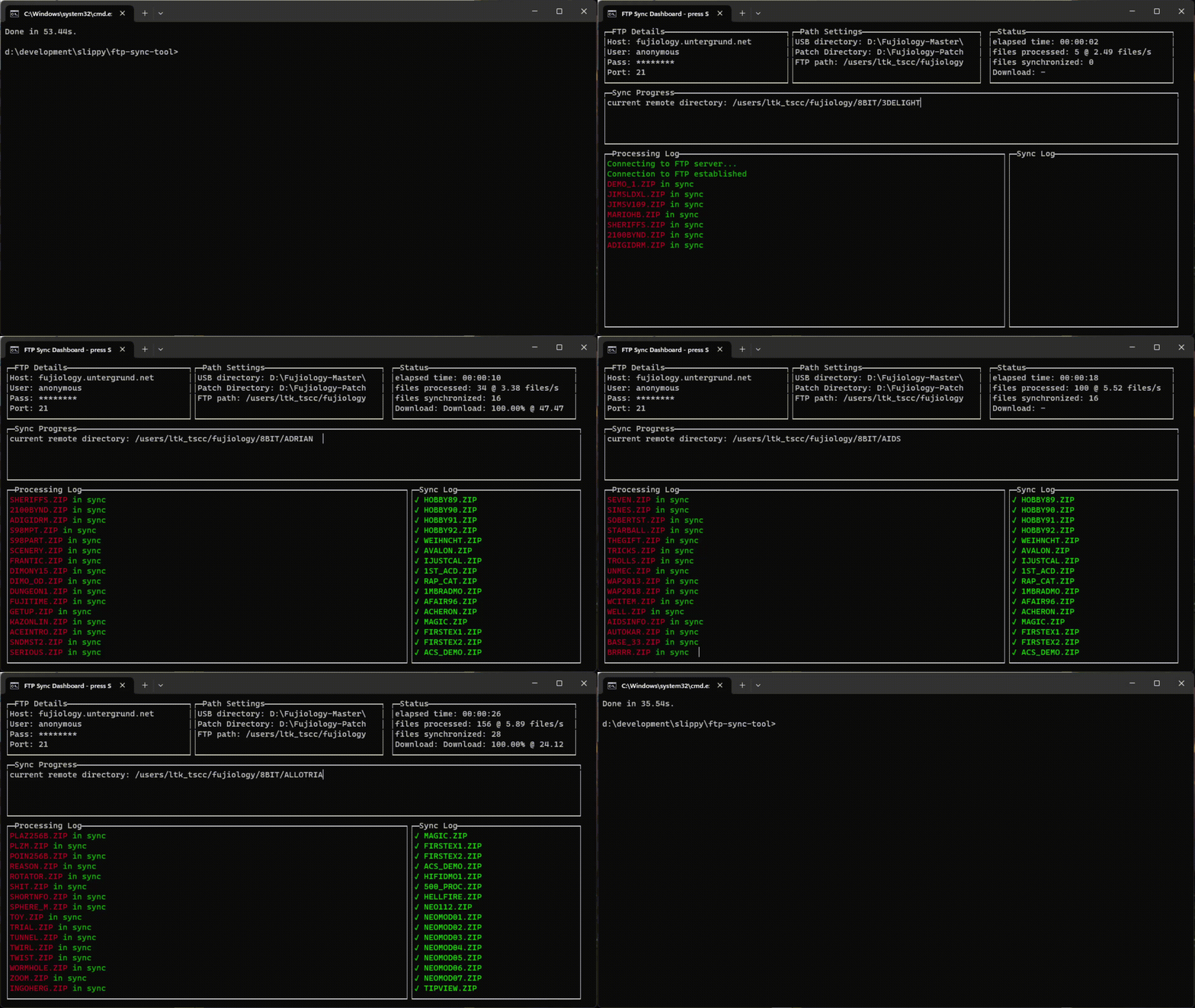
## 🎥 Sync tool in action
## 🌟 Features
- 📊 **Dynamic UI**: Real-time, visually appealing UI that keeps you informed about the synchronization status.
- 🔧 **Highly Configurable**: Tailor your paths for local, remote, and patch directories as per your needs.
- ⚡ **Hyper-Efficient Syncing**: Intelligent algorithms ensure only changed or new files are downloaded, saving you time and bandwidth.
- 🎮 **Interactive Controls**: Take control of your sync processes with intuitive keyboard commands.
## 🚀 Getting Started
### 🔍 Prerequisites
Make sure you've got Node.js and npm up and running.
1. 📦 Clone the repository and dive in!
```bash
> git clone https://github.com/slippyex/ftp-sync.git
```
2. 📍 Enter the heart of the project:
```
> cd ftp-sync
```
3. 🛠 set up in and jiffy
```
> npm install
```
## 🎮 How to Use
🛠 Customize Your Experience: Head over to the configs directory and fine-tune your FTP settings.
Have a look at the provided `config.json` file and create your own setup. Should be intuitive enough.
## 🚀 Launch and Soar:
```
> npm run sync config.json
```
## 🎹 Master the Controls:
s: Ignite the synchronization!
x: Pause to catch a breath or resume to fly again.
q or C-c: Say goodbye and exit.
## 🤝 Join the Movement!
We're always looking for fellow adventurers!
Got ideas? Wish to enhance a feature?
Or simply spotted a pesky bug?
Join hands with us! Contributions, issues, and feature requests are more than welcome.
Glide over to the issues page and drop a word.
## 📜 License
Exploring with freedom, under the MIT License.