https://github.com/smackem/ylang
An image manipulation language
https://github.com/smackem/ylang
compiler golang image image-analysis image-manipulation image-processing vscode-extension
Last synced: 5 months ago
JSON representation
An image manipulation language
- Host: GitHub
- URL: https://github.com/smackem/ylang
- Owner: smackem
- License: mit
- Created: 2019-01-13T10:44:39.000Z (over 7 years ago)
- Default Branch: master
- Last Pushed: 2020-08-25T15:06:01.000Z (almost 6 years ago)
- Last Synced: 2024-11-14T19:40:03.819Z (over 1 year ago)
- Topics: compiler, golang, image, image-analysis, image-manipulation, image-processing, vscode-extension
- Language: Go
- Size: 14.1 MB
- Stars: 3
- Watchers: 3
- Forks: 0
- Open Issues: 8
-
Metadata Files:
- Readme: README.md
- License: LICENSE
Awesome Lists containing this project
README
# ylang
An image manipulation language
ylang is able to easily express these algorithms:
* Convolution
* Median
* Color distribution
* Edge detection
* Hough transform
## Usage
```
./ylang -code script.ylang -image image.jpg -out out.png
```
* `script.ylang` contains the ylang code to execute against the passed image
* `image.jpg` is the input image
* `out.png` is the output image
## Samples
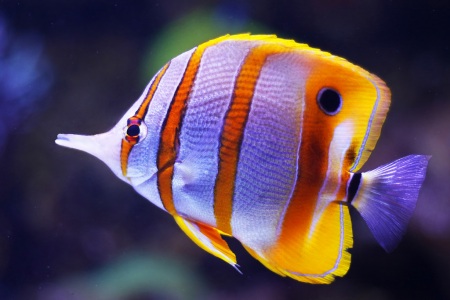
This is the original image:
### Invert
```
for point in Bounds {
color := @point
@point = -color
}
```
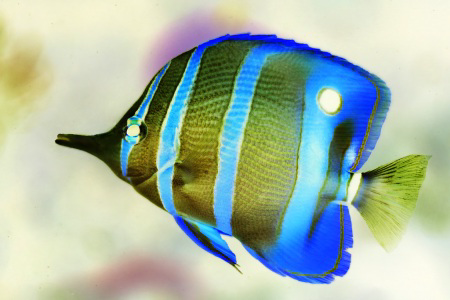
This is a complete ylang script. It iterates over all points contained in the rectangle `Bounds`, where `Bounds` is a constant that holds the dimensions of the input image.
`color := @point` assigns the color at point `point` to the new variable `color`.
`@point = -color` creates an rgb color with all three channels inverted, then sets the pixel at position `point` to this color.
### Monochrome
```
for p in Bounds {
@p = @p.intensity01 * #4080ff
}
```
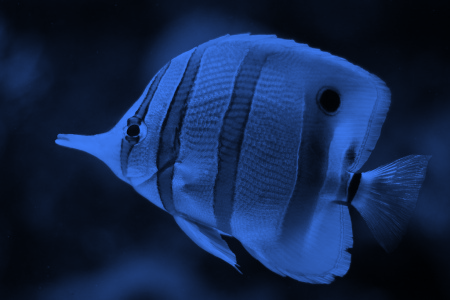
The single statement that is executed for each pixel in the source image is `@p = @p.i01 * #4080ff`.
It takes the color at point p, calculates the intensity (normalized to 0 .. 1) and multiplies the color `#4080ff` with the intensity. The result of this multiplication is a color with all color channels (r, g, b) multiplied by the intensity value.
Note that using white (`#ffffff`) instead of `#4080ff` yields a greyscale image.
### Saturate
```
for p in Bounds {
@p = @p | hsv($) | hsv($.h, $.s * 1.5, $.v) | rgb($)
}
```
Like bash, powershell or F#, ylang supports pipelining.
`n := 1 | $ + 5 | $ * 2` reads like "take the value 1, add 5, multiply with 2 and finally store the result in the newly declared variable n.
The statement is equivalent to `n := (1 + 5) * 2`.
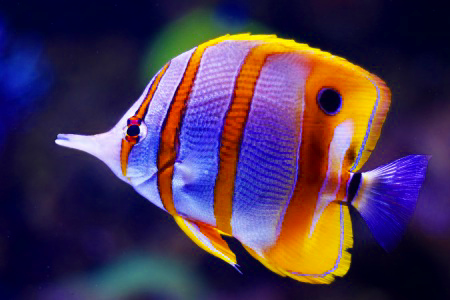
The sample takes the input pixel color, converts it to hsv, creates a new hsv color with 50% more saturation, converts it to rgb and stores it in the target image.
### Convolution
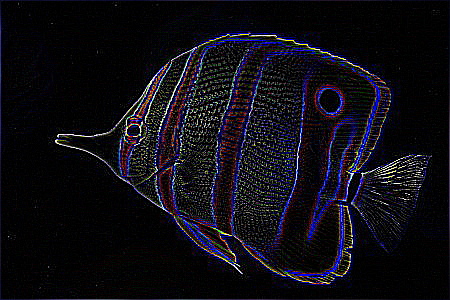
Convolution with a HPF (high-pass filter) kernel emphasizes edges:
```
Kernel := |-1 -1 -1
-1 8 -1
-1 -1 -1|
for p in Bounds {
@p = convolute(p, Kernel)
}
```
ylang supports kernel (a two-dimensional array of numbers) as a data type with concise and natural syntax. The built-in function `convolute` takes a point and a kernel as input and returns the resulting color.
The convolution is applied to all color channels (r, g, b).
To find out more about convolution and kernels, visit
https://en.wikipedia.org/wiki/Kernel_(image_processing)
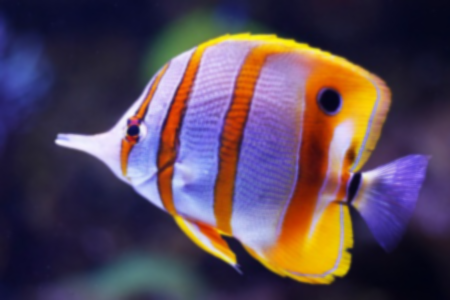
Running the same program with a LPF (low-pass filter) kernel blurs the image:
```
Kernel := |0 1 2 1 0
1 2 4 2 1
2 4 8 4 2
1 2 4 2 1
0 1 2 1 0|
for p in Bounds {
@p = convolute(p, Kernel)
}
```
### Slightly More Complex Sample
```
// create a 5x5 kernel with all elements set to 1
Median := kernel(5, 5, 1)
Center := 2;2
// iterate over the image:
// fetch the red channel values of the 5x5 area around p, sort the resulting kernel
// and get the median value (center of kernel).
// then do the same for the green and blue channel.
for p in Bounds {
r := fetchRed(p, Median) | sort($)[Center]
g := fetchGreen(p, Median) | sort($)[Center]
b := fetchBlue(p, Median) | sort($)[Center]
@p = rgb(r, g, b)
}
// swap target and source image, committing all changes
flip()
SobelX := |-1 0 1
-2 0 2
-1 0 1|
SobelY := | 1 2 1
0 0 0
-1 -2 -1|
// iterate over the image:
// apply the sobel operator in both directions and calculate the gradient's magnitude.
// hypot is the same as writing sqrt(gx*gx + gy*gy).
// then calculate the gradient's angle, add 90 deg to get the edge's angle,
// normalize the magnitude to 0..1 and the angle to 0..360 and write the resulting
// hsv color to the target image.
for p in Bounds {
gx := convolute(p, SobelX).i
gy := convolute(p, SobelY).i
mag := hypot(gx, gy)
angle := gx == 0 ? 0 : atan(gy / gx) * Rad2Deg + 90
mag = mag / 255
@p := round(angle * 2) | hsv($, mag, mag) | rgb($)
}
```
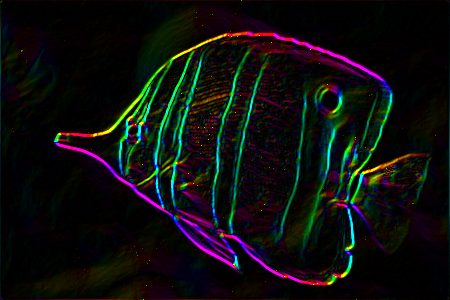
This sample first applies the median filter to the source image, then applies the sobel operator to the resulting image. The sobel operator yields gradient magnitude and gradient angle of edges, both of which are encoded into a the target pixel - the angle as the hue and the magnitude as value and saturation.
## Walkthrough
ylang is a dynamic script language featuring built-in types like points, kernels and colors - all of which are needed for image processing.
ylang's syntax is inspired by Go, JavaScript and Bash.
### Basics - Primitive Types
* All numbers in ylang are in 32 bit floating point format. The basic mathematical operations are supported on numbers. Constants can be written as `123` or `51.25`.
* Booleans have either the value `true` or `false`. All comparison operators like `==` or `<` return a boolean value.
* Strings are usually only used as hash map keys or for logging. String constants are written like this: `"Hello, world!"`.
### Basics - Variables and Constants
* Variables are declared with the `:=` operator, like in Go:
```
num := 1
str := "hello"
```
* Variables can be mutated with the `=` operator:
```
num := 1
log(num) // prints 1
num = 2
log(num) // prints 2
```
Because of the dynamic type system, variables can also change type:
```
v := 100 // initially a number
log(v)
v = "hello" // now a string
log(v)
```
* Identifiers that start with a capital letter can be assigned only once:
```
Ratio := 0.5
Ratio = 1 // compilation error - Ratio is constant
```
* The following built-in constants are available:
* `Black` - the color black #000000
* `White` - the color white #ffffff
* `Transparent` - transparent white #ffffff:00
* `Pi` - the mathematical constant pi in 32 bit resolution
* `Rad2Deg` - the factor to convert radians into degrees
* `Deg2Rad` - the factor to convert degrees to radians
* `Bounds` - a rectangle containing the bounds of the input image
### Basics - Control Flow
* ylang's `if else` statement is used like this:
```
if @p.alpha > 100 {
@p = #ff0000
} else {
@p = #00ff00
}
```
* A shorthand for the previous `if else` statement is the ternary operator:
```
@p = @p.alpha > 100 ? #ff0000 : #00ff00
```
* the `if else` statement can include any number of cases:
```
a := @p.alpha
if a > 200 {
@p = #ff0000
} else if a > 150 {
@p = #800000
} else if a > 100 {
@p = #00ff00
} else if a > 50 {
@p = #008000
} else {
@p = #0000ff
}
```
* The for loop iterates over ranges of numbers:
```
// draw the top line blue
for x in 0 .. Bounds.width {
@(x;0) = #0000ff
}
```
or:
```
// draw every second pixel in the top line blue
for x in 0 .. 2 .. Bounds.width {
@(x;0) = #0000ff
}
```
* As seen before, the for loop can also iterate over iterable objects, like lists, kernels or geometrical shapes:
```
for n in ["c", 0, 0, "l"] {
log(n)
}
```
* Another, much less common kind of loop is the while loop:
```
x := 100
y := 1
while x > y {
x = x / 2
y = y * 2
}
```
* To exit from a script or to return a value from a function, you can use the `return` statement:
```
for p in Bounds {
if p.y > 100 {
return nil
}
@p = #00ff00
}
```
When breaking execution of the script, you can only return the empty value `nil`.
### Colors
Color literals are written as in HTML: `#ff0000` is the color red. You can append the alpha channel like this: `#00ff00:80` is half-transparent green.
You can also create color values with the functions `rgb`, `rgba`, `rgb01` or `rgba01`:
```
gold := rgb(255, 190, 0)
grey := rgb(128)
halfOpaqueBlue := rgba(0, 0, 255, 127)
white := rgb01(1, 1, 1)
halfOpaqueRed := rgba01(1, 0, 0, 0.5)
```
The color type defines these properties:
```
color := rgba(255, 128, 64, 32)
red := color.red // or color.r -- red is 255
green := color.green // or color.g -- green is 128
blue := color.blue // or color.b -- blue is 64
alpha := color.alpha // or color.a -- alpha is 32
r01 := color.red01 // or color.r01 -- r01 is 1
g01 := color.green01 // or color.g01 -- g01 is 0.5
b01 := color.blue01 // or color.b01 -- b01 is 0.25
a01 := color.alpha01 // or color.a01 -- a01 is 0.125
i := color.intensity // or color.i -- the intensity (brightness) of the color
i01 := color.intensity01 // or color.i01 -- the intensity normalized to 0..1
```
The color type supports basic arithmetic operations, which are applied per channel:
```
rgb(100, 110, 120) + rgb(10, 20, 30) // = rgb(110, 130, 150)
#ff0080 * 0.5 // = #800040
rgb(100, 200, 300) * 2 // = rgb(200, 400, 600)
```
Colors can take any value and are only clamped to 0..255 when necessary, e.g. when writing the color to the target image.
### Point
`x;y` denotes a point. `x` and `y` are implicitly converted to integer values.
Points have the following properties:
```
p := 100;120
x := p.x // = 100
y := p.y // = 120
mag := p.mag // magnitude of the point interpreted as a vector
```
### Kernel
Kernels can be created as literals:
```
k := |0 1 0
1 2 1
0 1 0|
```
Kernel literals need to be quadratic: width and height must be equal. To create non-quadratic kernels, use the `kernel` function:
```
k := kernel(3, 3, 1) // 3x3 with all elements set to 1
k := kernel(4, 2, fn(x, y) -> x + y)
// = |0 1 2 3
// 1 2 3 4|
```
Kernels can be indexed with numbers or points:
```
k := |0 1 0
1 2 1
0 1 0|
n := k[4] // = 2
m := k[1;1] // = 2
```
Kernels have these properties:
```
k := kernel(2, 3, 0)
width := k.width // = 2
height := k.height // = 3
count := k.count // = 6 -- number of elements
```
Kernels can be iterated over:
```
maximum := 0
for n in |1 5 3 4| {
maximum = max(maximum, n)
}
// maximum is 5
```
Note that getting the maximum value of a kernel can be expressed much easier:
`max(|1 5 3 5|) // = 5`.
### Rectangle
Create rectangles by passing x, y, width and height to the function `rect`:
```
rectangle := rect(100, 100, 20, 50)
```
Rectangles have these properties:
```
x := rectangle.x // or rectangle.left
y := rectangle.y // or rectangle.top
w := rectangle.width // or rectangle.w
h := rectangle.height // or rectangle.h
r := rectangle.right
b := rectangle.bottom
```
Like all geometrical shape types in ylang, rectangles can be iterated over. The iteration yields all points within the bounds of the shape.
The most common rectangle constant is `Bounds`, which contains the bounds of the input image.
### Line
Create lines y passing the two endpoints of the line to the function `line`:
```
ln := line(100;100, 200;250)
```
Lines have these properties:
```
p1 := ln.p1 // or ln.point1
p2 := ln.p2 // or ln.point2
dx := ln.dx // the difference between x1 and x2
dy := ln.dy // the difference between y1 and y2
len := ln.len // the length of the line (distance between p1 and p2)
```
Like all geometrical shape types in ylang, lines can be iterated over. The iteration yields all points on the line.
### Polygon
Create polygons by passing either an arbitrary number of points or a list of points to the function `polygon`:
```
poly := polygon(100;100, 300;200, 150;300)
poly2 := polygon([100;100, 300;200, 150;300])
```
The last point does not have to be the same as the first, polygons are automatically closed.
Polygons have these properties:
```
bounds := poly.bounds // the bounding rectangle around the polygon
vertices := poly.vertices // the list of vertices (corner points) that make up the polygon
```
Like all geometrical shape types in ylang, polygons can be iterated over. The iteration yields all points within the shape.
### Circle
Create circles by passing the center point and the radius to the function `center`:
```
circ := circle(100;100, 50)
```
Circles have these properties:
```
center := circ.center
radius := circ.radius
bounds := circ.bounds
```
You can iterate over circles like over all geometrical shapes.
Plotting a red circle:
```
for p in circle(100;100, 50) {
@p = #ff0000
}
```
This can also be achieved more easily with function `plot`:
```
plot(circle(100;100, 50), #ff0000)
```
### Working with images
A ylang script is always executed against two images: a source image and a target image. All read operations are executed against the source image, all write operations against the target image.
Reading and writing single pixels can both be achieved with the `@` operator:
```
@(0;0) = @(100;100) // copy the source pixel at 100;100 to 0;0 in the target image
```
Initially, the target image has the same dimensions as the input image and all pixels are transparent black (`#000000:00`).
This loop copies the source image to the target image:
```
for p in Bounds {
@p = @p
}
```
The `blt` function is a much faster way to do this:
```
blt(Bounds)
```
A ylang script can only write to one target image at a time. To apply multiple operations that build upon each other (e.g. blur, then edge detect), use the `flip` function:
```
Gauss := // LPF kernel...
Laplace := // HPF kernel...
for p in Bounds {
@p = convolute(p, Gauss)
}
flip()
for p in Bounds {
@p = convolute(p, Laplace)
}
```
To recall a flipped source image, use the `recall` function:
```
// mutate target image...
OriginalImage := flip()
// mutate flipped image...
recall(OriginalImage)
// now, the source image is restored to the initial source image
// do more things...
```
To resize the output image, use the `resize` function:
```
outBounds := resize(Bounds.width * 2, Bounds.height * 2)
```
### Math Functions
The following basic math functions on numbers are available:
* sin(angle)
* cos(angle)
* tan(angle)
* asin(n)
* acos(n)
* atan(n)
* atan2(dy, dx)
* sqrt(n)
* pow(base, exponent)
* abs(n)
* round(n)
* floor(n)
* ceil(n)
* hypot(x, y)
* random(lower, upper)
* min(n...)
* max(n...)
All trigonometric functions work with angles in radians. Use the constants `Deg2Rad` and `Rad2Deg` to convert between degrees and radians.
See the functions documentation for details.
### Alpha Channel
The alpha channel does not take part in color arithmetics: `#ffffff:ff / 2` equals `#808080:ff`. All operations to manipulate the alpha channel must be executed explicitly:
```
old := #ff0080:ff
new := rgba(old, old.alpha / 2)
```
The alpha channel is also ignored by convolution. The color returned by the `convolute` function has the alpha value of the center pixel.
To convolute the alpha channel, use the `fetchAlpha` function:
```
k := |-1 0
0 1|
alpha := fetchAlpha(p, k) | sum($)
```
or for kernels with a non-zero sum:
```
k := |0 1 0
1 2 1
0 1 0|
alpha := fetchAlpha(p, k) | sum($) / sum(k)
```
ylang features the function `compose` for alpha composition:
```
grey := compose(#000000, #ffffff:80) // paint half-opaque white on black - the result is #808080
```
### Lists
Lists in ylang can be written like this:
```
ls := [1, 2, 3]
```
or with the `list` function:
```
ls := list(100, 0) // a list of 100 zeroes
```
You can append to lists with the `::` operator:
```
ls := [1, 2, 3] :: 4
ls = ls :: 5
// ls is now [1, 2, 3, 4, 5]
```
Thanks to ylang's dynamic nature, you can mix types in lists:
```
ls := [1, "B", 100;200] // list containing a number, a string and a point
```
To retrieve individual values from a list, use the index operator with a numeric index value:
```
ls := [1, 2, 3]
first := ls[0] // = 1
second := ls[1] // = 2
third := ls[2] // = 3
last := ls[-1] // = 3
```
You can also retrieve sub-lists (slices) from lists:
```
ls := [1, 2, 3, 4, 5]
firstTwo := ls[0 .. 1] // = [1, 2]
lastTwo := ls[-2 .. -1] // = [4, 5]
tail := ls[1 .. -1] // = [2, 3, 4, 5]
```
You can iterate over lists:
```
for elem in [1, 2, 3] {
...
}
```
### Hash Maps and Object Syntax
Like in JavaScript, ylang uses hash maps as objects. Create object literals like so:
```
pixel := {
point: 100;200,
color: #ff00ff,
}
```
To create hashmap the "traditional" way, use this syntax:
```
pixel := {}
pixel["point"] = 100;200
pixel["color"] = #ff00ff
```
Either way, the object properties can be accessed like this:
```
pt := pixel.point
```
or like this:
```
pt := pixel["point"]
```
### Functions and Lambdas
ylang supports functions as first-class objects, using the keyword `fn`:
```
pow2 := fn(n) {
return n * n
}
result := pow2(10) // = 100
```
You can also define functions with lambda syntax, if the function body only consists returning a single expression:
```
pow2 := fn(n) -> n * n
```
You can pass functions as arguments of functions:
```
filter := fn(ls, predicate) {
result := []
for elem in ls {
if predicate(elem) {
result = result :: elem
}
}
return result
}
numbers := [1, 2, 3, 4]
evenNumbers := filter(numbers, fn(n) -> n % 2 == 0) // [2, 4]
```
## Roadmap
* Web interface with monaco as editor
* Compile to intermediate language -> ByteCode
* Compile to JavaScript, maybe WASM?
* Implement canny
https://www.codeproject.com/kb/cs/canny_edge_detection.aspx
* Implement Rectange detection through hough transform