https://github.com/smallhelm/virtual-dom-absolute-layout
Easy way to layout elements via absolute positioning
https://github.com/smallhelm/virtual-dom-absolute-layout
Last synced: over 1 year ago
JSON representation
Easy way to layout elements via absolute positioning
- Host: GitHub
- URL: https://github.com/smallhelm/virtual-dom-absolute-layout
- Owner: smallhelm
- License: mit
- Created: 2015-10-21T18:40:13.000Z (over 10 years ago)
- Default Branch: master
- Last Pushed: 2015-10-23T02:00:32.000Z (over 10 years ago)
- Last Synced: 2024-04-16T00:49:00.683Z (over 2 years ago)
- Language: JavaScript
- Size: 148 KB
- Stars: 2
- Watchers: 2
- Forks: 0
- Open Issues: 0
-
Metadata Files:
- Readme: README.md
- License: LICENSE
Awesome Lists containing this project
README
# virtual-dom-absolute-layout
Easy way to layout elements via absolute positioning
## Example
```js
var h = require("virtual-dom/h");
var createElement = require("virtual-dom/create-element");
var AbsoluteLayout = require("virtual-dom-absolute-layout");
var Fill = function(color, text){
return h("div", {
style: {
position: "absolute",
top: 0,
right: 0,
bottom: 0,
left: 0,
fontSize: "30px",
lineHeight: "50px",
textAlign: "center",
background: color
}
}, text);
};
var render = function(){
return AbsoluteLayout(h, [
[Fill("lightgreen", "-- Header --"), 50],
[Fill("yellow", "-- Sub-header --"), 50],
[AbsoluteLayout(h, [
[Fill("lightblue", "-- Left --"), 150],
[Fill("white", "-- Main Body --")],
[Fill("red", "-- Right --"), 150]
], true)],
[Fill("pink", "-- Footer --"), 50]
]);
};
document.body.appendChild(createElement(render()));
```
Output:
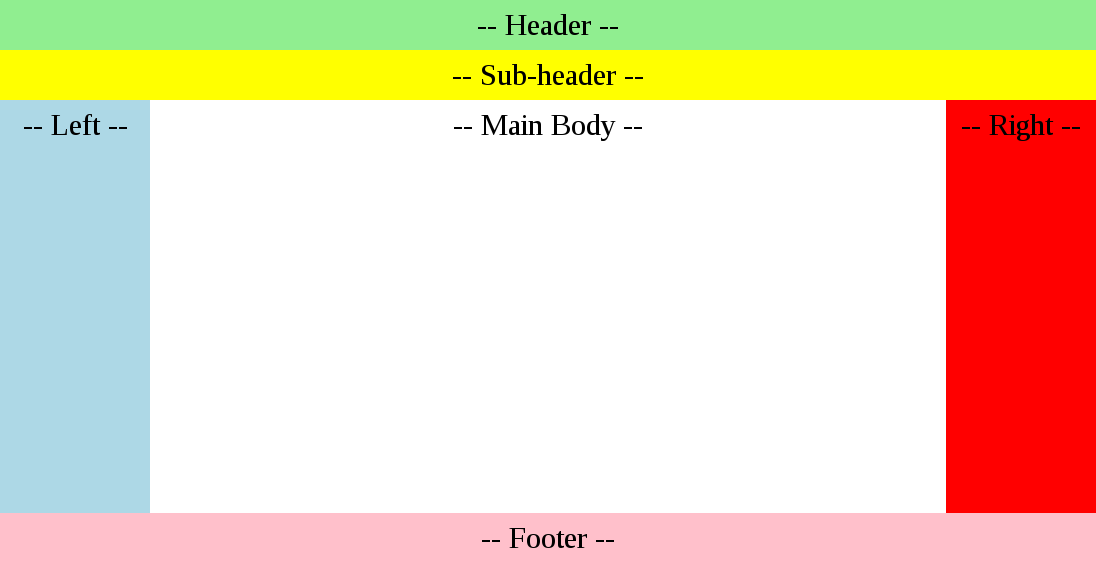
As the window resizes the layout adjusts giving more or less room for the Main Body.
You can also run this example by
```sh
$ npm i
$ npm start
```
It will give you a url to open in your browser. Edit example.js then refresh to see your changes.
## API
```js
var AbsoluteLayout = require("virtual-dom-absolute-layout");
```
### AbsoluteLayout(h, blocks, is\_horizontal)
* `h` - hyperscript
* `blocks` - [ [content, size], [content, size], ... ]
* `is_horizontal` - set this to true if you want it to lay out horizontally
## License
MIT